via <a href="https://www.sarasanalytics.net/2026/07/july-2026-sp-api-release.html">Ecommerce Data Analytics</a>
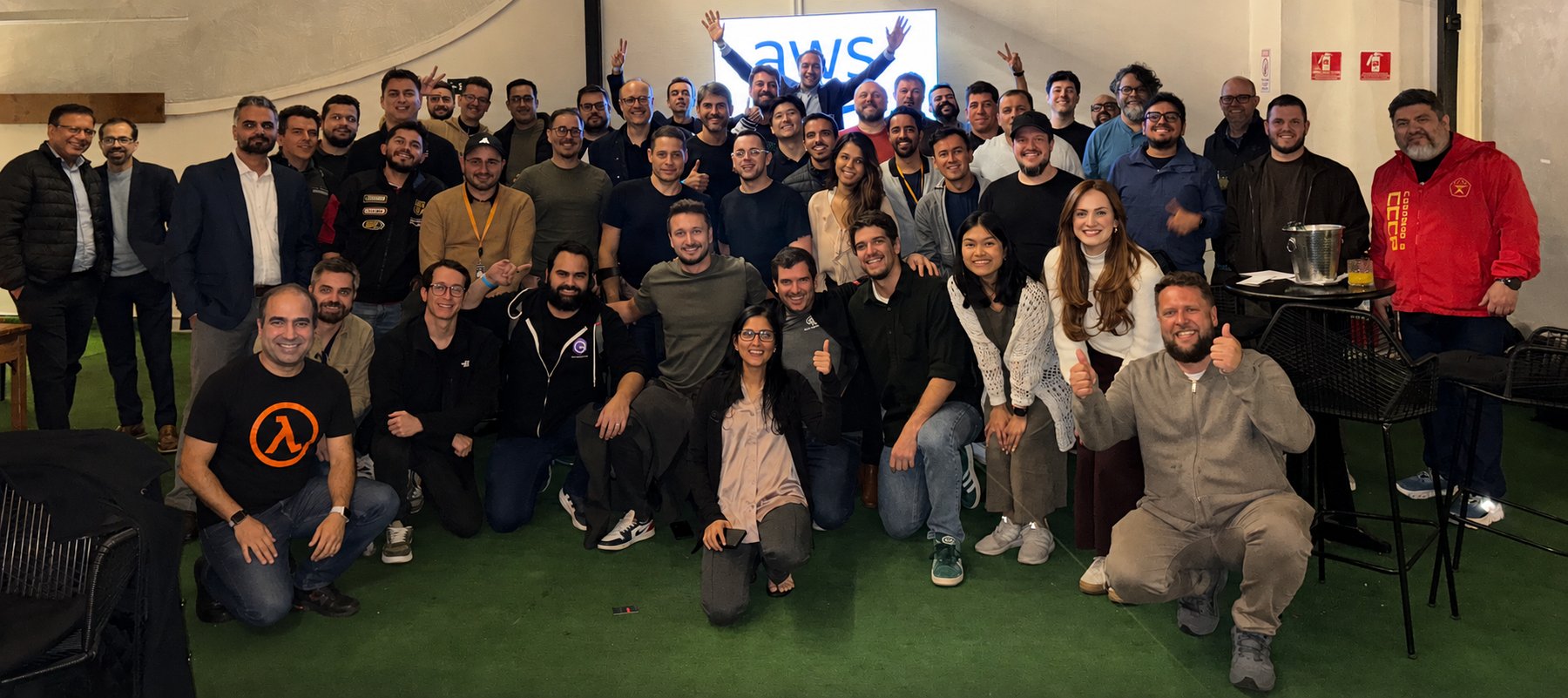
Last week I had the privilege of spending three days in São Paulo with technical builders from across Latin America, brought together for a regional tech event full of deep-dive sessions, hands-on workshops, and conversations with customers and partners. What struck me most wasn’t any single session, it was the energy of a technical community that so rarely gets to be in the same room. People traded architecture ideas over coffee, sketched out solutions on whiteboards, and left with a longer list of things to try than they arrived with. It’s a good reminder that, for all the tooling we build, the community around it is what makes the technology stick.
That community spirit connects nicely to the week’s biggest infrastructure news, which is all about bringing AWS closer to where builders actually are.
Now, let’s get into this week’s AWS news…
Headlines
AWS Local Zone in Athens, Greece: AWS has opened a new Local Zone in Athens, Greece, the second Local Zone in EMEA with support for Amazon S3 and Amazon EBS Local Snapshots, so you can store and process data within Greece to help meet local data residency requirements. The Athens Local Zone supports Amazon EC2 (C7i, M7i, and R7i instances), Amazon S3 with the One Zone-Infrequent Access storage class, Amazon EBS, and Amazon ECS.

AWS Local Zones place AWS infrastructure much closer to large population and industry hubs, enabling applications that require single-digit millisecond latency, such as real-time gaming, media production, and financial services, to run where end users actually are. For builders in Greece, you can now run latency-sensitive workloads locally while connecting seamlessly to the nearest AWS Region for services that don’t require low latency, giving you the flexibility to architect hybrid, latency-optimized applications without managing your own data center infrastructure. To learn more, visit AWS Global Infrastructure and Sustainability Blog post.
Last week’s launches
Here are some launches and updates from this past week that caught my attention:
For a full list of AWS announcements, be sure to keep an eye on the What’s New with AWS page.
Other AWS news
Here are some additional posts and resources that you might find interesting:
Upcoming AWS events
Check your calendar and sign up for upcoming AWS events:
Join the AWS Builder Center to connect with builders, share solutions, and access content that supports your development. Browse here for upcoming AWS-led in-person and virtual events and developer-focused events.
That’s all for this week. Check back next Monday for another Weekly Roundup!
This post is part of our Weekly Roundup series. Check back each week for a quick roundup of interesting news and announcements from AWS!
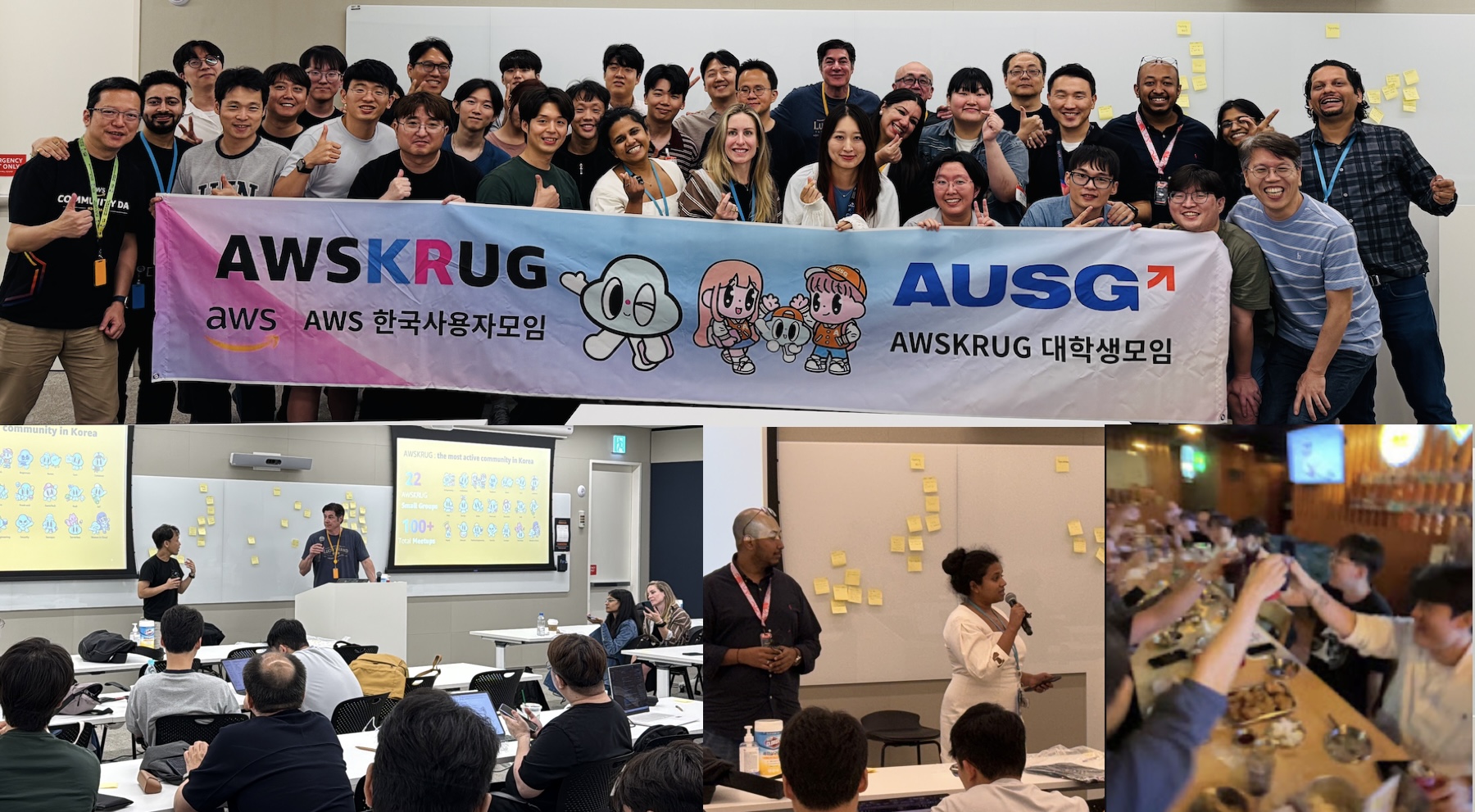
Last week, my team visited Seoul to meet AWS Korea User Group (AWSKRUG) leaders. AWSKRUG is the largest cloud developer community in Korea, with 20 meetup groups organized by topic and area that collectively host over 100 events each year, primarily in Seoul.
My team regularly visits countries across the Asia-Pacific region, listens to feedback from user group leaders, and works to support their communities. At this meeting, leaders honestly shared what they did well in the first half of the year, what needs improvement, and what they asked of AWS Developer Experience team. We also enjoyed a pleasant conversation during our Chimaek time together.
Now, let’s take a closer look at key launches of last week.
A one-click Lambda setup prompt for coding agents caught my eye most last week. This prompt configures your agent with AWS Serverless skills and the Serverless Model Context Protocol (MCP) server, embedding serverless best practices from the start. This prompt references the Lambda agent setup guide, which includes installation commands for Claude Code, Kiro, Cursor, GitHub Copilot, Codex, Devin Desktop, and OpenCode.
To get started, choose the Copy agent prompt button on the Lambda console screen or copy fetch https://docs.aws.amazon.com/lambda/latest/dg/samples/aws-lambda-agent-setup.md directly, and paste this URL in your preferred AI agent.
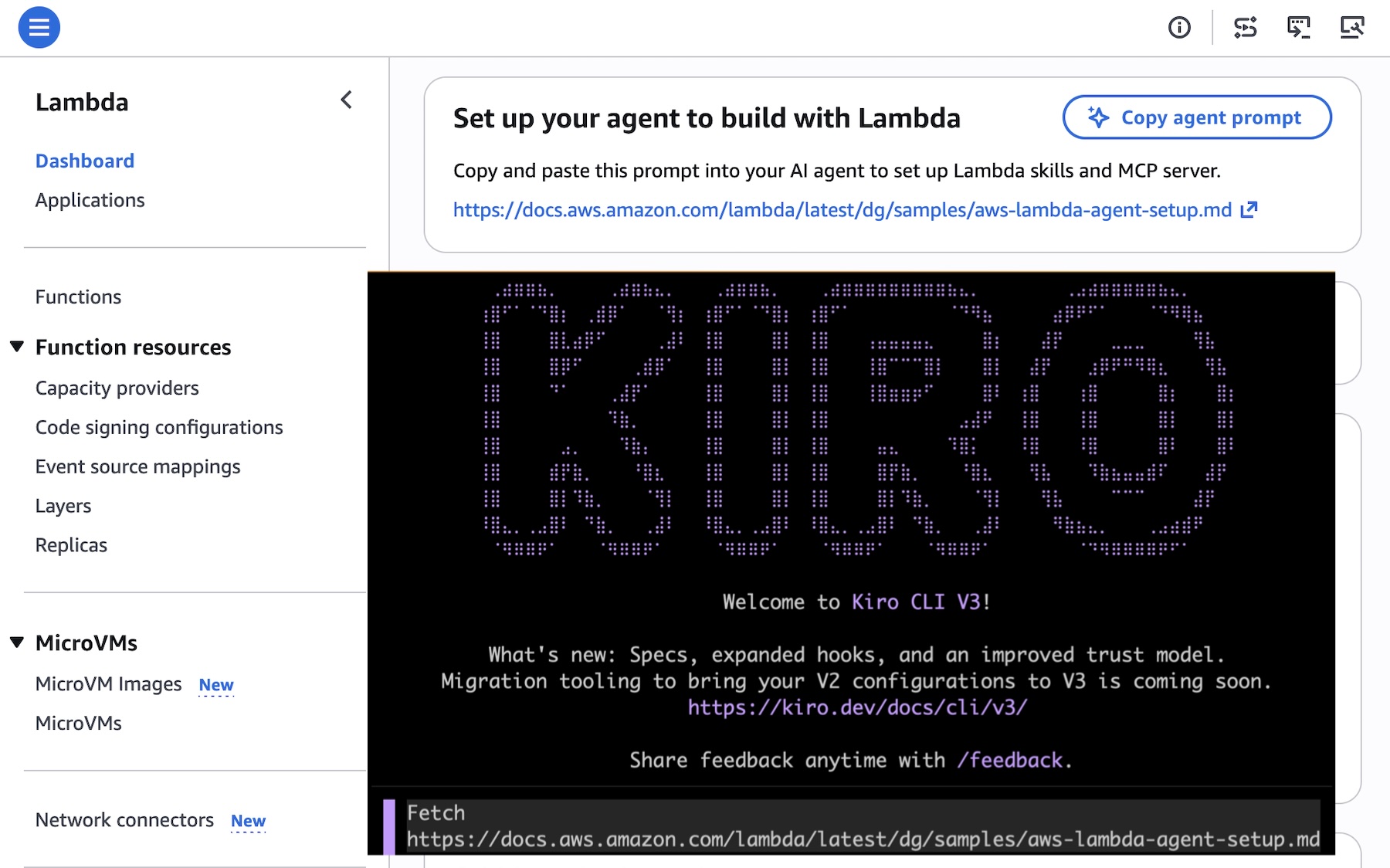
You can also use Agent Toolkit for AWS to give your coding agent current AWS knowledge and safe resource access. Use fetch https://raw.githubusercontent.com/aws/agent-toolkit-for-aws/refs/heads/main/setup-instructions/setup.md for installing AWS MCP Server.
Last week’s launches
Here are last week’s launches that caught my attention:
For a full list of AWS announcements, be sure to keep an eye on the What’s New with AWS page.
Additional updates
Here are some additional news items that you might find interesting:
count, find, delete, or update. No coding is required, even when running at large scale.For a full list of AWS blog posts, be sure to keep an eye on the AWS Blogs page.
Learn more about AWS, browse and join upcoming AWS-led in-person and virtual events, startup events, and developer-focused events including AWS Summits. Join the AWS Builder Center to connect with builders, share solutions, and access content that supports your development.
Finally, some customers experienced an issue with Cost Explorer displaying inaccurate estimated billing data in last weekend. They may have received erroneous budget and cost anomaly detection alerts, and observed inflated estimated cost and usage data. The issue has been resolved, and all AWS services are operating normally. We apologize for the concern this incident caused our customers and are conducting a thorough retrospective to prevent events like this from reoccurring, as well as improving our response when billing incidents occur. For more information, visit the AWS Health Dashboard.
That’s all for this week. Check back next Monday for another Weekly Roundup!
— Channy
On July 13, 2006, we launched Amazon Simple Queue Service (Amazon SQS) as one of the first three services available to customers, alongside Amazon EC2 and Amazon S3. We had learned firsthand that distributed systems need a reliable way to pass messages between components without creating tight dependencies. If one service called another directly and that service was slow or unavailable, failures cascaded through the entire system. Message queuing solved this by letting services communicate asynchronously: a producer could drop a message into a queue and move on, while a consumer picked it up when ready. This approach kept individual service failures from affecting the rest of the system.
When Amazon SQS launched publicly in July 2006, it made this pattern available to every AWS customer. Twenty years later, that core function, decoupling producers from consumers, remains the reason customers use SQS. The scale, performance, and operational controls around it look very different now though.
Jeff Barr covered the first 15 years of SQS milestones in his 15th anniversary post, from the original 8 KB message limit in 2006 through FIFO queues, server-side encryption, and Lambda integration. Over the last five years, we have continued to scale SQS, added stronger security defaults, and introduced new capabilities that address increasingly complex workload patterns.
Key milestones between 2021 and 2026
High throughput mode for FIFO queues (2021): In May 2021, we launched general availability of high throughput mode for FIFO queues, supporting up to 3,000 transactions per second (TPS) per API action, a tenfold increase over the previous limit. We continued raising this ceiling over the following two years: to 6,000 TPS in October 2022, to 9,000 TPS in August 2023, and to 18,000 TPS in October 2023, before reaching 70,000 TPS per API action in select Regions by November 2023.
Server-side encryption with SSE-SQS (2021): In November 2021, we introduced server-side encryption with Amazon SQS-managed encryption keys (SSE-SQS), giving customers an encryption option that required no key management. In October 2022, we made SSE-SQS the default for all newly created queues, so customers no longer needed to explicitly enable it.
Dead-letter queue redrive enhancements (2021): We progressively expanded how customers recover unconsumed messages from dead-letter queues. In December 2021, we added DLQ redrive to source queue directly in the SQS console. In June 2023, we extended this capability to the AWS SDK and CLI through new APIs, including StartMessageMoveTask, CancelMessageMoveTask, and ListMessageMoveTasks. In November 2023, we added redrive support for FIFO queues.
Attribute-based access control, ABAC (2022): In November 2022, we introduced ABAC, giving customers the ability to configure access permissions based on queue tags rather than maintaining static policies as resources scaled.
JSON protocol support (2023): In November 2023, we added support for the JSON protocol in the AWS SDK, reducing end-to-end message processing latency by up to 23% for a 5 KB payload and lowering client-side CPU and memory usage.
Amazon EventBridge Pipes console integration (2023): We added the ability to connect a queue directly to EventBridge Pipes from the SQS console, routing messages to a broad range of AWS service targets without writing custom integration code.
Extended Client Library for Python (2024): We brought the Extended Client Library, previously available for Java, to Python developers, allowing messages up to 2 GB to be sent through SQS by storing the payload in Amazon S3 and passing a reference through the queue.
FIFO in-flight message limit increase (2024): We increased the in-flight message limit for FIFO queues from 20,000 to 120,000 messages, so consumers can process significantly more messages concurrently without being constrained by the previous ceiling.
Fair queues for multi-tenant workloads (2025): We introduced fair queues to mitigate the noisy neighbor problem in multi-tenant standard queues. By including a message group ID when sending messages, customers can prevent a single tenant from delaying message delivery for others, without any changes required on the consumer side.
1 MiB maximum message payload size (2025): We increased the maximum message payload from 256 KiB to 1 MiB for both standard and FIFO queues, helping customers send larger messages without offloading data to external storage. AWS Lambda event source mapping for SQS was updated in parallel to support the new payload size.
The constant underneath the change
Despite two decades of feature additions, the fundamental use case for SQS has not shifted. Customers use it to decouple services, buffer bursts of traffic, and build systems that stay resilient when individual components fail. That same pattern now extends to AI workloads. Customers use SQS queues to buffer requests to large language models, manage inference throughput, and coordinate communication between autonomous AI agents operating as independent services. For an example of this architecture in practice, read Creating asynchronous AI agents with Amazon Bedrock.
To learn more about Amazon SQS, visit the Amazon SQS product page, review the developer guide, or explore recent updates on the AWS Blogs.
— EsraAWS Builder Center turned one year old last week. Launched on July 9, 2025, the platform has grown from a community hub with Wishlist voting, community profiles, and a toolbox into a full ecosystem with sandbox environments, workshops, Spaces, and a Builders’ Library. To mark the anniversary, Rick Suttles published a full feature timeline covering everything shipped over the past year: AWS Capabilities by Region (1,500+ services across 37 Regions), Spaces for community-created groups, workshops with category and complexity filters, badges and streaks, article series, view counts, saved items, student status, availability notifications, sign-in with GitHub and Amazon, and sandbox environments.
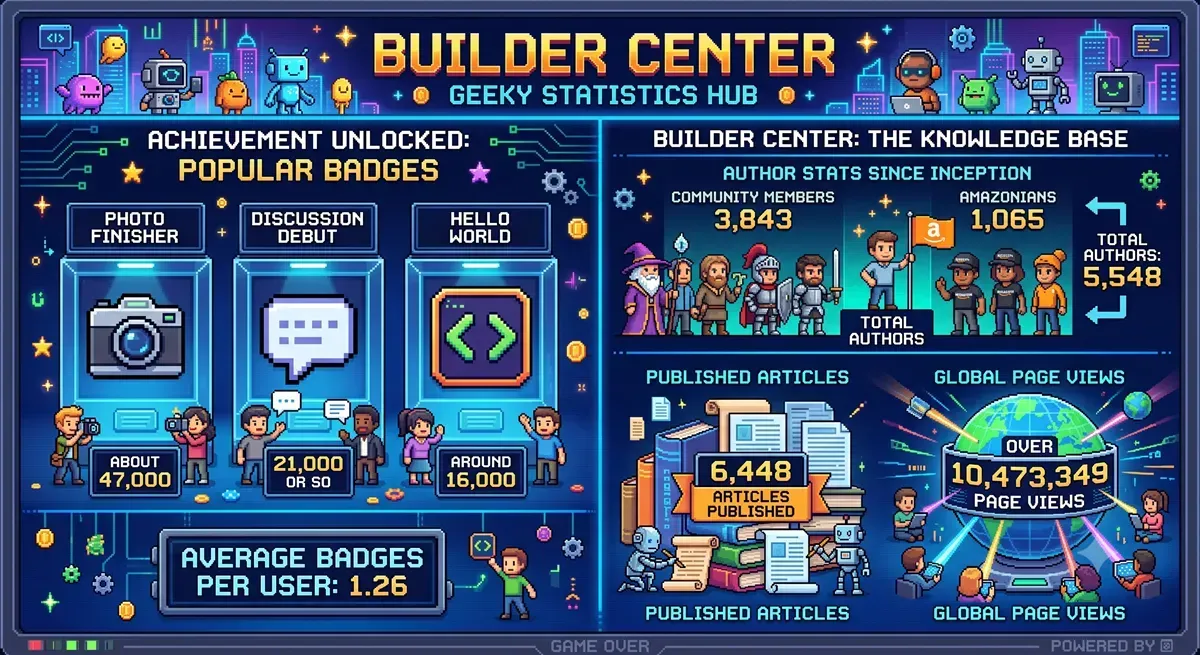
Jeff Barr published a retrospective summarizing Builder Center’s first year. Since launch, 5,548 authors have published 6,448 articles with more than 10.4 million page views combined. Builders have earned 99,226 badges since the badge system launched in March 2026. Community members have submitted 565 wishes, 10 of which have shipped with another 20 on the near-term roadmap.
The top community article Building an AWS Study Buddy with MCP + Strands Agents SDK by Dineshraj Dhanapathy reached 50,000+ views. Chris Miller’s Migrating an EOL Linux Server to AWS in 8 Hours with Kiro followed at 45,000+, and Yash Aggarwal’s AIdeas: NeuroVoice – Multimodal AI for Early Screening of Neurological Diseases article reached 38,000+.
The week’s headline addition is Sandbox Environments by Rick Suttles. Sandboxes give you a free, pre-provisioned AWS account to complete a workshop exercise. Each environment is active for 8 hours, after which the account and all its resources are automatically de-provisioned. You can have one active sandbox at a time and request one per week. No personal AWS account, credit card, or manual cleanup required.
Last week’s launches
Here’s what else happened this week.
For a full list of AWS announcements, be sure to keep an eye on the What’s New with AWS page.
Other AWS news
Here are some additional posts you may find useful:
create-oauth2-token-with-iam API. New governance controls include OAuth-specific IAM condition keys, token introspection and revocation, dynamic client registration, and CloudTrail audit elements.For a full list of AWS blog posts, be sure to keep an eye on the AWS Blogs page.
Upcoming AWS events
Check your calendar and sign up for upcoming AWS events:
Visit the AWS Builder Center to meet other builders, contribute solutions, and find resources that help you keep building.
Wishing everyone a restful and enjoyable summer. Whether you’re building, learning, or recharging, I hope you find time for all three. I’ll be heading to Scandinavia for a few weeks to trade the heat for some cooler weather and longer evenings. Come back next week for more news!
— Esra
A couple of editions ago I wrote about what I find so energizing about working with startups. Last week I got a fresh dose of it: I spent a few days with the AWS Startups team, listening to stories of founders talking about the problems they’re actually solving. One story that stayed with me came from Marco Negreiros, founder of EyeCare Health, a Brazilian healthtech expanding access to eye care. He shared a striking fact: more than 70% of Brazilian municipalities don’t have a single ophthalmologist. His answer was to put a vision test on the one device almost everyone already carries, the smartphone, so a basic eye screening no longer depends on living near a clinic. Watching a founder turn a gap that big into something that concrete is exactly why I love this space.

This week, I’ll take a closer look at some key launches, and then cover the quarterly AWS Service Availability updates.
Last week’s launches
Here are some of the launches covered from this past week in the AWS News Blog:
Here are some launches and updates that caught my attention:
For a full list of AWS announcements, be sure to keep an eye on the What’s New with AWS page.
AWS Service Availability Updates
When the availability of an AWS service or feature changes, we provide customers guidance in AWS Product Lifecycle Changes on available alternatives and support for migration so that disruptions to your operations are minimized. The following lifecycle changes were updated on June 30, 2026.
Services moving to Maintenance (no longer accessible to new customers starting July 30, 2026):
Services entering Sunset:
Services reaching End of Support (as of June 30, 2026):
We understand that changes in availability can impact your operations. For specific guidance, consult the relevant service documentation or contact AWS Support.
Upcoming AWS events
Check your calendar and sign up for upcoming AWS events:
Join the AWS Builder Center to connect with builders, share solutions, and access content that supports your development. Browse here for upcoming AWS-led in-person and virtual events and developer-focused events.
That’s all for this week. Check back next Monday for another Weekly Roundup!
– Daniel Abib
This post is part of our Weekly Roundup series. Check back each week for a quick roundup of interesting news and announcements from AWS!
Upgrading a Kubernetes control plane has long been a one way door. Open source Kubernetes doesn’t support control plane rollback, so once you upgrade, there’s no going back. The community is making real progress here, and KEP-4330 introduces emulated versions to ease rollback. But in practice this constraint has pushed organizations to build elaborate compensating mechanisms like bake periods, stagger groups, automated sign offs, and months long upgrade cycles. With Kubernetes releasing three minor versions per year, teams managing hundreds of clusters, especially in regulated environments, often delay upgrades entirely because they aren’t confident they can recover if something goes wrong. The result is clusters stuck on older versions, missing security patches, and eventually running up against extended support timelines.
Today, we’re announcing Kubernetes version rollbacks for Amazon Elastic Kubernetes Service (Amazon EKS), a new feature that gives cluster administrators a safety net when performing cluster upgrades. With version rollbacks, you can reverse a Kubernetes version upgrade within seven days if you encounter issues after upgrading, returning your cluster to its previous working state.
Where approaches like emulated versions keep a cluster in a transitional holding state, EKS version rollback returns your cluster to a fully validated previous version that ran in production, not an emulation of it. Now, if you upgrade a cluster from, say, Kubernetes 1.34 to 1.35 and discover a compatibility issue, you can roll back to 1.34 within seven days. There’s no need to rebuild your cluster or scramble to troubleshoot under pressure. Think of it as an undo button for Kubernetes version upgrades.
The feature supports rolling back one minor version at a time, matching the same incremental approach EKS uses for upgrades. And to help you roll back safely, EKS automatically evaluates your cluster’s rollback readiness through cluster insights, flagging items like node version compatibility or add-on dependencies before you proceed. If you’ve already assessed the situation and want to move quickly, you can use the --force flag to bypass those checks. The above applies to all EKS clusters, whether you manage your own nodes or let AWS handle them. But for customers who have embraced fully managed infrastructure, rollback goes a step further.
Rollback for EKS Auto Mode
EKS Auto Mode gives you one click deployment of production ready Kubernetes clusters, automating compute, networking, and storage management so you can focus on your applications rather than infrastructure. EKS Auto Mode introduces additional considerations for version rollbacks because both the control plane and managed nodes need to be rolled back together. Since node rollbacks respect your pod disruption budgets, the process can take time depending on your configuration.
To give you control over this process, we’ve introduced a cancel API that lets you stop a node rollback at any point. If you decide the rollback is taking too long or you want to change your approach, you can cancel and adjust your disruption budgets to accelerate things, or choose a different path forward.
By default, EKS never bypasses your disruption budgets during a rollback because we prioritize workload stability. You can always choose to modify or remove disruption budgets yourself to speed up the process if needed.
Let’s try it out
To try version rollbacks, I navigated to the Amazon EKS console and selected one of my clusters that I had recently upgraded.
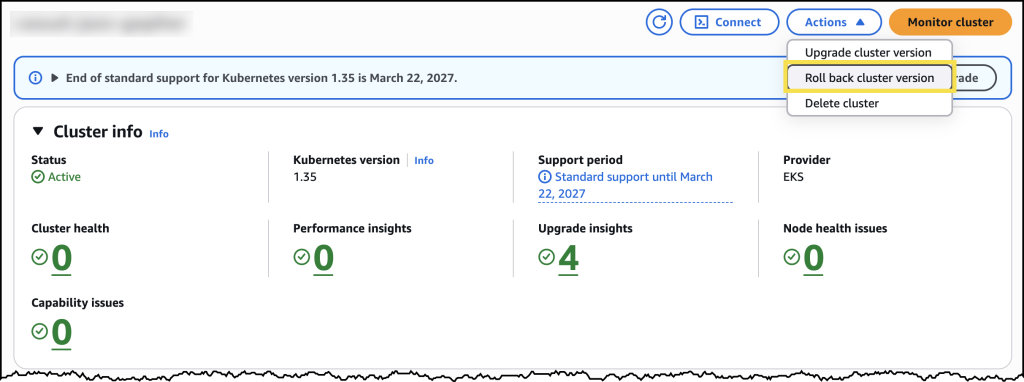
From the cluster’s configuration page, I can see the option to initiate a version rollback, along with information about my current rollback window.
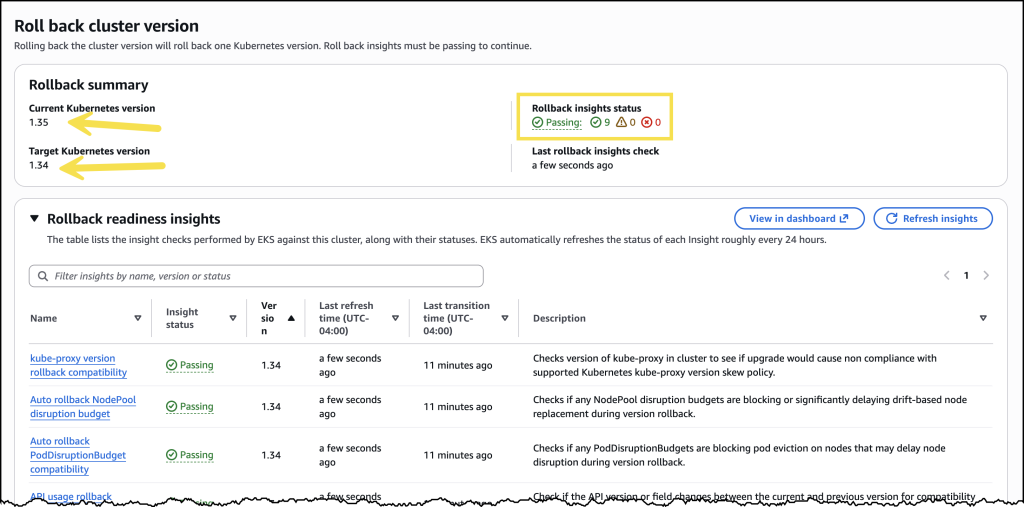
Before initiating the rollback, I reviewed the rollback insights to check for any potential issues. The insights showed me the status of my nodes and flagged anything I should address before proceeding.
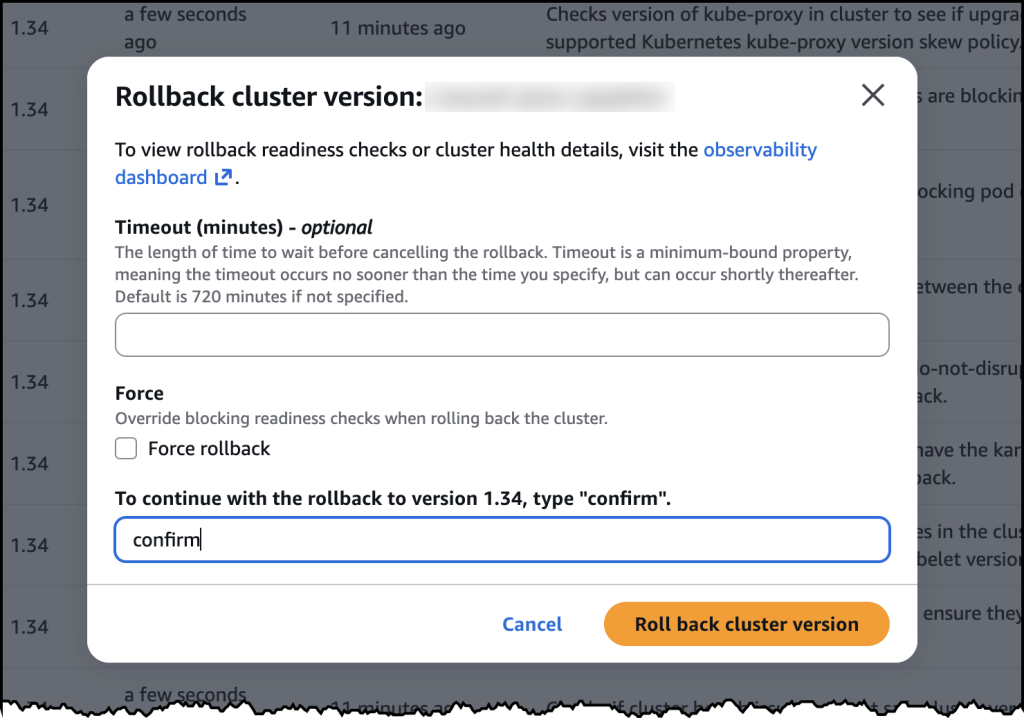
After confirming, the rollback began. My cluster remained functional throughout the process. The control plane rollback took about 20 minutes, similar to a standard upgrade. For my EKS Auto Mode cluster, the nodes rolled back gracefully according to my disruption budget settings.
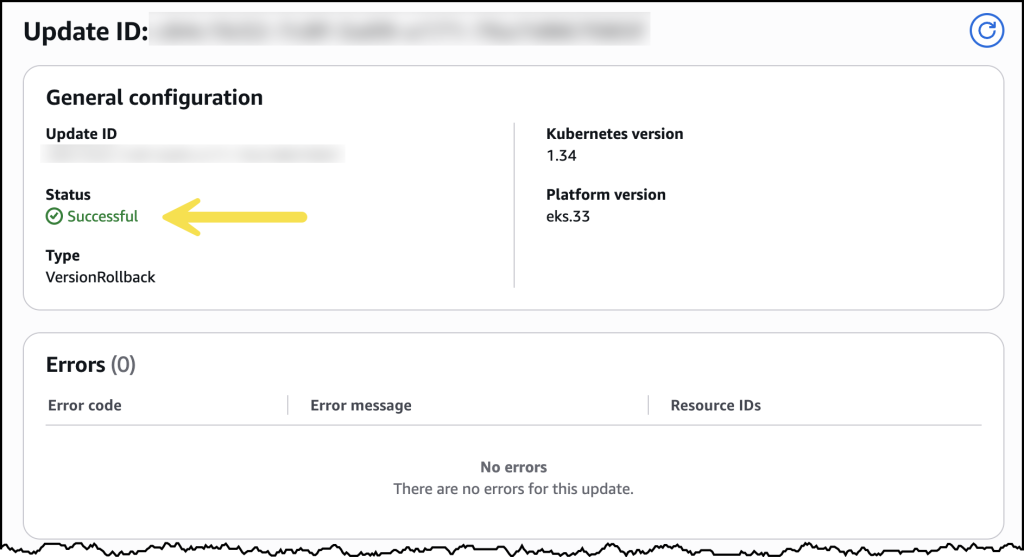
Once complete, my cluster was back on the previous Kubernetes version, running as expected.
Now available
Kubernetes version rollbacks for Amazon EKS are available today at no additional cost in all commercial AWS Regions where Amazon EKS is available. You pay only for the standard EKS and compute costs you would normally incur. There are no extra charges for using the rollback capability.
Control plane rollbacks are available for all EKS clusters, and node rollbacks are available for clusters running EKS Auto Mode. Version rollbacks support clusters running Kubernetes versions available in EKS standard support and extended support.
To get started, visit the Amazon EKS documentation or try it out directly in the Amazon EKS console.