Monday, May 1, 2023

Week in Review – AWS Verified Access, Java 17, Amplify Flutter, Conferences, and More – May 1, 2023

Conference season has started and I was happy to meet and talk with iOS and Swift developers at the New York Swifty conference last week. I will travel again to Turino (Italy), Amsterdam (Netherlands), Frankfurt (Germany), and London (UK) in the coming weeks. Feel free to stop by and say hi if you are around. But, while I was queuing for passport control at JFK airport, AWS teams continued to listen to your feedback and innovate on your behalf.

What happened on AWS last week ? I counted 26 new capabilities since last Monday (not counting last Friday, since I am writing these lines before the start of the day in the US). Here are the eight that caught my attention.

Last Week on AWS

Amplify Flutter now supports web and desktop apps. You can now write Flutter applications that target six platforms, including iOS, Android, Web, Linux, MacOS, and Windows with a single codebase. This update encompasses not only the Amplify libraries but also the Flutter Authenticator UI library, which has been entirely rewritten in Dart. As a result, you can now deliver a consistent experience across all targeted platforms.

AWS Lambda adds support for Java 17. AWS Lambda now supports Java 17 as both a managed runtime and a container base image. Developers creating serverless applications in Lambda with Java 17 can take advantage of new language features including Java records, sealed classes, and multi-line strings. The Lambda Java 17 runtime also has numerous performance improvements, including optimizations when running Lambda functions on Graviton 2 processors. It supports AWS Lambda Snap Start (in supported Regions) for fast cold starts, and the latest versions of the popular Spring Boot 3 and Micronaut 4 application frameworks

AWS Verified Access is now generally available. I first wrote about Verified Access when we announced the preview at the re:Invent conference last year. AWS Verified Access is now available. This new service helps you provide secure access to your corporate applications without using a VPN. Built based on AWS Zero Trust principles, you can use Verified Access to implement a work-from-anywhere model with added security and scalability.

AWS Support is now available in Korean. As the number of customers speaking Korean grows, AWS Support is invested in providing the best support experience possible. You can now communicate with AWS Support engineers and agents in Korean when you create a support case at the AWS Support Center.

AWS DataSync Discovery is now generally available. DataSync Discovery enables you to understand your on-premises storage performance and capacity through automated data collection and analysis. It helps you quickly identify data to be migrated and evaluate suggested AWS Storage services that align with your performance and capacity needs. Capabilities added since preview include support for NetApp ONTAP 9.7, recommendations at cluster and storage virtual machine (SVM) levels, and discovery job events in Amazon EventBridge.

Amazon Location Service adds support for long-distance matrix routing. This makes it easier for you to quickly calculate driving time and driving distance between multiple origins and destinations, no matter how far apart they are. Developers can now make a single API request to calculate up to 122,500 routes (350 origins and 350 destinations) within a 180 km region or up to 100 routes without any distance limitation.

AWS Firewall Manager adds support for multiple administrators. You can now create up to 10 AWS Firewall Manager administrator accounts from AWS Organizations to manage your firewall policies. You can delegate responsibility for firewall administration at a granular scope by restricting access based on OU, account, policy type, and Region, thereby enabling policy management tasks to be implemented faster and more effectively.

AWS AppSync supports TypeScript and source maps in JavaScript resolvers. With this update, you can take advantage of TypeScript features when you write JavaScript resolvers. With the updated libraries, you get improved support for types and generics in AppSync’s utility functions. The updated AppSync documentation provides guidance on how to get started and how to bundle your code when you want to use TypeScript.

Amazon Athena Provisioned Capacity. Athena is a query service that makes it simple to analyze data in S3 data lakes and 30 different data sources, including on-premises data sources or other cloud systems, using standard SQL queries. Athena is serverless, so there is no infrastructure to manage, and–until today–you pay only for the queries that you run. Starting last week, you can now get dedicated capacity for your queries and use new workload management features to prioritize, control, and scale your most important queries, paying only for the capacity you provision.

X in Y – We made existing services available in additional Regions and locations:

Upcoming AWS Events
And to finish this post, I recommend you check your calendars and sign up for these AWS events:

AWS Serverless Innovation Day – Join us on May 17, 2023, for a virtual event hosted on the Twitch AWS channel. We will showcase AWS serverless technology choices such as AWS Lambda, Amazon ECS with AWS Fargate, Amazon EventBridge, and AWS Step Functions. In addition, we will share serverless modernization success stories, use cases, and best practices.

AWS re:Inforce 2023 – Now register for AWS re:Inforce, in Anaheim, California, June 13–14. AWS Chief Information Security Officer CJ Moses will share the latest innovations in cloud security and what AWS Security is focused on. The breakout sessions will provide real-world examples of how security is embedded into the way businesses operate. To learn more and get the limited discount code to register, see CJ’s blog post Gain insights and knowledge at AWS re:Inforce 2023 in the AWS Security Blog.

AWS Global Summits – Check your calendars and sign up for the AWS Summit close to where you live or work: Seoul (May 3–4), Berlin and Singapore (May 4), Stockholm (May 11), Hong Kong (May 23), Amsterdam (June 1), London (June 7), Madrid (June 15), and Milano (June 22).

AWS Community Day – Join community-led conferences driven by AWS user group leaders close to your city: Chicago (June 15), Manila (June 29–30), and Munich (September 14). Recently, we have been bringing together AWS user groups from around the world into Meetup Pro accounts. Find your group and its meetups in your city!

AWS User Group Peru Conference – There is more than a new edge location opening in Lima. The local AWS User Group announced a one-day cloud event in Spanish and English in Lima on September 23. Three of us from the AWS News blog team will attend. I will be joined by my colleagues Marcia and Jeff. Save the date and register today!

You can browse all upcoming AWS-led in-person and virtual events and developer-focused events such as AWS DevDay.

Stay Informed
That was my selection for this week! To better keep up with all of this news, don’t forget to check out the following resources:

That’s all for this week. Check back next Monday for another Week in Review!

-- seb

This post is part of our Week in Review series. Check back each week for a quick roundup of interesting news and announcements from AWS!


from AWS News Blog https://ift.tt/cz6x20Y
via IFTTT

Friday, April 28, 2023

Introducing Athena Provisioned Capacity

Today we launch the ability to provision capacity to run your Amazon Athena queries.

Athena is a query service that makes it simple to analyze data in Amazon Simple Storage Service (Amazon S3) data lakes and 30 different data sources, including on-premises data sources or other cloud systems, using standard SQL queries. Athena is serverless, so there is no infrastructure to manage, and–until today–you pay only for the queries that you run. Starting today, you can get dedicated capacity for your queries and use new workload management features to prioritize, control, and scale your most important queries, paying only for the capacity you provision.

At AWS, 90 percent of the new services and features are driven by your direct feedback. Many of you Athena customers told us that, when running a large volume of queries, you sometimes experience queuing, which might slow down some applications or business processes. To work around this, you typically create a query prioritization mechanism to prioritize mission-critical queries over less critical, interactive, or exploratory queries. This prioritization mechanism helps to get the highest priority queries run first, at the price of building and maintaining code or business processes outside of Athena itself. You also told us it is difficult to forecast your Athena costs. Athena charges by the volume of data scanned, which is often difficult to predict as it depends on the size of your data set, the construction of the user queries, and the storage format for the data.

We heard this feedback, and today, we introduce the capability to provision dedicated query processing capacity at scale. With provisioned capacity, you provision a dedicated set of compute resources to run your queries. This always-on capacity can serve your business-critical queries with near-zero latency and no queuing. It gives you control over workload performance characteristics such as cost, concurrency, and query prioritization. Similar to provisioned capacity for other AWS services, you pay only for the capacity provisioned, not for the actual usage. With provisioned capacity, your Athena bills are predictable, and you do not have to limit user queries to stay within your monthly budget. I’ll share more about the billing model down below.

Behind the scenes, Athena maintains a large pool of compute in each AWS Region that it operates in. You can think of this as one large pool of compute, divided logically across customers. When you reserve capacity in Athena, the capacity is held for your exclusive use. You can choose which queries run on the capacity you provisioned and which run on Athena’s multi-tenant, on-demand capacity. Multiple queries can share the capacity you provisioned. You may add additional capacity units at any time, based on your evolving business requirements. You may also adjust the provisioned capacity down after a minimum period of time of 8 hours.

The unit of capacity is a Data Processing Unit (DPU). A single DPU is equivalent to four vCPU and 16 Gb RAM. The minimum capacity you may provision is 24 DPU for 8 hours. This new provisioned capacity for Athena is ideal for those of you running any volume of queries, but the sweet spot to start using provisioned capacity is when you spend $100 or more per month on Athena.

The number of DPUs you need depends on your goals and analysis patterns. For example, if you need queries to start immediately and without queuing, you should provision enough DPUs to meet your peak concurrent query demand. Provisioning fewer DPUs than your peak demand is allowed, but may result in queuing. When this occurs, queries are held in a queue and executed when capacity is available. If your goal is to run queries within a fixed budget, you can use the AWS Pricing Calculator to determine the number of DPUs that meets your budget. Lastly, remember that data size, storage format, and query construction influence the number of DPU a query requires. You can increase query performance by compressing, partitioning, and converting your data into columnar formats. Athena’s documentation provides you with guidelines to determine how much capacity you might require to run multiple queries at the same time.

How Does It Work?
Getting started is a three-step process. I navigate to the Athena page in the AWS Management Console and select Capacity Reservations on the left-side navigation menu.
(The console you see on this demo is based on the new Cloudscape open-source design system, yours might still see the traditional design on your AWS account.)

Athena Capacity Reservation landing page in the console

I select the Create capacity reservation button at the top right of the page.

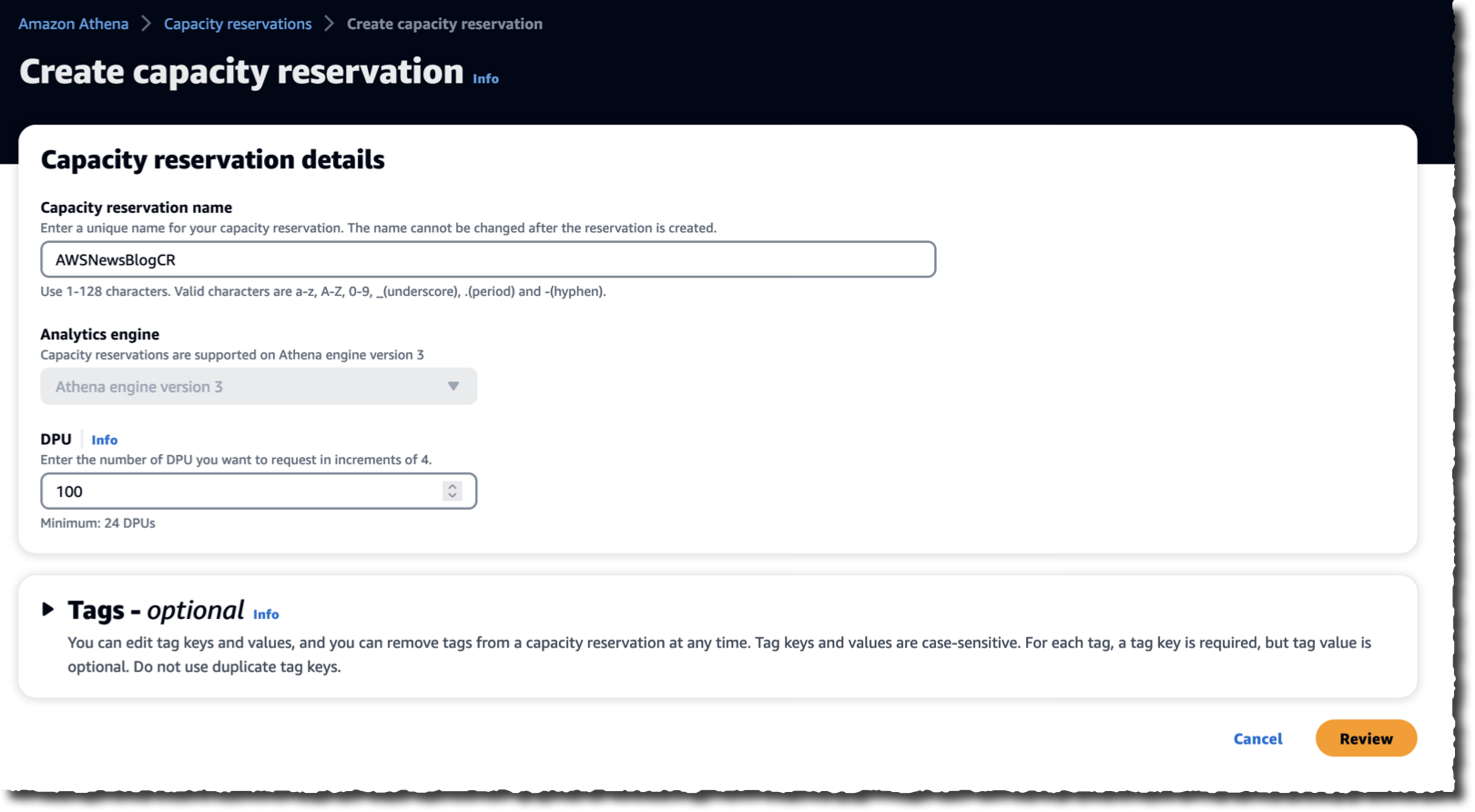
On the Create capacity reservation page, I enter a Capacity reservation name and the number of DPUs I want to provision.

Athena Capacity Reservation - Create Reservation

I select Review to review my choices, and I select Create capacity reservation to create my reservation. After a brief period of time, the capacity reservation status becomes ✅ Active.

Athena Capacity Reservation - Status

The third and last step is to create a workgroup and assign the workgroup to the provisioned capacity. A workgroup is an Athena mechanism allowing you to separate users, teams, applications, or workloads to set limits on the amount of data each query or the entire workgroup can process and to track costs.

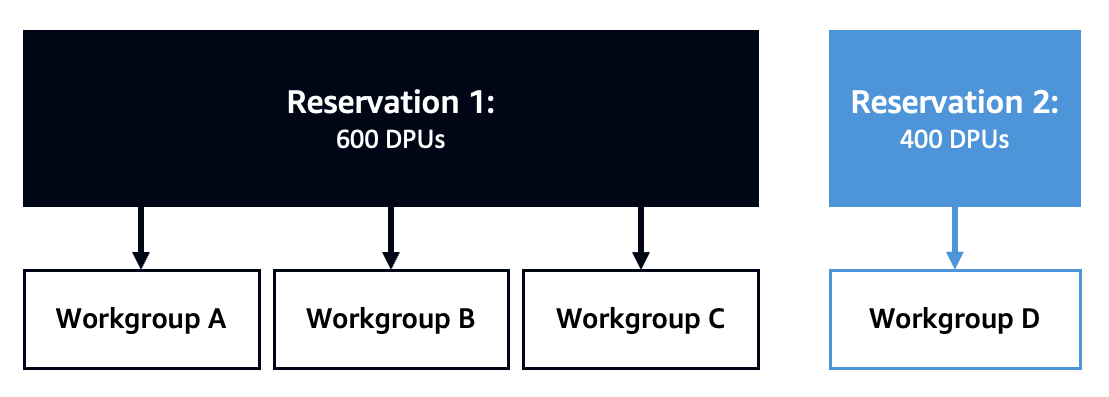
Queries belonging to the assigned workgroup will run on the capacity you provisioned. Capacity may be shared with multiple workgroups as long as they all use the same Athena engine version. This concept, depicted in the diagram below, is surfaced through a capacity allocation policy, which defines how capacity is assigned over workgroups. This gives you the flexibility to run queries with more or less capacity, depending on your business needs.

Athena Capacity Reservation - shared workgroups

To create a workgroup, I navigate to the Workgroups section of the Athena page. Then, I select Create workgroup.

Athena Capacity Reservation - Create Workgroup

I make sure the analytics engine selected in the reservation matches the one in the workgroup.

Athena Capacity Reservation - select analytic engineThen, I go back to the capacity reservation I just created, and I select Add workgroups to add the workgroup I just created.

Athena Capacity Reservation - Add workgroup

That’s it! Now that the configuration is ready, I can run my queries. Existing queries will run on the provisioned capacity unmodified. I make sure to select the workgroup I just created when I run queries. I choose a workgroup on the top right side of the query editor, or use the --work-group argument on the AWS command line, such as:

aws athena start-query-execution --work-group AWSNewsBlog

Athena Capacity Reservation - Select workgroup

Availability and Pricing
As I explained in the introduction, we charge for the number of DPUs you provisioned and the duration. The minimum duration is 8 hours, and after that, billing is per minute. You can release the provisioned capacity at any time. Cancellations within the minimum duration period are billed for the full term, and capacity is deallocated as soon as all currently running queries are terminated.

Queries run from a workgroup assigned to a provisioned capacity are not billed for the amount of data scanned. You effectively pay a flat rate depending on the provisioned capacity, not the usage. If you have excess capacity, you can reduce the number of DPUs you provisioned or add workgroups to consume the excess capacity.

As usual, the Athena pricing page has all the details.

Athena provisioned capacity is available today in US East (Ohio, N. Virginia), US West (Oregon), Asia Pacific (Singapore, Sydney, Tokyo), and Europe (Ireland, Stockholm) AWS Regions.

Go and provision your Athena capacity today!

-- seb

from AWS News Blog https://ift.tt/1iIdpS5
via IFTTT

Thursday, April 27, 2023

How CyberCRX cut ML processing time from 8 days to 56 minutes with AWS Step Functions Distributed Map

Last December, Sébastien Stormacq wrote about the availability of a distributed map state for AWS Step Functions, a new feature that allows you to orchestrate large-scale parallel workloads in the cloud. That’s when Charles Burton, a data systems engineer for a company called CyberGRX, found out about it and refactored his workflow, reducing the processing time for his machine learning (ML) processing job from 8 days to 56 minutes. Before, running the job required an engineer to constantly monitor it; now, it runs in less than an hour with no support needed. In addition, the new implementation with AWS Step Functions Distributed Map costs less than what it did originally.

What CyberGRX achieved with this solution is a perfect example of what serverless technologies embrace: letting the cloud do as much of the undifferentiated heavy lifting as possible so the engineers and data scientists have more time to focus on what’s important for the business. In this case, that means continuing to improve the model and the processes for one of the key offerings from CyberGRX, a cyber risk assessment of third parties using ML insights from its large and growing database.

What’s the business challenge?
CyberGRX shares third-party cyber risk (TPCRM) data with their customers. They predict, with high confidence, how a third-party company will respond to a risk assessment questionnaire. To do this, they have to run their predictive model on every company in their platform; they currently have predictive data on more than 225,000 companies. Whenever there’s a new company or the data changes for a company, they regenerate their predictive model by processing their entire dataset. Over time, CyberGRX data scientists improve the model or add new features to it, which also requires the model to be regenerated.

The challenge is running this job for 225,000 companies in a timely manner, with as few hands-on resources as possible. The job runs a set of operations for each company, and every company calculation is independent of other companies. This means that in the ideal case, every company can be processed at the same time. However, implementing such a massive parallelization is a challenging problem to solve.

First iteration
With that in mind, the company built their first iteration of the pipeline using Kubernetes and Argo Workflows, an open-source container-native workflow engine for orchestrating parallel jobs on Kubernetes. These were tools they were familiar with, as they were already using them in their infrastructure.

But as soon as they tried to run the job for all the companies on the platform, they ran up against the limits of what their system could handle efficiently. Because the solution depended on a centralized controller, Argo Workflows, it was not robust, and the controller was scaled to its maximum capacity during this time. At that time, they only had 150,000 companies. And running the job with all of the companies took around 8 days, during which the system would crash and need to be restarted. It was very labor intensive, and it always required an engineer on call to monitor and troubleshoot the job.

The tipping point came when Charles joined the Analytics team at the beginning of 2022. One of his first tasks was to do a full model run on approximately 170,000 companies at that time. The model run lasted the whole week and ended at 2:00 AM on a Sunday. That’s when he decided their system needed to evolve.

Second iteration
With the pain of the last time he ran the model fresh in his mind, Charles thought through how he could rewrite the workflow. His first thought was to use AWS Lambda and SQS, but he realized that he needed an orchestrator in that solution. That’s why he chose Step Functions, a serverless service that helps you automate processes, orchestrate microservices, and create data and ML pipelines; plus, it scales as needed.

Charles got the new version of the workflow with Step Functions working in about 2 weeks. The first step he took was adapting his existing Docker image to run in Lambda using Lambda’s container image packaging format. Because the container already worked for his data processing tasks, this update was simple. He scheduled Lambda provisioned concurrency to make sure that all functions he needed were ready when he started the job. He also configured reserved concurrency to make sure that Lambda would be able to handle this maximum number of concurrent executions at a time. In order to support so many functions executing at the same time, he raised the concurrent execution quota for Lambda per account.

And to make sure that the steps were run in parallel, he used Step Functions and the map state. The map state allowed Charles to run a set of workflow steps for each item in a dataset. The iterations run in parallel. Because Step Functions map state offers 40 concurrent executions and CyberGRX needed more parallelization, they created a solution that launched multiple state machines in parallel; in this way, they were able to iterate fast across all the companies. Creating this complex solution, required a preprocessor that handled the heuristics of the concurrency of the system and split the input data across multiple state machines.

This second iteration was already better than the first one, as now it was able to finish the execution with no problems, and it could iterate over 200,000 companies in 90 minutes. However, the preprocessor was a very complex part of the system, and it was hitting the limits of the Lambda and Step Functions APIs due to the amount of parallelization.

Second iteration with AWS Step Functions

Third and final iteration
Then, during AWS re:Invent 2022, AWS announced a distributed map for Step Functions, a new type of map state that allows you to write Step Functions to coordinate large-scale parallel workloads. Using this new feature, you can easily iterate over millions of objects stored in Amazon Simple Storage Service (Amazon S3), and then the distributed map can launch up to 10,000 parallel sub-workflows to process the data.

When Charles read in the News Blog article about the 10,000 parallel workflow executions, he immediately thought about trying this new state. In a couple of weeks, Charles built the new iteration of the workflow.

Because the distributed map state split the input into different processors and handled the concurrency of the different executions, Charles was able to drop the complex preprocessor code.

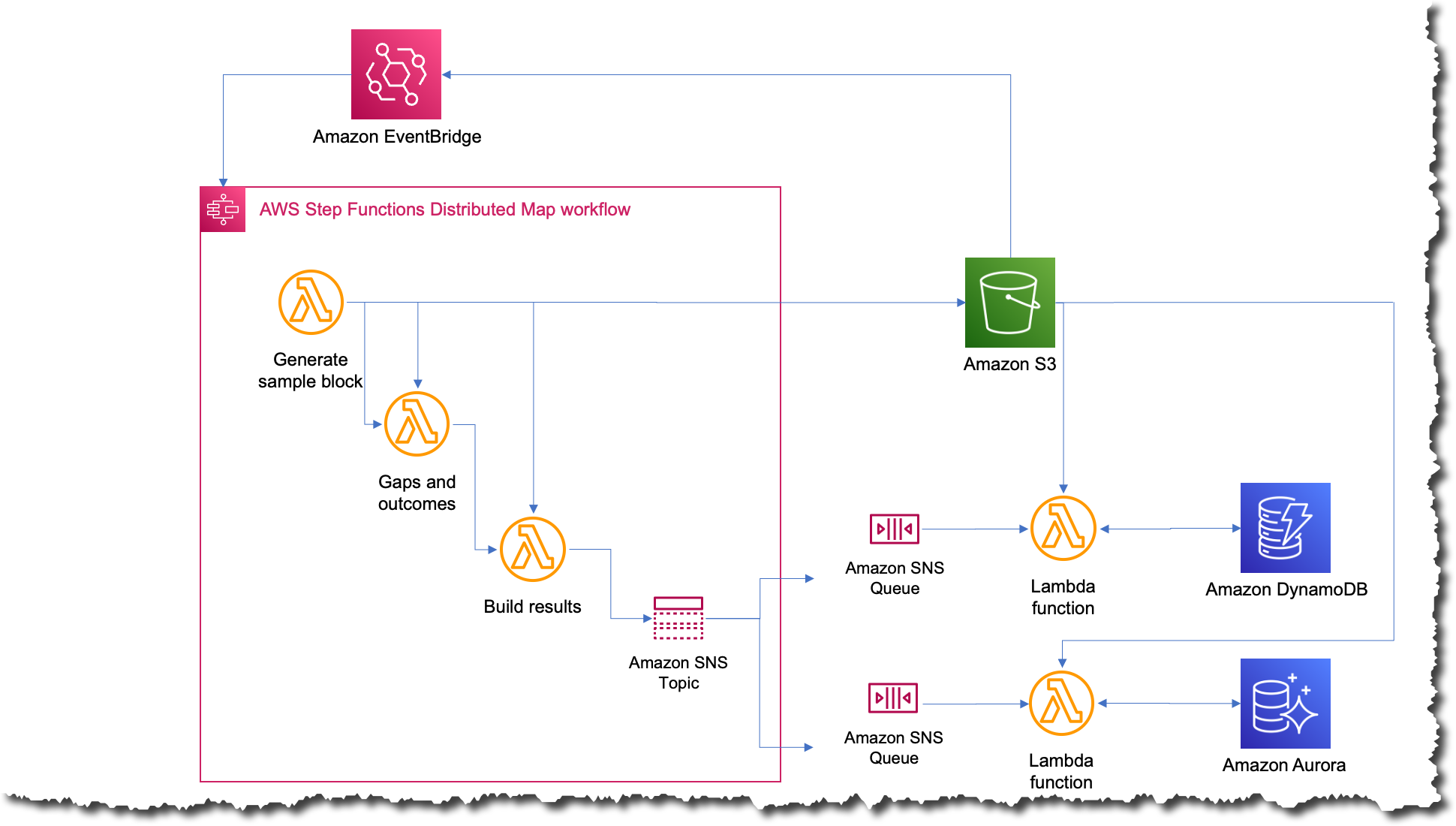
The new process was the simplest that it’s ever been; now whenever they want to run the job, they just upload a file to Amazon S3 with the input data. This action triggers an Amazon EventBridge rule that targets the state machine with the distributed map. The state machine then executes with that file as an input and publishes the results to an Amazon Simple Notification Service (Amazon SNS) topic.

Final iteration with AWS Step Functions

What was the impact?
A few weeks after completing the third iteration, they had to run the job on all 227,000 companies in their platform. When the job finished, Charles’ team was blown away; the whole process took only 56 minutes to complete. They estimated that during those 56 minutes, the job ran more than 57 billion calculations.

Processing of the Distributed Map State

The following image shows an Amazon CloudWatch graph of the concurrent executions for one Lambda function during the time that the workflow was running. There are almost 10,000 functions running in parallel during this time.

Lambda concurrency CloudWatch graph

Simplifying and shortening the time to run the job opens a lot of possibilities for CyberGRX and the data science team. The benefits started right away the moment one of the data scientists wanted to run the job to test some improvements they had made for the model. They were able to run it independently without requiring an engineer to help them.

And, because the predictive model itself is one of the key offerings from CyberGRX, the company now has a more competitive product since the predictive analysis can be refined on a daily basis.

Learn more about using AWS Step Functions:

You can also check the Serverless Workflows Collection that we have available in Serverless Land for you to test and learn more about this new capability.

— Marcia


from AWS News Blog https://ift.tt/x8uJt7A
via IFTTT

Monday, April 24, 2023

AWS Week in Review – April 24, 2023: Amazon CodeCatalyst, Amazon S3 on Snowball Edge, and More…

As always, there’s plenty to share this week: Amazon CodeCatalyst is now generally available, Amazon S3 is now available on Snowball Edge devices, version 1.0.0 of AWS Amplify Flutter is here, and a lot more. Let’s dive in!

Last Week’s Launches
Here are some of the launches that caught my eye this past week:

Amazon CodeCatalyst – First announced at re:Invent in preview form (Announcing Amazon CodeCatalyst, a Unified Software Development Service), this unified software development and delivery service is now generally available. As Steve notes in the post that he wrote for the preview, “Amazon CodeCatalyst enables software development teams to quickly and easily plan, develop, collaborate on, build, and deliver applications on AWS, reducing friction throughout the development lifecycle.” During the preview we added the ability to use AWS Graviton2 for CI/CD workflows and deployment environments, along with other new features, as detailed in the What’s New.

Amazon S3 on Snowball Edge – You have had the power to create S3 buckets on AWS Snow Family devices for a couple of years, and to PUT and GET object. With this new launch you can, as Channy says, “…use an expanded set of Amazon S3 APIs to easily build applications on AWS and deploy them on Snowball Edge Compute Optimized devices.” This launch allows you to manage the storage using AWS OpsHub, and to address multiple Denied, Disrupted, Intermittent, and Limited Impact (DDIL) use cases. To learn more, read Amazon S3 Compatible Storage on AWS Snowball Edge Compute Optimized Devices Now Generally Available.

Amazon Redshift Updates – We announced multiple updates to Amazon Redshift including the MERGE SQL command so that you can combine a series of DML statements into a single statement, dynamic data masking to simplify the process of protecting sensitive data in your Amazon Redshift data warehouse, and centralized access control for data sharing with AWS Lake Formation.

AWS Amplify – You can now build cross-platform Flutter apps that target iOS, Android, Web, and desktop using a single codebase and with a consistent user experience. To learn more and to see how to get started, read Amplify Flutter announces general availability for web and desktop support. In addition to the GA, we also announced that AWS Amplify supports Push Notifications for Android, Swift, React Native, and Flutter apps.

X in Y – We made existing services available in additional regions and locations:

For a full list of AWS announcements, take a look at the What’s New at AWS page and consider subscribing to the page’s RSS feed. If you want even more detail, you can Subscribe to AWS Daily Feature Updates via Amazon SNS.

Interesting Blog Posts

Other AWS Blogs – Here are some fresh posts from a few of the other AWS Blogs:

AWS Open Source – My colleague Ricardo writes a weekly newsletter to highlight new open source projects, tools, and demos from the AWS Community. Read edition 154 to learn more.

AWS Graviton Weekly – Marcos Ortiz writes a weekly newsletter to highlight the latest developments in AWS custom silicon. Read AWS Graviton weekly #33 to see what’s up.

Upcoming Events
Here are some upcoming live and online events that may be of interest to you:

AWS Community Day Turkey will take place in Istanbul on May 6, and I will be there to deliver the keynote. Get your tickets and I will see you there!

AWS Summits are coming to Berlin (May 4), Washington, DC (June 7 and 8), London (June 7), and Toronto (June 14). These events are free but I highly recommend that you register ahead of time.

.NET Enterprise Developer Day EMEA is a free one-day virtual conference on April 25; register now.

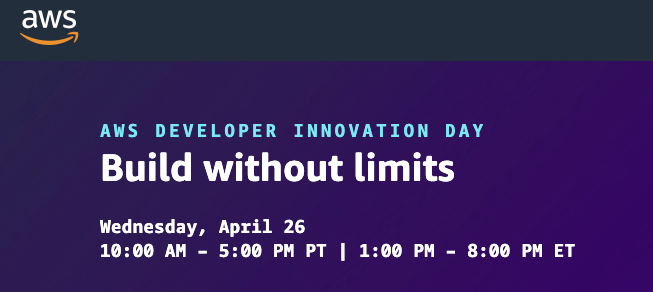
AWS Developer Innovation Day is also virtual, and takes place on April 26 (read Discover Building without Limits at AWS Developer Innovation Day for more info). I’ll be watching all day and sharing a live recap at the end; learn more and see you there.

And that’s all for today!

— Jeff;


from AWS News Blog https://ift.tt/O5dISax
via IFTTT

Choose Korean in AWS Support as Your Preferred Language

Today, we are announcing the general availability of AWS Support in Korean as your preferred language, in addition to English, Japanese, and Chinese.

As the number of customers speaking Korean grows, AWS Support is invested in providing the best support experience possible. You can now communicate with AWS Support engineers and agents in Korean when you create a support case at the AWS Support Center.

Now all customers can receive account and billing support in Korean by email, phone, and live chat at no additional cost during the supported hours. Per your Support plan, customers subscribed to Enterprise, Enterprise On-Ramp, or Business Support plans can receive personalized technical support 24 hours a day and 7 days a week in Korean. Customers subscribed to the Developer Support plan can receive technical support during business hours generally defined as 9:00 AM to 6:00 PM in the customer country as set in My Account console, excluding holidays and weekends. These times may vary in countries with multiple time zones.

We also added the localized user interface of the AWS Support Center in Korean, in addition to Japanese and Chinese. AWS Support Center will be displayed in the language you select from the dropdown of available languages in Unified Settings of your AWS Account.

Here is a new AWS Support Center page in Korean:

You can also access customer service, AWS documentation, technical papers, and support forums in Korean.

Getting Started with Your Supported Language in AWS Support
To get started with AWS Support in your supported language, create a Support case in AWS Support Center. In the final step in creating a Support case, you can choose a supported language, such as English, Chinese (中文), Korean (한국어), or Japanese (日本語) as your Preferred contact language.

When you choose Korean, the customized contact options will be shown by your support plan.

For example, in the case of Basic Support plan customers, you can choose Web to get support via email, Phone, or Live Chat when available. AWS customers with account and billing inquiries can receive support in Korean from our customer service representatives with proficiency in Korean at no additional cost during business hours defined as 09:00 AM to 06:00 PM Korean Standard Time (GMT+9), excluding holidays and weekends.

If you get technical support per your Support plan, you may choose Web, Phone, or Live Chat depending on your Support plan to get in touch with support staff with proficiency in Korean, in addition to English, Japanese, and Chinese.

Here is a screen in Korean to get technical support in the Enterprise Support plan:

When you create a support case in your preferred language, the case will be routed to support staff with proficiency in the language indicated in your preferred language selection. To learn more, see Getting started with AWS Support in the AWS documentation.

Now Available
AWS Support in Korean is now available today, in addition to English, Japanese, and Chinese. Give it a try, learn more about AWS Support, and send feedback to your usual AWS Support contacts.

– Channy

This article was translated into Korean (한국어) in the AWS Korea Blog.


from AWS News Blog https://ift.tt/5h7XWYV
via IFTTT

Thursday, April 20, 2023

Amazon S3 Compatible Storage on AWS Snowball Edge Compute Optimized Devices Now Generally Available

We have added a collection of purpose-built services to the AWS Snow Family for customers, such as Snowball Edge in 2016 and Snowcone in 2020. These services run compute intensive workloads and stores data in edge locations with denied, disrupted, intermittent, or limited network connectivity and for transferring large amounts of data from on-premises and rugged or mobile environments.

Each new service is optimized for space- or weight-constrained environments, portability, and flexible networking options. For example, Snowball Edge devices have three options for device configurations. AWS Snowball Edge Compute Optimized provides a suitcase-sized, secure, and rugged device that customers can deploy in rugged and tactical edge locations to run their compute applications. Customers modernize their edge applications in the cloud use AWS compute services and storage services such as Amazon Simple Storage Service (Amazon S3), and then deploy these applications on Snow devices at the edge.

We heard from customers that they also needed access to local object store to run applications at the edge, such as 5G mobile core and real-time data analytics, to process end-user transactions, and they had limited storage infrastructure availability in these environments. Although the Amazon S3 Adapter for Snowball enables the basic storage and retrieval of objects on a Snow device, customers wanted access to a broader set of Amazon S3 APIs, including flexibility at scale, local bucket management, object tagging, and S3 event notifications.

Today, we’re announcing the general availability of Amazon S3 compatible storage on Snow for our Snowball Edge Compute Optimized devices. This makes it easy for you to store data and run applications with local S3 buckets that require low latency processing at the edge.

With Amazon S3 compatible storage on Snow, you can use an expanded set of Amazon S3 APIs to easily build applications on AWS and deploy them on Snowball Edge Compute Optimized devices. This eliminates the need to re-architect applications for each deployment. You can manage applications requiring Amazon S3 compatible storage across the cloud, on-premises, and at the edge in connected and disconnected environments with a consistent experience.

Moreover, you can use AWS OpsHub, a graphical user interface, to manage your Snow Family services and Amazon S3 compatible storage on the devices at the edge or remotely from a central location. You can also use Amazon S3 SDK or AWS Command Line Interface (AWS CLI) to create and manage S3 buckets, get S3 event notifications using MQTT, and local service notifications using SMTP, just as you do in AWS Regions.

With Amazon S3 compatible storage on Snow, we are now able to address various use cases in limited network environments, giving customers secure, durable local object storage. For example, customers in the intelligence community and in industrial IoT deploy applications such as video analytics in rugged and mobile edge locations.

Getting Started with S3 Compatible Storage on Snowball Edge Compute Optimized
To order new Amazon S3 enabled Snowball Edge devices, create a job in the AWS Snow Family console. You can replace an existing Snow device or cluster with new replacement devices that support S3 compatible storage.

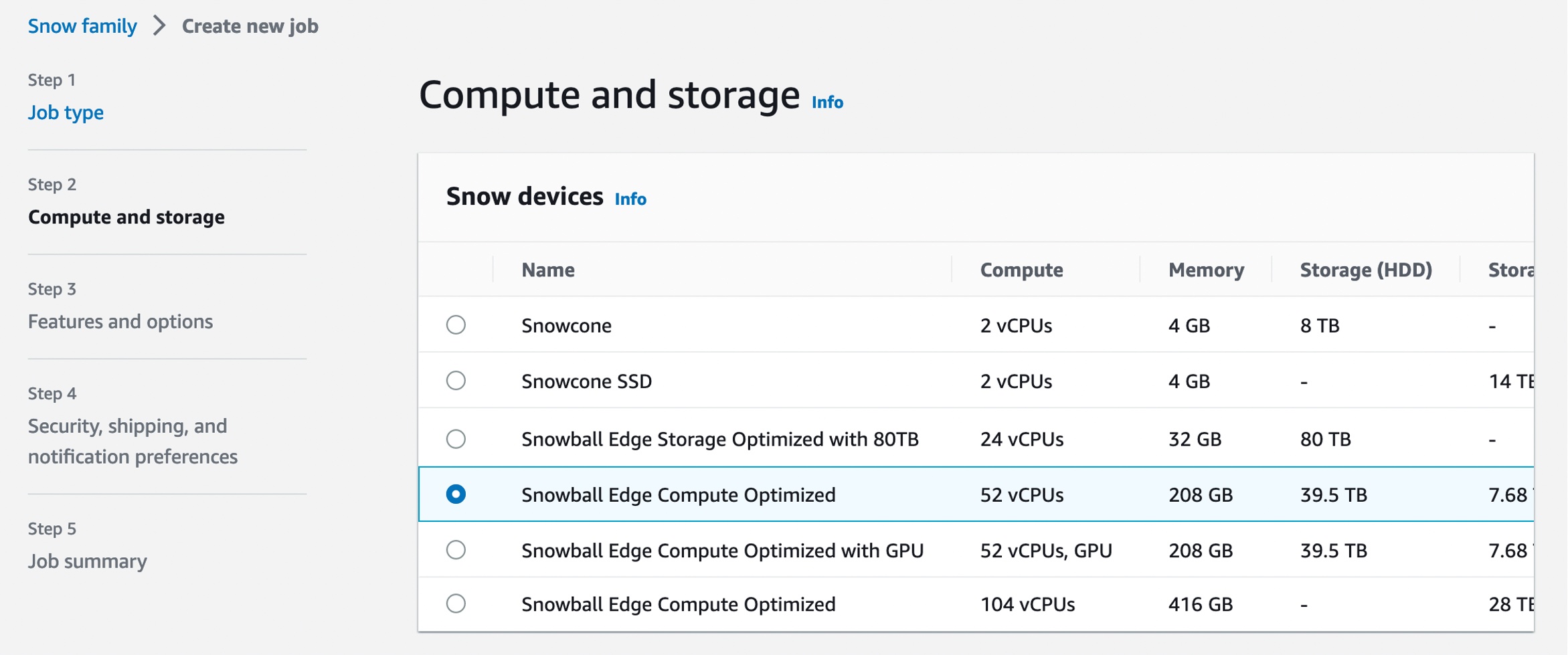
In Step 1 – Job type, input your job name and choose Local compute and storage only. In Step 2 – Compute and storage, choose your preferred Snowball Edge Compute Optimized device.

Select Amazon S3 compatible storage, a new option for S3 compatible storage. The current S3 Adapter solution is on deprecation path, and we recommend migrating workloads to use Amazon S3 compatible storage on Snow.

When you select Amazon S3 compatible storage, you can configure Amazon S3 compatible storage capacity for a single device or for a cluster. The Amazon S3 storage capacity depends on the quantity and type of Snowball Edge device.

  • For single-device deployment, you can provision granular Amazon S3 capacity up to a maximum of 31 TB on a Snowball Edge Compute Optimized device.
  • For a cluster setup, all storage capacity on a device is allocated to Amazon S3 compatible storage on Snow. You can provision a maximum of 500 TB on a 16 node cluster of Snowball Edge Compute Optimized devices.

When you provide all necessary job details and create your job, you can see the status of the delivery of your device in the job status section.

Manage S3 Compatible Storage on Snow with OpsHub
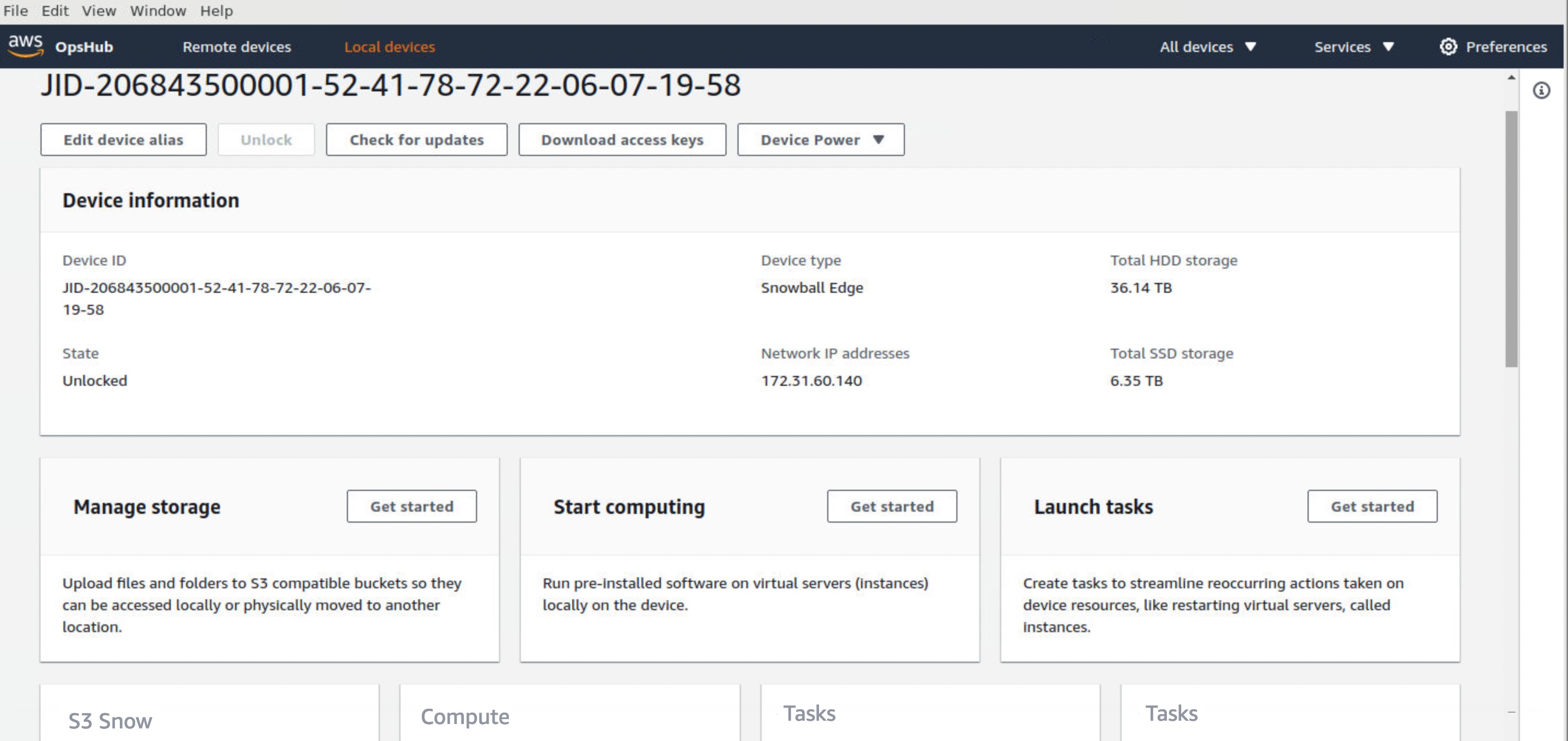
Once your device arrives at your site, power it on, and connect it to your network. To manage your device, download, install, and launch the OpsHub application in your laptop. After installation, you can unlock the device and start managing it and using supported AWS services locally.

OpsHub provides a dashboard that summarizes key metrics, such as storage capacity and active instances on your device. It also provides a selection of AWS services that are supported on the Snow Family devices.

Log in to OpsHub, then choose Manage Storage. This takes you to the Amazon S3 compatible storage on Snow landing page.

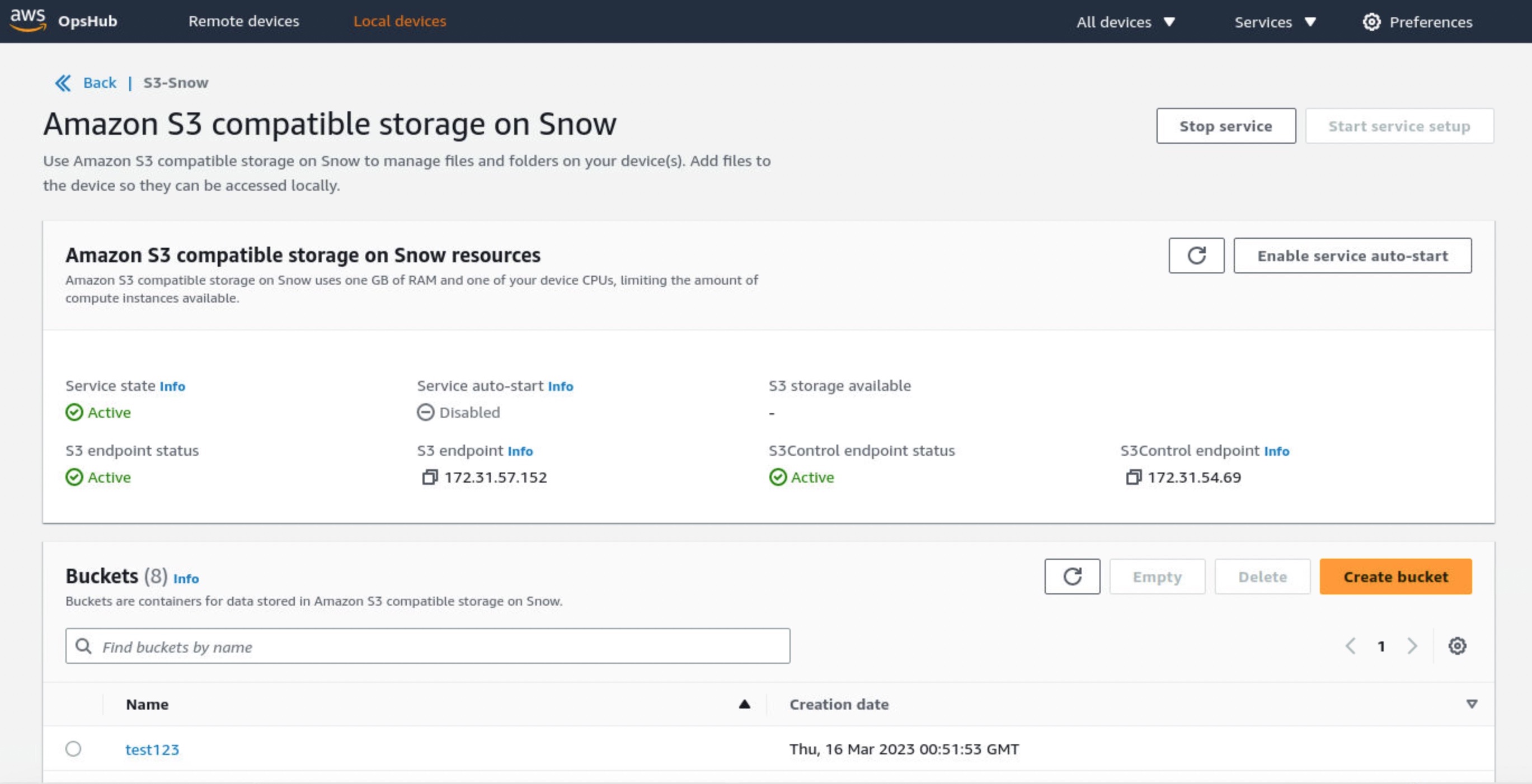
For Start service setup type, choose Simple if your network uses dynamic host configuration protocol (DHCP). With this option, the virtual network interface cards (VNICs) are created automatically on each device when you start the service. When your network uses static IP addresses, you need to create VNICs for each device manually, so choose the Advanced option.

Once the service starts, you’ll see its status is active with a list of endpoints. The following example shows the service activated in a single device:

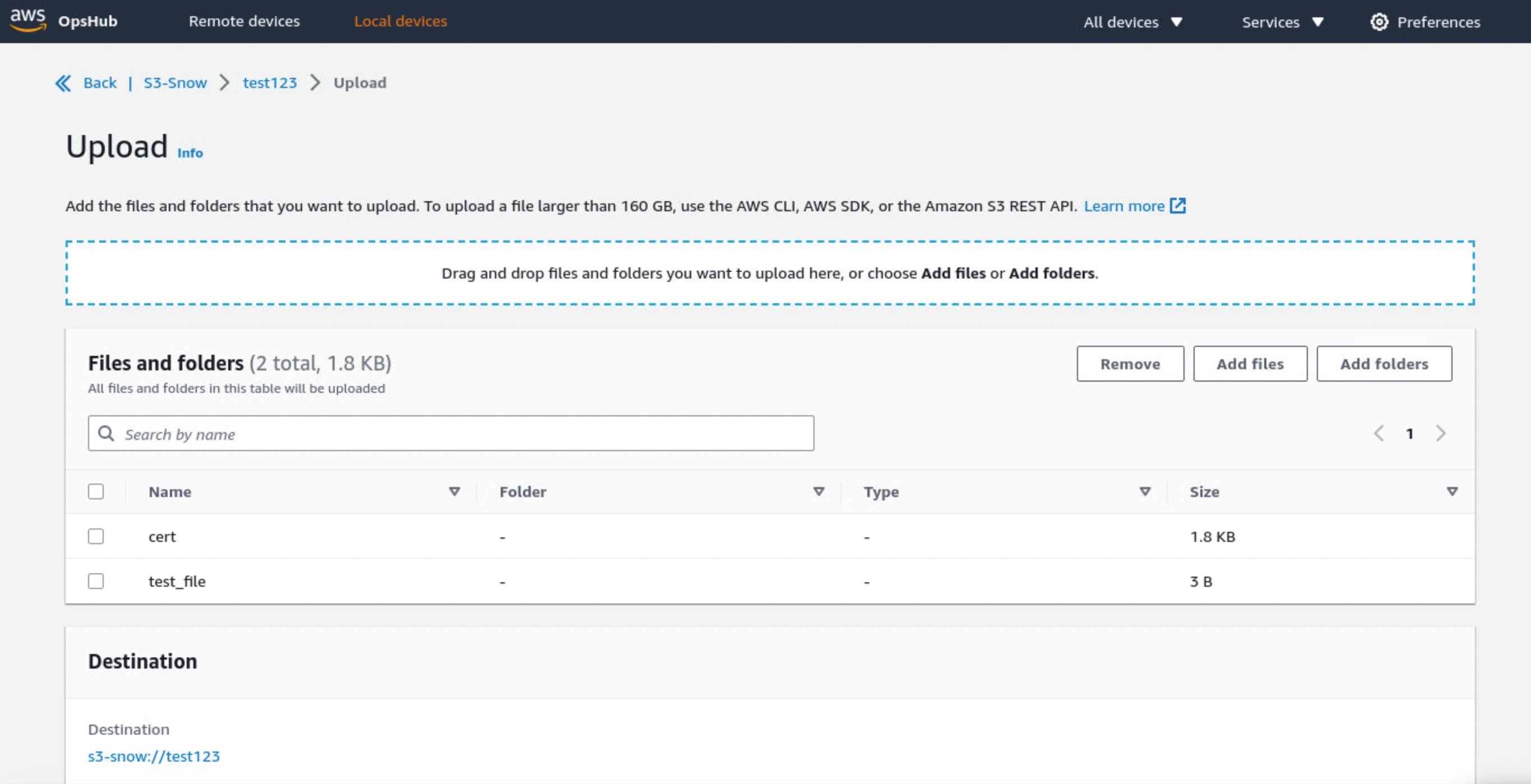
Choose Create bucket if you want the new S3 bucket in your device. Otherwise, you can upload files to your selected bucket. New uploaded objects have destination URLs such as s3-snow://test123/test_file with the unique bucket name in the device or cluster.

You can also use the bucket lifecycle rule to define when to trigger object deletion based on age or date. Choose Create lifecycle rule in the Management tab to add a new lifecycle rule.

You can select either Delete objects or Delete incomplete multipart uploads as a rule action. Configure the rule trigger that schedules deletion based on a specific date or object’s age. In this example, I set two days to delete objects after being uploaded.

You can also use the Amazon S3 SDK/CLI for all API operations supported by S3 for Snowball Edge. To learn more, see API Operations Supported on Amazon S3 for Snowball Edge in the AWS documentation.

Things to know
Keep these things in mind regarding additional features and considerations when you use Amazon S3 compatible storage on Snow:

  • Capacity: If you fully utilize Amazon S3 capacity on your device or cluster, your write (PUT) requests return an insufficient capacity error. Read (GET) operations continue to function normally. To monitor the available Amazon S3 capacity, you can use the OpsHub S3 on the Snow page or use the describe-service CLI command. Upon detecting insufficient capacity on the Snow device or cluster, you must free up space by deleting data or transferring data to an S3 bucket in the Region or another on-premises device.
  • Resiliency: Amazon S3 compatible storage on Snow stores data redundantly across multiple disks on each Snow device and multiple devices in your cluster, with built-in protection against correlated hardware failures. In the event of a disk or device failure within the quorum range, Amazon S3 compatible storage on Snow continues to operate until hardware is replaced. Additionally, Amazon S3 compatible storage on Snow continuously scrubs data on the device to make sure of data integrity and recover any corrupted data. For workloads that require local storage, the best practice is to back up your data to further protect your data stored on Snow devices.
  • Notifications: Amazon S3 compatible storage on Snow continuously monitors the health status of the device or cluster. Background processes respond to data inconsistencies and temporary failures to heal and recover data to make sure of resiliency. In the case of nonrecoverable hardware failures, Amazon S3 compatible storage on Snow can continue operations and provides proactive notifications through emails, prompting you to work with AWS to replace failed devices. For connected devices, you have the option to enable the “Remote Monitoring” feature, which will allow AWS to monitor service health online and proactively notify you of any service issues.
  • Security: Amazon S3 compatible storage on Snow supports encryption using server-side encryption with Amazon S3 managed encryption keys (SSE-S3) or customer-provided keys (SSE-C) and authentication and authorization using Snow IAM actions namespace (s3:*) to provide you with distinct controls for data stored on your Snow devices. Amazon S3 compatible storage on Snow doesn’t support object-level access control list and bucket policies. Amazon S3 compatible storage on Snow defaults to Bucket Owner is Object Owner, making sure that the bucket owner has control over objects in the bucket.

Now Available
Amazon S3 compatible storage on Snow is now generally available for AWS Snowball Edge Compute Optimized devices in all AWS Commercial and GovCloud Regions where AWS Snow is available.

To learn more, see the AWS Snowball Edge Developer Guide and send feedback to AWS re:Post for AWS Snowball or through your usual AWS support contacts.

– Channy


from AWS News Blog https://ift.tt/7wHUPML
via IFTTT

Wednesday, April 19, 2023