Thursday, May 11, 2023

New – Amazon Aurora I/O-Optimized Cluster Configuration with Up to 40% Cost Savings for I/O-Intensive Applications

Since Amazon Aurora launched in 2014, hundreds of thousands of customers have chosen Aurora to run their most demanding applications. Aurora provides unparalleled high performance and availability at global scale with full MySQL and PostgreSQL compatibility at up to one-tenth the cost of commercial databases.

Many customers benefit from the cost-effectiveness of Aurora’s current simple, pay-per-request pricing for input/output (I/O) usage, removing the need to provision I/Os in advance. Customers also benefit from additional cost-saving innovations such as Amazon Aurora Serverless v2 (ASv2), which provides seamless scaling in fine-grained increments based on the application’s demands. For workloads with spikes in demand, you can save up to 90 percent in costs vs. provisioning capacity for peak load with ASv2.

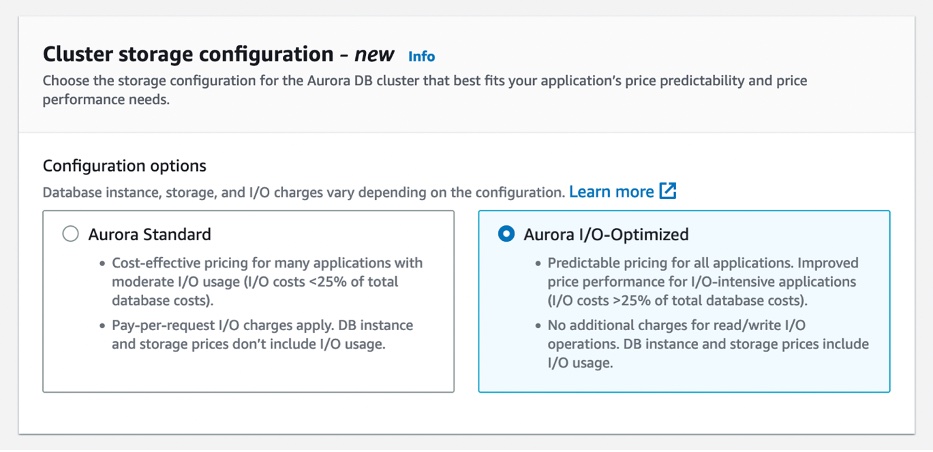
Today, we are announcing the general availability of Amazon Aurora I/O-Optimized, a new cluster configuration that offers improved price performance and predictable pricing for customers with I/O-intensive applications, such as e-commerce applications, payment processing systems, and more. Aurora I/O-Optimized offers improved performance, increasing throughput and reducing latency to support your most demanding workloads.

You can now confidently predict costs for your most I/O-intensive workloads, with up to 40 percent cost savings when your I/O spend exceeds 25 percent of your current Aurora database spend. If you are using Reserved Instances, you will see even greater cost savings.

Now you have the flexibility to choose between the existing configuration newly called Aurora Standard, which is the existing pay-per-request pricing model that is cost-effective for applications with low-to-moderate I/O usage or the new Aurora I/O-Optimized configuration for I/O-intensive applications.

Getting Started with Aurora I/O-Optimized
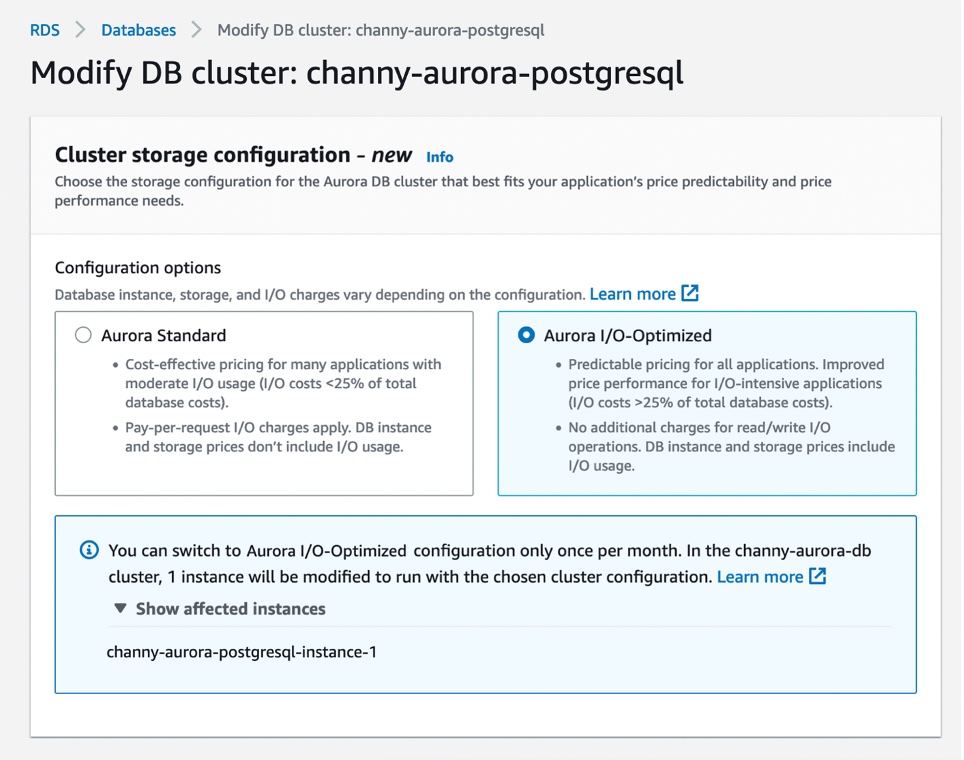
You can create a new database cluster using the Aurora I/O-Optimized configuration or convert your existing database clusters with a few clicks in the AWS Management Console, AWS Command Line Interface (AWS CLI), or AWS SDKs.

For the Aurora MySQL-Compatible Edition and Aurora PostgreSQL-Compatible Edition, you can choose either the Aurora Standard or Aurora I/O-Optimized configuration.

Aurora I/O-Optimized configuration is available in the latest version of Aurora MySQL version 3.03.1 and higher, Aurora PostgreSQL v15.2 and higher, v14.7 and higher, and v13.10 and higher.

This configuration supports Intel-based Aurora database instance types such as t3, r5, and r6i, Graviton-based database instance types such as t4g, r7g, and x2g, Aurora Serverless v2, Aurora Global Database, on-demand Aurora database instances, and reserved instances.

R7g instances for Amazon Aurora are powered by the latest generation AWS Graviton3 processors, delivering up to 30 percent performance gains and up to 20 percent improved price performance for Aurora, as compared to R6g instances.

In your existing Aurora clusters, you can switch the storage configuration to Aurora I/O-Optimized once every 30 days or switch back to Aurora Standard at any time. You can change the cluster storage configuration only at the cluster level. The change applies to all instances in the cluster.

After changing the configuration, you don’t need to reboot the database instances within the cluster to take advantage of the price-performance benefits of Aurora I/O-Optimized.

Now Available
Amazon Aurora I/O-Optimized configuration is now generally available for Amazon Aurora MySQL-Compatible Edition and Aurora PostgreSQL-Compatible Edition in most AWS Regions where Aurora is available, with China (Beijing), China (Ningxia), AWS GovCloud (US-East), and AWS GovCloud (US-West) Regions coming soon.

Aurora is billed differently for the two configurations: Aurora Standard or Aurora I/O-Optimized. The latter doesn’t charge for I/Os, charging a set price for compute and storage relative to the former. For I/O-intensive applications, its price/performance will be better, and you can save up to 40 percent on costs. To see pricing examples, visit the Aurora Pricing page.

To learn more, read Amazon Aurora storage and reliability in the AWS documentation. Give it a try, and please send feedback to AWS re:Post for Amazon Aurora or through your usual AWS support contacts.

– Channy


from AWS News Blog https://ift.tt/rRF40f6
via IFTTT

Tuesday, May 9, 2023

New Storage-Optimized Amazon EC2 I4g Instances: Graviton Processors and AWS Nitro SSDs

Today we are launching I4g instances powered by AWS Graviton2 processors that deliver up to 15% better compute performance than our other storage-optimized instances.

With up to 64 vCPUs, 512 GiB of memory, and 15 TB of NVMe storage, one of the six instance sizes is bound to be a great fit for your storage-intensive workloads: relational and non-relational databases, search engines, file systems, in-memory analytics, batch processing, streaming, and so forth. These workloads are generally very sensitive to I/O latency, and require plenty of random read/write IOPS along with high CPU performance.

Here are the specs:

Instance Name vCPUs
Memory
Storage
Network Bandwidth
EBS Bandwidth
i4g.large 2 16 GiB 468 GB up to 10 Gbps up to 40 Gbps
i4g.xlarge 4 32GiB 937 GB up to 10 Gbps up to 40 Gbps
i4g.2xlarge 8 64 GiB 1.875 TB up to 12 Gbps up to 40 Gbps
i4g.4xlarge 16 128 GiB 3.750 TB up to 25 Gbps up to 40 Gbps
i4g.8xlarge 32 256 GiB 7.500 TB
(2 x 3.750 TB)
18.750 Gbps 40 Gbps
i4g.16xlarge 64 512 GiB 15.000 TB
(4 x 3.750 TB)
37.500 Gbps 80 Gbps

The I4g instances make use of AWS Nitro SSDs (read AWS Nitro SSD – High Performance Storage for your I/O-Intensive Applications to learn more) for NVMe storage. Each storage volume can deliver the following performance (all measured using 4 KiB blocks):

  • Up to 800K random write IOPS
  • Up to 1 million random read IOPS
  • Up to 5600 MB/second of sequential writes
  • Up to 8000 MB/second of sequential reads

Torn Write Protection is supported for 4 KiB, 8 KiB, and 16 KiB blocks.

Available Now
I4g instances are available today in the US East (Ohio, N. Virginia), US West (Oregon), and Europe (Ireland) AWS Regions in On-Demand, Spot, Reserved Instance, and Savings Plan form.

— Jeff;


from AWS News Blog https://ift.tt/GEwF9Xm
via IFTTT

Monday, May 8, 2023

AWS Week in Review – AWS Notifications, Serverless event, and More – May 8, 2023

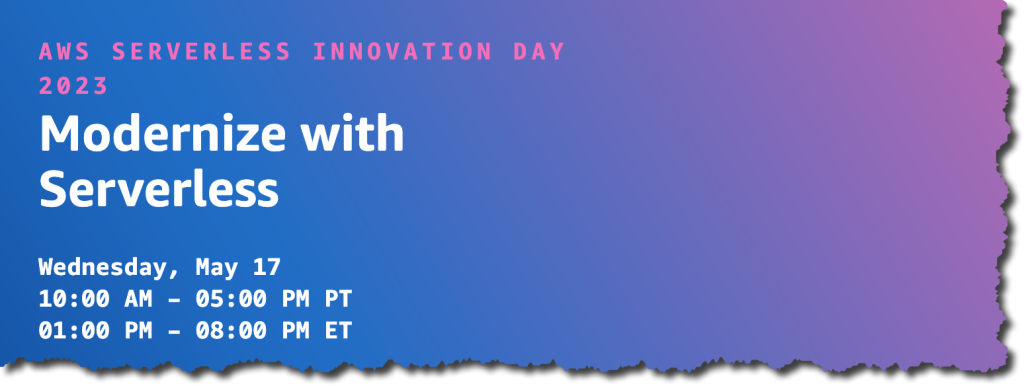
At the end of this week, I’m flying to Seattle to take part in the AWS Serverless Innovation Day. Along with many customers and colleagues from AWS, we are going to be live on May 17 at a virtual free event. During the AWS Serverless Innovation Day we will share best practices related to building event-driven applications and using serverless functions and containers. Get a calendar reminder and check the full agenda at the event site.

Serverless innovation day

Last Week’s Launches
Here are some launches that got my attention during the previous week.

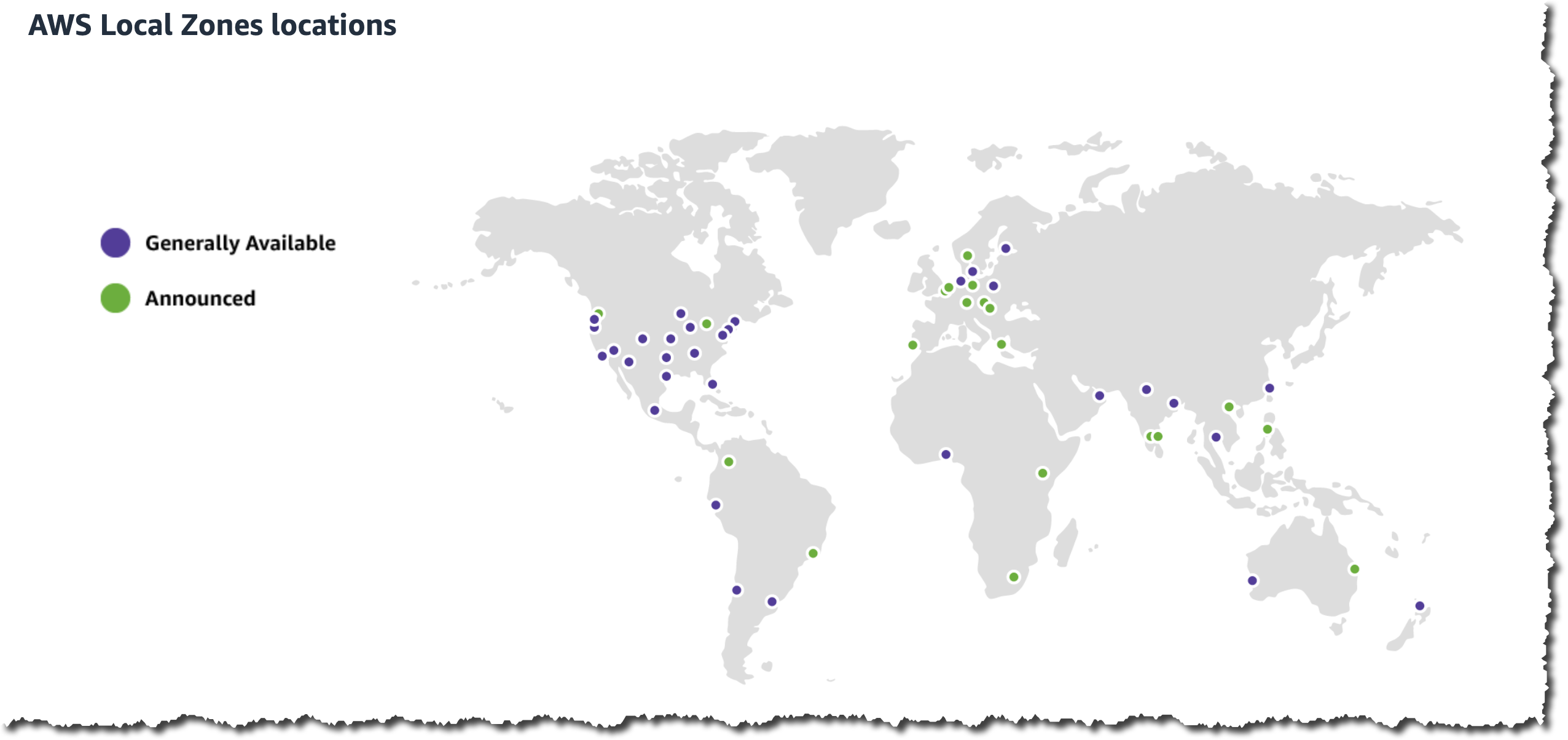
New Local Zones in Auckland – AWS Local Zones allow you to deliver applications that require single-digit millisecond latency or local data processing. Starting last week, AWS Local Zones is available in Auckland, New Zealand.

All AWS Local Zones

AWS Notifications – Channy wrote an article explaining how you can view and configure notifications for your AWS account. In addition to the AWS Management Console notifications, the AWS Console Mobile Application now allows you to create and receive actionable push notifications when a resource requires your attention.

AWS SimSpace Weaver – Last reInvent, we launched AWS SimSpace Weaver, a fully managed compute service that helps you deploy large spatial simulations in the cloud. Starting last week, AWS SimSpace Weaver allows you to save the state of the simulations at a specific point in time.

AWS Security Hub – Added four new integration partners to help customers with their cloud security posture monitoring, and now it provides detailed tracking of finding changes with the finding history feature. This last feature provides an immutable trail of changes to get more visibility into the changes made to your findings.

AWS Compute Optimizer – AWS Compute Optimizer supports inferred workload type filtering on Amazon EC2 instance recommendations and automatically detects the applications that might run on your AWS resources. Now AWS Compute Optimizer supports filtering your rightsizing recommendation by tags and identifies and filters Microsoft SQL Server workloads as an inferred workload type.

AWS AppSync– Now AWS AppSync GraphQL APIs support Private API. With Private APIs, you can now create GraphQL APIs that can only be accessed from your Amazon Virtual Private Cloud (Amazon VPC).

For a full list of AWS announcements, be sure to keep an eye on the What's New at AWS page.

Other AWS News
Some other updates and news that you may have missed:

  • Responsible AI in the Generative Era – Amazon Science published a very interesting blog post this week about the special challenges raised by building a responsible generative AI and the different things builders of applications can do in order to solve these challenges.
  • Patterns for Building an API to Upload Files to Amazon S3 – Amazon S3 is one of the most used services by our customers, and applications often require a way for users to upload files. In this article, Thomas Moore shows different ways to do this in a secure way.
  • The Official AWS Podcast – Listen each week for updates on the latest AWS news and deep dives into exciting use cases. There are also official AWS podcasts in your local languages. Check out the ones in French, German, Italian, and Spanish.
  • AWS Open-Source News and Updates – This is a newsletter curated by my colleague Ricardo to bring you the latest open-source projects, posts, events, and more.

Upcoming AWS Events
Check your calendars and sign up for these AWS events:

  • AWS Serverless Innovation Day – Join us on May 17 for a virtual and free event about AWS Serverless. We will have talks and fireside chats with customers related to AWS Lambda, Amazon ECS with Fargate, AWS Step Functions, and Amazon EventBridge.
  • AWS re:Inforce 2023 – You can now register for AWS re:Inforce, happening in Anaheim, California, on June 13–14.
  • AWS Global Summits – There are many summits going on right now around the world: Stockholm (May 11), Hong Kong (May 23), India (May 25), Amsterdam (June 1), London (June 7), Washington, DC (June 7–8), Toronto (June 14), Madrid (June 15), and Milano (June 22).
  • AWS Community Day – Join a community-led conference run by AWS user group leaders in your region: Warsaw (June 1), Chicago (June 15), Manila (June 29–30), and Munich (September 14).
  • AWS User Group Peru Conference – The local AWS User Group announced a one-day cloud event in Spanish and English in Lima on September 23. Seb, Jeff, and I will be attending the event from the AWS News blog team. Register today!

That’s all for this week. Check back next Monday for another Week in Review!

— Marcia

This post is part of our Week in Review series. Check back each week for a quick roundup of interesting news and announcements from AWS!

from AWS News Blog https://ift.tt/fbprEWZ
via IFTTT

Friday, May 5, 2023

Wednesday, May 3, 2023

Introducing Bob’s Used Books—a New, Real-World, .NET Sample Application

Today, I’m happy to announce that a new open-source sample application, a fictitious used books eCommerce store we call Bob’s Used Books, is available for .NET developers working with AWS. The .NET advocacy and development teams at AWS talk to customers regularly and, during those conversations, often receive requests for more in-depth samples. Customers tell us that, while small code snippets serve well to illustrate the mechanics of an API, their development teams also need and want to make use of fuller, more real-world samples to understand better how to construct modern applications for the cloud. Today’s sample application release is in response to those requests.

Bob’s Used Books is a sample eCommerce application built using ASP.NET Core version 6 and represents an initial modernization of a typical on-premises custom application. Representing a first stage of modernization, the application uses modern cross-platform .NET, enabling it to run on both Windows and Linux systems in the cloud. It’s typical of what many .NET developers are just now going through, porting their own applications from .NET Framework to .NET using freely available tools from AWS such as the Toolkit for .NET Refactoring and the Porting Assistant for .NET.
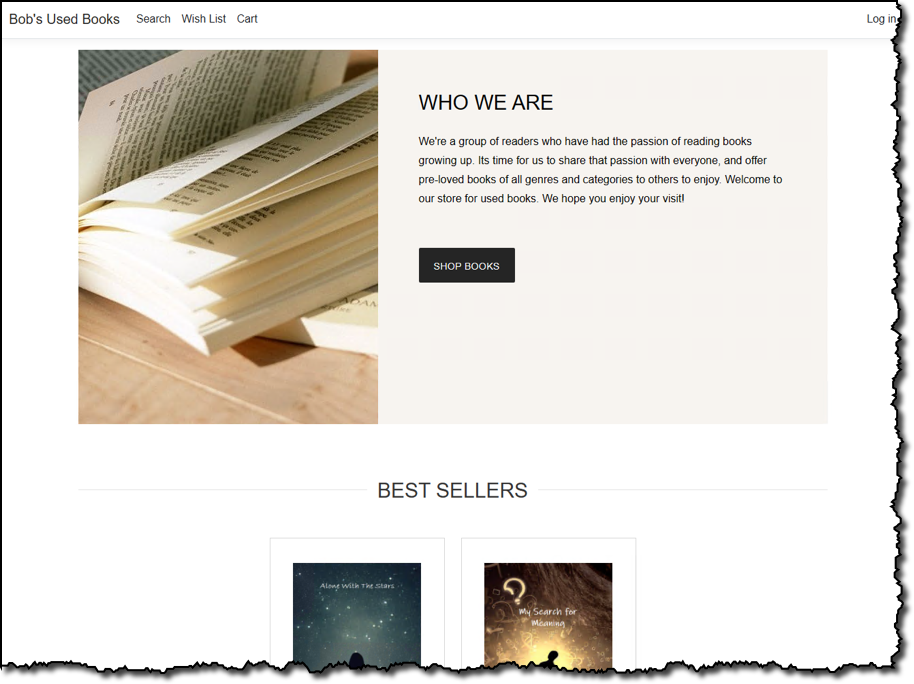
Bob's Used Books sample application homepage

Sample application features
Customers of our fictional bookstore can browse and search on the store for used books and view details on selected books such as price, condition, genre, and more:

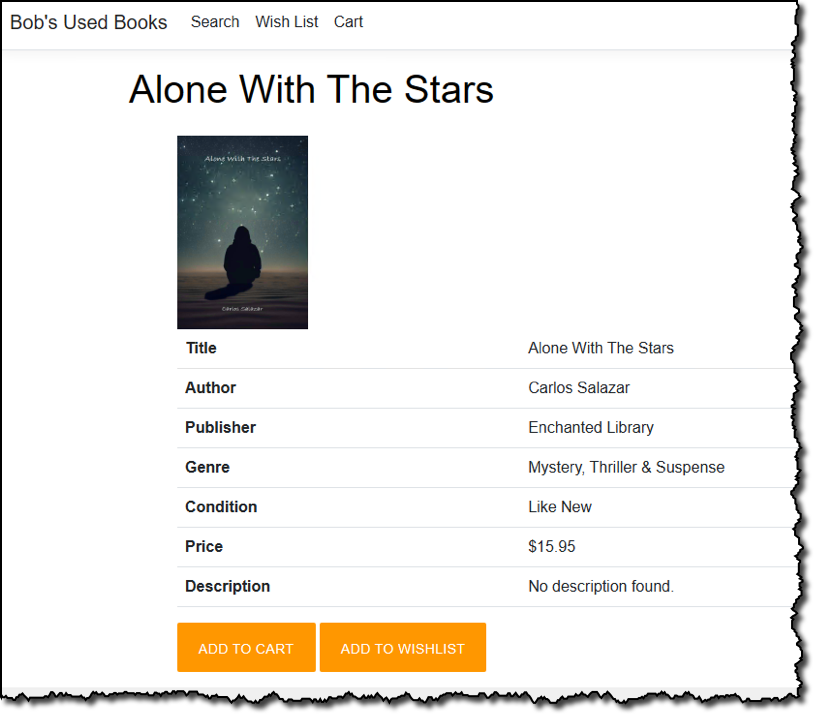
Bob's Used Books sample application search results page, which shows 8 books and their prices.


Bob's Used Books sample application book details page

Just like a real e-commerce store, customers can add books to a shopping cart, pending subsequent checkout, or to a personal wish list. When the time comes to purchase, the customer can start the checkout process, which will encourage them to sign in if they are an existing customer or sign up during the process.
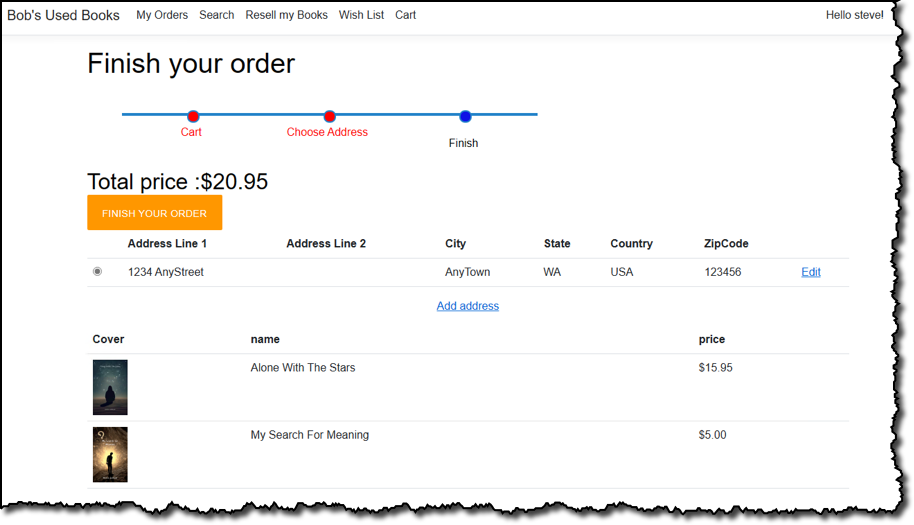
Bob's Used Books sample application checkout page

In this sample application, the bookstore’s staff uses the same web application to manage inventory and customer orders. Role-based authentication is used to determine whether it’s a staff member signing in, in which case they can view an administrative portal, or a regular store customer. For staff, having accessed the admin portal, they start with a dashboard view that summarizes pending, in-process, or completed orders and the state of the store’s inventory:

Bob's Used Books sample application staff dashboard page

Staff can edit inventory to add new books, complete with cover images, or adjust stock levels. From the same dashboard, staff can also view and process pending orders.

Bob's Used Books sample application staff order processing page

Not shown here, but something I think is pretty cool, is a simulated workflow where customers can re-sell their books through the store. This involves the customer submitting an application, the store admin evaluating and deciding whether to purchase from the customer, the customer “posting” the book to the store if accepted, and finally the admin adding the book into inventory and reimbursing the customer. Remember, this is all fictional, however—no actual financial transactions take place!

Application architecture
The bookstore sample didn’t start as a .NET Framework-based application that needed porting to .NET, but it does use a monolithic MVC (model-view-controller) application design, typical of the .NET Framework development era (and still in use today). It also uses a single Microsoft SQL Server database to contain inventory, shopping cart, user data, and more.
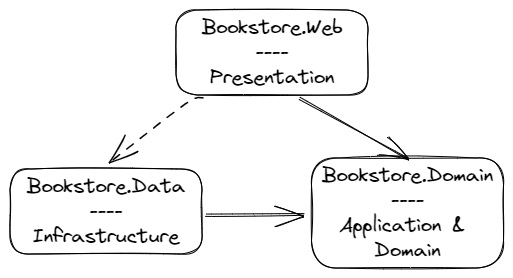
Bob's Used Books sample application outline architecture

When fully deployed to AWS, the application makes use of several services. These provide resources to host the application, provide configuration to the running application, and also provide useful functionality to the running code, such as image verification:

  • Amazon Cognito – used for customer and bookstore staff authentication. The application uses Cognito‘s Hosted UI to provide sign-in and sign-up functionality.
  • Amazon Relational Database Service (RDS) – manages a single Microsoft SQL Server Express instance containing inventory, customer, and other typical data for an e-commerce application.
  • Amazon Simple Storage Service (Amazon S3) – an S3 bucket is used to store cover images for books.
  • AWS Systems Manager Parameter Store – contains runtime configuration data, including the name of the S3 bucket for cover images, and Cognito user pool details.
  • AWS Secrets Manager – holds the user and password details for the underlying SQL Server database in RDS.
  • Amazon CloudFront – provides a domain for accessing the cover images in the S3 bucket, which means the bucket does not need to be publicly available.
  • Amazon Rekognition – used to verify that cover images uploaded for a book do not contain objectionable content.

The application is a starting point to showcase further modernization opportunities in the future, such as adopting purpose-built databases instead of using a single relational database, decomposing the monolith to use microservices (for the latter, AWS provides the Microservice Extractor for .NET), and more. The .NET development, advocacy, and solution architect teams here at AWS are quite excited at the opportunities for new content, using this sample, to illustrate those modernization opportunities in the upcoming months. And, as the sample is open-source, we’re also interested to see where the .NET development community takes it regarding modernization.

Running the application
My colleague Brad Webber, a Solutions Architect at AWS, has written the first in a series of technical blog posts we’ll be publishing about the sample. You’ll find these on the new .NET on AWS blog channel. In his first post, you’ll learn more about how to run or debug the application on your own machine as well as deploy it completely to the AWS cloud.

The application uses SQL Server Express localdb instance for its database needs when running outside the cloud, which means you do currently need to be using a Windows machine to run or debug. Launch profiles, accessible from Visual Studio, Visual Studio Code, or JetBrains Rider (all on Windows), are used to select how the application runs (for example, with no or some cloud resources):

  • Local – When you select this launch profile, the application runs completely on your machine, using no cloud resources, and doesn’t need an AWS account. This enables you to investigate and experiment with the code incurring no charges for cloud resources.
  • Integrated – When you use this profile, the application still runs locally on your Windows machine and continues to use the localdb database instance, but now also uses some AWS resources, such as an S3 bucket, Rekognition, Cognito, and others. This profile enables you to learn how you can use AWS services within your application code, using the AWS SDK for .NET and various extension libraries that we distribute on NuGet (for a full list of all available libraries you can use when developing your applications, see the .NET on AWS repository on GitHub). To enable you to set up the cloud resources needed by the application when using this profile, an AWS Cloud Development Kit (AWS CDK) project is provided in the sample repository, making it easy to set up and tear down those resources on demand.

Deploying the Sample to AWS
You can also deploy the entire application to the AWS Cloud, in this case, to virtual machines in Amazon Elastic Compute Cloud (Amazon EC2) with a SQL Server Express database instance in Amazon Relational Database Service (RDS). The deployment uses resources compatible with the AWS Free Tier but do note, however, that you may still incur charges if you exceed the Free Tier limits. Unlike running the application on your own machine, which requires Windows because of the localdb dependency, you can deploy the application to AWS from any machine, including those running macOS and Linux. Once again, a CDK project is included in the repository to get you started, and Brad’s blog post goes into more detail on these steps so I won’t repeat them here.

Using virtual machines in the cloud is often a first step in modernizing on-premises applications because of similarity with an on-premises server setup, hence the reason for supporting Amazon EC2 deployments out-of-the-box. In the future, we’ll be adding content showing how to deploy the application to container services on AWS, such as AWS App Runner, Amazon Elastic Container Service (Amazon ECS), and Amazon Elastic Kubernetes Service (EKS).

Next steps
The Bob’s Used Books sample application is available now on GitHub. We encourage you, if you’re a .NET developer working on AWS and looking for a deeper, more real-world sample, to clone the repository and take the application for a spin. We’re also curious about what modernization journeys you would decide to take with the application, which will help us create future content for the sample. Let us know in the issues section of the repository. And if you want to contribute to the sample, we welcome contributions!


from AWS News Blog https://ift.tt/2EkuQoy
via IFTTT

New – Set Up Your AWS Notifications in One Place

Today we are launching AWS User Notifications, a single place in the AWS console to set up and view AWS notifications across multiple AWS accounts, Regions, and services.

You can centrally set up and view notifications from over 100 AWS services, such as Amazon Simple Storage Service (Amazon S3) objects events, Amazon Elastic Compute Cloud (Amazon EC2) instance state changes, AWS Health Dashboard events, Amazon CloudWatch alarms, or AWS Support case updates in a consistent, human-friendly format. You can also configure delivery channels—email, chat, and push notifications to the AWS console mobile app, where you can receive these notifications.

Alternatively, you can view notifications in the AWS Management Console by clicking the bell icon!

Choose See all notifications to find all your configured notifications in the Notification Center. You can filter notifications in your accounts by services, display a detailed notification view with human-readable messages, and access deep links to the relevant console resource pages.

Configure Notifications the Way You Want
To receive your notifications, set up notification configurations. If this is your first time using the service, you will be prompted to first set up at least one notification hub.

Notification hubs are the Regions your notifications are stored and processed in or replicated to. You are required to select at least one notification hub before you can create notification configurations. You can also edit notification hubs from Notification hubs in the navigation pane.

Currently, you can select up to three Regions.

Next, choose Notification configurations and Create notification configuration to specify what event will generate a notification. You can select the services, create event rules that you want to be notified about, and set up how often you are notified in your communication channels.

Next, enter a name and description for your configuration. Here is an example to get all notifications for Amazon EC2 instance state changes.

In the Event rules section, use the Pattern builder to create one or more event rules to specify which events generate notifications. Choose your AWS service name as the event source, the type of events as the source of the matching pattern, and the Regions the events will be sourced from.

You can select any Amazon EventBridge events, like CloudWatch alarm state change, and configure them to generate notifications. Currently, more than 100 AWS services emit events to Amazon EventBridge.

Optionally, use the Advanced filter to further customize the event rules using a JSON format with EventBridge event patterns. For example, you can create a rule to only generate notifications for EC2 instances with the production tag.

{
    "detail": {
    "tag": ["production"]
     }
}

You can also define the cadence of when you want to receive the notifications. Choose either Receive fewer notifications only to receive a few daily notifications or Reduce notification delivery time to get high-priority notifications.

Configure delivery channels where you want the notifications to be sent, such as specific email addresses or AWS Chatbot. You can get notifications in chat clients like Slack and Amazon Chime via AWS Chatbot. Also, you can enable push notifications in the AWS Console Mobile Application as one of the delivery channels.

Choose Create notification configuration after reviewing your configuration and confirming the details.

If you would like to receive notifications from multiple accounts, see the instructions for Sending and receiving Amazon EventBridge events between AWS accounts in the Amazon EventBridge User Guide. Once you’ve completed setting up a receiver account, create a notification configuration that reacts to events.

Now Available
AWS User Notifications are now available in US East (Ohio), US East (N. Virginia), US West (N. California), US West (Oregon), Asia Pacific (Mumbai), Asia Pacific (Osaka), Asia Pacific (Seoul), Asia Pacific (Singapore), Asia Pacific (Sydney), Asia Pacific (Tokyo), Canada (Central), Europe (Frankfurt), Europe (Ireland), Europe (London), Europe (Paris), Europe (Stockholm), and South America (São Paulo) Regions, and you can start using it today.

To use User Notifications in Regions added after March 2019, such as Africa (Cape Town), Asia Pacific (Hong Kong), Asia Pacific (Hyderabad), Asia Pacific (Jakarta), Asia Pacific (Melbourne), Europe (Milan), Europe (Spain), Europe (Zurich), Middle East (Bahrain), and Middle East (UAE), enable them in your account. To learn more, see Managing AWS Regions in the AWS Reference guide.

For more information, see the AWS User Notifications Guide, and please send feedback to AWS re:Post for AWS User Notifications or through your usual AWS support contacts.

– Channy


from AWS News Blog https://ift.tt/LBlZ15c
via IFTTT