Monday, May 22, 2023

AWS Week in Review – AWS Documentation Updates, Amazon EventBridge is Faster, and More – May 22, 2023
 Here are your AWS updates from the previous 7 days. Last week I was in Turin, Italy for CloudConf, a conference I’ve had the pleasure to participate in for the last 10 years. AWS Hero Anahit Pogosova was also there sharing a few serverless tips in front of a full house. Here’s a picture I took from the last row during her keynote.
On Thursday, May 25, I’ll be at the AWS Community Day in Dublin to celebrate the 10 years of the local AWS User Group. Say hi if you’re there!
Last Week’s Launches
Last week was packed with announcements! Here are the launches that got my attention:
Amazon SageMaker – Geospatial capabilities are now generally available with security updates and more use case samples.
Amazon Detective – Simplify the investigation of AWS Security Findings coming from new sources such as AWS IAM Access Analyzer, Amazon Inspector, and Amazon Macie.
Amazon EventBridge – EventBridge now delivers events up to 80% faster than before, as measured by the time an event is ingested to the first invocation attempt. No change is required on your side.
AWS Control Tower – The service has launched 28 new proactive controls that allow you to block non-compliant resources before they are provisioned for services such as AWS OpenSearch Service, AWS Auto Scaling, Amazon SageMaker, Amazon API Gateway, and Amazon Relational Database Service (Amazon RDS). Check out the original posts from when proactive controls were launched.
Amazon CloudFront – CloudFront now supports two new control directives to help improve performance and availability: stale-while-revalidate (to immediately deliver stale responses to users while it revalidates caches in the background) and the stale-if-error cache (to define how long stale responses should be reused if there’s an error).
Amazon Timestream – Timestream now enables to export query results to Amazon S3 in a cost-effective and secure manner using the new UNLOAD statement.
AWS Distro for OpenTelemetry – The tail sampling and the group-by-trace processors are now generally available in the AWS Distro for OpenTelemetry (ADOT) collector. For example, with tail sampling, you can define sampling policies such as “ingest 100% of all error cases and 5% of all success cases.”
AWS DataSync – You can now use DataSync to copy data to and from Amazon S3 compatible storage on AWS Snowball Edge Compute Optimized devices.
AWS Device Farm – Device Farm now supports VPC integration for private devices, for example, when an unreleased version of an app is accessing a staging environment and tests are accessing internal packages only accessible via private networking. Read more at Access your private network from real mobile devices using AWS Device Farm.
Amazon Kendra – Amazon Kendra now helps you search across different content repositories with new connectors for Gmail, Adobe Experience Manager Cloud, Adobe Experience Manager On-Premise, Alfresco PaaS, and Alfresco Enterprise. There is also an updated Microsoft SharePoint connector.
Amazon Omics – Omics now offers pre-built bioinformatic workflows, synchronous upload capability, integration with Amazon EventBridge, and support for Graphical Processing Units (GPUs). For more information, check out New capabilities make it easier for healthcare and life science customers to get started, build applications, and scale-up on Amazon Omics.
Amazon Braket – Braket now supports Aria, IonQ’s largest and highest fidelity publicly available quantum computing device to date. To learn more, read Amazon Braket launches IonQ Aria whith built-in error mitigation.
For a full list of AWS announcements, be sure to keep an eye on the What's New at AWS page.Other AWS News
A few more news items and blog posts you might have missed:
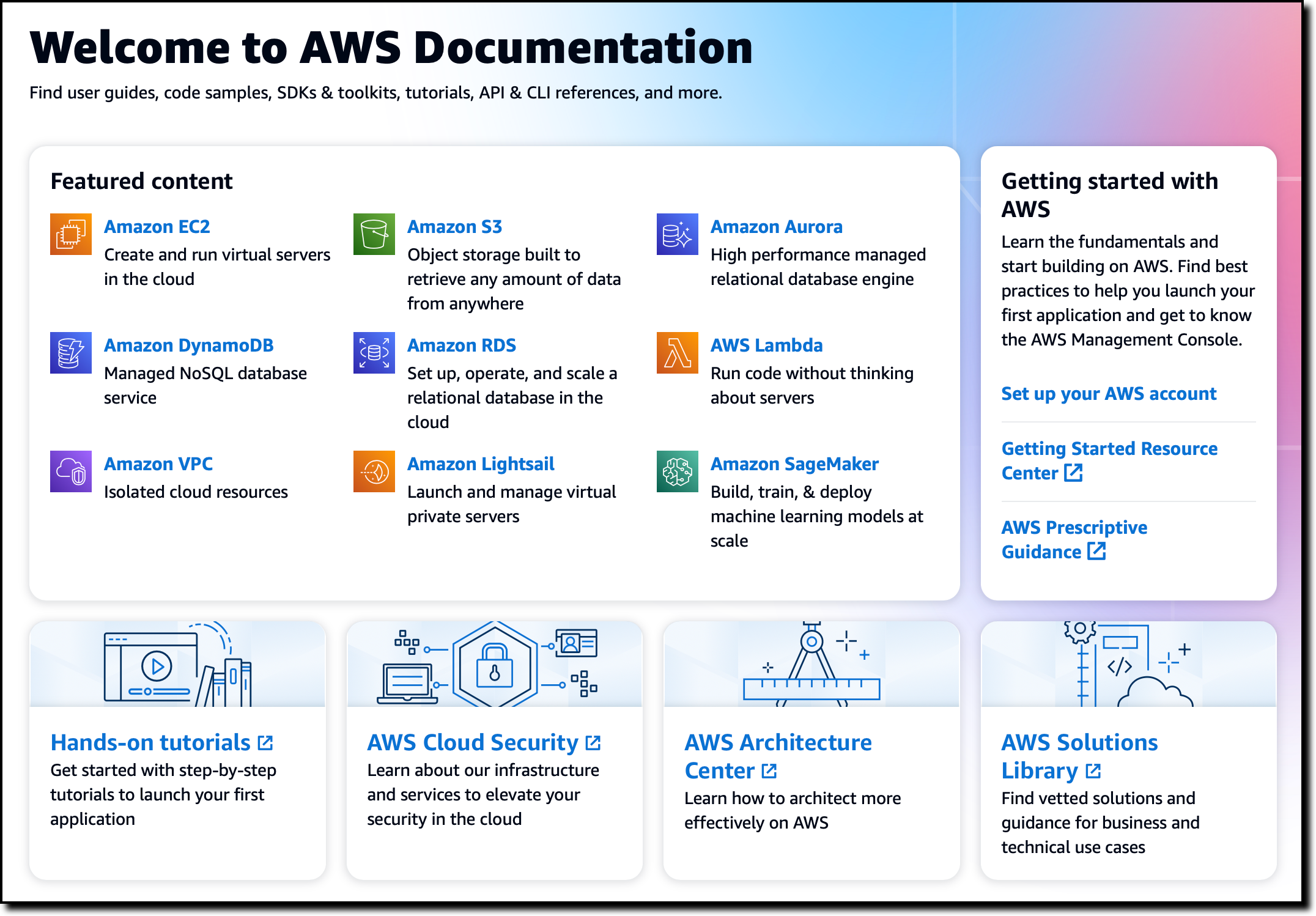 AWS Documentation – The AWS Documentation home page has been redesigned. Leave your feedback there to let us know what you think or to suggest future improvements. Last week we also announced that we are retiring the AWS Documentation GitHub repo to focus our resources to directly improve the documentation and the website.
Peloton case study – Peloton embraces Amazon Redshift to unlock the power of data during changing times.
Zoom case study – Learn how Zoom implemented streaming log ingestion and efficient GDPR deletes using Apache Hudi on Amazon EMR.
Nice solution – Introducing an image-to-speech Generative AI application using SageMaker and Hugging Face.
For AWS open-source news and updates, check out the latest newsletter curated by Ricardo to bring you the most recent updates on open-source projects, posts, events, and more.
Upcoming AWS Events
Here are some opportunities to meet and learn:
AWS Data Insights Day (May 24) – A virtual event to discover how to innovate faster and more cost-effectively with data. This event focuses on customer voices, deep-dive sessions, and best practices of Amazon Redshift. You can register here.
AWS Silicon Innovation Day (June 21) – AWS has designed and developed purpose-built silicon specifically for the cloud. Join to learn AWS innovations in custom-designed Amazon EC2 chips built for high performance and scale in the cloud. Register here.
AWS re:Inforce (June 13–14) – You can still register for AWS re:Inforce. This year it is taking place in Anaheim, California.
AWS Global Summits – Sign up for the AWS Summit closest to where you live: Hong Kong (May 23), India (May 25), Amsterdam (June 1), London (June 7), Washington, DC (June 7-8), Toronto (June 14), Madrid (June 15), and Milano (June 22). If you want to meet, I’ll be at the one in London.
AWS Community Days – Join these community-led conferences where event logistics and content is planned, sourced, and delivered by community leaders: Dublin, Ireland (May 25), Shenzhen, China (May 28), Warsaw, Poland (June 1), Chicago, USA (June 15), and Chile (July 1).
That’s all from me for this week. Come back next Monday for another Week in Review!
— Danilo
This post is part of our Week in Review series. Check back each week for a quick roundup of interesting news and announcements from AWS!from AWS News Blog https://ift.tt/2lw63xi
via IFTTT
Friday, May 19, 2023
Amazon SageMaker Geospatial Capabilities Now Generally Available with Security Updates and More Use Case Samples
Amazon SageMaker Geospatial Capabilities Now Generally Available with Security Updates and More Use Case Samples
At AWS re:Invent 2022, we previewed Amazon SageMaker geospatial capabilities, allowing data scientists and machine learning (ML) engineers to build, train, and deploy ML models using geospatial data. Geospatial ML with Amazon SageMaker supports access to readily available geospatial data, purpose-built processing operations and open source libraries, pre-trained ML models, and built-in visualization tools with Amazon SageMaker’s geospatial capabilities.
 During the preview, we had lots of interest and great feedback from customers. Today, Amazon SageMaker geospatial capabilities are generally available with new security updates and additional sample use cases.
Introducing Geospatial ML features with SageMaker Studio
To get started, use the quick setup to launch Amazon SageMaker Studio in the US West (Oregon) Region. Make sure to use the default Jupyter Lab 3 version when you create a new user in the Studio. Now you can navigate to the homepage in SageMaker Studio. Then select the Data menu and click on Geospatial.
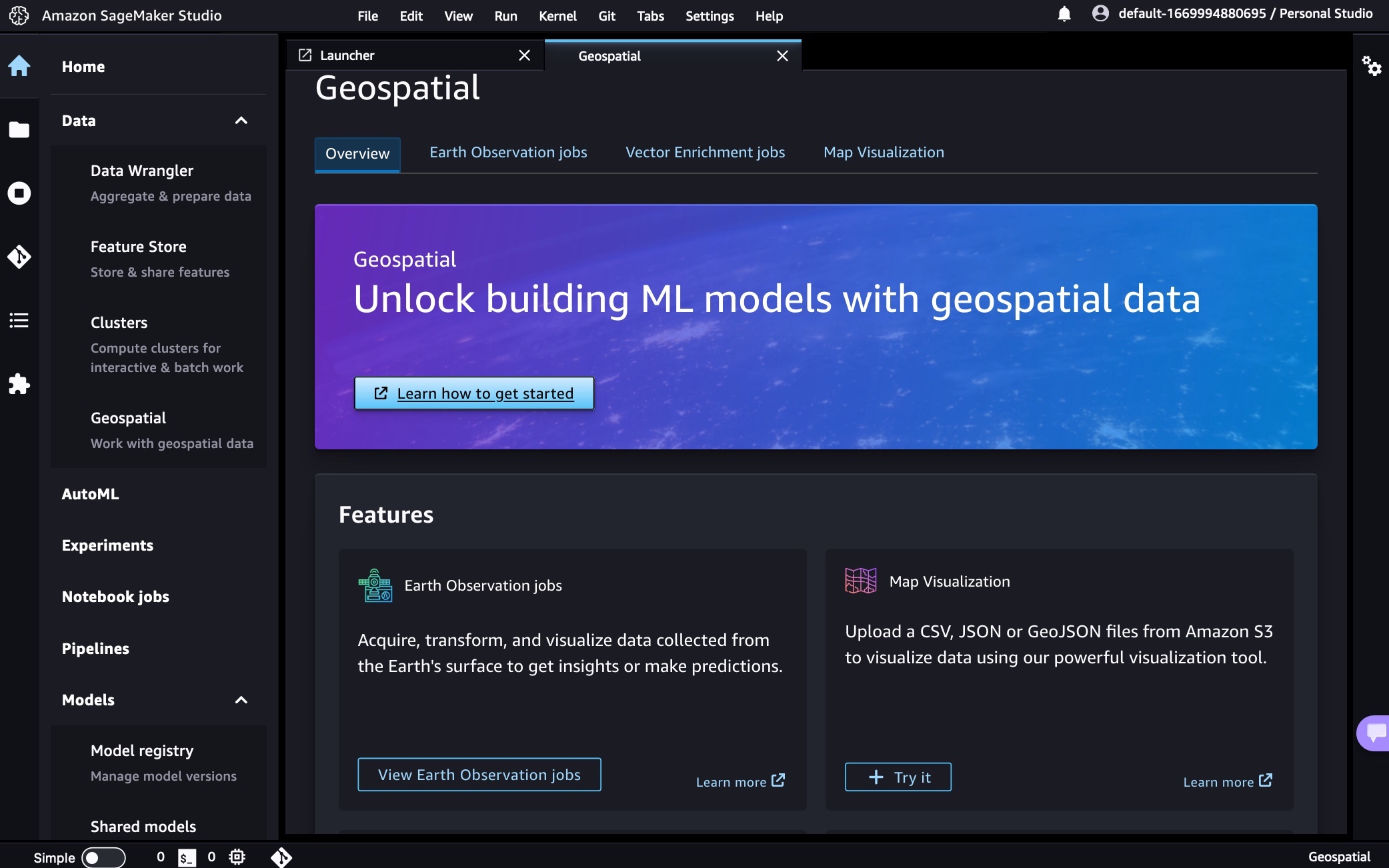
Here is an overview of three key Amazon SageMaker geospatial capabilities:
- Earth Observation jobs – Acquire, transform, and visualize satellite imagery data using purpose-built geospatial operations or pre-trained ML models to make predictions and get useful insights.
- Vector Enrichment jobs – Enrich your data with operations, such as converting geographical coordinates to readable addresses.
- Map Visualization – Visualize satellite images or map data uploaded from a CSV, JSON, or GeoJSON file.
You can create all Earth Observation Jobs (EOJ) in the SageMaker Studio notebook to process satellite data using purpose-built geospatial operations. Here is a list of purpose-built geospatial operations that are supported by the SageMaker Studio notebook:
- Band Stacking – Combine multiple spectral properties to create a single image.
- Cloud Masking – Identify cloud and cloud-free pixels to get improved and accurate satellite imagery.
- Cloud Removal – Remove pixels containing parts of a cloud from satellite imagery.
- Geomosaic – Combine multiple images for greater fidelity.
- Land Cover Segmentation – Identify land cover types such as vegetation and water in satellite imagery.
- Resampling – Scale images to different resolutions.
- Spectral Index – Obtain a combination of spectral bands that indicate the abundance of features of interest.
- Temporal Statistics – Calculate statistics through time for multiple GeoTIFFs in the same area.
- Zonal Statistics – Calculate statistics on user-defined regions.
A Vector Enrichment Job (VEJ) enriches your location data through purpose-built operations for reverse geocoding and map matching. While you need to use a SageMaker Studio notebook to execute a VEJ, you can view all the jobs you create using the user interface. To use the visualization in the notebook, you first need to export your output to your Amazon S3 bucket.
- Reverse Geocoding – Convert coordinates (latitude and longitude) to human-readable addresses.
- Map Matching – Snap inaccurate GPS coordinates to road segments.
Using the Map Visualization, you can visualize geospatial data, the inputs to your EOJ or VEJ jobs as well as the outputs exported from your Amazon Simple Storage Service (Amazon S3) bucket.
Security Updates
At GA, we have two major security updates—AWS Key Management Service (AWS KMS) for customer managed AWS KMS key support and Amazon Virtual Private Cloud (Amazon VPC) for geospatial operations in the customer Amazon VPC environment.
AWS KMS customer managed keys offer increased flexibility and control by enabling customers to use their own keys to encrypt geospatial workloads.
You can use KmsKeyId to specify your own key in StartEarthObservationJob and StartVectorEnrichmentJob as an optional parameter. If the customer doesn’t provide KmsKeyId, a service owned key will be used to encrypt the customer content. To learn more, see SageMaker geospatial capabilities AWS KMS Support in the AWS documentation.
Using Amazon VPC, you have full control over your network environment and can more securely connect to your geospatial workloads on AWS. You can use SageMaker Studio or Notebook in your Amazon VPC environment for SageMaker geospatial operations and execute SageMaker geospatial API operations through an interface VPC endpoint in SageMaker geospatial operations.
To get started with Amazon VPC support, configure Amazon VPC on SageMaker Studio Domain and create a SageMaker geospatial VPC endpoint in your VPC in the Amazon VPC console. Choose the service name as com.amazonaws.us-west-2.sagemaker-geospatial and select the VPC in which to create the VPC endpoint.
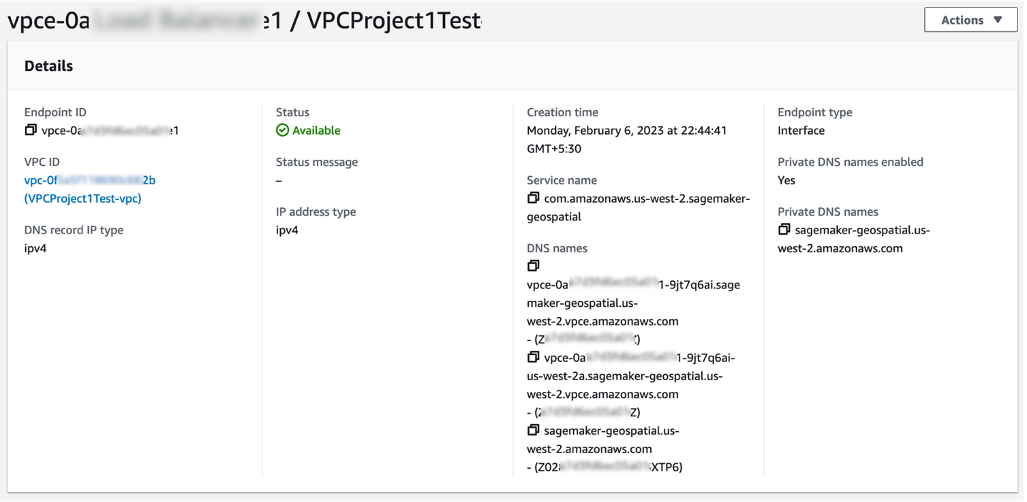
All Amazon S3 resources that are used for input or output in EOJ and VEJ operations should have internet access enabled. If you have no direct access to those Amazon S3 resources via the internet, you can grant SageMaker geospatial VPC endpoint ID access to it by changing the corresponding S3 bucket policy. To learn more, see SageMaker geospatial capabilities Amazon VPC Support in the AWS documentation.
Example Use Case for Geospatial ML
Customers across various industries use Amazon SageMaker geospatial capabilities for real-world applications.
Maximize Harvest Yield and Food Security
Digital farming consists of applying digital solutions to help farmers optimize crop production in agriculture through the use of advanced analytics and machine learning. Digital farming applications require working with geospatial data, including satellite imagery of the areas where farmers have their fields located.

You can use SageMaker to identify farm field boundaries in satellite imagery through pre-trained models for land cover classification. Learn about How Xarvio accelerated pipelines of spatial data for digital farming with Amazon SageMaker Geospatial in the AWS Machine Learning Blog. You can find an end-to-end digital farming example notebook via the GitHub repository.
Damage Assessment
As the frequency and severity of natural disasters increase, it’s important that we equip decision-makers and first responders with fast and accurate damage assessment. You can use geospatial imagery to predict natural disaster damage and geospatial data in the immediate aftermath of a natural disaster to rapidly identify damage to buildings, roads, or other critical infrastructure.
From an example notebook, you can train, deploy, and predict natural disaster damage from the floods in Rochester, Australia, in mid-October 2022. We use images from before and after the disaster as input to its trained ML model. The results of the segmentation mask for the Rochester floods are shown in the following images. Here we can see that the model has identified locations within the flooded region as likely damaged.

You can train and deploy a geospatial segmentation model to assess wildfire damages using multi-temporal Sentinel-2 satellite data via GitHub repository. The area of interest for this example is located in Northern California, from a region that was affected by the Dixie Wildfire in 2021.
Monitor Climate Change
Earth’s climate change increases the risk of drought due to global warming. You can see how to acquire data, perform analysis, and visualize the changes with SageMaker geospatial capabilities to monitor shrinking shoreline caused by climate change in the Lake Mead example, the largest reservoir in the US.
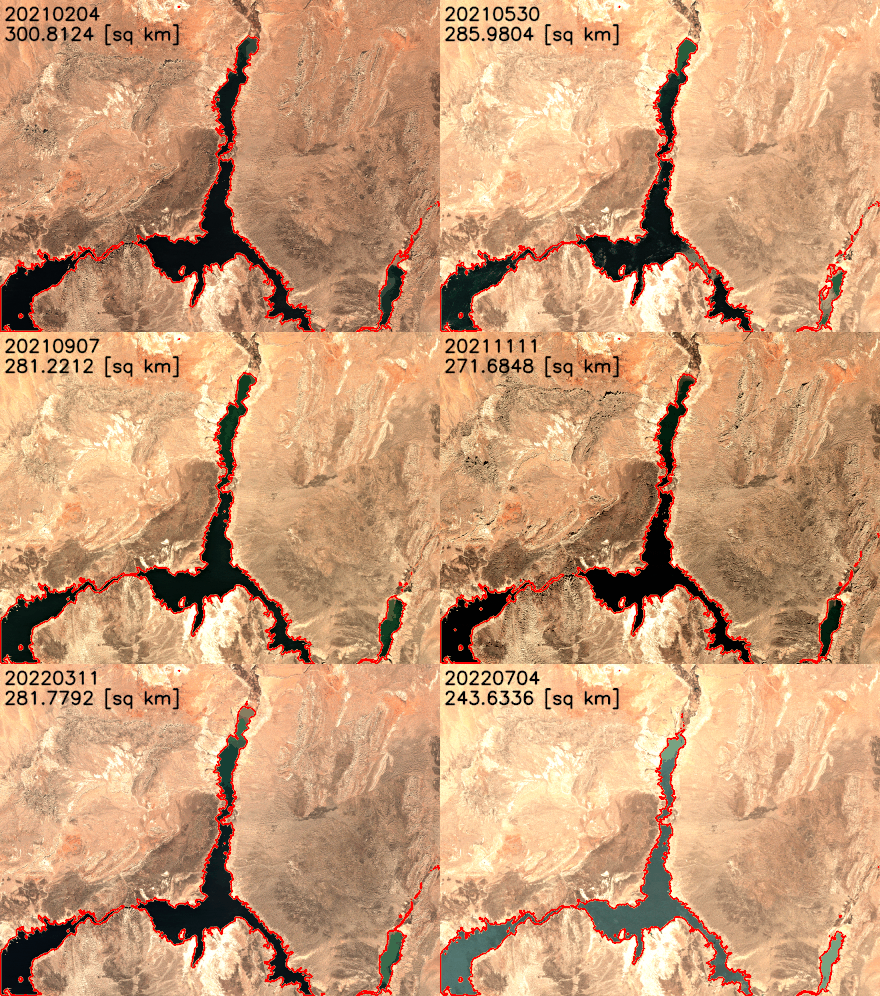
You can find the notebook code for this example in the GitHub repository.
Predict Retail Demand
The new notebook example demonstrates how to use SageMaker geospatial capabilities to perform a vector-based map-matching operation and visualize the results. Map matching allows you to snap noisy GPS coordinates to road segments. With Amazon SageMaker geospatial capabilities, it is possible to perform a VEJ for map matching. This type of job takes a CSV file with route information (such as longitude, latitude, and timestamps of GPS measurements) as input and produces a GeoJSON file that contains the predicted route.
Support Sustainable Urban Development
Arup, one of our customers, uses digital technologies like machine learning to explore the impact of heat on urban areas and the factors that influence local temperatures to deliver better design and support sustainable outcomes. Urban Heat Islands and the associated risks and discomforts are one of the biggest challenges cities are facing today.
Using Amazon SageMaker geospatial capabilities, Arup identifies and measures urban heat factors with earth observation data, which significantly accelerated their ability to counsel clients. It enabled its engineering teams to carry out analytics that weren’t possible previously by providing access to increased volumes, types, and analysis of larger datasets. To learn more, see Facilitating Sustainable City Design Using Amazon SageMaker with Arup in AWS customer stories.
Now Available
Amazon SageMaker geospatial capabilities are now generally available in the US West (Oregon) Region. As part of the AWS Free Tier, you can get started with SageMaker geospatial capabilities for free. The Free Tier lasts 30 days and includes 10 free ml.geospatial.interactive compute hours, up to 10 GB of free storage, and no $150 monthly user fee.
After the 30-day free trial period is complete, or if you exceed the Free Tier limits defined above, you pay for the components outlined on the pricing page.
To learn more, see Amazon SageMaker geospatial capabilities and the Developer Guide. Give it a try and send feedback to AWS re:Post for Amazon SageMaker or through your usual AWS support contacts.
– Channy
from AWS News Blog https://ift.tt/GfdycvD
via IFTTT
Thursday, May 18, 2023
New – Simplify the Investigation of AWS Security Findings with Amazon Detective
With Amazon Detective, you can analyze and visualize security data to investigate potential security issues. Detective collects and analyzes events that describe IP traffic, AWS management operations, and malicious or unauthorized activity from AWS CloudTrail logs, Amazon Virtual Private Cloud (Amazon VPC) Flow Logs, Amazon GuardDuty findings, and, since last year, Amazon Elastic Kubernetes Service (EKS) audit logs. Using this data, Detective constructs a graph model that distills log data using machine learning, statistical analysis, and graph theory to build a linked set of data for your security investigations.
Starting today, Detective offers investigation support for findings in AWS Security Hub in addition to those detected by GuardDuty. Security Hub is a service that provides you with a view of your security state in AWS and helps you check your environment against security industry standards and best practices. If you’ve turned on Security Hub and another integrated AWS security services, those services will begin sending findings to Security Hub.
With this new capability, it is easier to use Detective to determine the cause and impact of findings coming from new sources such as AWS Identity and Access Management (IAM) Access Analyzer, Amazon Inspector, and Amazon Macie. All AWS services that send findings to Security Hub are now supported.
Let’s see how this works in practice.
Enabling AWS Security Findings in the Amazon Detective Console
When you enable Detective for the first time, Detective now identifies findings coming from both GuardDuty and Security Hub, and automatically starts ingesting them along with other data sources. Note that you don’t need to enable or publish these log sources for Detective to start its analysis because this is managed directly by Detective.
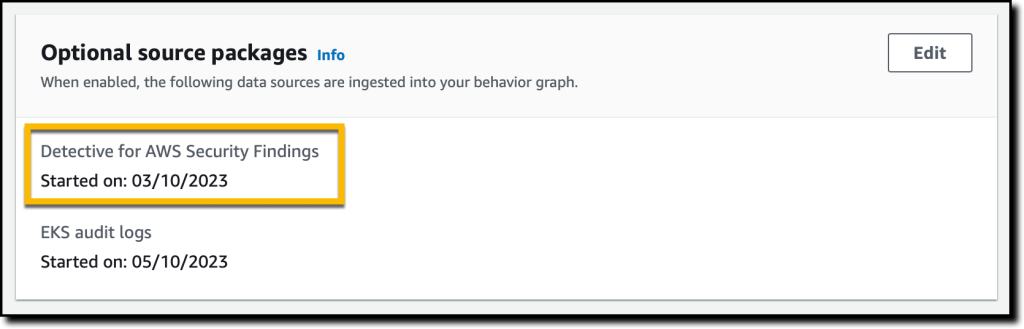
If you are an existing Detective customer, you can enable investigation of AWS Security Findings as a data source with one click in the Detective Management Console. I already have Detective enabled, so I add the source package.
In the Detective console, in the Settings section of the navigation pane, I choose General. There, I choose Edit in the Optional source packages section to enable Detective for AWS Security Findings.
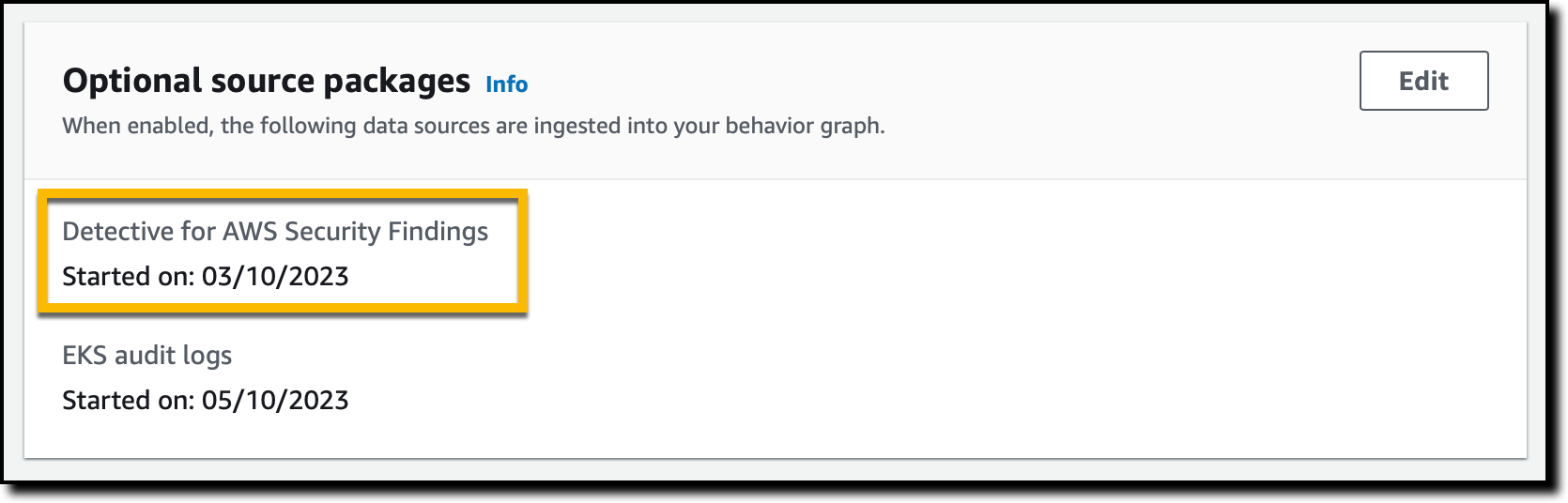
Once enabled, Detective starts analyzing all the relevant data to identify connections between disparate events and activities. To start your investigation process, you can get a visualization of these connections, including resource behavior and activities. Historical baselines, which you can use to provide comparisons against recent activity, are established after two weeks.
Investigating AWS Security Findings in the Amazon Detective Console
I start in the Security Hub console and choose Findings in the navigation pane. There, I filter findings to only see those where the Product name is Inspector and Severity label is HIGH.

The first one looks suspicious, so I choose its Title (CVE-2020-36223 – openldap). The Security Hub console provides me with information about the corresponding Common Vulnerabilities and Exposures (CVE) ID and where and how it was found. At the bottom, I have the option to Investigate in Amazon Detective. I follow the Investigate finding link, and the Detective console opens in another browser tab.

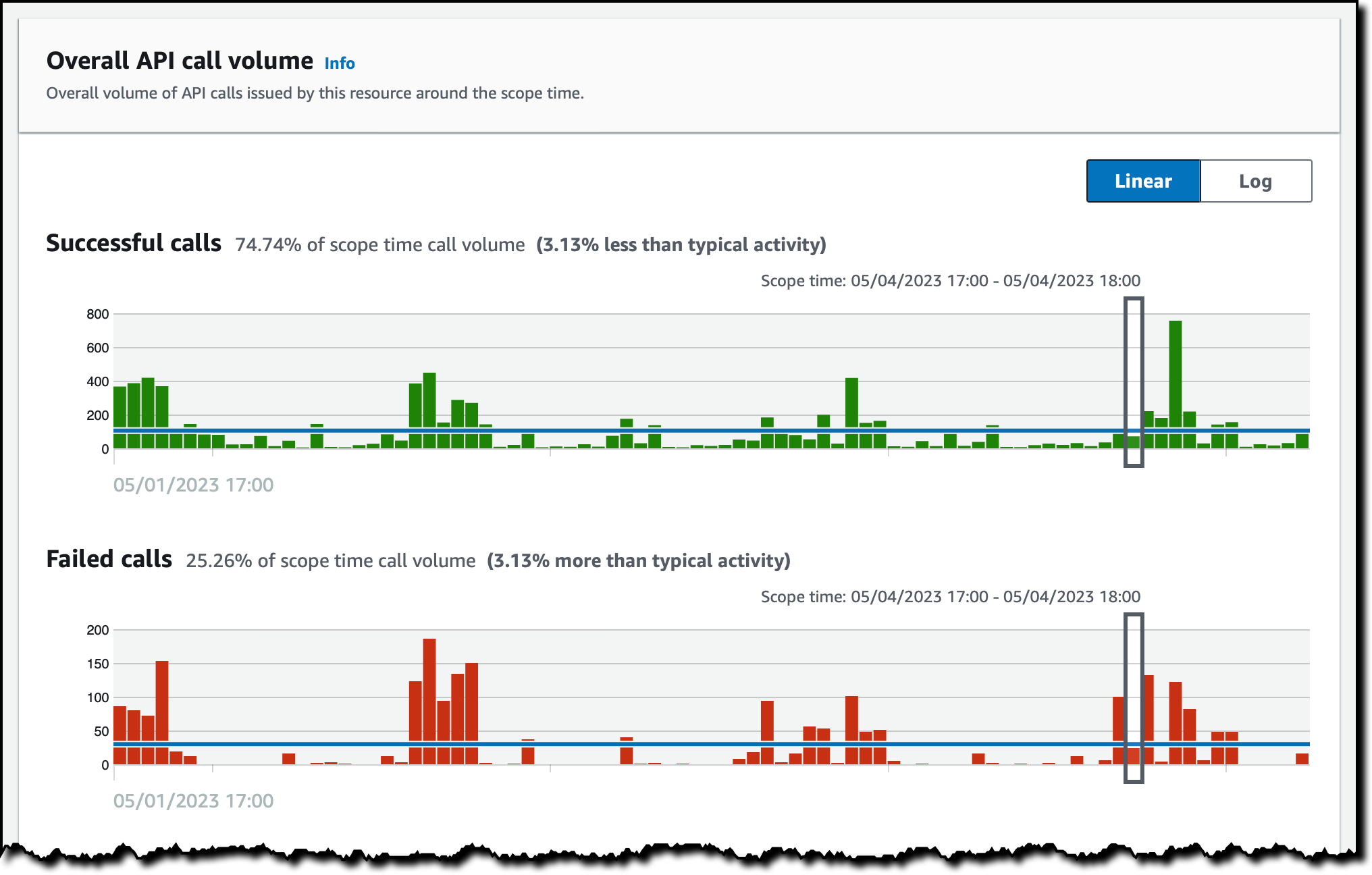
Here, I see the entities related to this Inspector finding. First, I open the profile of the AWS account to see all the findings associated with this resource, the overall API call volume issued by this resource, and the container clusters in this account.
For example, I look at the successful and failed API calls to have a better understanding of the impact of this finding.
Then, I open the profile for the container image. There, I see the images that are related to this image (because they have the same repository or registry as this image), the containers running from this image during the scope time (managed by Amazon EKS), and the findings associated with this resource.
Depending on the finding, Detective helps me correlate information from different sources such as CloudTrail logs, VPC Flow Logs, and EKS audit logs. This information makes it easier to understand the impact of the finding and if the risk has become an incident. For Security Hub, Detective only ingests findings for configuration checks that failed. Because configuration checks that passed have little security value, we’re filtering these outs.
Availability and Pricing
Amazon Detective investigation support for AWS Security Findings is available today for all existing and new Detective customers in all AWS Regions where Detective is available, including the AWS GovCloud (US) Regions. For more information, see the AWS Regional Services List.
Amazon Detective is priced based on the volume of data ingested. By enabling investigation of AWS Security Findings, you can increase the volume of ingested data. For more information, see Amazon Detective pricing.
When GuardDuty and Security Hub provide a finding, they also suggest the remediation. On top of that, Detective helps me investigate if the vulnerability has been exploited, for example, using logs and network traffic as proof.
Currently, findings coming from Security Hub are not included in the Finding groups section of the Detective console. Our plan is to expand Finding groups to cover the newly integrated AWS security services. Stay tuned!
Start using Amazon Detective to investigate potential security issues.
— Danilo
from AWS News Blog https://ift.tt/5cCgJPh
via IFTTT
Wednesday, May 17, 2023
Retiring the AWS Documentation on GitHub
About five years ago I announced that AWS Documentation is Now Open Source and on GitHub. After a prolonged period of experimentation we will archive most of the repos starting the week of June 5th, and will devote all of our resources to directly improving the AWS documentation and website.
The primary source for most of the AWS documentation is on internal systems that we had to manually sync with the GitHub repos. Despite the best efforts of our documentation team, keeping the public repos in sync with our internal ones has proven to be very difficult and time consuming, with several manual steps and some parallel editing. With 262 separate repos and thousands of feature launches every year, the overhead was very high and actually consumed precious time that could have been put to use in ways that more directly improved the quality of the documentation.
Our intent was to increase value to our customers through openness and collaboration, but we learned through customer feedback that this wasn’t necessarily the case. After carefully considering many options we decided to retire the repos and to invest all of our resources in making the content better.
Repos containing code samples, sample apps, CloudFormation templates, configuration files, and other supplementary resources will remain as-is since those repos are primary sources and get a high level of engagement.
To help us improvement the documentation, we’re also focusing more resources on your feedback:

We watch the thumbs-up and thumbs-down metrics on a weekly basis, and use the metrics as top-level pointers to areas of the documentation that could be improved. The incoming feedback creates tickets that are routed directly to the person or the team that is responsible for the page. I strongly encourage you to make frequent use of both feedback mechanisms.
— Jeff;
from AWS News Blog https://ift.tt/eghdV03
via IFTTT
Tuesday, May 16, 2023

Monday, May 15, 2023
AWS Week in Review – New Open-Source Updates for Snapchange, Cedar, and Jupyter Community Contributions – May 15, 2023
AWS Week in Review – New Open-Source Updates for Snapchange, Cedar, and Jupyter Community Contributions – May 15, 2023
A new week has begun. Last week, there was a lot of news related to AWS. I have compiled a few announcements you need to know. Let’s get started right away!
Last Week’s Launches
Let’s take a look at some launches from the last week that I want to remind you of:
New Amazon EC2 I4g Instances – Powered by AWS Graviton2 processors, Amazon Elastic Compute Cloud (Amazon EC2) I4g instances improve real-time storage performance up to 2x compared to prior generation storage-optimized instances. Based on AWS Nitro SSDs that are custom-built by AWS and reduce both latency and latency variability, I4g instances are optimized for workloads that perform a high mix of random read/write and require very low I/O latency, such as transactional databases and real-time analytics. To learn more, see Jeff’s post.
Amazon Aurora I/O-Optimized – You can now choose between two storage configurations for Amazon Aurora DB clusters: Aurora Standard or Aurora I/O-Optimized. For applications with low-to-moderate I/Os, Aurora Standard is a cost-effective option.
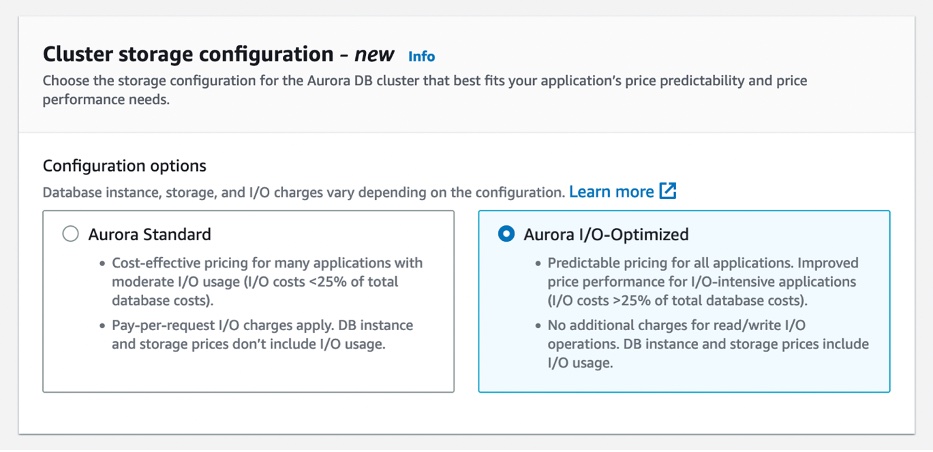
For applications with high I/Os, Aurora I/O-Optimized provides improved price performance, predictable pricing, and up to 40 percent costs savings. To learn more, see my full blog post.
AWS Management Console Private Access – This is a new security feature that allows you to limit access to the AWS Management Console from your Virtual Private Cloud (VPC) or connected networks to a set of trusted AWS accounts and organizations. It is built on VPC endpoints, which use AWS PrivateLink to establish a private connection between your VPC and the console.

AWS Management Console Private Access is useful when you want to prevent users from signing in to unexpected AWS accounts from within your network. To learn more, see the AWS Management Console getting started guide.
One-Click Security Protection on the Amazon CloudFront Console – You can now secure your web applications and APIs with AWS WAF with a single click on the Amazon CloudFront console. CloudFront handles creating and configuring AWS WAF for you with out-of-the-box protections recommended by AWS and this simple and convenient way to protect applications at the time you create or edit your distribution.
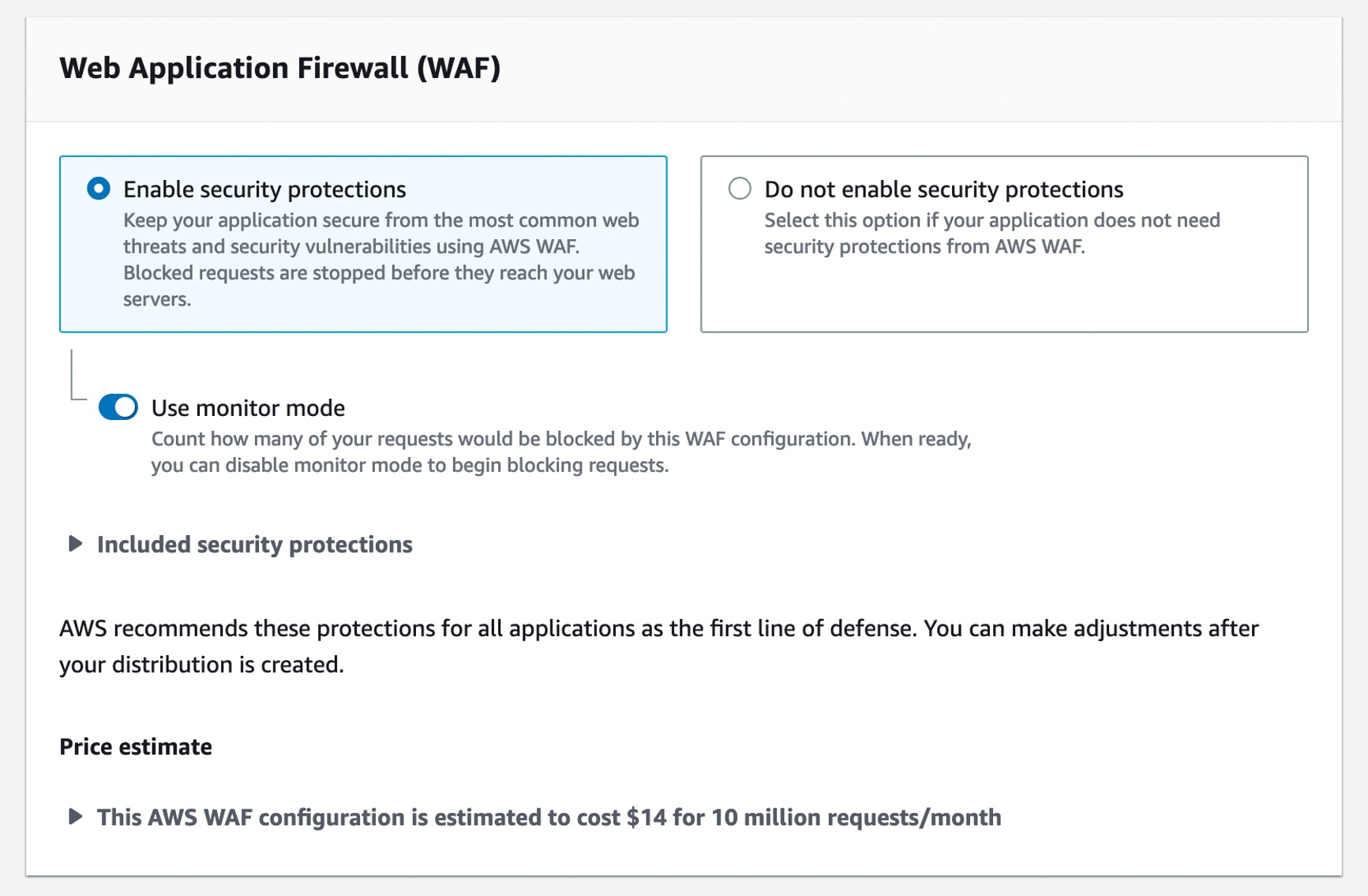
You may continue to select a preconfigured AWS WAF web access control list (ACL) when you prefer to use an existing web ACL. To learn more, see Using AWS WAF to control access to your content in the AWS documentation.
Tracing AWS Lambda SnapStart Functions with AWS X-Ray – You can use AWS X-Ray traces to gain deeper visibility into your function’s performance and execution lifecycle, helping you identify errors and performance bottlenecks for your latency-sensitive Java applications built using SnapStart-enabled functions.
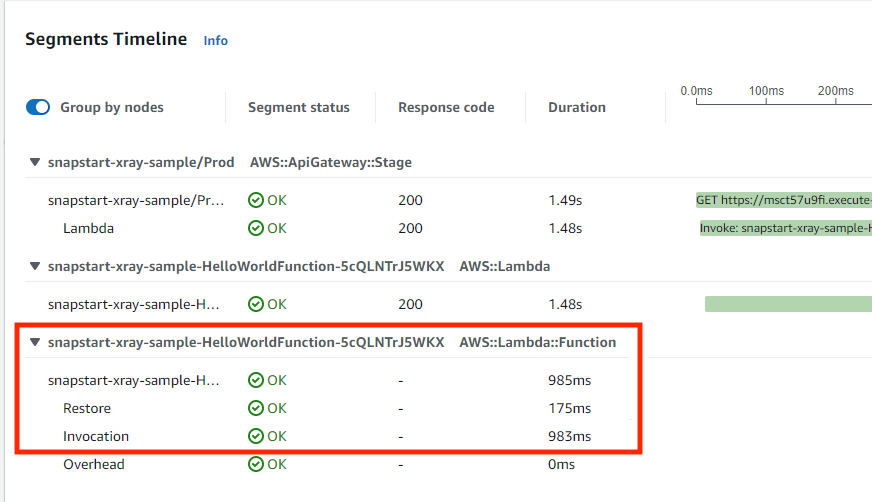
With X-Ray support for SnapStart-enabled functions, you can now see trace data about the restoration of the execution environment and execution of your function code. You can enable X-Ray for Java-based SnapStart-enabled Lambda functions running on Amazon Corretto 11 or 17. To learn more about X-Ray for SnapStart-enabled functions, visit the Lambda Developer Guide or read Marcia’s blog post.
For a full list of AWS announcements, be sure to keep an eye on the What’s New at AWS page.
Open Source Updates
Last week, we introduced new open-source projects and significant roadmap contributions to the Jupyter community.
Snapchange – Snapchange is a new open-source project to make fuzzing of a memory snapshot easier using KVM written by Rust. Snapchange enables a target binary to be fuzzed with minimal modifications, providing useful introspection that aids in fuzzing. Snapchange utilizes the features of the Linux kernel’s built-in virtual machine manager known as kernel virtual machine or KVM. To learn more, see the announcement post and GitHub repository.
Cedar – Cedar is a new open-source language for defining permissions as policies, which describes who should have access to what, and evaluating those policies. You can use Cedar to control access to resources such as photos in a photo-sharing app, compute nodes in a microservices cluster, or components in a workflow automation system. Cedar is also authorization-policy language used by the Amazon Verified Permissions, a scalable, fine-grained permissions management and authorization service for custom applications and AWS Verified Access managed services to validate each application request before granting access. To learn more, see the announcement post , Amazon Science blog post and Cedar playground to test sample policies.
Jupyter Community Contributions – We announced new contributions to Jupyter community to democratize generative artificial intelligence (AI) and scale machine learning (ML) workloads. We contributed two Jupyter extensions – Jupyter AI to bring generative AI to Jupyter notebooks and Amazon CodeWhisperer Jupyter extension to generate code suggestions for Python notebooks in JupyterLab. We also contributed three new capabilities to help you scale ML development faster: notebooks scheduling, SageMaker open-source distribution, and Amazon CodeGuru Jupyter extension. To learn more, see the announcement post and Jupyter on AWS.
To learn about weekly updates for open source at AWS, check out the latest AWS open source newsletter by Ricardo.
Upcoming AWS Events
Check your calendars and sign up for these AWS-led events:
AWS Serverless Innovation Day on May 17 – Join us for a free full-day virtual event to learn about AWS Serverless technologies and event-driven architectures from customers, experts, and leaders. Marcia outlined the agenda and main topics of this event in her post. You can register on the event page.
AWS Data Insights Day on May 24 – Join us for another virtual event to discover ways to innovate faster and more cost-effectively with data. Whether your data is stored in operational data stores, data lakes, streaming engines, or within your data warehouse, Amazon Redshift helps you achieve the best performance with the lowest spend. This event focuses on customer voices, deep-dive sessions, and best practices of Amazon Redshift. You can register on the event page.
AWS Silicon Innovation Day on June 21 – Join AWS leaders and experts showcasing AWS innovations in custom-designed EC2 chips built for high performance and scale in the cloud. AWS has designed and developed purpose-built silicon specifically for the cloud. You can understand AWS Silicons and how they can use AWS’s unique EC2 chip offerings to their benefit. You can register on the event page.
AWS re:Inforce 2023 – You can still register for AWS re:Inforce, in Anaheim, California, June 13–14.
AWS Global Summits – Sign up for the AWS Summit closest to your city: Hong Kong (May 23), India (May 25), Amsterdam (June 1), London (June 7), Washington DC (June 7-8), Toronto (June 14), Madrid (June 15), and Milano (June 22).
AWS Community Day – Join community-led conferences driven by AWS user group leaders closest to your city: Chicago (June 15), and Philippines (June 29–30).
You can browse all upcoming AWS-led in-person and virtual events, and developer-focused events such as AWS DevDay.
That’s all for this week. Check back next Monday for another Week in Review!
— Channy
This post is part of our Week in Review series. Check back each week for a quick roundup of interesting news and announcements from AWS!
from AWS News Blog https://ift.tt/jW60CFk
via IFTTT
Friday, May 12, 2023
Learn How to Modernize Your Applications at AWS Serverless Innovation Day
Join us on Wednesday, May 17, for AWS Serverless Innovation Day, a free full-day virtual event. You will learn about AWS Serverless technologies and event-driven architectures from customers, experts, and leaders.
AWS Serverless Innovation Day is an event to empower builders and technical decision-makers with different AWS Serverless technologies, including AWS Lambda, Amazon Elastic Container Service (Amazon ECS) with AWS Fargate, Amazon EventBridge, and AWS Step Functions. The talks of the day will cover three key topics: event-driven architectures, serverless containers, and serverless functions, and how they can be utilized to build and modernize applications. Application modernization is a priority for organizations this year, and serverless helps to increase the software delivery speed and reduce the total cost of ownership.

Eric Johnson and Jessica Deen will be the hosts for the event. Holly Mesrobian, VP of Serverless Compute at AWS, will deliver the welcome keynote and share AWS’s vision for Serverless. The day ends with closing remarks from James Beswick and Usman Khalid, Events and Workflows Director at AWS.
The event is split into three groups of talks: event-driven architecture, serverless containers, and Lambda-based applications. Each group kicks off with a fireside chat between AWS customers and an AWS leader. You can learn how organizations, such as Capital One, PostNL, Pentasoft, Delta Air Lines, and Smartsheets, are using AWS Serverless technologies to solve their most challenging problems and continue to innovate.
During the day, all the sessions include demos and use cases, where you can learn the best practices and how to build applications. If you cannot attend all day, here are some of my favorite sessions to watch:
- Building with serverless workflows at scale – Ben Smith will show you how to unleash the power of AWS Step Functions.
- Event design and event-first development – In this session, David Boyne will show you a robust approach to event design with Amazon EventBridge.
- Best practices for AWS Lambda – You will learn from Julian Wood how to get the most out of your functions.
- Optimizing for cost using Amazon ECS – Scott Coulton will show you how to reduce operational overhead from the control plane with Amazon ECS.
There is no up-front registration required to join the AWS Serverless Innovation Day, but if you want to be notified before the event starts, get in-depth news, articles, and event updates, and get a notification when the on-demand videos are available, you can register on the event page. The event will be streamed on Twitch, LinkedIn Live, YouTube, and Twitter.
See you there.
— Marcia
from AWS News Blog https://ift.tt/peCvV3N
via IFTTT
Subscribe to:
Posts (Atom)