Tuesday, June 27, 2023

New AWS AppFabric Improves Application Observability for SaaS Applications

In today’s business landscape, companies strive to equip their employees with the most suitable and efficient tools to perform their jobs effectively. To achieve this goal, many companies turn to Software-as-a-Service (SaaS) applications. This approach allows companies to optimize their workflows, enhance employee productivity, and focus their resources on core business activities rather than software development and maintenance.

As the use of SaaS applications expands, there’s an increasing need for solutions that can proactively identify and address potential security threats to maintain uninterrupted business operations. Security teams spend time monitoring application usage data for threats or suspicious behavior, and they’re responsible for maintaining security oversight to meet regulatory and compliance requirements.

Unfortunately, integrating SaaS applications with existing security tools requires many teams to build, manage, and maintain point-to-point (P2P) integrations. These P2P integrations are needed so security teams can monitor event logs to understand user or system activity from each application.

Introducing AWS AppFabric
Today, we’re launching AWS AppFabric, a fully managed service that aggregates and normalizes security data across SaaS applications to improve observability and help reduce operational effort and cost with no integration work necessary.

Here’s an animated GIF that gives you a quick look at how AWS AppFabric works.
With AppFabric, you can easily integrate leading SaaS applications without building and managing custom code or point-to-point integrations. For more information on what’s supported, refer to Supported Applications for AppFabric.

The generative AI features of AppFabric, powered by Amazon Bedrock, will be available in a future release. To learn more, visit the AWS AppFabric website.

When the SaaS applications are authorized and connected, AppFabric ingests the data and normalizes disparate security data such as user activity logs; this is accomplished using the Open Cybersecurity Schema Framework (OCSF), an industry standard schema and open-source project co-founded by AWS. This delivers an extensible framework for developing schemas and a vendor-agnostic core security schema.

The data is then enriched with a user identifier, such as a corporate email address. This reduces security incident response time because you gain full visibility to user information for each incident. You can ingest normalized and enriched data to your preferred security tools, which allows you to set common policies, standardize security alerts, and easily manage user access across multiple applications.

Getting Started with AWS AppFabric
To get started with AppFabric, you need to create an App bundle, a one-time process. This stores all AppFabric app authorizations and ingestions, including the encryption key used. When you create an app bundle, AppFabric creates the required AWS Identity and Access Management (IAM) role in your AWS account, which is required to send metrics to Amazon CloudWatch and to access AWS resources such as Amazon Simple Storage Service (Amazon S3) and Amazon Kinesis Data Firehose.

Creating an App Bundle
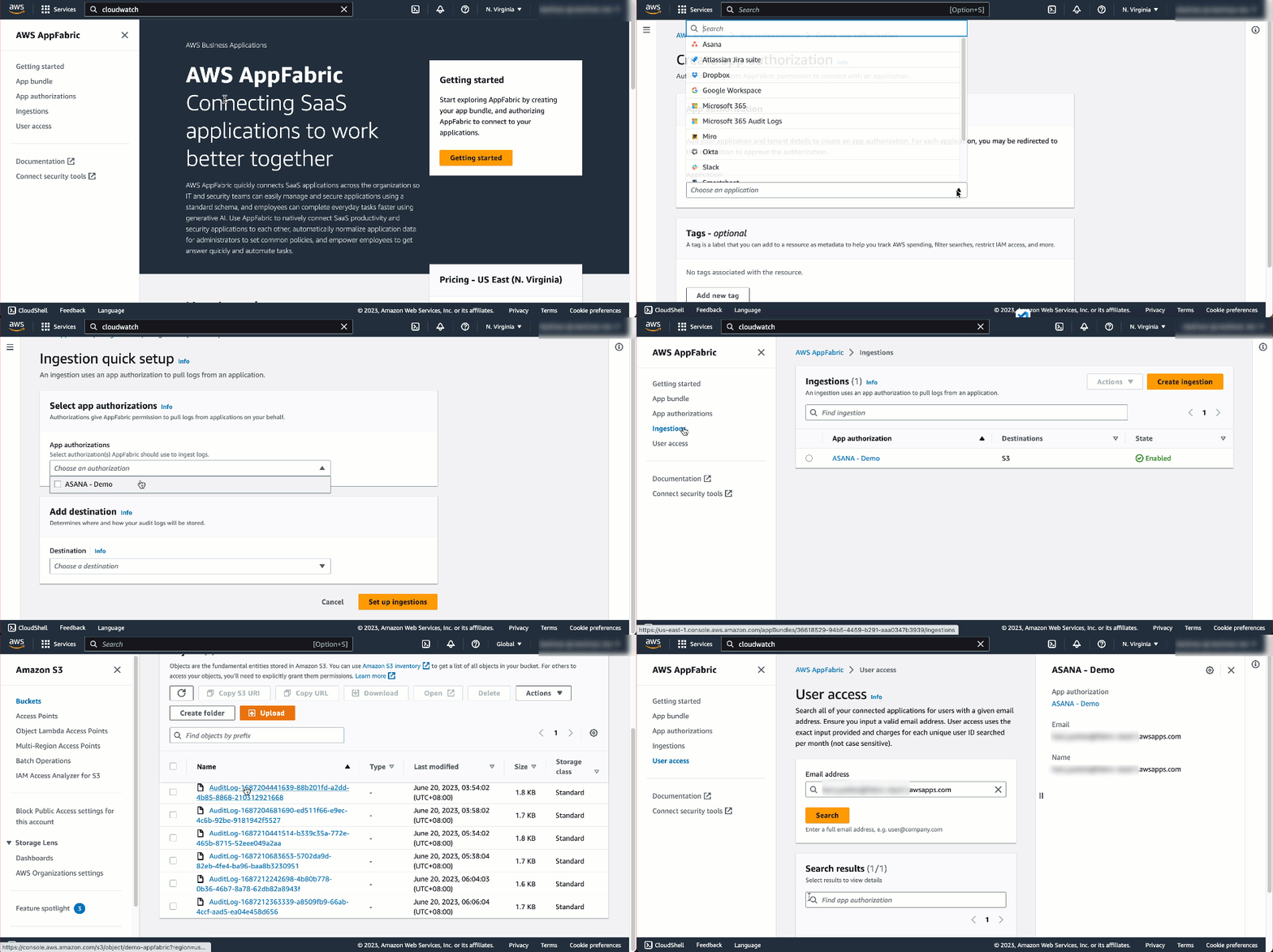
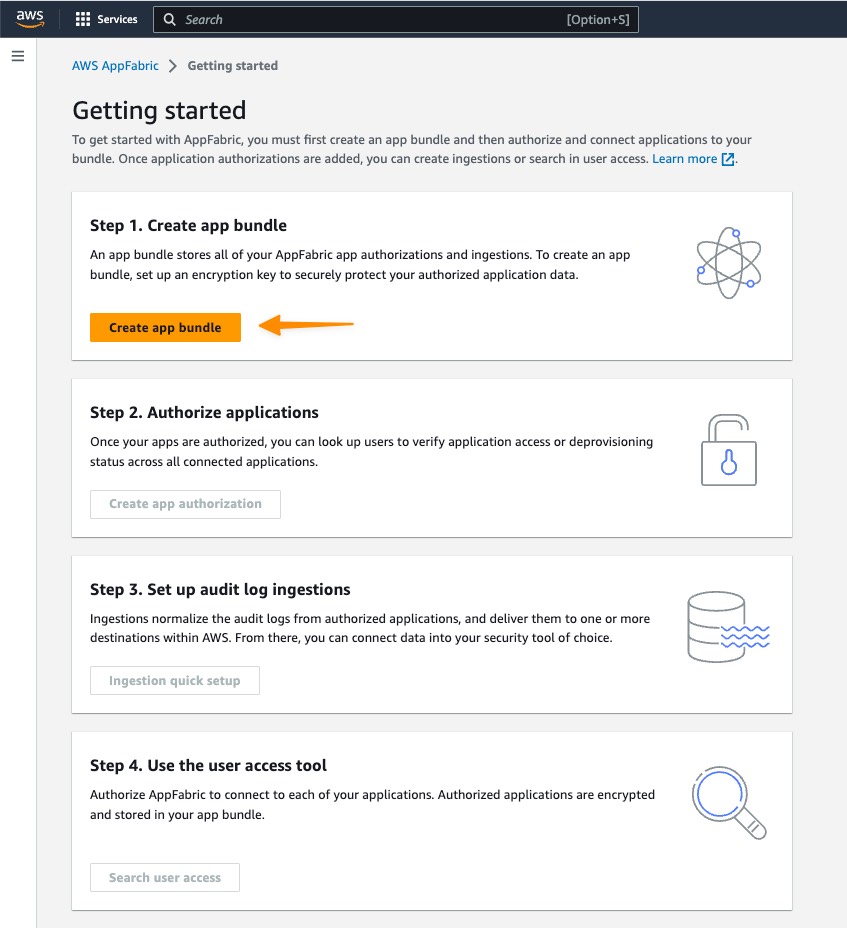
First, I select Getting started from the home page or left navigation panel from within the AWS Management Console.

Following the step-by-step instructions to set up AppFabric, I select Create app bundle.
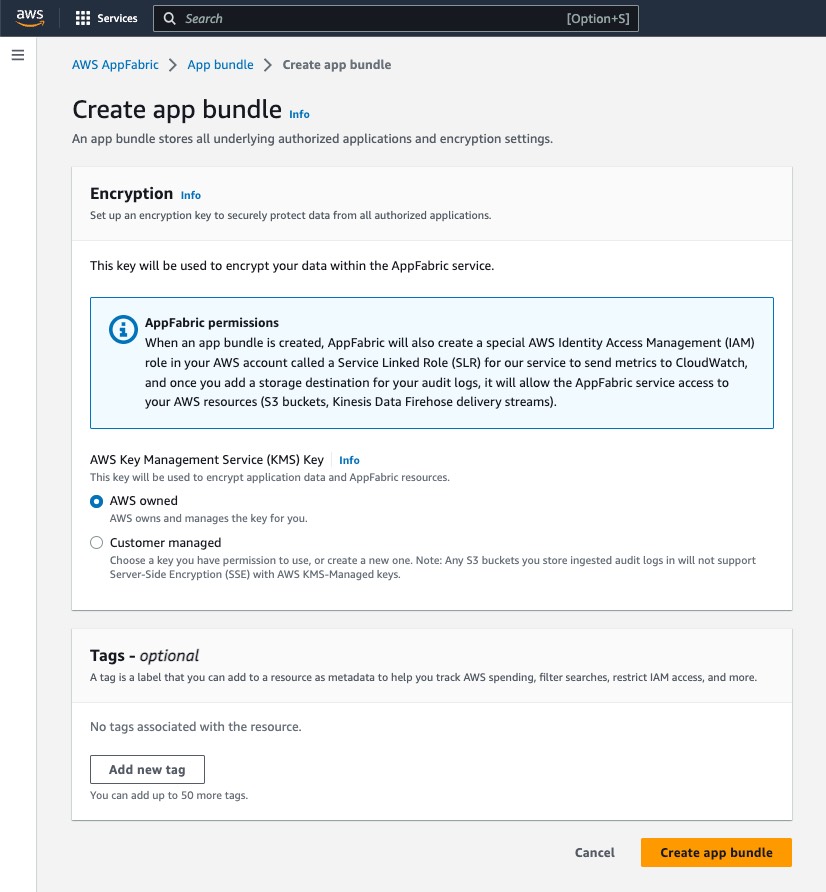
In the Encryption section, I use AWS Key Management Service (AWS KMS) to define an encryption key to securely protect my data in all unauthorized applications. The KMS key encrypts my data within my internal data stores used as my ingestion destinations; for this example, my destination is Amazon S3. My key options include AWS owned and Customer managed. Select Customer managed if you want to use a key you have inside KMS.
Authorizing Applications
Once I have created the app bundle, the next step is Create app authorization. On this page, I can select the supported SaaS application that I want to connect to my app bundle.

Then, I need to enter my application credentials so that AppFabric can connect; one of the advantages of using AppFabric is that it connects directly into SaaS applications without the need for me to write any code.
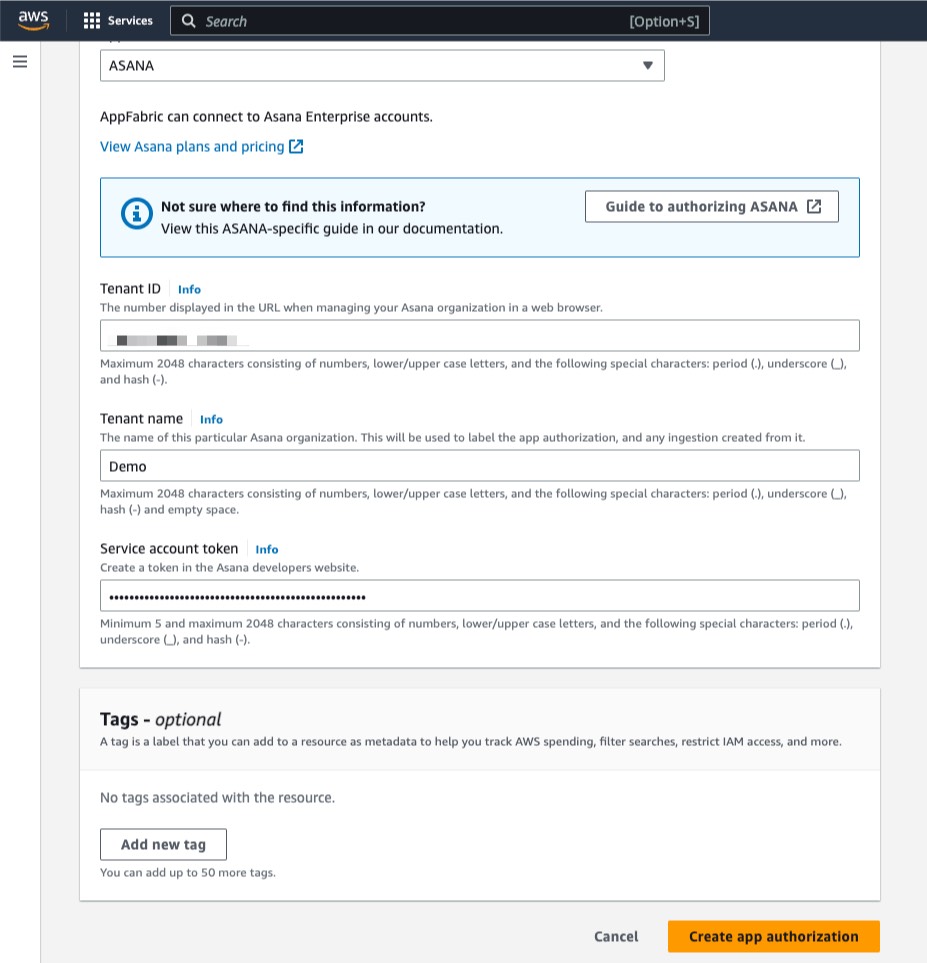
I can set up multiple app authorizations by repeating this step, as required, for each application. The credentials required for authorization vary by app; see the AppFabric documentation for details.

Setting up Audit Log Ingestions
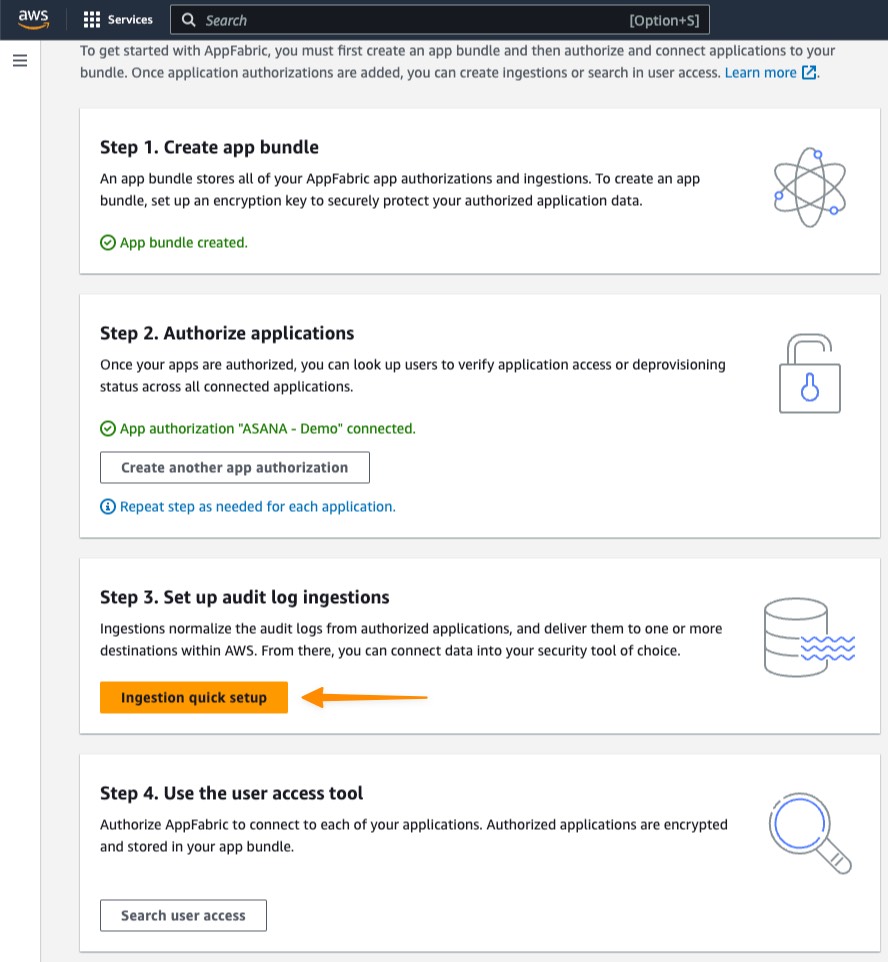
Now I have created an app authorization in my app bundle. I can proceed with Set up audit log ingestions. This step ingests and normalizes audit logs and delivers them to one or more destinations within AWS, including Amazon S3 or Amazon Kinesis Data Firehose.
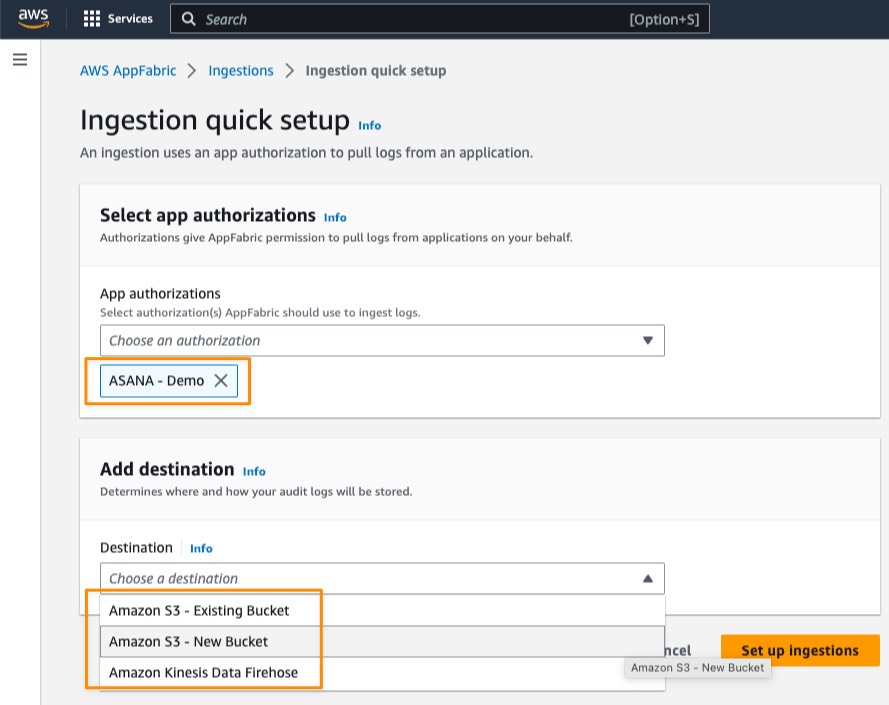
Under Select app authorizations, I select the authorized app that I created in the previous step. Here, I can choose more than one authorized application that allows me to consolidate data from various SaaS applications into a single destination. Then, I can select a destination for the audit logs of the selected apps. If I selected multiple app authorizations, the destination is applied to each authorized app. Currently, AppFabric supports the following destinations:

  • Amazon S3 – New Bucket
  • Amazon S3 – Existing Bucket
  • Amazon Kinesis Data Firehose

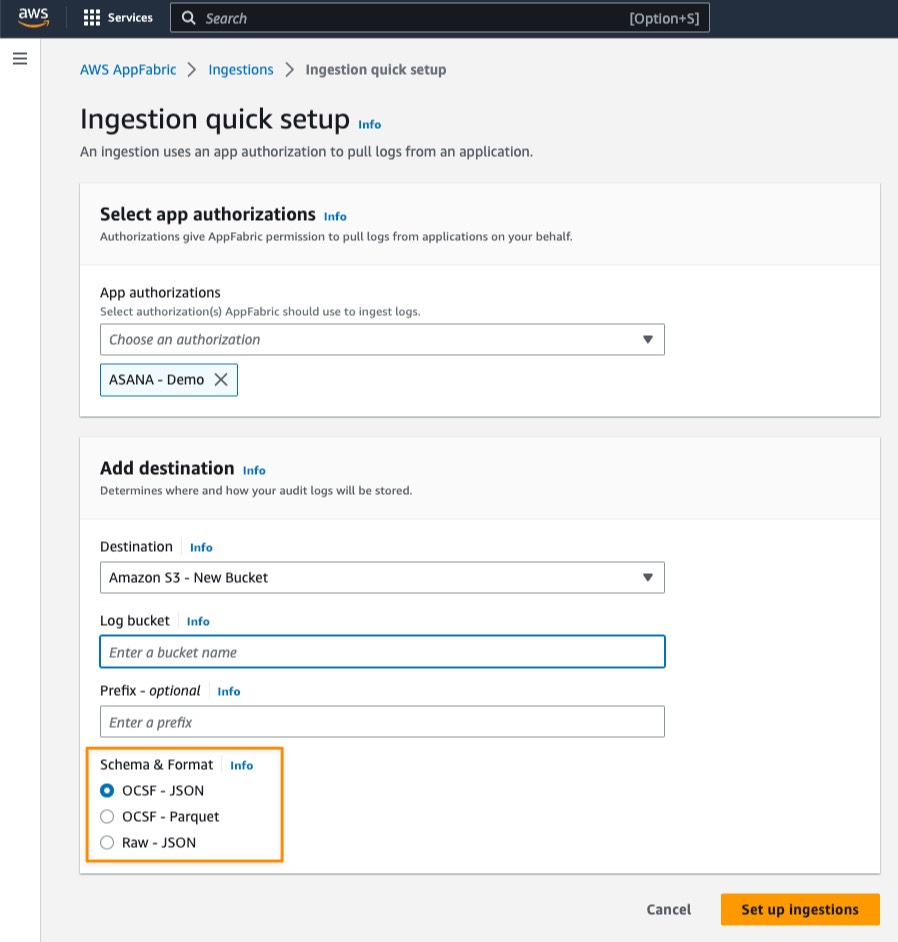
When I select a destination, additional fields appear. For example, if I select Amazon S3 – New Bucket, I need to fill the details for my Amazon S3 bucket and the optional prefix.

After that, I need to define Schema & Format of the ingested audit log data for my selected applications. Here, I have three options:

  • OCSF – JSON
  • OCSF – Parquet
  • Raw – JSON


AppFabric normalizes the audit log data to the OCSF schema and formats the audit log data into JSON or Parquet format. For OCSF – JSON and OCSF – Parquet options, AppFabric automatically maps the fields and enriches the field with user email as an identifier. As for the Raw – JSON data format, AppFabric simply provides the audit log data in its original JSON form.

To see a detailed view of my ingestion status, on the Ingestions page, I select my existing ingestion.

Here, I see the ingestion status is Enabled and the status for my Amazon S3 bucket is Active.

After my ingestion runs for around 10 minutes, I can see AppFabric stored the audit data logs in my Amazon S3 bucket.

When I open the file, I can see all the audit data logs from the SaaS application.

With audit data logs now in Amazon S3, I can also use AWS services to analyze and extract insights from the log data. For example, from data in Amazon S3, I can use AWS Glue and run a query using Amazon Athena. The following screenshot shows how I run a query for all activities in the audit data logs.

User Access
AWS AppFabric also has a feature called User access to allow security and IT admin teams to quickly see who has access to which applications. Using an employee’s corporate email address, AppFabric searches all authorized applications in the app bundle to return a list of apps that the user has access to. This helps to identify unauthorized user access and accelerate user deprovisioning.

Things to Know
Availability — AWS AppFabric is generally available today in US East (N. Virginia), Europe (Ireland), and Asia Pacific (Tokyo), with availability in additional AWS Regions coming soon.

AWS AppFabric generative AI capabilities – Available in a future release, AWS AppFabric will empower you to automatically perform tasks across applications using generative AI. Powered by Amazon Bedrock, this AI assistant generates answers to natural language queries, automates task management, and surfaces insights across SaaS applications.

Integrations with SaaS applications — AppFabric connects SaaS applications including Asana, Atlassian Jira suite, Dropbox, Miro, Okta, Slack, Smartsheet, Webex by Cisco, Zendesk, and Zoom. Refer to Supported applications for more details.

Integration with Security Tools — Audit data log from AppFabric is compatible with security tools, such as Logz.io, Netskope, NetWitness, Rapid7, and Splunk, or a customer’s proprietary security solution. Refer to Compatible security tools and services for more details on how to set up specific security tools and services.

Learn more
To get started, go to AWS AppFabric for more information and pricing details.

Happy building.
— Donnie


from AWS News Blog https://ift.tt/zUaZHFE
via IFTTT
Monday, June 26, 2023

AWS Week in Review Step Functions Versions and Aliases EC2 Instances with Graviton3E Processors and More June 26 2023

It’s now summer in the northern hemisphere, and you can feel it in London where I live. But let’s not get distracted by the nice weather and go through your AWS updates from the previous seven days.

Last Week’s Launches
Another interesting week with many announcements! Here are some that got more of my attention:

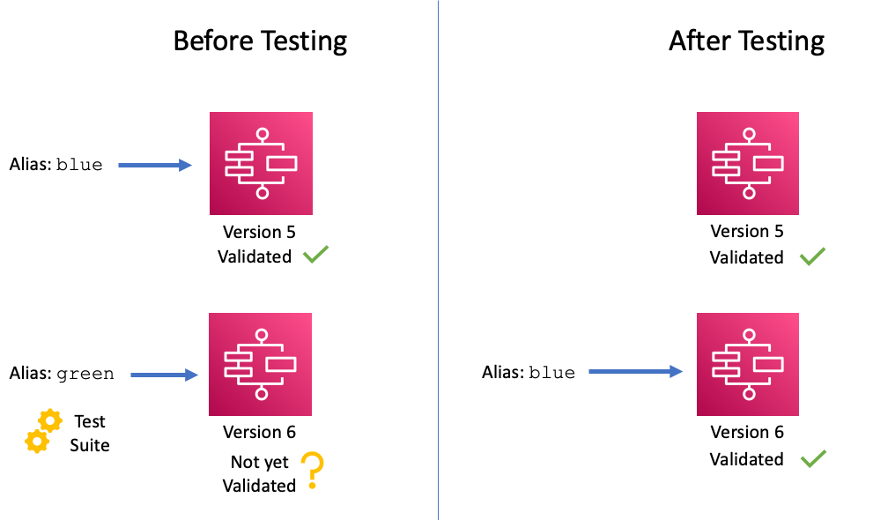
Architectural diagram for AWS Step Functions versioning and aliasesAWS Step Functions – You can now use versions and aliases to maintain multiple versions of your workflows, track which version was used for each execution, and create aliases that route traffic between workflow versions. To learn more, refer to this blog post.

AWS SAM – You can now simplify the way you define an AppSync GraphQL API in AWS SAM with the new a resource abstraction that includes everything necessary for a typical AppSync GraphQL API definition, including the API schema, the resolver pipeline functions, and data sources.

AWS Amplify – With the new Amplify UI Builder Figma plugin, you can theme your components, upgrade to new Amplify UI kit versions, and generate and preview React code from your designs directly in Figma.

AWS Local Zones – Now available in Manila, Philippines. You can use AWS Local Zones for applications that require single-digit millisecond latency or local data processing.

AWS Control Tower – The integration with Security Hub is now generally available. You can now enable over 170 Security Hub detective controls that map to related control objectives from AWS Control Tower. AWS Control Tower also detects drifts when you disable a control from Security Hub.

Amazon Kinesis Data Firehose – You can now deliver streaming data to Amazon Redshift Serverless. In this way, you can build an analytics platform without having to manage ingestion infrastructure or data warehouse clusters.

Amazon CloudWatch Internet Monitor – Now available in all standard AWS Regions. Internet Monitor helps you diagnose internet issues between your AWS hosted applications and your application’s end users.

AWS Verified Access – Now provides improved logging functionality. With that, It’s easier to author and troubleshoot application access policies by reviewing the end-user context received from third-party services.

Amazon Managed Grafana – Now supports Trace Analytics with the OpenSearch Grafana data source plugin in addition to the existing support for Log Analytics. You can simplify the correlation and analysis of logs and trace data stored in OpenSearch along with metrics from other data sources.

Amazon CloudWatch Logs Insights – You can now use the new dedup command in your queries to view unique results based on one or more fields. Duplicates are discarded based on the sort order so that only the first result is kept.

AWS Config – Now supports 21 more resource types for services such as AWS Amplify, AWS App Mesh, AWS App Runner, Amazon Kinesis Data Firehose, and Amazon SageMaker.

Amazon EC2 – Announcing the new EC2 C7gn and Hpc7g instances that use Graviton3E processors. The Graviton3E processor delivers higher memory bandwidth and compute performance than Graviton2, and higher vector instruction performance than Graviton3. Read more in Jeff’s C7gn and Channy’s Hpc7g blog posts.

Amazon EFS – Provisioned Throughput now supports up to 10 GiB/s (from 3 GiB/s) for reads and 3 GiB/s (from 1 GiB/s) for writes.

For a full list of AWS announcements, be sure to keep an eye on the What's New at AWS page.

Other AWS News
Architecture diagram for AWS Distro for OpenTelemetry sample app.A few more news items and blog posts you might have missed:

Good tips – Mitigate Common Web Threats with One Click in Amazon CloudFront

A nice series – Let’s Architect! Open-source technologies on AWS

An interesting solution – Deploy a serverless ML inference endpoint of large language models using FastAPI, AWS Lambda, and AWS CDK

For AWS open-source news and updates, check out the latest newsletter curated by Ricardo to bring you the most recent updates on open-source projects, posts, events, and more.

Upcoming AWS Events
Here are some opportunities to meet and learn:

AWS Applications Innovation Day (June 27) – Learn how product teams across applications, security, and artificial intelligence (AI) are collaborating with AWS Partners like Asana, Slack, Splunk, Atlassian, Okta, and more to help organizations work smarter together. For more information on the event, refer to this blog post.

AWS Summits – Get together to connect, collaborate, and learn about AWS in Hong Kong (July 20), New York (July 26), Taiwan (Aug 2 & 3), Sao Paulo (Aug 3).

AWS re:Invent (Nov 27 – Dec 1) – Join us to hear the latest from AWS, learn from experts, and connect with the global cloud community. Registration is now open.

Amazon Prime Day (July 11-12) is coming, and you can learn more in this blog post. We should keep an eye out for Jeff’s annual Prime Day post following the event.

That’s all from me for this week. Come back next Monday for another Week in Review!

— Danilo

This post is part of our Week in Review series. Check back each week for a quick roundup of interesting news and announcements from AWS!

from AWS News Blog https://ift.tt/pJTq0FC
via IFTTT

Wednesday, June 21, 2023

Tuesday, June 20, 2023

New Amazon EC2 Hpc7g Instances Powered by AWS Graviton3E Processors Optimized for High Performance Computing Workloads

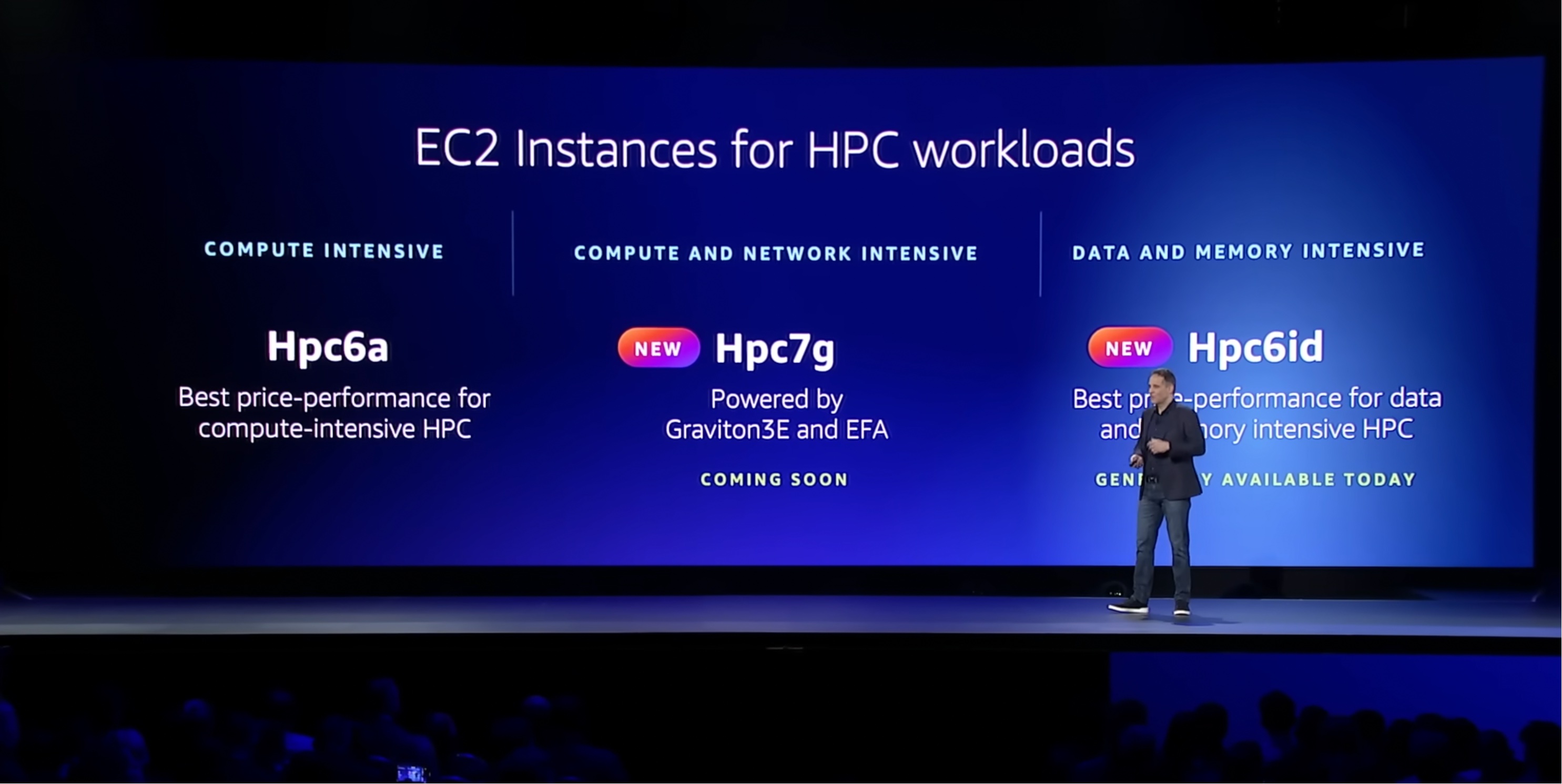
At AWS re:Invent 2022, Adam Selipsky, CEO of AWS, explained high performance computing (HPC) workloads typically can either be compute-intensive, compute- and networking-intensive, or data- and memory-intensive in his keynote.

Compute workloads include weather forecasting, computational fluid dynamics, and financial options pricing. To help with this, you have Amazon EC2 Hpc6a instances, which deliver up to 65 percent better price performance over comparable compute optimized x86-based instances.

Other HPC workloads require modeling the performance of complex structures—things like wind turbines, concrete buildings, and industrial equipment. Without enough data and memory, these models can take days or weeks to run in a cost-effective way. The Amazon EC2 Hpc6id instance is designed to deliver leading price performance for data and memory-intensive HPC workloads with higher memory bandwidth per core, faster local solid-state drive (SSD) storage, and enhanced networking with Elastic Fabric Adapter (EFA).

Announcing Amazon EC2 Hpc7g Instances
Compute-intensive HPC workloads such as weather forecasting, computational fluid dynamics, and financial options pricing also require more network performance, even better price performance, and greater energy efficiency.

Today we are announcing the general availability of Amazon EC2 Hpc7g instances, a new purpose-built instance type for tightly coupled compute and network-intensive HPC workloads.

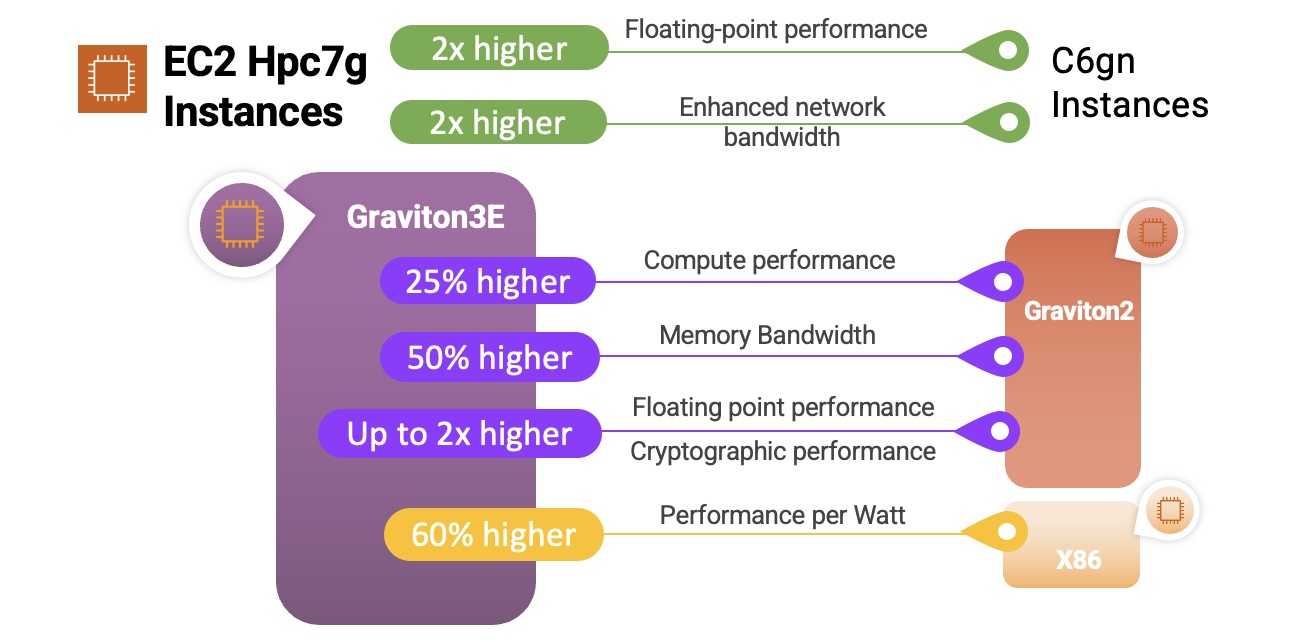
Hpc7g instances are powered by AWS Graviton3E processors that provide up to two times better floating-point performance and 200 Gbps dedicated EFA bandwidth than EC2 C6gn instances powered by AWS Graviton2 processors and are up to 60 percent more energy efficient than comparable x86 instances.

Here’s a quick infographic that shows you how the Hpc7g instances and the Graviton3E processors compare to previous instances and processors:

Hpc7g instances feature sizes of up to 64 cores of the latest AWS custom Graviton3E CPUs with 128 GiB RAM. Here are the detailed specs:

Instance Name
CPUs RAM (GiB)
EFA Network Bandwidth (Gbps) Attached Storage
hpc7g.4xlarge 16 128 Up to 200 EBS Only
hpc7g.8xlarge 32 128 Up to 200 EBS Only
hpc7g.16xlarge 64 128 Up to 200 EBS Only

Hpc7g instances are the most cost-efficient option to scale your HPC clusters on AWS. If you are considering migrating your largest HPC workloads requiring tens of thousands of cores at scale to AWS, you can take advantage of up to 200 Gbps EFA bandwidth to reduce the latency and run message passing interface (MPI) applications on parallel computing architectures while ensuring minimized power consumption on Hpc7g instances.

You can choose to use smaller sizes of Hpc7g instances to pick a lower number of cores and evenly distribute memory and network resources across the remaining cores to increase per-core performance to help reduce software licensing costs.

You can also use Hpc7g instances with AWS ParallelCluster to offer a complete HPC run-time environment that spans both x86 and arm64 instance types, giving you the flexibility to run different workload types within the same HPC cluster. You can compare and contrast performance, thus making it easier to find out what’s best for you and enabling easier porting of your workload.

Customer Story
The Water Institute is an independent, non-profit applied research organization that works across disciplines to advance science and develop integrated methods used to solve complex environmental and societal challenges.

They benchmarked the Hpc7g instances with 200 Gbps EFA using the Advanced Circulation (ADCIRC) model. ADCIRC is deployed throughout many US government agencies to simulate the movement of water due to astronomic tides, riverine flows, and atmospheric forces, including hurricanes and it is often used for real-time forecasting applications and design studies.

The model run for this application is targeted at Southern Louisiana and is the basis for most of the analysis conducted there including levee design, planning studies, and real-time hurricane storm surge forecasting applications. The left graphic above shows the full extent of the domain, while to the right of that, the high-resolution area targeted at Southern Louisiana shows flooding around the levees in New Orleans during a simulation of Hurricane Katrina.

The model contains 1.6 million vertices and 3 million elements. It’s these parameters that affect the computational complexity of the simulations. The simulations depict 18 days of astronomic tide, river inflows, and atmospheric wind and pressure forcing.

The Water Institute benchmarked against many of the instance types that would be useful for their workload types at AWS, including c6gn.16xlarge, hpc7g.16xlarge, hpc6a.48xlarge, and hpc6id.36xlarge.

The Hpc7g instance shows more than 40 percent better performance than the C6gn instance and has comparable performance to other high performance x86 instance types but with a better price-to-performance ratio. With Hpc7g instances, the Water Institute can lower its costs while maintaining the performance levels they expect.

RIKEN, who has built the powerful supercomputer, FUGAKU using arm64, is collaborating with AWS to create a virtual Fugaku using Hpc7g with Graviton3E to support Japanese manufacturers’ increasing demand for compute power. RIKEN has already confirmed that multiple Fugaku applications provide excellent performance on the AWS Graviton3E processor in the AWS cloud environment.

Also, Siemens has optimized the scalability of Simcenter STAR-CCM+ across a broad range of CPU and GPU instances on AWS. This technology is supported on Linux and available through Arm-based EC2 instances or the Fugaku supercomputer.

To hear more voices of customers and partners such as Ansys, Arup, CERFACS, ESI, Jij, ParTec, Rescale, and TotalCAE, see the Hpc7g instances page.

Now Available
Amazon EC2 Hpc7g instances are now generally available in the US East (N. Virginia) Region for purchase in On-Demand, Reserved Instance, and Savings Plan form.

To learn more, see the Amazon EC2 Hpc7g instances page. Give it a try, and please send feedback to AWS re:Post for High Performance Compute or through your usual AWS support contacts.

– Channy


from AWS News Blog https://ift.tt/ChWzqPs
via IFTTT

New Amazon EC2 C7gn Instances: Graviton3E Processors and Up To 200 Gbps Network Bandwidth

The C7gn instances that we previewed last year are now available and you can start using them today. The instances are designed for your most demanding network-intensive workloads (firewalls, virtual routers, load balancers, and so forth), data analytics, and tightly-coupled cluster computing jobs. They are powered by AWS Graviton3E processors and support up to 200 Gbps of network bandwidth.

Here are the specs:

Instance Name vCPUs
Memory
Network Bandwidth
EBS Bandwidth
c7gn.medium 1 2 GiB up to 25 Gbps up to 10 Gbps
c7gn.large 2 4 GiB up to 30 Gbps up to 10 Gbps
c7gn.xlarge 4 8 GiB up to 40 Gbps up to 10 Gbps
c7gn.2xlarge 8 16 GiB up to 50 Gbps up to 10 Gbps
c7gn.4xlarge 16 32 GiB 50 Gbps up to 10 Gbps
c7gn.8xlarge 32 64 GiB 100 Gbps up to 20 Gbps
c7gn.12xlarge 48 96 GiB 150 Gbps up to 30 Gbps
c7gn.16xlarge 64 128 GiB 200 Gbps up to 40 Gbps

The increased network bandwidth is made possible by the new 5th generation AWS Nitro Card. As another benefit, these instances deliver the lowest Elastic Fabric Adapter (EFA) latency of any current EC2 instance.

Here’s a quick infographic that shows you how the C7gn instances and the Graviton3E processors compare to previous instances and processors:

As you can see, the Graviton3E processors deliver substantially higher memory bandwidth and compute performance than the Graviton2 processors, along with higher vector instruction performance than the Graviton3 processors.

C7gn instances are available in the US East (Ohio, N. Virginia), US West (Oregon), and Europe (Ireland) AWS Regions in On-Demand, Reserved Instance, Spot, and Savings Plan form. Dedicated Instances and Dedicated Hosts are also available.

— Jeff;


from AWS News Blog https://ift.tt/FKyjg19
via IFTTT

Learn how to streamline and secure your SaaS applications at AWS Applications Innovation Day

Companies continue to adopt software as a service (SaaS) applications at a rapid clip, with recent research showing that the average SaaS portfolio now has at least 200 applications. While organizations purchase these purpose-built tools to make their employees more productive, they now must contend with growing security complexities, context switching, and data silos.

If your company faces these issues, or you want to avoid them in the future, join us on Tuesday, June 27, for a free-to-attend online event AWS Applications Innovation Day. AWS will stream the event simultaneously across multiple platforms, including LinkedIn Live, Twitter, YouTube, and Twitch. You can also join us in person in Seattle to hear from Dilip Kumar, Vice President of AWS Applications and an executive panel with AWS Partners Splunk, Asana, and Okta.

Join us for Applications Innovation Day June 27, 2023.

Applications Innovation Day is designed to give you the tools you need to improve how your organization uses and secures SaaS applications. Sessions throughout the day will show you how you can secure data while providing your employees with the best tools for the job. You’ll also learn how to support the right mix of applications to improve workforce collaboration, and how to use generative artificial intelligence securely and effectively to improve insights and enhance employee productivity.

We’ll start the virtual broadcast with a keynote from Dilip Kumar, Vice President of AWS Applications, who will discuss the way we use and govern SaaS applications at AWS. He’ll also discuss how we’ll make it easier to deploy purpose-built SaaS applications like Asana, Okta, Splunk, Zoom, and others across your business, including the announcement of some exciting new innovations from AWS.

AWS product leaders will present technical breakout sessions during the day on the productivity and security aspects of managing a SaaS application tech stack. Sessions will cover a wide range of topics, including how the nature of productivity at work is changing, how AI is transforming SaaS applications and collaboration, how you can improve your security observability across your applications, and how you can create custom analytics on SaaS application activity.

Overall, the event is a great opportunity for security leaders, IT administrators and operations leaders, and anyone leading digital workplace and transformation initiatives to learn how to better leverage and govern SaaS applications.

To register for AWS Applications Innovation Day, simply go to the event page.


from AWS News Blog https://ift.tt/hW4A7lr
via IFTTT

Monday, June 19, 2023

AWS Week in Review Amazon EC2 Instance Connect Endpoint Detective Amazon S3 Dual Layer Encryption Amazon Verified Permission June 19 2023

This week, I’ll meet you at AWS partner’s Jamf Nation Live in Amsterdam where we’re showing how to use Amazon EC2 Mac to deploy your remote developer workstations or configure your iOS CI/CD pipelines in the cloud.Mac in an instant

Last Week’s Launches
While I was traveling last week, I kept an eye on the AWS News. Here are some launches that got my attention.

Amazon EC2 Instance Connect Endpoint. Endpoint for EC2 Instance Connect allows you to securely access Amazon EC2 instances using their private IP addresses, making the use of bastion hosts obsolete. Endpoint for EC2 Instance Connect is by far my favorite launch from last week. With EC2 Instance Connect, you use AWS Identity and Access Management (IAM) policies and principals to control SSH access to your instances. This removes the need to share and manage SSH keys. We also updated the AWS Command Line Interface (AWS CLI) to allow you to easily connect or open a secured tunnel to an instance using only its instance ID. I read and contributed to a couple of threads on social media where you pointed out that AWS Systems Manager Session Manager already offered similar capabilities. You’re right. But the extra advantage of EC2 Instance Connect Endpoint is that it allows you to use your existing SSH-based tools and libraries, such as the scp command.

Amazon Inspector now supports code scanning of AWS Lambda functions. This expands the existing capability to scan Lambda functions and associated layers for software vulnerabilities in application package dependencies. Amazon Detective also extends finding groups to Amazon Inspector. Detective automatically collects findings from Amazon Inspector, GuardDuty, and other AWS security services, such as AWS Security Hub, to help increase situational awareness of related security events.

Amazon Verified Permissions is generally available. If you’re designing or developing business applications that need to enforce user-based permissions, you have a new option to centrally manage application permissions. Verified Permissions is a fine-grained permissions management and authorization service for your applications that can be used at any scale. Verified Permissions centralizes permissions in a policy store and helps developers use those permissions to authorize user actions within their applications. Similarly to the way an identity provider simplifies authentication, a policy store lets you manage authorization in a consistent and scalable way. Read Danilo’s post to discover the details.

Amazon S3 Dual-Layer Server-Side Encryption with keys stored in AWS Key Management Service (DSSE-KMS). Some heavily regulated industries require double encryption to store some type of data at rest. Amazon Simple Storage Service (Amazon S3) offers DSSE-KMS, a new free encryption option that provides two layers of data encryption, using different keys and different implementation of the 256-bit Advanced Encryption Standard with Galois Counter Mode (AES-GCM) algorithm. My colleague Irshad’s post has all the details.

AWS CloudTrail Lake Dashboards provide out-of-the-box visibility and top insights from your audit and security data directly within the CloudTrail Lake console. CloudTrail Lake features a number of AWS curated dashboards so you can get started right away – with no required detailed dashboard setup or SQL experience.

AWS IAM Identity Center now supports automated user provisioning from Google Workspace. You can now connect your Google Workspace to AWS IAM Identity Center (successor to AWS Single Sign-On) once and manage access to AWS accounts and applications centrally in IAM Identity Center.

AWS CloudShell is now available in 12 additional regions. AWS CloudShell is a browser-based shell that makes it easier to securely manage, explore, and interact with your AWS resources. The list of the 12 new Regions is detailed in the launch announcement.

For a full list of AWS announcements, be sure to keep an eye on the What's New at AWS page.

Other AWS News
Here are some other updates and news that you might have missed:

  • AWS Extension for Stable Diffusion WebUI. WebUI is a popular open-source web interface that allows you to easily interact with Stable Diffusion generative AI. We built this extension to help you to migrate existing workloads (such as inference, train, and ckpt merge) from your local or standalone servers to the AWS Cloud.
  • GoDaddy developed a multi-Region, event-driven system. Their system handles 400 millions events per day. They plan to scale it to process 2 billion messages per day in a near future. My colleague Marcia explains the detail of their architecture in her post.
  • The Official AWS Podcast – Listen each week for updates on the latest AWS news and deep dives into exciting use cases. There are also official AWS podcasts in several languages. Check out the podcasts in French, German, Italian, and Spanish.
  • AWS Open Source News and Updates – This is a newsletter curated by my colleague Ricardo to bring you the latest open source projects, posts, events, and more.

Upcoming AWS Events
Check your calendars and sign up for these AWS events:

  • AWS Silicon Innovation Day (June 21) – A one-day virtual event that will allow you to better understand AWS Silicon and how you can use the Amazon EC2 chip offerings to your benefit. My colleague Irshad shared the details in this post. Register today.
  • AWS Global Summits – There are many AWS Summits going on right now around the world: Milano (June 22), Hong Kong (July 20), New York (July 26), Taiwan (Aug 2 & 3), and Sao Paulo (Aug 3).
  • AWS Community Day – Join a community-led conference run by AWS user group leaders in your region: Manila (June 29–30), Chile (July 1), and Munich (September 14).
  • AWS User Group Perú Conf 2023 (September 2023). Some of the AWS News blog writer team will be present: Marcia, Jeff, myself, and our colleague Startup Developer Advocate Mark. Save the date and register today.
  • CDK Day – CDK Day is happening again this year on September 29. The call for papers for this event is open, and this year we’re also accepting talks in Spanish. Submit your talk here.

That’s all for this week. Check back next Monday for another Week in Review!

This post is part of our Week in Review series. Check back each week for a quick roundup of interesting news and announcements from AWS! -- seb

from AWS News Blog https://ift.tt/MdPmZjS
via IFTTT

Friday, June 16, 2023

How GoDaddy Implemented a Multi-Region Event-Driven Platform at Scale

GoDaddy, a leading global provider of domain registration and web hosting services, has served over 84 million domains and 22 million customers since its establishment in 1997. Among its various internal systems, the Customer Signal Platform provides tooling to capture, analyze, and act on customer and product data to drive better business outcomes. With this platform, GoDaddy can track user visits and interactions on its website and use meaningful event data to improve its customer experience and overall business performance.

Nowadays, the Customer Signal Platform processes 400 million events every day. As GoDaddy expands its integrations, it aims to increase this number to 2 billion events per day in the near future.

When building the Customer Signal Platform, GoDaddy had three main requirements for the system architecture:

  1. Minimize their operational load.
  2. Scale automatically as traffic changes.
  3. Provide high availability and ensure that all the customer signals are captured.

Amazon EventBridge Event Bus
After evaluating many options against their requirements, GoDaddy decided to implement the customer signal platform using Amazon EventBridge Event Bus. EventBridge Event Bus is a serverless event bus that helps you receive, filter, transform, route, and deliver events. Because EventBridge is serverless, it requires minimal configuration to get started and scales automatically—GoDaddy’s first two requirements were checked.

To comply with the third requirement, the solution needed to provide business continuity and ensure that no event is lost from the moment the client produces it until it gets to the platform to be analyzed. EventBridge Event Bus comes with many features that helped GoDaddy build their application with this requirement in mind.

The main feature that GoDaddy took advantage of was global endpoints. EventBridge global endpoints provide a reliable and simple way to improve the business continuity of event-driven applications. This new feature, added in 2022, allows customers to build a multi-Region event-driven application.

EventBridge Global Endpoints
Global endpoints allow you to configure a managed DNS endpoint in EventBridge, to which your applications will send events. Then you need to configure two custom event buses in two distinct AWS Regions. One is the primary Region, and the other is the failover, or secondary Region. The failover of events is decided based on the health indicated by an Amazon Route 53 health check. When the health check is healthy, the events are routed from the global endpoint to the custom event bus in the primary Region. And if the health check is unhealthy, then the global endpoint will send the events to the event bus in the secondary Region.

Healthcheck status

The simplest configuration for global endpoints is the active/archive configuration. This configuration provides business continuity and simplicity at the same time. The active/archive configuration defines two different Regions. The primary Region is where the application is deployed and all the business processes are happening. The archive Region is where only a custom bus is deployed and all the events are archived.

In addition, there is a bidirectional replication rule between the buses in separate Regions. In the normal case, when there are no errors, whenever an event arrives at the custom bus in the primary Region, the event is automatically replicated to the archive custom bus in the secondary Region.

In the case of failover, the global endpoint redirects the events to the secondary Region, where they get archived for processing at another time.

Active/ Archive configuration

GoDaddy Implementation of Global Endpoints
GoDaddy was looking for a solution that minimized their operations load while still providing business continuity, and that is why they adopted global endpoints and the active/archive configuration. In this way, they could have the event processing logic in their primary Region and have a secondary Region in case of any issues.

In their configuration, events are archived in the secondary Region for 30 days, after which the events expire. In the case of a failover, because they don’t need to process the events in real time, they collect them in the archive. If the issue is resolved within 24 hours, the retention period for the replication rule, the events are sent automatically to the primary Region. If the issue is solved in more than 24 hours the events need to be replayed to the primary Region.

The following image shows what their current solution looks like. They are working with two Regions. US West (Oregon) is their primary Region and is the location of the data lake, which is the primary consumer of the events. US East (N. Virginia) is the secondary Region. Events are being produced in different clients; from the clients, they are sent to Amazon API Gateway. GoDaddy deployed two API Gateways in their two Regions. The events are sent to the API Gateway with the smallest latency from the client. To do that, they use latency-based routing provided by Amazon Route 53. Then events are sent to an AWS Lambda function that validates the events and forwards them to the EventBridge global endpoint at the DNS level.

GoDaddy architecture

The global endpoint is configured with the active/archive setup, and the failover is configured to be triggered via a Route 53 health check that monitors an Amazon CloudWatch alarm. That alarm observes the IngestionToInvocationStartLatency metric in the primary Region.

IngestionToInvocationStartLatency is a service-level metric that exposes the time to process events from the point at which they are ingested by EventBridge to the point the first invocation of a target in the configured rules is made. This metric is measured across all the rules in your bus and provides an indication of the health of the EventBridge service. Any extended periods of high latency over 30 seconds indicate a service disruption.

When the system is in the normal state, the events are forwarded from the global endpoint to the custom ingress event bus in the primary Region. That custom event bus has replication enabled; this means that all the events that arrive at the bus get replicated automatically in the secondary Region custom ingress event bus.

All the events received by the ingress event bus are sent to the enrichment function. This function performs basic validation and authentication, and it enriches the event data to make sure that all the events from different clients are standard.

From there, the events are forwarded to the data platform event bus to be sent to the different consumer targets. The main target is their data lake solution, which analyzes all the events.

What Was the Impact?
For GoDaddy, business continuity is important, and their customer signals are not getting lost due to any issue with their platform. This makes them confident that they can expand their customer signal platforms from 400 million events per day to 2 billion events per day without introducing any additional operations overhead.

Now, they can confidently process hundreds of millions of events per day to their system, and they can keep on growing. The following image shows the number of events ingested by global endpoints in a normal day.

Events ingested

While GoDaddy’s use of the active/archive pattern enables them to ensure they never lose any events, they’re already starting to see certain use cases where they want to minimize any delays in processing their events, even when service disruptions occur. Because they’re already replicating their events to a secondary Region, they can deploy their most critical consumers to both Regions and enable an active/active configuration for their mission-critical systems. Active/active configuration allows you to process parallel events in both the primary and secondary Regions, simplifying the processing of events even during disruptions and enabling business continuity.

The vision when building the Customer Signal Platform was to align with GoDaddy’s high bar for reliability, scalability, and maintainability and, at the same time, keep the platform self-service so that developers can focus on business needs. This led GoDaddy to choose Amazon EventBridge global endpoints and serverless technologies to build this solution.

GoDaddy Customer Signal Platform is an excellent example of what serverless technologies enable. By leveraging the cloud to handle as much of the undifferentiated heavy lifting as possible, GoDaddy has reduced the operational complexity of setting up an event bus for a multi-Region strategy, implemented failover mechanisms in the case of Regional distruptions, and ensured that events are not lost by enabling replication. Global endpoints active/archive configuration improves the availability of customer applications with the least amount of configuration changes.

If you want to get started with EventBridge global endpoints, you can check out this talk on event-driven applications. For a working demo on how to use EventBridge global endpoints for failover events, check out this Serverless Land repository.

— Marcia


from AWS News Blog https://ift.tt/enlpTgQ
via IFTTT

Wednesday, June 14, 2023

Discover How AWS Designed Silicon Fuels Customer Outcomes at AWS Silicon Innovation Day

We hope you will join us on Wednesday, June 21, for a free-to-attend online event, AWS Silicon Innovation Day. AWS will stream the event simultaneously across multiple platforms, including LinkedIn Live, Twitter, YouTube, and Twitch.

AWS Silicon Innovation Day is a one-day virtual event on June 21, 2023, that will allow you to better understand AWS Silicon and how you can use AWS’s unique Amazon EC2 chip offerings to your benefit. AWS has designed and developed purpose-built silicon specifically for the cloud.

During this event, you will have the opportunity to hear directly from senior leaders at AWS. Our panel of lead architects, engineers, customers, and analysts will provide insights into our silicon journey. Through deep dives into our cutting-edge silicon design and customer success stories, the panel will provide insights on security enhancements and cost-saving opportunities. Here are some of the highlights you can expect from this event.

Leadership session – To kick off the day, we have a Leadership session featuring Dave Brown, VP of Amazon EC2 and Dr. Ruba Borno, VP of WW Channels and Alliances joining us on stage. Dave will engage in a discussion with Ruba about how you can benefit from the innovation AWS delivers with its silicon technology.

AI/ML session – Gary Szilagyi, VP of Annapurna Labs will discuss with Nafea Bshara, co-founder of Annapurna Labs the utilization of chipset development by his team to create specialized chips for Generative AI, CPU, and the AWS Nitro system. He will highlight how you can harness the Annapurna mindset to develop not only CPUs but also tailor-made chips with specific purposes in mind.

Customer session – Jeff Barr, VP of AWS Evangelism, and Tiffany Wissner, Director of Product Marketing, will delve into insights from our customers. They will share anecdotes and experiences gathered from various sources, such as re:Invent, summits, and developer events, where you have expressed how you harnessed AWS silicon to drive your own remarkable innovations.

Networking session – JR Rivers, Senior Principal Engineer, and Madhura Kale, Senior Product Manager will shed light on the impact of silicon innovation, not only on the benefits you experience using our CPUs, GPUs, or Nitro System, but also on the transformation of AWS’s network infrastructure. They will delve into the realm of networking advancements, showcasing some of the latest innovations and highlighting the instrumental role played by AWS silicon in powering these developments.

Arm and Nitro Innovation session – Anthony Liguori, VP and Fellow, Nitro System architecture will be joined by Ali Saidi, Director of Annapurna Labs to discuss harnessing the power of hardware and software in tandem to drive the development of cutting-edge silicon technologies.

Analyst and Executive session – Raj Pai, VP of Amazon EC2 Product Management will engage in a conversation with an analyst, delving into the realm of silicon innovation in the cloud.

Join us for Silicon Innovation Day Wednesday June 21 9:00am - 4:00pm PDT

No advance registration is needed to participate in AWS Silicon Innovation Day, but you can add an event reminder to your calendar by registering on the event page. We sincerely hope that you will join us in embracing the excitement and seizing the valuable learning opportunities at this new event!

Meet you there.

— Irshad


from AWS News Blog https://ift.tt/lIkDBdz
via IFTTT

Tuesday, June 13, 2023

New – Amazon S3 Dual-Layer Server-Side Encryption with Keys Stored in AWS Key Management Service (DSSE-KMS)

Today, we are launching Amazon S3 dual-layer server-side encryption with keys stored in AWS Key Management Service (DSSE-KMS), a new encryption option in Amazon S3 that applies two layers of encryption to objects when they are uploaded to an Amazon Simple Storage Service (Amazon S3) bucket. DSSE-KMS is designed to meet National Security Agency CNSSP 15 for FIPS compliance and Data-at-Rest Capability Package (DAR CP) Version 5.0 guidance for two layers of CNSA encryption. Using DSSE-KMS, you can fulfill regulatory requirements to apply multiple layers of encryption to your data.

Amazon S3 is the only cloud object storage service where customers can apply two layers of encryption at the object level and control the data keys used for both layers. DSSE-KMS makes it easier for highly regulated customers to fulfill rigorous security standards, such as US Department of Defense (DoD) customers.

With DSSE-KMS, you can specify dual-layer server-side encryption (DSSE) in the PUT or COPY request for an object or configure your S3 bucket to apply DSSE to all new objects by default. You can also enforce DSSE-KMS using IAM and bucket policies. Each layer of encryption uses a separate cryptographic implementation library with individual data encryption keys. DSSE-KMS helps protect sensitive data against the low probability of a vulnerability in a single layer of cryptographic implementation.

DSSE-KMS simplifies the process of applying two layers of encryption to your data, without having to invest in infrastructure required for client-side encryption. Each layer of encryption uses a different implementation of the 256-bit Advanced Encryption Standard with Galois Counter Mode (AES-GCM) algorithm. DSSE-KMS uses the AWS Key Management Service (AWS KMS) to generate data keys, allowing you to control your customer managed keys by setting permissions per key and specifying key rotation schedules. With DSSE-KMS, you can now query and analyze your dual-encrypted data with AWS services such as Amazon Athena, Amazon SageMaker, and more.

With this launch, Amazon S3 now offers four options for server-side encryption:

  1. Server-side encryption with Amazon S3 managed keys (SSE-S3)
  2. Server-side encryption with AWS KMS (SSE-KMS)
  3. Server-side encryption with customer-provided encryption keys (SSE-C)
  4. Dual-layer server-side encryption with keys stored in KMS (DSSE-KMS)

Let’s see how DSSE-KMS works in practice.

Create an S3 Bucket and Turn on DSSE-KMS
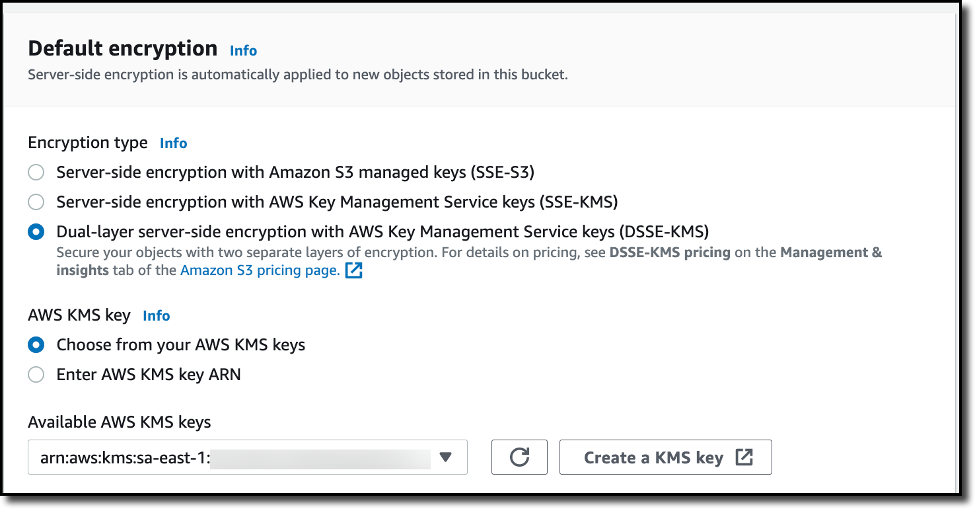
To create a new bucket in the Amazon S3 console, I choose Buckets in the navigation pane. I choose Create bucket, and I select a unique and meaningful name for the bucket. Under Default encryption section, I choose DSSE-KMS as the encryption option. From the available AWS KMS keys, I select a key for my requirements. Finally, I choose Create bucket to complete the creation of the S3 bucket, encrypted by DSSE-KMS encryption settings.

Encryption

Upload an Object to the DSSE-SSE enabled S3 Bucket
In the Buckets list, I choose the name of the bucket that I want to upload an object to. On the Objects tab for the bucket, I choose Upload. Under Files and folders, I choose Add files. I then choose a file to upload, and then choose Open. Under Server-side encryption, I choose Do not specify an encryption key. I then choose Upload.

Server Side Encryption

Once the object is uploaded to the S3 bucket, I notice that the uploaded object inherits the Server-side encryption settings from the bucket.

Server Side Encryption Setting

Download a DSSE-KMS Encrypted Object from an S3 Bucket
I select the object that I previously uploaded and choose Download or choose Download as from the Object actions menu. Once the object is downloaded, I open it locally, and the object is decrypted automatically, requiring no change to client applications.

Now Available
Amazon S3 dual-layer server-side encryption with keys stored in AWS KMS (DSSE-KMS) is available today in all AWS Regions. You can get started with DSSE-KMS via the AWS CLI or AWS Management Console. To learn more about all available encryption options on Amazon S3, visit the Amazon S3 User Guide. For pricing information on DSSE-KMS, visit the Amazon S3 pricing page (Storage tab) and the AWS KMS pricing page.

— Irshad


from AWS News Blog https://ift.tt/z3vpE9P
via IFTTT