Wednesday, May 22, 2024

Ultimate Guide: Maximize Brand Protection, Growth, and Profit with Amazon Brand Registry

Amazon Brand Registry

Unlock Your Brand’s Full Potential Utilizing Amazon Brand Tools, Data And Insights

With the rise of counterfeit goods and intellectual property infringements, brands must proactively protect their assets. Despite the perception that Amazon does little to protect brands, it is deeply committed to protecting brands on its platform.

It’s a significant task for Amazon, and they are continually improving their efforts. However, brands need to partner with Amazon to counter the rise of counterfeit goods and intellectual property infringements. This means brands must proactively protect their assets in partnership with Amazon. This is where Amazon Brand Services comes into play.

We will broadly cover Amazon's efforts to protect brand owners and deep-dive into the Amazon Brand Registry, its benefits, eligibility requirements, and how to leverage its features to safeguard your brand as a retailer on Amazon Seller Central or Vendor Central.

Amazon’s Brand Protection Efforts: A Comprehensive Overview

Amazon is committed to ensuring customers receive authentic products and a secure selling environment from businesses within the broader Amazon platform ecosystem. This applies to Amazon Seller Central and Amazon Vendor Central, which are global marketplaces.

Amazon has made substantial investments and innovative strategies to combat counterfeit products and fraud, reflecting this dedication to brand protection for Amazon marketplaces.

Amazon’s brand protection strategy focuses on four key areas:

  • Proactive Efforts to Protect the Store: Utilizing advanced machine learning and robust seller verification processes.
  • Tools for Brands: Offering powerful tools for rights owners to protect intellectual property.
  • Accountability for Bad Actors: Dismantling counterfeit organizations and holding bad actors accountable.
  • Customer Protection and Education: Educating consumers about the dangers of counterfeit products.

Robust Proactive Controls

Amazon’s proactive measures to protect its stores involve advanced technologies and continuous monitoring. These efforts have significantly decreased bad actor attempts to create new selling accounts, from 6 million in 2020 to 700,000 in 2023.

Key strategies include:

  • Seller Verification: Utilizing document forgery detection, image and video verification, and machine learning to confirm the authenticity of government-issued identity documents.
  • Continuous Monitoring: Scanning billions of product detail pages daily to detect and prevent the listing of counterfeit products.
  • AI and Machine Learning: Leveraging large language models and computer vision to identify and remove infringing listings.

Powerful Tools to Protect Brands

Amazon provides several tools and programs to help brands protect their intellectual property:

  • Brand Registry: A free service, the brand registry supports offering automated protections, the Report a Violation tool, and an Impact Dashboard to track infringing listings. Amazon also offers related Amazon brand registry benefits like brand dashboards and Amazon brand analytics.
  • Project Zero: Combines Amazon’s technology with brands’ knowledge to directly remove counterfeit listings and prevent counterfeits from reaching customers.
  • Amazon Transparency Program: A product serialization service that uses unique codes to verify product authenticity.
  • Intellectual Property Accelerator: Helps small businesses obtain intellectual property rights efficiently.
  • Amazon Patent Evaluation Express (APEX): Resolves patent infringement disputes quickly, typically within 30 days.

Holding Bad Actors Accountable

Amazon’s Counterfeit Crimes Unit (CCU) works globally to identify, seize, and dispose of counterfeit products, preventing them from harming customers. Since its launch in 2020, the CCU has pursued over 21,000 bad actors through litigation and criminal referrals.

Key efforts include:

  • Collaborations with Law Enforcement: Working with agencies worldwide to conduct raids and prosecutions, leading to numerous criminal convictions.
  • Public-Private Partnerships: Sharing information with customs and law enforcement to stop counterfeits at the border and dismantle counterfeit networks.

Protecting and educating Amazon customers

Amazon recognizes the importance of consumer education in combating counterfeits. Initiatives include:

  • Unreal Campaign Challenge: Partnering with the International Trademark Association to educate young consumers about the risks of counterfeit goods.
  • Global Awareness Campaigns: Collaborating with organizations worldwide to raise awareness through podcasts, social media campaigns, and educational workshops.

Amazon’s commitment to brand protection involves continuous innovation and collaboration with brands, law enforcement, and industry experts. Their approach ensures that customers receive authentic products and that the marketplace remains safe and trustworthy for buyers and sellers.

Amazon Brand Protection Benchmarks and Results

It is not a perfect system, but it reflects an ongoing commitment to solving serious challenges for brand owners, large and small.

The following are key benchmarks of their efforts to date:

  • Investment and Workforce: Invested over $1.2 billion in brand protection in 2023. Employed over 15,000 people dedicated to protecting customers, brands, and stores from counterfeiting, fraud, and other abuses.
  • Proactive Controls: Stopped over 700,000 bad actor attempts to create new selling accounts in 2023, down from 6 million in 2020. Blocked more than 99% of suspected infringing listings before brands had to report them.
  • Infringement Notices: More than a 30% decrease in total valid notices of infringement submitted by brands since 2020.
  • Counterfeit Product Seizures: Identified, seized, and appropriately disposed of over 7 million counterfeit products worldwide in 2023.
  • Brand Registry: Over 25,000 brands empowered through Project Zero. Over 1.6 billion product units are enrolled in Transparency, which ensures authenticity through code scan verification.
  • Intellectual Property Accelerator: Helped over 15,000 brands obtain trademark protection, supporting businesses from 38 countries and 13 languages.
  • Patent Dispute Resolution: Amazon Patent Evaluation Express (APEX) cases are decided in an average of 30 days, significantly faster than the traditional U.S. patent lawsuit process.
  • Counterfeit Crimes Unit: Pursued more than 21,000 bad actors through litigation and criminal referrals since 2020.
  • Customer Protection: Launched campaigns and partnerships to educate consumers on the dangers of counterfeit goods, including the Unreal Campaign Challenge, reaching 177,000 global DECA members.

You can read Amazon’s 2023 Brand Protection Report for more detailed updates and insights.

What is Amazon Brand Registry?

The primary goal of the Brand Registry is to create a trusted shopping experience for customers while empowering brands to protect their rights.

Amazon Brand Registry is a global service designed to help brands protect their intellectual property on Amazon.

By enrolling in the Brand Registry, brands gain access to powerful tools that enable them to manage their brand representation, report intellectual property infringements, and proactively prevent counterfeit listings.

What is the point of the Amazon Brand Registry? The Benefits!

We encourage all brands selling on Amazon to enroll in the Brand Registry and fully use its features to safeguard their intellectual property. With the right tools and proactive measures, you can focus on growing your brand and confidently reaching more customers on Amazon.

Enrolling in the Amazon Brand Registry unlocks a wide range of benefits for brands like;

  • Proactive brand protection: Brand Registry provides automated protections that use machine learning to detect and prevent potential infringements before they impact your brand and customers.
  • Improved brand control: With Brand Registry, you have greater control over your brand’s product listings, ensuring accurate and consistent representation of your products.
  • Powerful search and reporting tools: The “Report a Violation” tool allows you to easily search for and report suspected intellectual property infringements across Amazon’s catalog.

Brand-Building Tools in Amazon’s Brand Registry

Enrolling in Amazon’s Brand Registry offers robust brand protection and unlocks a suite of powerful brand-building tools. These tools help brand owners manage, grow, and enhance their presence on Amazon.

Here are the vital brand-building tools available to brand owners:

  1. Amazon brand store: Provide a customizable Amazon storefront that allows brands to create a unique and immersive shopping experience for customers across the Amazon marketplace. You can customize the layout, images, and content to reflect your brand’s identity in your Amazon store. Create multi-page storefronts within your store to showcase different product categories or seasonal promotions. You can also create an enhanced shopping experience to offer a curated shopping journey with rich multimedia content, videos, and interactive elements.
  2. Amazon Advertising Sponsored Brands: Customizable Sponsored Brand campaigns appear prominent on Amazon’s search results pages. You get increased brand visibility with ads featuring your logo, a custom headline, and multiple products. You can target Sponsored Brand ads to reach relevant audiences with keyword-targeted ads that drive traffic to your Brand Store or a specific product page. You can access new performance metrics and detailed analytics data to track ad performance and optimize campaigns for better results.
  3. Amazon Attribution: You can measure the impact of your off-Amazon marketing efforts on sales and conversions. Gain insights into which channels and tactics drive the best results.
  4. Amazon Posts: Share your brand story, product news, and lifestyle content with shoppers through curated feeds.
  5. Brand Analytics: A powerful tool that provides valuable insights into customer behavior and market trends. Get access to customer Search Terms to analyze what customers are searching for and identify high-performing keywords. Access a Market Basket Analysis to understand which products are frequently purchased together to inform cross-selling and bundling strategies. Also, get access to Demographic data to gain insights into the demographic profile of your customers, including age, gender, and location. Also, see Amazon Brand Insights.
  6. Amazon A+ Content: Allows brands to enhance their product detail pages with rich multimedia content. Get enhanced descriptions with high-quality images, comparison charts, and narrative text to highlight product features and benefits. Execute robust brand storytelling by sharing your brand’s story and values to create a deeper connection with customers. Drive results with improved conversion rates by providing customers with detailed and engaging content that can help drive purchase decisions.
  7. Amazon Live: It enables brands to engage with customers through live streaming. Brands can connect with customers, answer questions, and demonstrate products. They can also partner with influencers to reach a wider audience and boost brand visibility. Products can be linked directly within the live stream for a seamless shopping experience.
  8. Amazon Vine Program: This program allows brands to receive reviews from trusted reviewers. Get early product reviews from top reviewers to build credibility and trust. High-quality reviews can help improve product ranking and visibility on Amazon.
  9. Enhanced Brand Content (EBC): Enables brands to add rich content to their product descriptions. Get features like visual storytelling for images, infographics, and enhanced text to tell your product’s story. You also get SEO benefits like improved product discoverability with keyword-rich content.
  10. Brand Follow Feature: The Brand Follow feature allows shoppers to engage with brands by following them on Amazon, leading to higher customer retention and increased sales. Shoppers can follow their favorite brands and receive updates on new releases, deals, and trending products. Shoppers who follow a brand spend 2.3 times more and purchase 1.8 times more frequently than non-followers. Followed brands’ products and content receive elevated placements, making it easier for loyal customers to find them.

Case Studies: Real-World Success with Amazon’s Brand Protection Tools

Amazon’s brand protection tools have helped numerous registered brands safeguard their intellectual property and build strong customer relationships. Here are some success stories:

New Republic

  • Overview: New Republic sells refined men’s footwear and accessories, incorporating unexpected twists on memorable classics at affordable prices.
  • Success: By leveraging Amazon’s brand protection tools, New Republic has effectively protected its brand name and products from counterfeiters, ensuring customers receive only authentic items.

Freshly Picked

  • Overview: Freshly Picked offers high-end shoes and accessories for babies, children, and moms, designed to make life more fun, colorful, and easier.
  • Success: Utilizing Amazon’s IP Accelerator and Brand Registry, Freshly Picked has secured its intellectual property, allowing the brand to focus on growth and customer satisfaction.

Hope & Henry

  • Overview: Hope & Henry produces beautiful, high-quality, affordable clothing using organic cotton, sharing profits with the men and women who sew their products.
  • Success: With Amazon’s Project Zero and Transparency programs, Hope & Henry has maintained the integrity of its supply chain and ensured that customers receive genuine products.

Eligibility Requirements for Amazon Brand Registry

To be eligible for Amazon Brand Registry, your brand must meet the following criteria:

  1. Registered Trademark: You must have an active registered trademark for your brand. The trademark can be a wordmark, design mark, or image-based mark.
  2. Trademark Registration Number: You must provide the trademark registration number issued by your country’s trademark office.
  3. Brand Logo: A clear image of your brand’s logo is required during the enrollment process.
  4. Government ID: You may need to provide a valid government-issued ID for verification purposes.

How to Enroll in Amazon Brand Registry

Enrolling in Amazon Brand Registry is a straightforward process that involves the following steps:

  1. Sign in to your Amazon account: Use your existing Seller Central or Vendor Central account to sign in. You’ll need to create an account if you don’t have one.
  2. Provide your brand information: Enter your name, trademark registration number, and other relevant details.
  3. Verify your identity: Amazon may require you to verify your identity using a government-issued ID or other verification methods.
  4. Complete the enrollment process: Review and submit your application. Once approved, you’ll access the full Brand Registry tools and features suite.

Amazon Brand Registry currently accepts trademarks issued by government trademark offices in the following countries and regions:

  • United States
  • Brazil
  • Canada
  • Mexico
  • Australia
  • India
  • Japan
  • France
  • Germany
  • Italy
  • Turkey
  • Singapore
  • Spain
  • Saudi Arabia
  • United Kingdom
  • Egypt
  • Sweden
  • Poland
  • Benelux
  • European Union (EUIPO)
  • United Arab Emirates

If your trademark is registered with the World Intellectual Property Organization (WIPO), please submit the corresponding trademark number assigned by the national trademark office, as it may differ from that assigned by WIPO.

For trademarks registered by the European Union Intellectual Property Office (EUIPO), please select EUIPO as your trademark registrar in your application.

Please note that Brand Registry is not affiliated with any of these offices, so do not contact them for information about Brand Registry.

Strategic Account Services: Personalized Support for Brand Owners

Amazon’s Strategic Account Services (SAS) provides brand owners with dedicated support to help scale their business, reach new customers, and increase sales. Here are the key benefits:

  • Personalized Insights and Recommendations: SAS offers tailored strategies for critical areas such as fulfillment, account health, conversion growth, merchandising, and global expansion.
  • Operational Support: Assistance with listing creation, catalog optimization, and A+ content recommendations.
  • Programs, Deals, and Early Access: Access the latest seller offerings, beta programs, and deal opportunities with tailored guidance on the best options.
  • Issue Assistance: A dedicated team of specialists to help manage and resolve issues efficiently, minimizing business interruptions.

Amazon Brand Analytics Report Data Automation

Openbridge allows Amazon Sellers, Vendors, Advertisers, Agencies, and others to streamline the data management process by automating Amazon Brand Analytics API.

Automation eliminates manual download wrangling, ensuring up-to-date and accurate brand data straight from Amazon APIs. With data stored in a unified data warehouse like Amazon Redshift, Amazon Redshift Spectrum, Google BigQuery, Snowflake, Azure Data Lake, and Amazon Athena, you can combine different Amazon brand, retail, and ads data into one 360 view, which makes it easier to gain a more holistic brand performance across the business.

Your team can then leverage best-in-class analytics and business tools like Google Data Studio, Tableau, Microsoft Power BI, Looker, or Amazon Quicksight to create a brand dashboard that combines data across Amazon FBA, Amazon Advertising, Vendor Central, and many more.

>> Sign up for a 30-day free trial of our Brand Analytics Amazon Insights Report automation.<<

Frequently Asked Questions

Amazon Brand Registry Cost?

Enrolling in the Brand Registry on Amazon is free. However, you may need to factor in the costs of obtaining a registered trademark if you don’t already have one.

The Amazon Brand Registry cost of trademark registration varies depending on your country and the type of trademark you’re applying for.

Amazon Brand Registry Without Trademark?

While having a registered trademark is a key requirement for enrolling in Brand Registry Amazon, there are still steps you can take to protect your brand even without a trademark:

  • As a brand owner, use Amazon’s intellectual property reporting tools to report any suspected infringements, such as a product listing, and call out the Amazon standard identification number (ASIN).
  • Leverage Amazon’s transparency program to authenticate your products using unique serialized codes.
  • Consider applying for a trademark to become eligible for the Brand Registry.

If I meet Amazon brand registry requirements, how long does the Amazon Brand Registry process take?

The time it takes to get approved for Brand Registry Amazon varies, but it typically ranges from 2 to 10 days. The approval process involves verifying your trademark information and meeting all eligibility requirements. Once approved, you can access the full Brand Registry tools and features suite.

Can You Sell on Amazon Without Brand Registry?

Yes, you can sell on Amazon without the Brand Registry. Many sellers do not have a Brand Registry, particularly those just starting or selling unbranded products. However, enrolling in the Brand Registry provides additional tools and protections that can help you safeguard your brand and create a better customer experience.

Can You Sell Private Label on Amazon?

Yes, you can sell private-label products on Amazon. The private label refers to products manufactured by a third party but sold under the retailer’s name. Many Amazon sellers use private labels to build their brand presence. Enrolling in the Brand Registry can provide additional benefits and protections for your private label brand.

External Resources:


Ultimate Guide: Maximize Brand Protection, Growth, and Profit with Amazon Brand Registry was originally published in Openbridge on Medium, where people are continuing the conversation by highlighting and responding to this story.


from Openbridge - Medium https://ift.tt/Sh52FCW
via Openbridge

Monday, May 20, 2024

Unlock the Secrets to Skyrocket Vendor Central Profits: Eliminate Devastating Financial Scorecard Defects Now!

Unlock the Secrets to Skyrocket Vendor Central Profits: Eliminate Devastating Financial Scorecard Defects Now!

Tips, how-to’s, and best practices to optimize the health of your Vendor Central financials

Managing financial transactions within Amazon Vendor Central can be challenging, especially when dealing with late or short payments.

This guide provides a detailed overview of the Financial Scorecard, the common issues it highlights, and the corrective actions vendors can take to ensure smooth and timely payments.

Overview of the Financial Scorecard

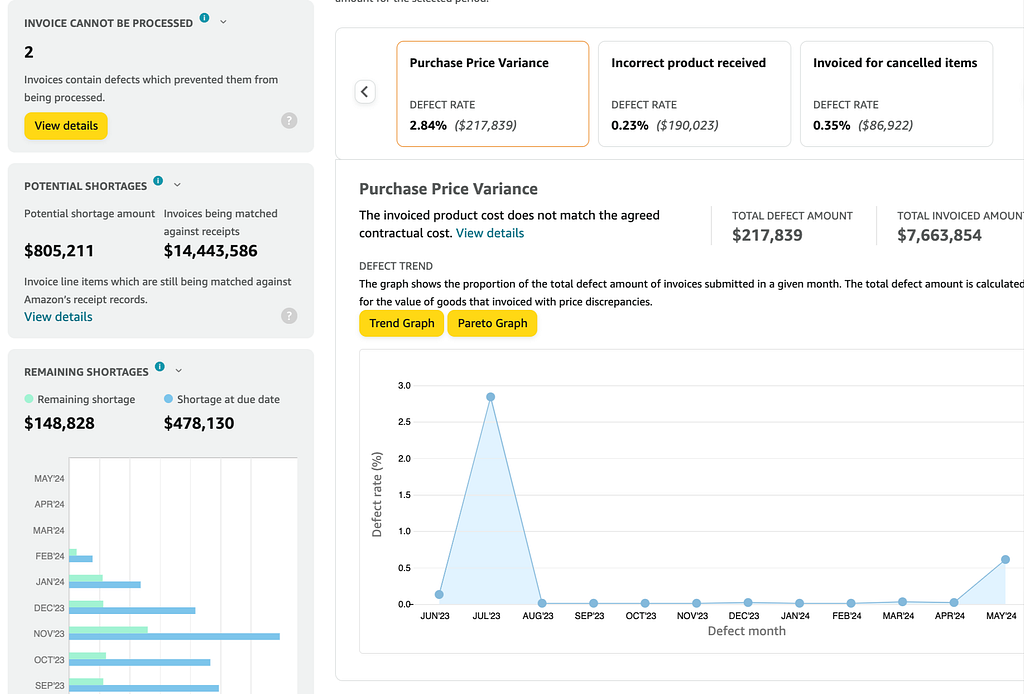
The Financial Scorecard offers an in-depth analysis of transactions between vendors and Amazon over a specific period. It helps vendors understand the reasons behind late or short payments related to invoicing, catalog discrepancies, and supply chain issues.

By using the Scorecard, vendors can identify potential gaps in their processes and receive guidance on addressing these issues to improve their business operations.

Common Issues and Corrective Actions

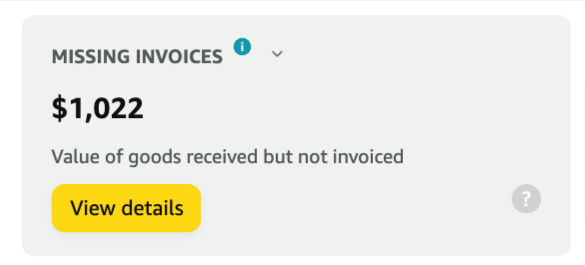
1. Missing Invoices

Issue Description:

  • Instances where Amazon has received shipments but cannot locate the corresponding invoice.

Corrective Actions:

  • Ensure an invoice is submitted when shipping products to facilitate timely payments.
  • Avoid submitting invoices via paper or PDF, as these require manual processing and take longer to appear in the system.
  • Ensure invoices comply with tax and compliance rules to prevent rejection.
  • Do not submit duplicate invoices if one has already been sent.

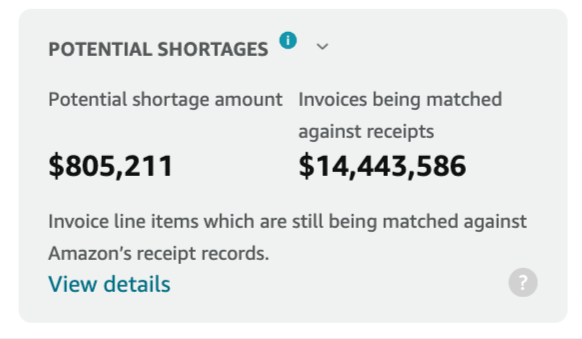
2. Potential Shortages

Issue Description:

  • Invoice line items are still being matched against Amazon’s receipt records.

Corrective Actions:

  • If products have not been shipped, send them promptly or submit a credit memo to release the invoice for payment.
  • If the shipment has already been sent, wait for the ongoing matching activities to be completed.
  • If items cannot be matched to receipts, they will be moved to remaining shortages.

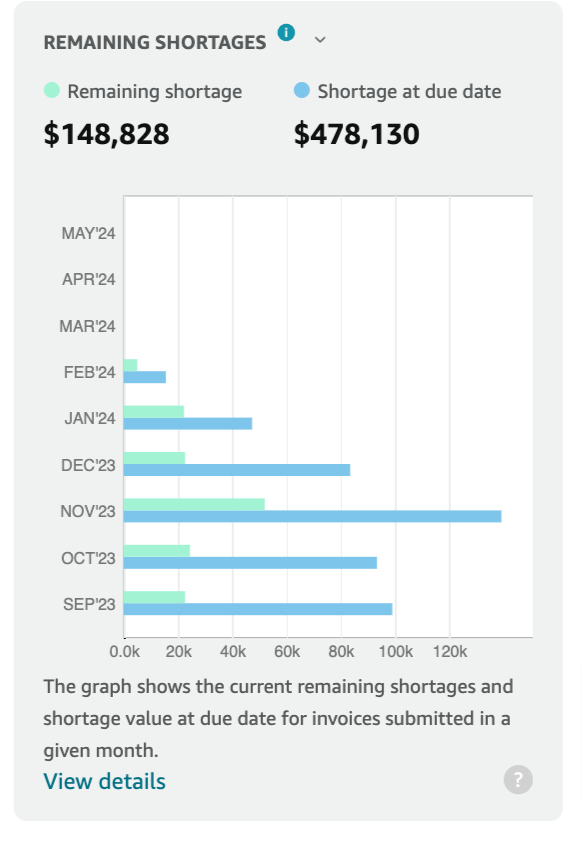
3. Remaining Shortages

Issue Description:

  • Shortages during the payment dispute process after invoice matching and reconciliation.

Corrective Actions:

  • Resolve or cancel remaining shortages promptly.
  • Send shipments for the shortage quantity within the delivery window to receive payments.
  • Submit a credit memo for the shortage quantity if the shipment was not sent.
  • Contact Amazon to cancel the Shortage Claim Reversal (SCR) invoice. An SCR invoice lists all remaining unpaid items on an invoice.

Detailed Defects Overview

The Defect Overview provides further insights into specific issues and their resolutions:

Product Not Listed on PO

Issue Description:

  • The product on the invoice is not on the purchase order (PO).

Corrective Actions:

  • Short-term Solution: Send a credit memo and a new invoice with the correct items.
  • Long-term Solution: Ensure invoiced products match the ordered ones and contact Amazon for catalog mapping verification if necessary.

Invoiced Quantity Greater Than Ordered Quantity

Issue Description:

  • The invoiced quantity exceeds the quantity on the PO.

Corrective Actions:

  • Short-term Solution: Submit a credit memo for the excess quantity.
  • Long-term Solution: Ensure the invoice reflects the exact quantity ordered.

Unrecognized Product

Issue Description:

  • The product ID on the invoice is not recognized in Amazon’s catalog.

Corrective Actions:

  • Short-term Solution: Correct ID issues in the catalog and resubmit the invoice.
  • Long-term Solution: Ensure the invoiced and shipped product ID matches the product ordered.

Multiple ASINs for a Single Product

Issue Description:

  • The product ID on the invoice refers to multiple ASINs.

Corrective Actions:

  • Short-term Solution: Verify and correct the product ID.
  • Long-term Solution: Update product details regularly through Items > Edit Products.

Incorrect Unit vs Pack Quantity

Issue Description:

  • The product quantity and cost specified on the invoice do not match the PO.

Corrective Actions:

  • Short-term Solution: Verify consistency between the PO and the invoice.
  • Long-term Solution: Regularly update product details to ensure accuracy.

Late Shipping

Issue Description:

  • The shipment arrived at least 14 days after the product was invoiced or the invoice was due for payment.

Corrective Actions:

  • Short-term Solution: Ensure timely delivery by coordinating with your carrier.
  • Long-term Solution: Issue the invoice on the same day as dispatch and deliver within the PO delivery window.

Invoiced for Cancelled Items

Issue Description:

  • Supplying products for purchase order items that were canceled before invoice submission.

Corrective Actions:

  • Short-term Solution: Check internal data to verify the items sent and send a credit memo for incorrect items.
  • Long-term Solution: Ensure timely delivery and avoid invoicing canceled items.

Incorrect Product Received

Issue Description:

  • The received products differ from the invoiced products.

Corrective Actions:

  • Short-term Solution: Send a credit memo for the wrong items and a new invoice with the correct items.
  • Long-term Solution: Ensure the warehouse team ships products listed on the invoice and PO.

Deleted Appointment

Issue Description:

  • The truck delivering the shipment failed to arrive or was rejected at the fulfillment center.

Corrective Actions:

  • Short-term Solution: Ensure the carrier arrives at the correct delivery slot.
  • Long-term Solution: Create valid appointments for truck deliveries and respect delivery dates.

Purchase Price Variance

Issue Description:

  • The invoiced product cost does not match the agreed contractual cost.

Corrective Actions:

  • Short-term Solution: Ensure no variance between the PO price and invoice price.
  • Long-term Solution: Update product costs as soon as changes occur.

Liquidated Products

Issue Description:

  • Delivered products not listed in Amazon’s catalog could not be received.

Corrective Actions:

  • Short-term Solution: Send a credit memo for the wrong items.
  • Long-term Solution: Ensure the warehouse team ships the products listed on the invoice and PO.

Overages Not Invoiced

Issue Description:

  • Items shipped but not ordered or invoiced.

Corrective Actions:

  • Short-term Solution: Verify the shipped quantity and submit an invoice for the correct quantity.
  • Long-term Solution: Ensure the warehouse team ships the quantity of units confirmed in the PO.

Invoice Cannot Be Processed

Issue Description:

  • Invoices containing defects preventing processing.

Corrective Actions:

  • Short-term Solution: Check rejected invoices and correct the issues.
  • Long-term Solution: Follow the correct guidelines to create and submit invoices.

Submitting a Credit Note (Memo)

When managing your financial transactions with Amazon Vendor Central, you may occasionally need to submit a credit note (memo) if an invoice is placed on hold due to a quantity shortage or price discrepancy. Submitting a credit note helps resolve these issues promptly and ensures your payment process continues smoothly.

Steps to Submit a Credit Note:

Navigate to Payments > Invoices:

  • This section allows you to manage and review all your invoices.

Review/Dispute Shortages:

  • In the Available Actions section, click on “Review/Dispute shortages”.
  • This will allow you to select the specific invoice that requires a credit note.

Select an Action on the Invoice:

  • Select the invoice in question and click on “Actions.”

View Invoice Details and Submit Credit Memo:

  • In the Available Actions window, click on “View Invoice details”.
  • Then, click on “Submit credit memo.”
  • Note: You can create a credit note for the total amount or a partial credit note by clicking “Submit ASIN level details.”

Enter Required Details and Submit:

  • Fill in the necessary details for the credit note.
  • Once all details are entered correctly, click “Submit”.

Alternative Method via Financial Dashboard:

  • You can also submit a credit note from the Financial Dashboard:
  • Click on “In progress” under “Your payables.”
  • Select the invoice that needs a credit memo.
  • Choose “Submit credit memo” from the Available Actions drop-down menu.

Following these steps, you can efficiently manage discrepancies and ensure your invoices are processed without delays. Submitting credit notes promptly helps maintain a healthy cash flow and keeps your transactions with Amazon running smoothly.

Understanding Provisions for Receivables

Provisions for receivables are essential to managing your financial transactions with Amazon, mainly when dealing with returns, marketing expenses, and rebates. These provisions act as temporary credit memos, ensuring your account remains balanced even when forecasted costs exceed forecasted payments.

What are Provisions for Receivables?

Provisions for receivables are temporary credit memos that Amazon can place on your account. They are used when the forecasted costs associated with returns, marketing, and rebates due to Amazon exceed the forecasted payments owed to you. The primary purpose of these provisions is to prevent these costs from creating a debit balance on your account.

How Provisions Work:

  • Deduction from Payments: Provisions are deducted from the payments due to you.
  • Subsequent Adjustment: These provisions are subject to subsequent adjustments based on the actual costs of returns, marketing, and rebates, as well as the actual payments due to you.

Provision Placement:

  • When a provision is placed on your account, it will be dated and displayed in the format YYMMDD_PROVISION_FOR_RECEIVABLES.
  • For example, a date of 161017 on your remittance means that the provision was placed on October 17, 2023.

Reversing Provisions for Receivables

Temporary Nature:

  • The provision for receivables will reverse when invoices for returns, marketing, and rebates are settled or when a decision is made not to return the inventory.
  • When a provision is reversed, it will display as YYMMDD_PROVISION_FOR_RECEIVABLESR.

Daily Recalculation:

  • Provisions are recalculated, adopted, or reversed daily.
  • No invoice copies are associated with these provisions since they are not “real” deductions.

Understanding and managing provisions for receivables helps ensure that your account remains balanced and that you can accurately forecast your financial position with Amazon.

By keeping track of these temporary credit memos and their adjustments, you can maintain a clearer picture of your overall financial health and prevent any unexpected debit balances on your account.

Improving Your Financial Transactions

Vendors can significantly improve their financial transactions with Amazon by regularly reviewing the Financial Scorecard and addressing the issues it highlights.

Here are some general tips for maintaining smooth operations:

  • Consistency: Always ensure that invoiced quantities and costs match those on the PO.
  • Accuracy: Double-check all details before submitting invoices to avoid rejections and delays.
  • Communication: Maintain open communication with Amazon to resolve any discrepancies promptly.

For further training and support, vendors can access additional resources through Vendor Central > Support > Training topics.

By understanding and utilizing the Financial Scorecard, vendors can minimize payment issues, streamline their invoicing processes, and enhance their overall business performance with Amazon.

Unlock Effortless Financial Insights With Our Code-Free Vendor Central Integration

Are you struggling with complex, messy financial data management for Vendor Central? Say goodbye to the hassle.

The Amazon Selling Partner API (SP-API) allows for direct, automated access to Amazon forecasting data, making it easier for businesses to integrate it into their systems. Openbridge allows Amazon Vendors to save time manually downloading reports, increasing data velocity and reducing errors in messy merging and tracking downloaded reports.

Openbridge automation extends beyond financial data to a broad collection of Amazon and non-Amazon data sources;

Openbridge offers a seamless, automated solution that unifies your data into a private, trusted data warehouse or data lake like Amazon Redshift, Databricks, Google BigQuery, and more — all without a single line of code. With your data unified, you can use your favorite analytic tools like Power BI, Looker, Tableau, and others for internal teams or external partners.

Automate And Unify Your Vendor Central Data — Free For 30 Days

Start your journey towards data-driven growth and profit with Openbridge. Our code-free, fully automated Selling Partner API integration simplifies your Amazon Vendor Central operations.

Ready to harness the power of your Vendor data?

Sign Up Now for Your Free 30-day Trial For Amazon Vendor Central Data Automation.


Unlock the Secrets to Skyrocket Vendor Central Profits: Eliminate Devastating Financial Scorecard Defects Now! was originally published in Openbridge on Medium, where people are continuing the conversation by highlighting and responding to this story.


from Openbridge - Medium https://ift.tt/NMFJPnO
via Openbridge

Friday, May 17, 2024

Amazon Vendor Central Purchase Orders: The Missing Guide

Explore How The Vendor Central Purchase Order Fulfillment Lifecycle Operates

Whether you’re a seasoned operator in Amazon Vendor Central or just trying to understand what a vendor journey on Amazon involves, this guide will be a reference point for daily operations, avoiding potential pitfalls, and maximizing the potential of a partnership in Amazon Vendor Central.

7 Steps In The Amazon Vendor Central Purchase Order Fulfillment Lifecycle

If you are a Vendor, you are well aware there are seven critical stages of the Purchase Order Fulfillment Lifecycle:

  1. PO Submission
  2. PO Confirmation
  3. Transportation Management
  4. Pick, Prep, and Pack
  5. Label and Build Pallet
  6. Submit Shipment
  7. Shipment Received

Each step highlights Amazon’s order processing and inventory decisions in Amazon Vendor Central.

1. PO Submission

The lifecycle begins with the submission of an Amazon purchase order.

  • Automatic Orders: Generated and submitted automatically based on a schedule for each vendor code.
  • Manual Orders: Created manually by an In-Stock Manager for specific, non-regular needs.

This initial step involves selecting and finalizing the products ordered from the supplier in Amazon Vendor Central.

2. PO Confirmation

Review and confirm the products. Vendors must confirm PO actions within 48 hours of receipt.

  • Product Availability: Confirm if the products can be shipped within the requested window.
  • Shipping Capability: Provide information on when the products can be shipped or delivered.
  • Quantity Details: Specify how many units of each product can be shipped.

Vendors in Amazon Vendor Central must accept or reject orders promptly to ensure smooth processing.

3. Transportation Management

Secure your shipment pick-up or delivery date. Transportation management in Amazon Vendor Central involves coordinating with carriers and scheduling shipments effectively.

Types of Vendors:

  1. Collect (WePay) Vendors: Pay a Freight Allowance and use Amazon-provided carriers.
  2. Prepaid (TheyPay) Vendors: Manage their shipping and use their carriers.

Vendors should submit routing requests on the order day to secure optimal shipping routes and times.

4. Pick, Prep, and Pack

Prepare the ordered products for shipment. Ensure compliance with Amazon Vendor Central packaging standards to maintain product integrity during transit.

  • Packaging Standards: Products must be ready to ship before storage, adhering to specific packaging standards.
  • Resources: Visit the Support > View Resource Center for packaging requirements and search for “Amazon Packaging Certification” for better packaging practices.

5. Label and Build Pallet

Organize and label shipments.

  • Label & Build: Each pallet is labeled with relevant shipping and order information. This labeling is essential for tracking and ensuring the correct items are shipped and received in Amazon Vendor Central.

6. Submit Shipment

Notify the buyer of shipment details. Ensures proper planning and reception of the shipment, providing insight into the contents and expected arrival.

  • Advance Shipment Notification (ASN): The ASN is a crucial document that provides detailed information about the shipment. Must be sent within 30 minutes of the carrier’s departure or 6 hours before arrival at the fulfillment center, whichever is earliest.

7. Shipment is Received

Completion of the fulfillment process.

  • Breakdown of Pallets to Cartons: Upon arrival at the fulfillment center, the shipment is broken down from pallets into individual cartons or packages for easier handling and sorting.
  • Scanning and Verification: Each carton label is scanned using a Parcel Identifier (PID) scanner to match the data submitted in the ASN.
  • Unpacking Cartons: Cartons are unpacked, and products are placed into totes for sorting according to their final delivery destinations.
  • Storing Products on Shelves: Unpacked and sorted products are stored on shelves in the fulfillment center and ready to be shipped to customers.

The final step in Amazon Vendor Central ensures that the received products are processed and prepared for final delivery to the customer.

Causes of Amazon Purchase Order Modifications

Amazon may modify a PO as they are not set in stone. The following are a few causes for a PO to be modified

1. Cancellation:

  • Vendor Non-Acceptance: POs may be canceled if they do not accept unconfirmed POs before they are automatically canceled.
  • Non-Receipt of Confirmed Quantities: If the accepted quantity on confirmed POs isn’t received by the expected-to-receive timelines, the POs are automatically canceled.
  • Issuance Errors: POs that are issued in error by Amazon will be canceled.

2. Accepted Quantity Updated:

  • Increase Requests: If a vendor’s request to increase the accepted quantity on confirmed POs is approved by Amazon, the accepted quantity will be adjusted accordingly.

3. Ship/Delivery Window Updated:

  • Extension Requests: If a vendor’s request for an extension of the shipping or delivery window is approved by Amazon, the timeline will be modified to match the new requested window.

4. Ship-to Location Updated:

  • Capacity Issues: If the initial ship-to-location encounters capacity issues, it may be modified to prevent delays in receiving the vendor’s shipments.

5. PO Item Cost Updated:

  • Cost Change Requests: If a vendor’s request for a change in the cost price of a PO item is approved by Amazon, the item cost will be updated to reflect the new amount.

Modification History Accessibility

  • Start Date: The modification history is accessible from September 8, 2023.
  • Duration: History records go back up to six months.
  • Viewing Instructions: To review past modifications within the specified timeframe, deactivate the “Hide viewed items” toggle next to the search bar.

Communicating Product Availability in Amazon Vendor Central

Effective communication of product availability is crucial for optimizing the purchase order fulfillment process and ensuring accuracy throughout the supply chain in Amazon Vendor Central.

Methods to Communicate Product Availability

1. Before a Purchase Order is Placed:

  • How to Communicate: Navigate to Items > Catalog. Utilize the Update Availability feature to verify and update product availability instantly.

2. After a Purchase Order is Placed:

  • Current Purchase Orders: Go to Orders > Purchase Orders. Use Purchase Order Acknowledgement Statuses to accept or reject orders. (See the Amazon Selling Partner API for more details)
  • Future Purchase Orders: Use the Update Availability feature to communicate changes in product availability.

Importance of Communication

  • Impact on Amazon’s Decisions: The availability signals sent by vendors influence Amazon’s purchasing strategies and the management of catalog availability, thereby affecting future buying decisions and the acknowledgment of purchase orders.

Interpretation of Availability Signals

  1. In Stock: Accepted (AC): Indicates products are in stock and expected to be fulfilled within PO policy terms.
  2. Backordered: Variants include not yet available (BA), not yet published (BX), or to be reprinted (BR).
  3. Temporarily Unavailable: This includes various cancellation statuses, such as out of stock (OS) or temporarily out of stock (IR). Soft rejection may occur, leading to potential suspension of orders if repeated.
  4. Permanently Unavailable: Statuses like permanently out of stock (CK), out of print (OP), or obsolete (CP) lead to a hard rejection, potentially resulting in indefinite suspension of orders for that product.

Actions and Consequences

  1. Acceptance: Expectation to fulfill the product as per the terms specified.
  2. Soft Reject: The product might be ordered again in the future. Frequent soft rejections can lead to a 30-day suspension of orders for the products.
  3. Hard Reject: Indicates that the product will not be available. Repeated hard rejections may cause an indefinite suspension of orders for the product.

No Purchase Orders in Amazon Vendor Central

Occasionally, vendors may encounter situations where no purchase orders are available in Amazon Vendor Central. This section outlines potential reasons and steps to address the issue.

Possible Reasons for No Purchase Orders

  1. Product Availability Issues: If product availability signals indicate frequent out-of-stock statuses or backorders, Amazon may suspend placing new purchase orders for those items.
  2. Performance Metrics: Poor performance metrics, such as low on-time delivery rates or high defect rates, can lead to a reduction or cessation of purchase orders.
  3. Changes in Demand: Shifts in consumer demand or changes in Amazon’s purchasing strategy may result in fewer or no purchase orders for specific products.

Steps to Address the Issue

  1. Review Availability Signals: Ensure product availability signals are accurate and up-to-date in Amazon Vendor Central.
  2. Improve Performance Metrics: Improve key performance metrics such as on-time delivery rates and reducing defect rates.
  3. Communicate with Amazon: Contact Amazon Vendor Central support to understand the reasons for the lack of purchase orders and seek guidance on corrective actions. By understanding the potential reasons and taking proactive steps, vendors can address the issue of no purchase orders in Amazon Vendor Central and work towards restoring regular order placements.

Automate And Unify Your Vendor Central Purchase Order Data— Free For 30 Days

Our direct, code-free data integration for Amazon Vendor Central Retail Procurement provides reliable, integrated data automation solutions that allow you to;

  • Unify data in a trusted, private industry-leading data lake, data lakehouse, or cloud warehouses like Databricks, Amazon Redshift, Amazon Redshift Spectrum, Google BigQuery, Snowflake, Azure Data Lake, Ahana, and Amazon Athena. Data is always wholly owned by you.
  • Take control, and put your data to work with your favorite analytics tools. Explore, analyze, and visualize data to deliver faster innovation while avoiding vendor lock-in using tools like Google Data Studio, Tableau, Microsoft Power BI, Looker, Amazon QuickSight, SAP, Alteryx, dbt, Azure Data Factory, Qlik Sense, and many others.

Get a 30-day free trial of the Openbridge Amazon Vendor Central Retail Procurement.


Amazon Vendor Central Purchase Orders: The Missing Guide was originally published in Openbridge on Medium, where people are continuing the conversation by highlighting and responding to this story.


from Openbridge - Medium https://ift.tt/UZTjSFW
via Openbridge

Thursday, May 16, 2024

Wednesday, May 15, 2024

Amazon Vendor Central EDI or API Integration?

Amazon EDI or SP-API? Choosing the right Vendor integration options

Amazon Vendor Central provides invaluable data for managing and growing your business with Amazon Retail. You can monitor retail KPIs, evaluate performance, identify operational improvement opportunities, and glean insights to shape your business strategy through vendor-specific dashboards.

However, understanding the best way to integrate this data — whether through EDI or the newer SP-API — can be challenging.

Why Choose Amazon Vendor Central API Over EDI?

While Electronic Data Interchange (EDI) has been a traditional method for managing supply chain messages, the Selling Partner API (SP-API) offers a more modern, efficient, and cost-effective solution. Here’s why:

  1. Lower Infrastructure and Development Costs: SP-API requires less infrastructure and development costs than EDI, making it a more cost-effective vendor choice.
  2. Ease of Use: SP-API is easier to use than EDI and does not require specialized knowledge. Your team can quickly adapt to the new system and leverage its benefits.
  3. Near Real-Time Processing: With SP-API, you can enjoy efficient near-real-time data processing, making timely decisions based on the most up-to-date information.
  4. Data Parity: SP-API ensures data parity across reports and Amazon Retail Analytics dashboards in Vendor Central, providing a consistent and reliable view of your business performance.
  5. Flexible Data Aggregation: SP-API allows you to specify and request data from different time range aggregations, such as daily, weekly, monthly, quarterly, yearly, and trailing four weeks. This allows you to analyze your data at the granularity that matters most to your business.
  6. Easy Access to Historical Data: With SP-API, you can easily access data backfills for historical data, enabling you to analyze trends and make informed decisions based on past performance.

Amazon Cendor EDI Integration Overview

While SP-API is the preferred integration method, Amazon also offers EDI integration for vendors who wish to integrate their existing EDI system with Amazon’s. The EDI Integration feature provides a solution for integrating your company’s EDI system without the need to contact Amazon directly.

You will enter the relevant information for your EDI setup during the integration process and learn about Amazon’s EDI requirements. A series of tests will ensure that the entered information and your message mapping comply with Amazon’s requirements.

Supported Messages for EDI Integration The EDI Integration feature supports various message types and EDI standards for both Amazon Retail (warehouse orders) and Direct Fulfillment (direct to customer) business types. Some of the supported message types include:

  • Purchase orders
  • Purchase order acknowledgments
  • Advance shipment notifications
  • Invoices
  • Remittance advice
  • Cost and inventory feeds
  • Routing requests and instructions
  • Order fulfillment requests and responses
  • Inventory availability advice
  • Ship label requests and responses
  • Shipment status

EDI Integration Process The EDI Integration feature is divided into three sections: Home, the Messages dashboard, and the Connection dashboard. The process involves:

  1. Access the EDI Integration feature under the Integration (EDI/API) tab and start EDI for the desired vendor code.
  2. Selecting whether to set up a new connection or reuse one from another EDI-enabled Amazon vendor account.
  3. Configuring global settings and selecting supported message types to test and schedule for production.
  4. Setting up a connection endpoint using AS2, hosted SFTP, or VAN/EDI Service Provider as connectivity protocols.

Use Case: Looking at Amazon Retail Analytics

Amazon Retail Analytics (ARA) is a powerful vendor-specific dashboard that provides the data you need to manage and grow your business on Amazon Retail. With ARA, you can monitor key performance indicators (KPIs), evaluate your performance, identify improvement opportunities, and gain valuable insights to shape your business strategy.

Mapping Amazon Retail Analytics EDI Transactions to API Report Types

To help you transition from EDI to SP-API, Amazon maps EDI transactions to API report types. Here’s a quick overview:

Table 1: Mapping Amazon Retail Analytics EDI Transactions to API Report Types

Name                        | EDI Transaction Value            | API Report Type Value
-------------------------------------------------------------------------------------------------
Sales Diagnostic | Sales (X12 852, EDIFACT SLSRPT) | GET_VENDOR_SALES_REPORT
Inventory Health & Planning | Sales (X12 852, EDIFACT SLSRPT) | GET_VENDOR_INVENTORY_REPORT
Forecasting | Forecasting (X12 830, EDIFACT DELFOR) | GET_VENDOR_FORECASTING_REPORT

Table 2: Mapping Amazon Retail Analytics Data Elements from EDI to API

Dataset       | EDI Report                          | EDI Data Element         | EDI Element Description       | API Report                   | API Element Description
-----------------------------------------------------------------------------------------------------------------------------------------------------------------------------------------
Sales | Sales report (X12 852, EDIFACT SLSRPT) | X12: AMT*8T / EDIFACT: MOA+36E | ordered_product_sales | GET_VENDOR_SALES_REPORT | orderedRevenue
Sales | Sales report (X12 852, EDIFACT SLSRPT) | X12: ZA*QS / EDIFACT: QTY+153 | customer_ordered_units | GET_VENDOR_SALES_REPORT | orderedUnits
Sales | Sales and inventory report (X12 852) | X12: ZA*TS | shipped_units | GET_VENDOR_SALES_REPORT | shippedUnits
Sales | n/a | n/a | n/a | GET_VENDOR_SALES_REPORT | shippedCogs
Sales | Sales and inventory report (X12 852) | X12: ZA*QU | customer_return_units | GET_VENDOR_SALES_REPORT | customerReturns
Sales | n/a | n/a | n/a | GET_VENDOR_SALES_REPORT | shippedRevenue
Traffic | n/a | n/a | n/a | GET_VENDOR_TRAFFIC_REPORT | glanceViews
Net pure product margin | n/a | n/a | n/a | GET_VENDOR_NET_PURE_PRODUCT_MARGIN_REPORT | netPureProductMargin
Inventory | Sales report (X12 852, EDIFACT SLSRPT) | X12: ZA*QA / EDIFACT: QTY+145 | sellable_on_hand_units | GET_VENDOR_INVENTORY_REPORT | sellableOnHandUnits
Inventory | Sales and inventory report (X12 852) | X12: ZA*QE | quantity_ending_balance | n/a | n/a
Inventory | Sales report (X12 852, EDIFACT SLSRPT) | X12: ZA*QP / EDIFACT: QTY+21 | quantity_on_order | GET_VENDOR_INVENTORY_REPORT | openPurchaseOrderQuantity
Inventory | Sales and inventory report (X12 852) | X12: ZA*DG | quantity_damaged | GET_VENDOR_INVENTORY_REPORT | unsellableOnHandUnits
Inventory | Sales and inventory report (X12 852) | X12: ZA*HL | quantity_on_hold | n/a | n/a
Inventory | Sales and inventory report (X12 852) | X12: ZA*QO | quantity_oos | GET_VENDOR_INVENTORY_REPORT | unfilledCustomerOrderedUnits
Inventory | Sales and inventory report (X12 852) | X12: ZA*QR | quantity_received | GET_VENDOR_INVENTORY_REPORT | netReceivedUnits
Inventory | Sales and inventory report (X12 852) | X12: ZA*DS | days_supply_daily | n/a | n/a
Inventory | Sales and inventory report (X12 852) | X12: ZA*WS | weeks_supply_daily | n/a | n/a
Inventory | Sales and inventory report (X12 852) | X12: ZA*ST | sell_through | GET_VENDOR_INVENTORY_REPORT | sellThroughRate
Inventory | Sales and inventory report (X12 852) | X12: ZA*FV | forecast_variance | n/a | n/a
Inventory | Sales and inventory report (X12 852) | X12: ZA*QI | quantity_in_transit | n/a | n/a
Inventory | n/a | n/a | n/a | GET_VENDOR_INVENTORY_REPORT | [various inventory metrics]
Forecasting | Forecast report (X12 830, EDIFACT DELFOR) | n/a | Mean forecast value (week 1-26) | GET_VENDOR_FORECASTING_REPORT | meanForecastUnits (week 1-26)
Forecasting | n/a | n/a | n/a | GET_VENDOR_FORECASTING_REPORT | [various forecast accuracy metrics]

How to Integrate with Amazon Retail Analytics Report APIs

There are two main pathways to take advantage of the SP-API, each suited for different enterprise needs. However, only one option allows vendors to get data flowing in minutes to a private, trusted data warehouse or lake: Openbridge!

1. DIY Integration

Why Choose This Path? Enterprises with strong internal development teams and a preference for full control over their data integration processes might opt for the DIY approach.

  • Review the Selling Partner API Developer Guide: Familiarize yourself with the documentation and requirements.
  • Complete Your Developer Profile: Apply for access to the Brand Analytics role on Vendor Central.
  • Set Up Development Environments: Establish development, staging, and production environments.
  • Select Coding Libraries and SDKs: Choose appropriate libraries and SDKs to facilitate integration.
  • Make API Calls: Start integrating with the vendor retail analytics reports.
  • Fetch SP-API Reports and Upload to S3 Bucket (1 week): Include any necessary JSON conversions.
  • Load Data from S3 to a Database (e.g., Redshift) (1 week): Utilize pre-existing solutions for efficiency.
  • Implement Monitoring and Error Handling: Set up systems to monitor performance and handle errors effectively.
  • Manage Change Control: Keep up with API updates and deprecations to ensure continued compatibility.
  • Backfill Historical Data (Optional): Use the documentation to understand the availability of historical data.

2. Openbridge: A Code-Free, Fully Automated Solution

Why Choose This Path? Enterprises seeking a rapid, hassle-free implementation with minimal setup time and no coding required will find Openbridge the perfect fit.

  • Automation Accelerates Insights: Seamlessly integrate data with tools like Tableau, Looker, Power BI, Google Data Studio, and AWS Quicksight for forecasting, analysis, reporting, and marketing efforts.
  • Unify Data in Your Cloud Warehouse: Consolidate data in a trusted, private data lake or cloud warehouse such as Snowflake, Azure Data Lake, AWS Redshift, AWS Redshift Spectrum, AWS Athena, and Google BigQuery.

Each pathway offers unique advantages depending on your enterprise’s needs, but only Openbridge provides a code-free, fully automated solution that gets your data up and running swiftly and securely.

Automate And Unify Your Vendor Central Data — Free For 30 Days

Openbridge automation extends beyond inventory to a broad collection of Amazon and non-Amazon data sources;

Start your journey towards data-driven growth and profit with Openbridge. Code-free, fully automated Selling Partner API integration simplifies your Amazon Vendor Central operations.

Ready to harness the power of your Amazon Vendor Central data?

Sign Up Now for Your Free 30-day Trial For Amazon Vendor Central Automation.


Amazon Vendor Central EDI or API Integration? was originally published in Openbridge on Medium, where people are continuing the conversation by highlighting and responding to this story.


from Openbridge - Medium https://ift.tt/nUI7Fkj
via Openbridge

Tuesday, May 14, 2024

New compute-optimized (C7i-flex) Amazon EC2 Flex instances

The vast majority of applications don’t run run the CPU flat-out at 100% utilization continuously. Take a web application, for instance. It typically fluctuates between periods of high and low demand, but hardly ever uses a server’s compute at full capacity.

a graph showing how a typical application runs with low-to-moderate CPU utilization most of the time with occasional peaks.

CPU utilization for many common workloads that customers run in the AWS Cloud today. (source: AWS Documentation)

One easy and cost-effective way to run such workloads is to use the Amazon EC2 M7i-flex instances which we introduced last August. These are lower-priced variants of the Amazon EC2 M7i instances offering the same next-generation specs for general purpose compute for the most popular sizes with the added benefit of giving you better price/performance if you don’t need full compute power 100 percent of the time. This makes them a great first choice if you are looking to reduce your running cost while meeting the same performance benchmarks.

This flexibility resonated really well with customers so, today, we are expanding our Flex portfolio by launching Amazon EC2 C7i-flex instances offering similar benefits of price/performance and lower costs for compute-intensive workloads. These are lower-priced variants of the Amazon EC2 C7i instances that offer a baseline level of CPU performance with the ability to scale up to the full compute performance 95% of the time.

C7i-flex instances
C7i-flex offers five of the most common sizes from large to 8xlarge, delivering 19 percent better price performance than Amazon EC2 C6i instances.

Instance name vCPU Memory (GiB) Instance storage (GB) Network bandwidth (Gbps) EBS bandwidth (Gbps)
c7i-flex.large 2 4 EBS-only up to 12.5 up to 10
c7i-flex.xlarge 4 8 EBS-only up to 12.5 up to 10
c7i-flex.2xlarge 8 16 EBS-only up to 12.5 up to 10
c7i-flex.4xlarge 16 32 EBS-only up to 12.5 up to 10
c7i-flex.8xlarge 32 64 EBS-only up to 12.5 up to 10

Should I use C7i-flex or C7i?
Both C7i-flex and C7i are compute-optmized instances powered by custom 4th Generation Intel Xeon Scalable processors which are only available at Amazon Web Services (AWS). They offer up to 15 percent better performance over comparable x86-based Intel processors used by other cloud providers.

They both also use DDR5 memory, feature a 2:1 ratio of memory to vCPU, and are ideal for running applications such as web and application servers, databases, caches, Apache Kafka, and Elasticsearch.

So why would you use one over the other? Here are three things to consider when deciding which one is right for you.

Usage pattern
EC2 flex instances are a great fit for when you don’t need to fully utilize all compute resources.

You can achieve 5 percent better price performance and 5 percent lower prices due to efficient use of compute resources. Typically, this is a great fit for most applications, so C7i-flex instances should be the first choice for compute-intensive workloads.

However, if your application requires continuous high CPU usage, then you should use C7i instances instead. They are likely more suitable for workloads such as batch processing, distributed analytics, high performance computing (HPC), ad serving, highly scalable multiplayer gaming, and video encoding.

Instance sizes
C7i-flex instances offer the most common sizes used by a majority of workloads going up to a maximum of 8xlarge in size.

If you need higher specs, then you should look into the large C7i instances, which include 12xlarge, 16xlarge, 24xlarge, 48xlarge and two bare metal options with metal-24xl and metal-48xl sizes.

Network bandwidth
Larger sizes also offer higher network and Amazon Elastic Block Store (Amazon EBS) bandwidths so you may need to use one of the larger C7i instances depending on your requirements. C7i-flex instances offer up to 12.5 Gbps of network bandwidth and up to 10 Gbps of Amazon Elastic Block Store (Amazon EBS) bandwidth which should be suitable for most applications.

Things to know
Regions – Visit AWS Services by Region to check whether C7i-flex instances are available in your preferred regions.

Purchasing options – C7i-Flex and C7i instances are available in On-Demand, Savings Plan, Reserved Instance, and Spot form. C7i instances are also available in Dedicated Host and Dedicated Instance form.

To learn more visit Amazon EC2 C7i and C7i-flex instances

Matheus Guimaraes


from AWS News Blog https://ift.tt/BRfJjpT
via IFTTT