Tuesday, March 21, 2023

AWS Clean Rooms Now Generally Available — Collaborate with Your Partners without Sharing Raw Data

Companies across multiple industries, such as advertising and marketing, retail, consumer packaged goods (CPG), travel and hospitality, media and entertainment, and financial services, increasingly look to supplement their data with data from business partners, to build a complete view of their business.

Let’s take a marketing use case as an example. Brands, publishers, and their partners need to collaborate using datasets that are stored across many channels and applications to improve the relevance of their campaigns and better engage with consumers. At the same time, they also want to protect sensitive consumer information and eliminate the sharing of raw data. Data clean rooms can help solve this challenge by allowing multiple companies to analyze their collective data in a private environment.

However, it’s difficult to build data clean rooms. It requires complex privacy controls, specialized tools to protect each collaborator’s data, and months of development time customizing analytics tools. The effort and complexity grows when a new collaborator is added, or a different type of analysis is needed, as companies have to spend even more development time. Finally, companies prefer to limit data movement as much as possible, usually leading to less collaboration and missed opportunities to generate new business insights.

Introducing AWS Clean Rooms
Today, I’m excited to announce the general availability of AWS Clean Rooms which we first announced at AWS re:Invent 2022 and released the preview of in January 2023. AWS Clean Rooms is an analytics service of AWS Applications that helps companies and their partners more easily and securely analyze and collaborate on their collective datasets without sharing or copying each other’s data. AWS Clean Rooms enables customers to generate unique insights about advertising campaigns, investment decisions, clinical research, and more, while helping them protect data.

Now, with AWS Clean Rooms, companies are able to easily create a secure data clean room on the AWS Cloud in minutes and collaborate with their partners. They can use a broad set of built-in, privacy-enhancing controls for clean rooms. These controls allow companies to customize restrictions on the queries run by each clean room participant, including query controls, query output restrictions, and query logging. AWS Clean Rooms also includes advanced cryptographic computing tools that keep data encrypted—even as queries are processed—to help comply with stringent data handling policies.

Key Features of AWS Clean Rooms
Let me share with you the key features and how easy it is to collaborate with AWS Clean Rooms.

Create Your Own Clean Rooms
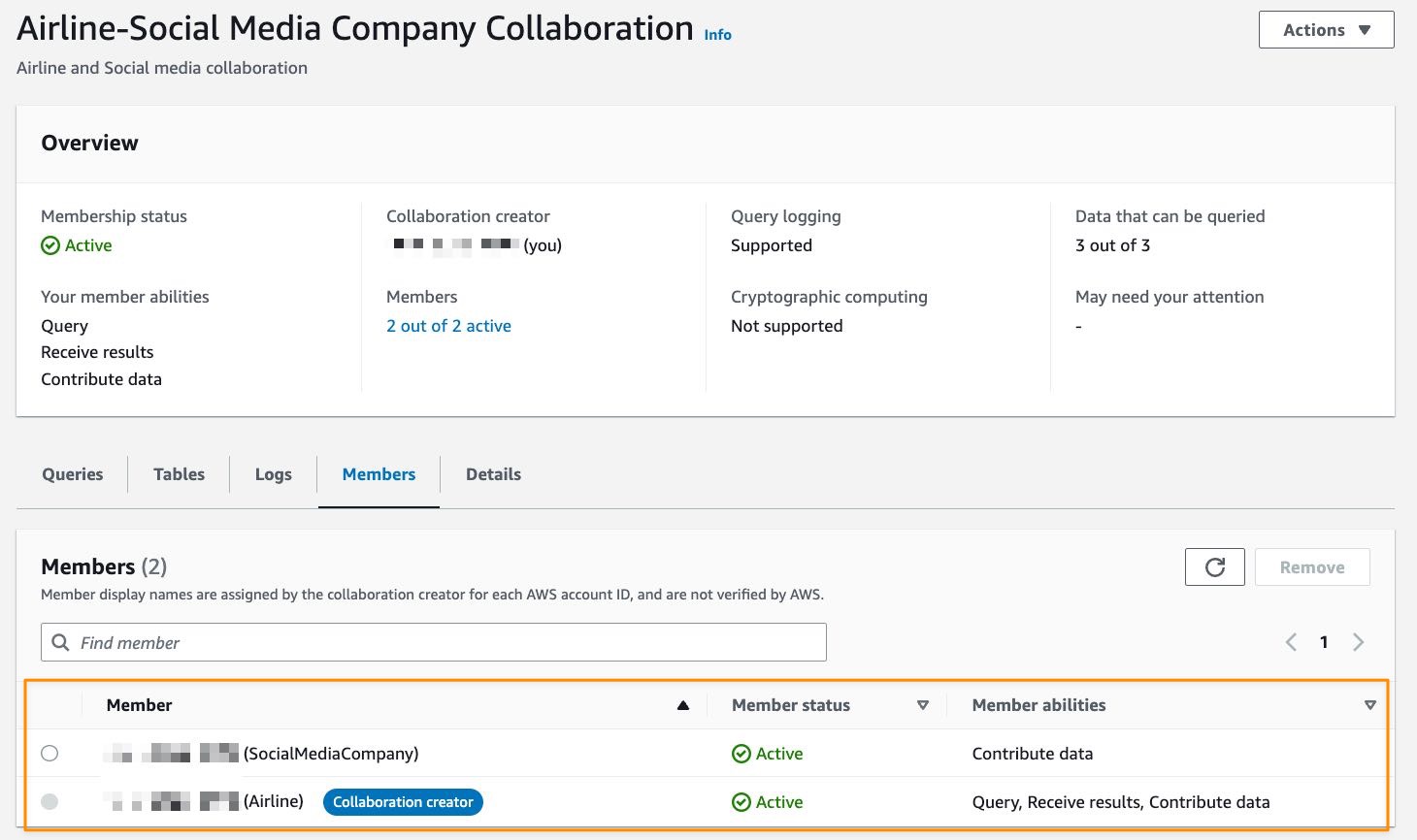
AWS Clean Rooms helps you to start a collaboration in minutes and then select the other companies you want to collaborate with. You can collaborate with any of your partners that agree to participate in your clean room collaboration. You can create a collaboration by following several steps.
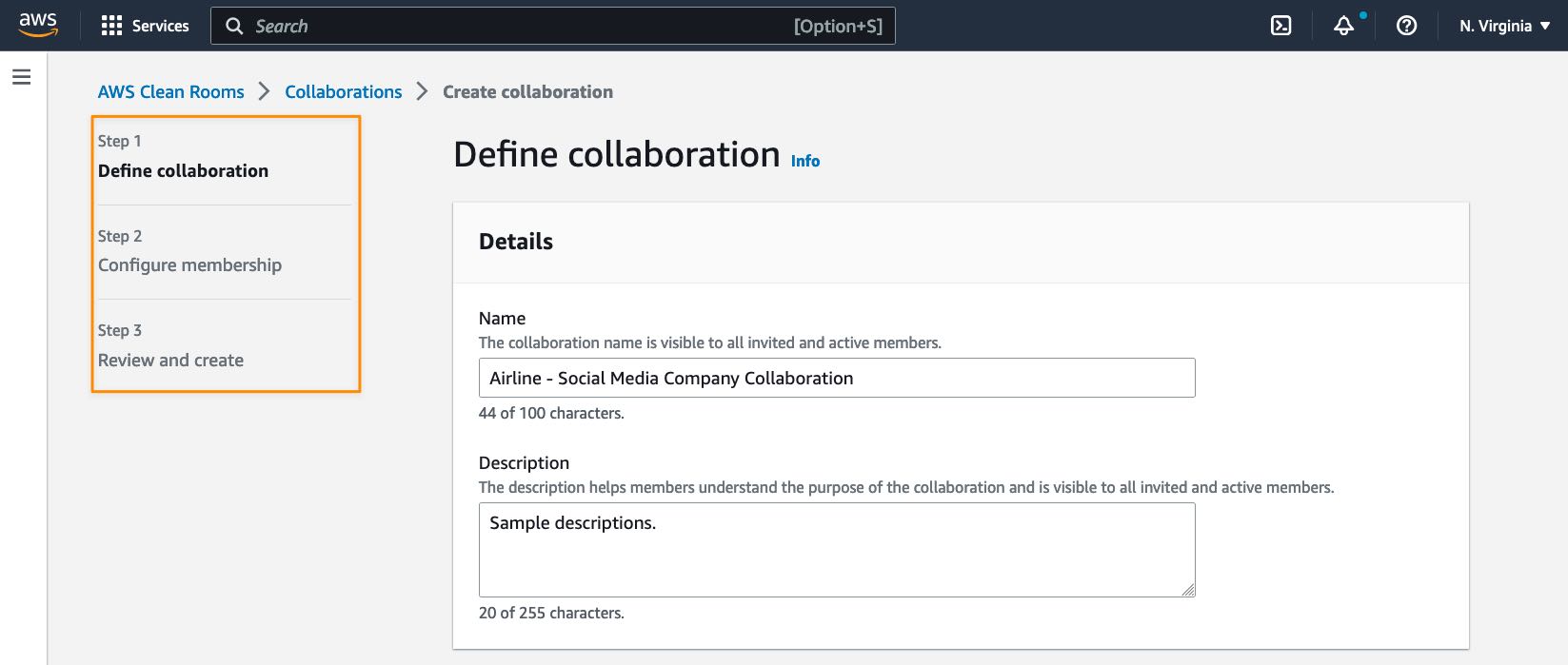
After creating a collaboration in AWS Clean Rooms, you can select additional collaboration members who can contribute. Currently, AWS Clean Rooms supports up to five collaboration members, including you as the collaboration creator.
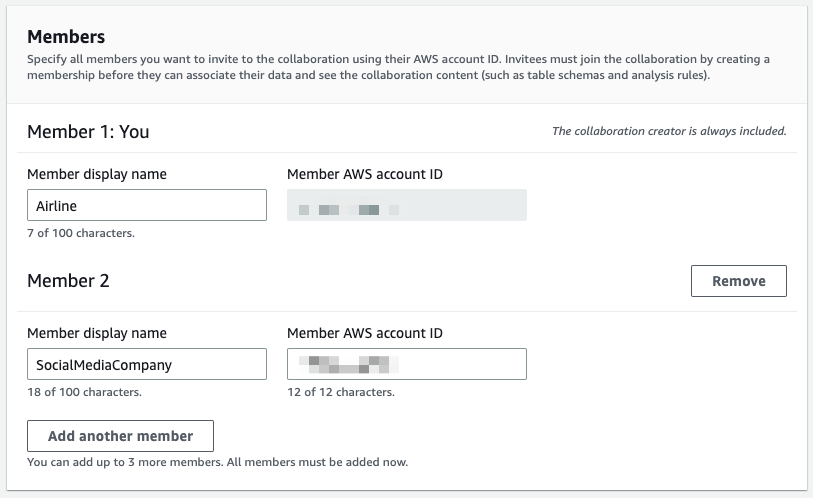
The next step is to define which collaboration member can perform a query in collaboration with the member abilities setting.
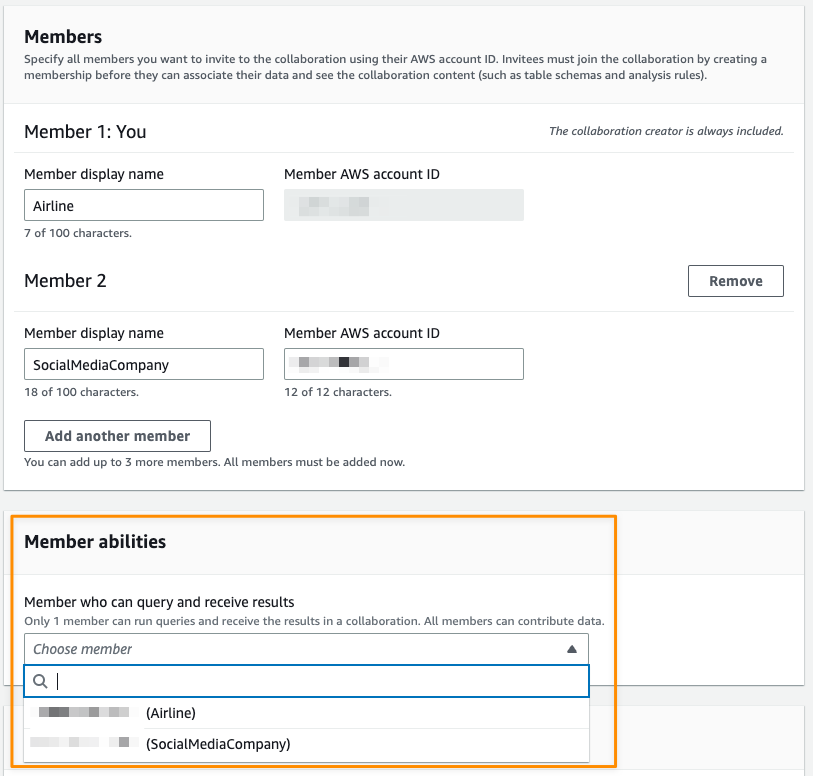
Then, collaboration members will get notifications in their accounts, see detailed info from a collaboration, and decide whether to join the collaboration by selecting Create membership in their AWS Clean Rooms dashboard.
Collaborate without Moving Data Outside AWS
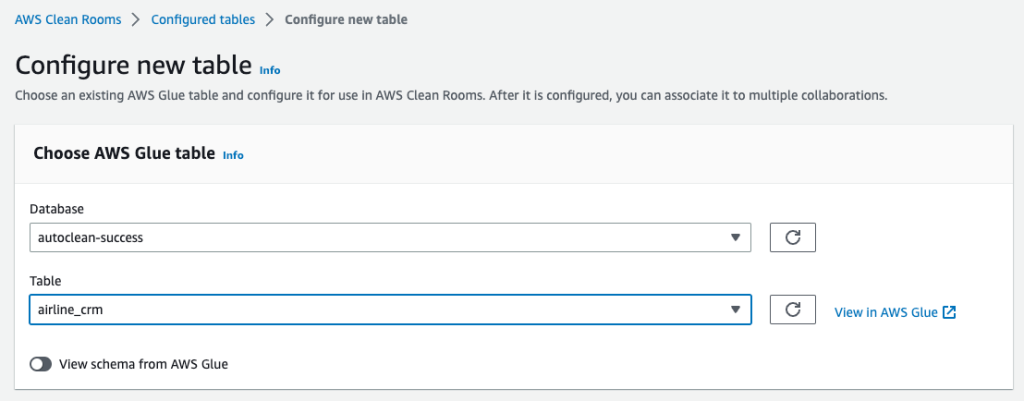
AWS Clean Rooms works by analyzing Amazon S3 data in place. This eliminates the need for companies to copy and load their data into destinations outside their respective AWS environments of the collaboration members or using third-party services.

Each collaboration member can create configured tables, an AWS Clean Rooms resource that contains reference to the AWS Glue catalog with underlying data that define how that data can be used. The configured table can be used across many collaborations.
Protecting Data
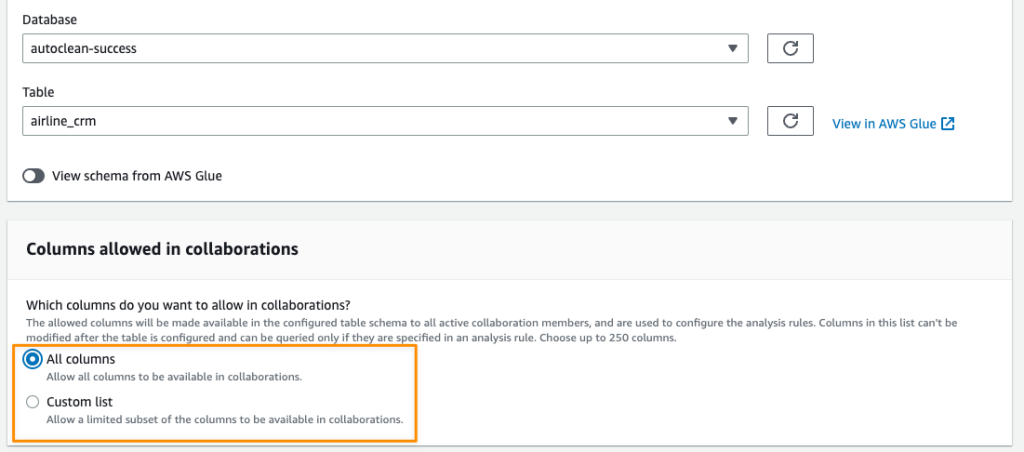
AWS Clean Rooms provides you with a broad set of privacy-enhancing controls to protect your customers’ and partners’ data. Each collaboration member has the flexibility to determine what columns can be accessed in a collaboration.
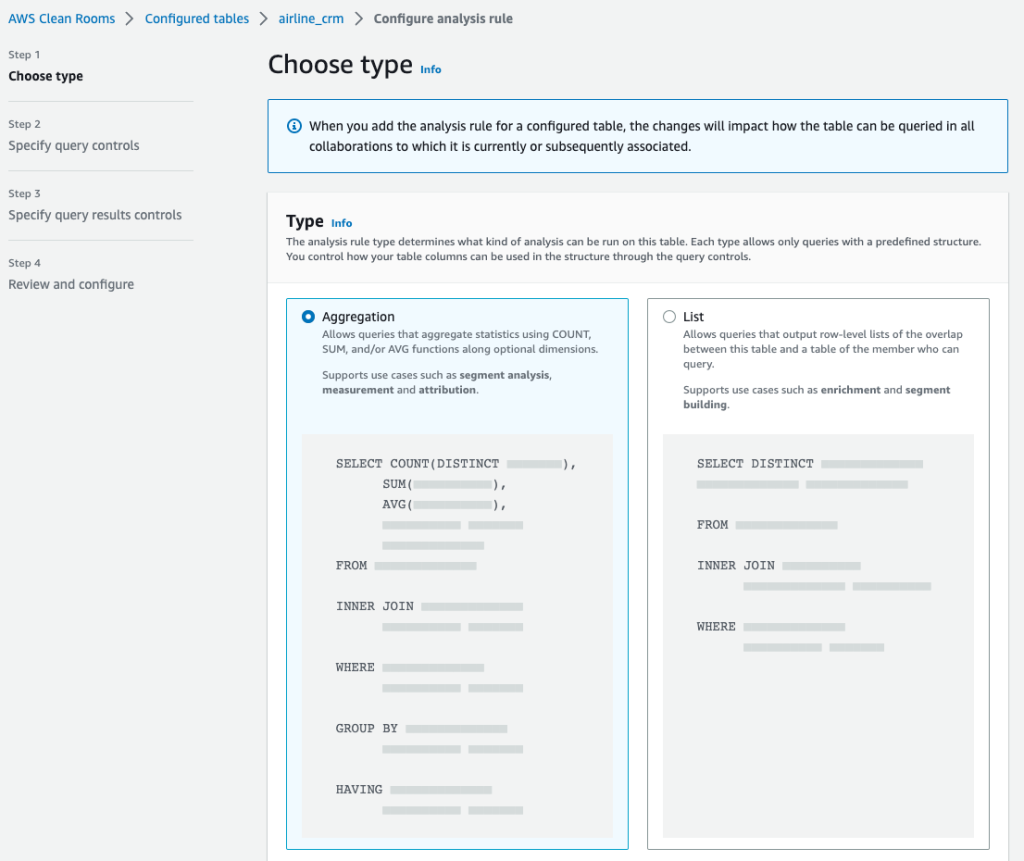
In addition to column-level privacy controls, as in the example above, AWS Clean Rooms also provides fine-grained query controls called analysis rules. With built-in and flexible analysis rules, customers can tailor queries to specific business needs. AWS Clean Rooms provides two types of analysis rules for customers to use:

  • Aggregation analysis rules allows queries that aggregate analysis without revealing user-level information using COUNT, SUM, and AVG functions along optional dimensions.
  • List analysis rules allow queries that output user-level attribute analysis of the overlap between the customer’s table and the tables of the member who can query.

Both analysis rule types allow data owners to require a join between their datasets and the datasets of the collaborator running the query. This limits the results to just their intersection of the collaborators datasets.
After defining the analysis rules, the member who can query and receive results can start writing queries according to the restrictions defined by each participating collaboration member. The following is an example query in the collaboration.
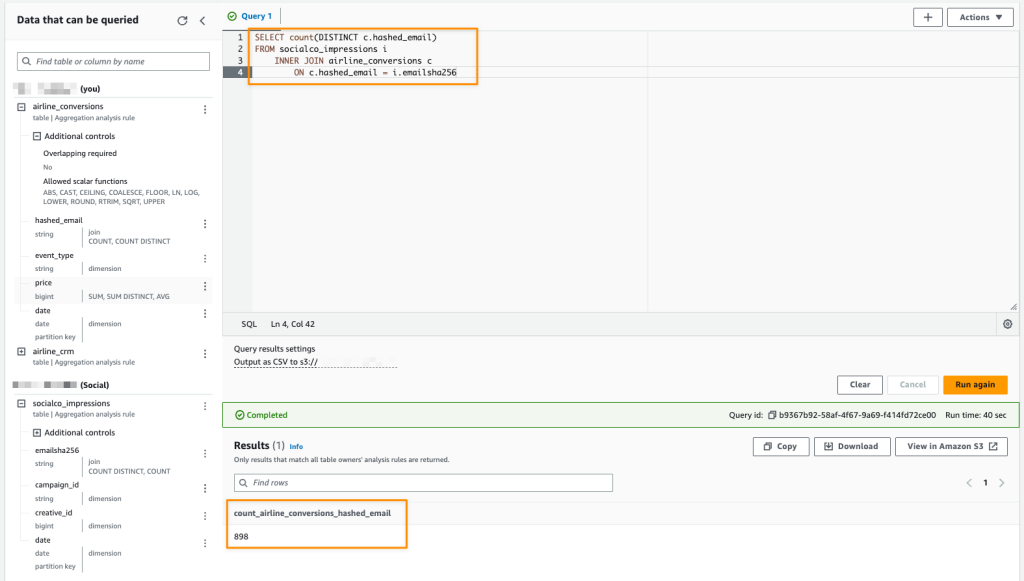
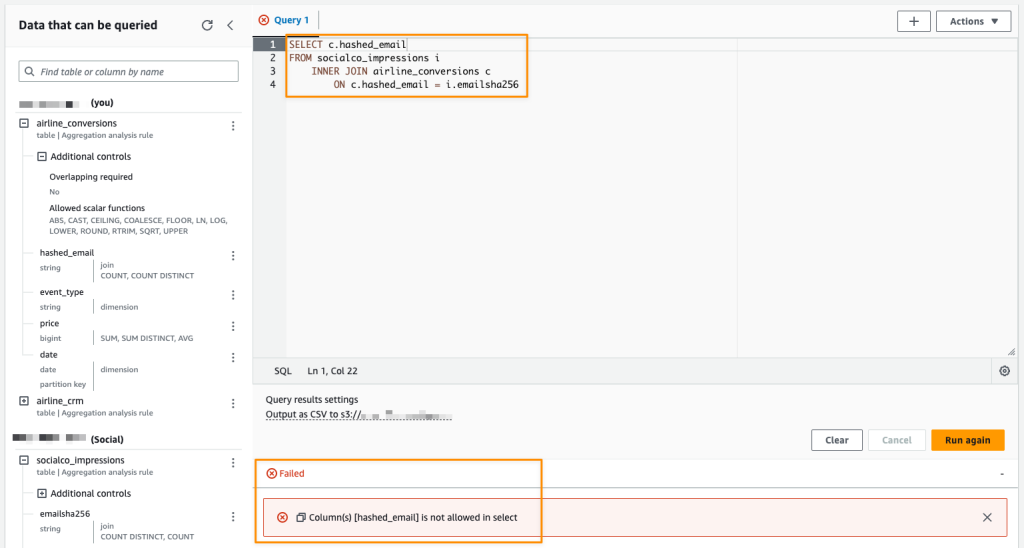
Analysis rules allow collaboration members to restrict the types of queries that can be performed against their datasets and the usable output of the query results. The following screenshot is an example of a query that will not be successful because it does not satisfy the analysis rule since the hashed_email column cannot be used in SELECT queries.
Full Programmatic Access
Any functionality offered by AWS Clean Rooms can also be accessed via the API using AWS SDKs or AWS CLI. This makes it easier for you to integrate AWS Clean Rooms into your products or workflows. This programmatic access also unlocks the opportunity for you to host clean rooms for your customers with your own branding.

Query Logging
This feature allows collaboration members to review and audit the queries that use their datasets to make sure data is being used as intended. With query logging, collaboration members who have query control and other members whose data is part of the query, can receive logs if they enable query logging.
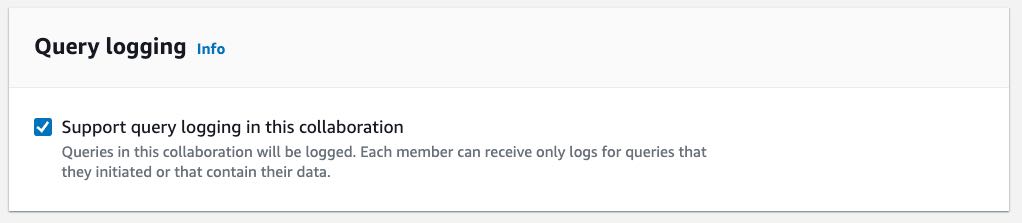
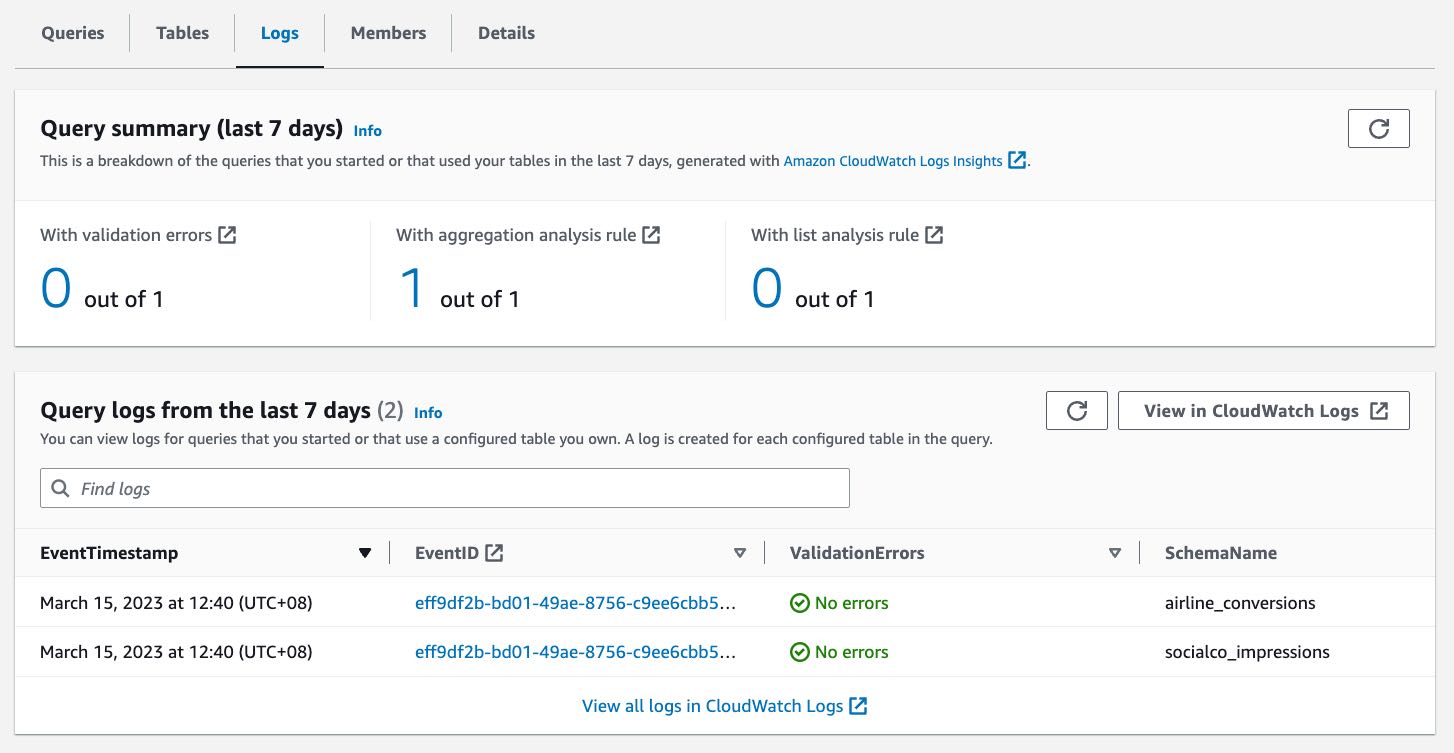
If this feature is enabled, query logs are written to Amazon CloudWatch Logs in each collaboration member’s account. You can access the summary of the log queries in the last 7 days from the collaboration dashboard.
Cryptographic Computing
With this feature, you have the option to perform client-side encryption for sensitive data with cryptographic computing. You can encrypt your dataset to add a protection layer, and the data will use a cryptographic computing protocol called private-set intersection to keep data encrypted even as the query runs.

To use the cryptographic computing feature, you need to download and use the Cryptographic Computing for Clean Rooms (C3R) encryption client to encrypt and decrypt your data. C3R keeps your data cryptographically protected while in use in AWS Clean Rooms. C3R supports a subset of SQL queries, including JOIN, SELECT, GROUP BY, COUNT, and other supported statements on cryptographically protected data.

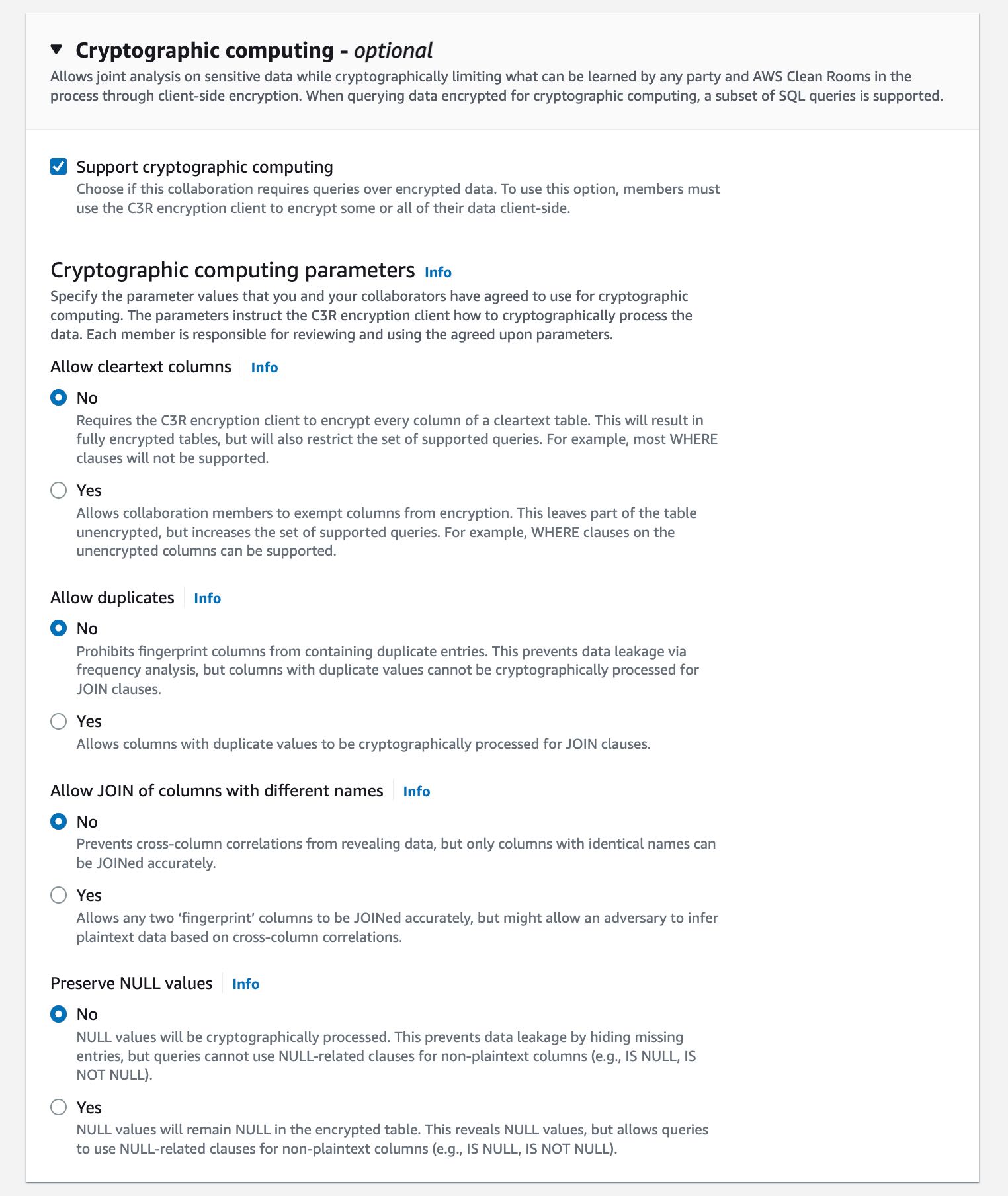
The following image shows how you can enable cryptographic computing when creating a collaboration:
Customer Voices
During the preview period, we heard lots of feedback from our customers about AWS Clean Rooms. Here’s what our customers say:

Comscore is a measurement and analytics company that brings trust and transparency to media. Brian Pugh, Chief Information Officer at Comscore, said, “As advertisers and marketers adapt to deliver relevant campaigns leveraging their combined datasets while protecting consumer data, Comscore’s Media Metrix suite, powered by Unified Digital Measurement 2.0 and Campaign Ratings services, will continue to support critical measurement and planning needs with services like AWS Clean Rooms. AWS Clean Rooms will enable new methods of collaboration among media owners, brands, or agency customers through customized data access controls managed and set by each data owner without needing to share underlying data.”

DISH Media is a leading TV provider that offers over-the-top IPTV service. “At DISH Media, we empower brands and agencies to run their own analyses of prior campaigns to allow for flexibility, visibility, and ease in optimizing future campaigns to reach DISH Media’s 31 million consumers. With AWS Clean Rooms, we believe advertisers will benefit from the ease of use of these services with their analysis, including data access and security controls,” said Kemal Bokhari, Head of Data, Measurement, and Analytics at DISH Media.

Fox Corporation is a leading producer and distributor of ad-supported content through its sports, news, and entertainment brands. Lindsay Silver, Senior Vice President of Data and Commercial Technology at Fox Corporation, said, “It can be challenging for our advertising clients to figure out how to best leverage more data sources to optimize their media spend across their combined portfolio of entertainment, sports, and news brands which reach 200 million monthly viewers. We are excited to use AWS Clean Rooms to enable data collaborations easily and securely in the AWS Cloud that will help our advertising clients unlock new insights across every Fox brand and screen while protecting consumer data.”

Amazon Marketing Cloud (AMC) is a secure, privacy-safe clean room application from Amazon Ads that supports thousands of marketers with custom analytics and cross-channel analysis.

“Providing marketers with greater control over their own signals while being able to analyze them in conjunction with signals from Amazon Ads is crucial in today’s marketing landscape. By migrating AMC’s compute infrastructure to AWS Clean Rooms under the hood, marketers can use their own signals in AMC without storing or maintaining data outside of their AWS environment. This simplifies how marketers can manage their signals and enables AMC teams to focus on building new capabilities for brands,” said Paula Despins, Vice President of Ads Measurement at Amazon Ads.

Watch this video to learn more about AWS Clean Rooms:

Availability
AWS Clean Rooms is generally available in the following AWS Regions: US East (Ohio), US East (N. Virginia), US West (Oregon), Asia Pacific (Seoul), Asia Pacific (Singapore), Asia Pacific (Sydney), Asia Pacific (Tokyo), Europe (Frankfurt), Europe (Ireland), Europe (London), and Europe (Stockholm).

Pricing & Free Tier
AWS Clean Rooms measures compute capacity in Clean Rooms Processing Units (CRPUs). You only pay the compute capacity of queries that you run in CRPU-hours on a per-second basis (with a 60-second minimum charge). AWS Clean Rooms automatically scales up or down to meet your query workload demands and shuts down during periods of inactivity, saving you administration time and costs. AWS Clean Rooms free tier provides a tier of 9 CRPU-hours per month for the first 12 months per new customer.

AWS Clean Rooms helps companies and their partners more easily and securely analyze and collaborate on their collective datasets without sharing or copying each other’s data. Learn more about benefits, use cases, how to get started, and pricing details on the AWS Clean Rooms page.

Happy collaborating!

— Donnie


from AWS News Blog https://ift.tt/t9QXPHY
via IFTTT

AWS Week in Review – March 20, 2023

This post is part of our Week in Review series. Check back each week for a quick roundup of interesting news and announcements from AWS!

A new week starts, and Spring is almost here! If you’re curious about AWS news from the previous seven days, I got you covered.

Last Week’s Launches
Here are the launches that got my attention last week:

Picture of an S3 bucket and AWS CEO Adam Selipsky.Amazon S3 – Last week there was AWS Pi Day 2023 celebrating 17 years of innovation since Amazon S3 was introduced on March 14, 2006. For the occasion, the team released many new capabilities:

Amazon Linux 2023 – Our new Linux-based operating system is now generally available. Sébastien’s post is full of tips and info.

Application Auto Scaling – Now can use arithmetic operations and mathematical functions to customize the metrics used with Target Tracking policies. You can use it to scale based on your own application-specific metrics. Read how it works with Amazon ECS services.

AWS Data Exchange for Amazon S3 is now generally available – You can now share and find data files directly from S3 buckets, without the need to create or manage copies of the data.

Amazon Neptune – Now offers a graph summary API to help understand important metadata about property graphs (PG) and resource description framework (RDF) graphs. Neptune added support for Slow Query Logs to help identify queries that need performance tuning.

Amazon OpenSearch Service – The team introduced security analytics that provides new threat monitoring, detection, and alerting features. The service now supports OpenSearch version 2.5 that adds several new features such as support for Point in Time Search and improvements to observability and geospatial functionality.

AWS Lake Formation and Apache Hive on Amazon EMR – Introduced fine-grained access controls that allow data administrators to define and enforce fine-grained table and column level security for customers accessing data via Apache Hive running on Amazon EMR.

Amazon EC2 M1 Mac Instances – You can now update guest environments to a specific or the latest macOS version without having to tear down and recreate the existing macOS environments.

AWS Chatbot – Now Integrates With Microsoft Teams to simplify the way you troubleshoot and operate your AWS resources.

Amazon GuardDuty RDS Protection for Amazon Aurora – Now generally available to help profile and monitor access activity to Aurora databases in your AWS account without impacting database performance

AWS Database Migration Service – Now supports validation to ensure that data is migrated accurately to S3 and can now generate an AWS Glue Data Catalog when migrating to S3.

AWS Backup – You can now back up and restore virtual machines running on VMware vSphere 8 and with multiple vNICs.

Amazon Kendra – There are new connectors to index documents and search for information across these new content: Confluence Server, Confluence Cloud, Microsoft SharePoint OnPrem, Microsoft SharePoint Cloud. This post shows how to use the Amazon Kendra connector for Microsoft Teams.

For a full list of AWS announcements, be sure to keep an eye on the What's New at AWS page.

Other AWS News
A few more blog posts you might have missed:

Example of a geospatial query.Women founders Q&A – We’re talking to six women founders and leaders about how they’re making impacts in their communities, industries, and beyond.

What you missed at that 2023 IMAGINE: Nonprofit conference – Where hundreds of nonprofit leaders, technologists, and innovators gathered to learn and share how AWS can drive a positive impact for people and the planet.

Monitoring load balancers using Amazon CloudWatch anomaly detection alarms – The metrics emitted by load balancers provide crucial and unique insight into service health, service performance, and end-to-end network performance.

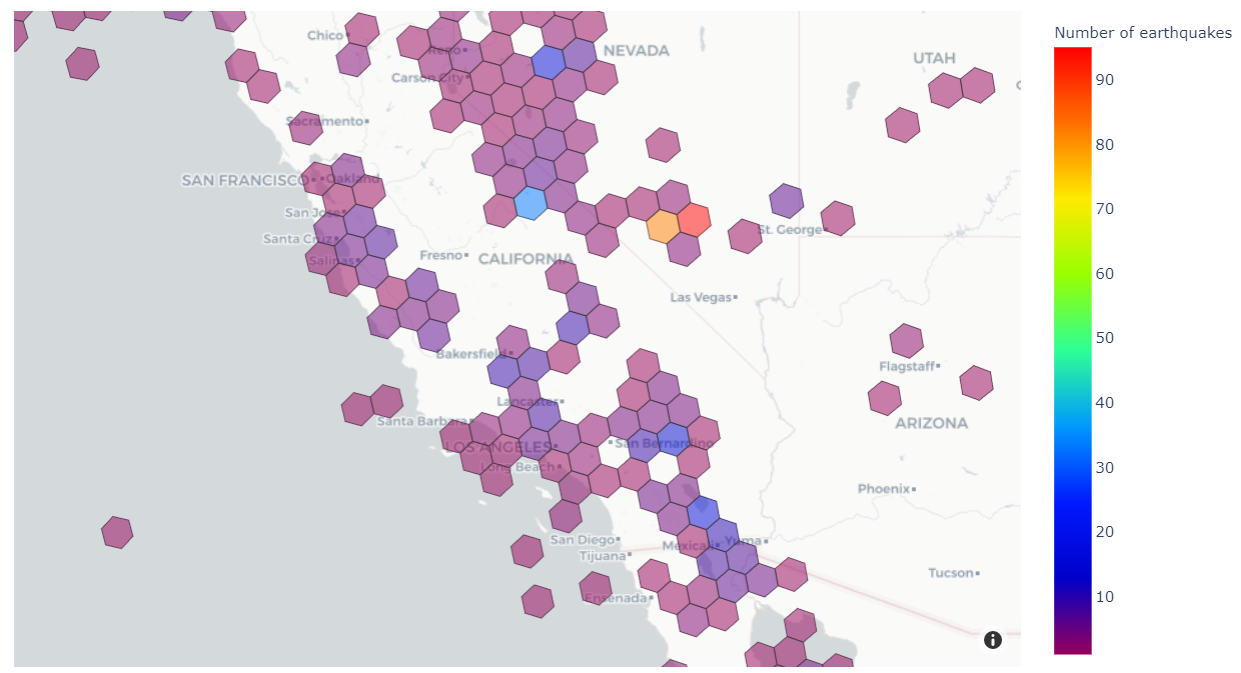
Extend geospatial queries in Amazon Athena with user-defined functions (UDFs) and AWS Lambda – Using a solution based on Uber’s Hexagonal Hierarchical Spatial Index (H3) to divide the globe into equally-sized hexagons.

How cities can use transport data to reduce pollution and increase safety – A guest post by Rikesh Shah, outgoing head of open innovation at Transport for London.

For AWS open-source news and updates, here’s the latest newsletter curated by Ricardo to bring you the most recent updates on open-source projects, posts, events, and more.

Upcoming AWS Events
Here are some opportunities to meet:

AWS Public Sector Day 2023 (March 21, London, UK) – An event dedicated to helping public sector organizations use technology to achieve more with less through the current challenging conditions.

Women in Tech at Skills Center Arlington (March 23, VA, USA) – Let’s celebrate the history and legacy of women in tech.

The AWS Summits season is warming up! You can sign up here to know when registration opens in your area.

That’s all from me for this week. Come back next Monday for another Week in Review!

— Danilo


from AWS News Blog https://ift.tt/RvZWfgw
via IFTTT

Thursday, March 16, 2023

AWS Chatbot Now Integrates With Microsoft Teams

I am pleased to announce that, starting today, you can use AWS Chatbot to troubleshoot and operate your AWS resources from Microsoft Teams.

Communicating and collaborating on IT operation tasks through chat channels is known as ChatOps. It allows you to centralize the management of infrastructure and applications, as well as to automate and streamline your workflows. It helps to provide a more interactive and collaborative experience, as you can communicate and work with your colleagues in real time through a familiar chat interface to get the job done.

We launched AWS Chatbot in 2020 with Amazon Chime and Slack integrations. Since then, the landscape of chat platforms has evolved rapidly, and many of you are now using Microsoft Teams.

AWS Chatbot Benefits
When using AWS Chatbot for Microsoft Teams or other chat platforms, you receive notifications from AWS services directly in your chat channels, and you can take action on your infrastructure by typing commands without having to switch to another tool.

Typically you want to receive alerts about your system health, your budget, any new security threat or risk, or the status of your CI/CD pipelines. Sending a message to the chat channel is as simple as sending a message on an Amazon Simple Notification Service (Amazon SNS) topic. Thanks to the native integration between Amazon CloudWatch alarms and SNS, alarms are automatically delivered to your chat channels with no additional configuration step required. Similarly, thanks to the integration between Amazon EventBridge and SNS, any system or service that emits events to EventBridge can send information to your chat channels.

But ChatOps is more than the ability to spot problems as they arise. AWS Chatbot allows you to receive predefined CloudWatch dashboards interactively and retrieve Logs Insights logs to troubleshoot issues directly from the chat thread. You can also directly type in the chat channel most AWS Command Line Interface (AWS CLI) commands to retrieve additional telemetry data or resource information or to run runbooks to remediate the issues.

Typing and remembering long commands is difficult. With AWS Chatbot, you can define your own aliases to reference frequently used commands and their parameters. It reduces the number of steps to complete a task. Aliases are flexible and can contain one or more custom parameters injected at the time of the query.

And because chat channels are designed for conversation, you can also ask questions in natural language and have AWS Chatbot answer you with relevant extracts from the AWS documentation or support articles. Natural language understanding also allows you to make queries such as “show me my ec2 instances in eu-west-3.”

Let’s Configure the Integration Between AWS Chatbot and Microsoft Teams
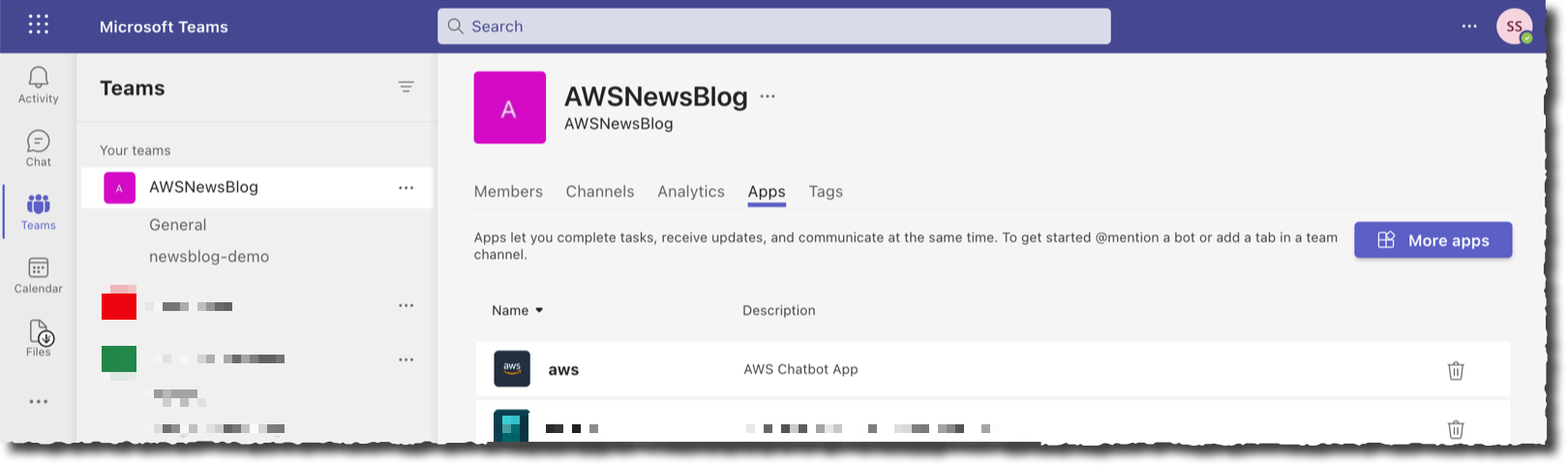
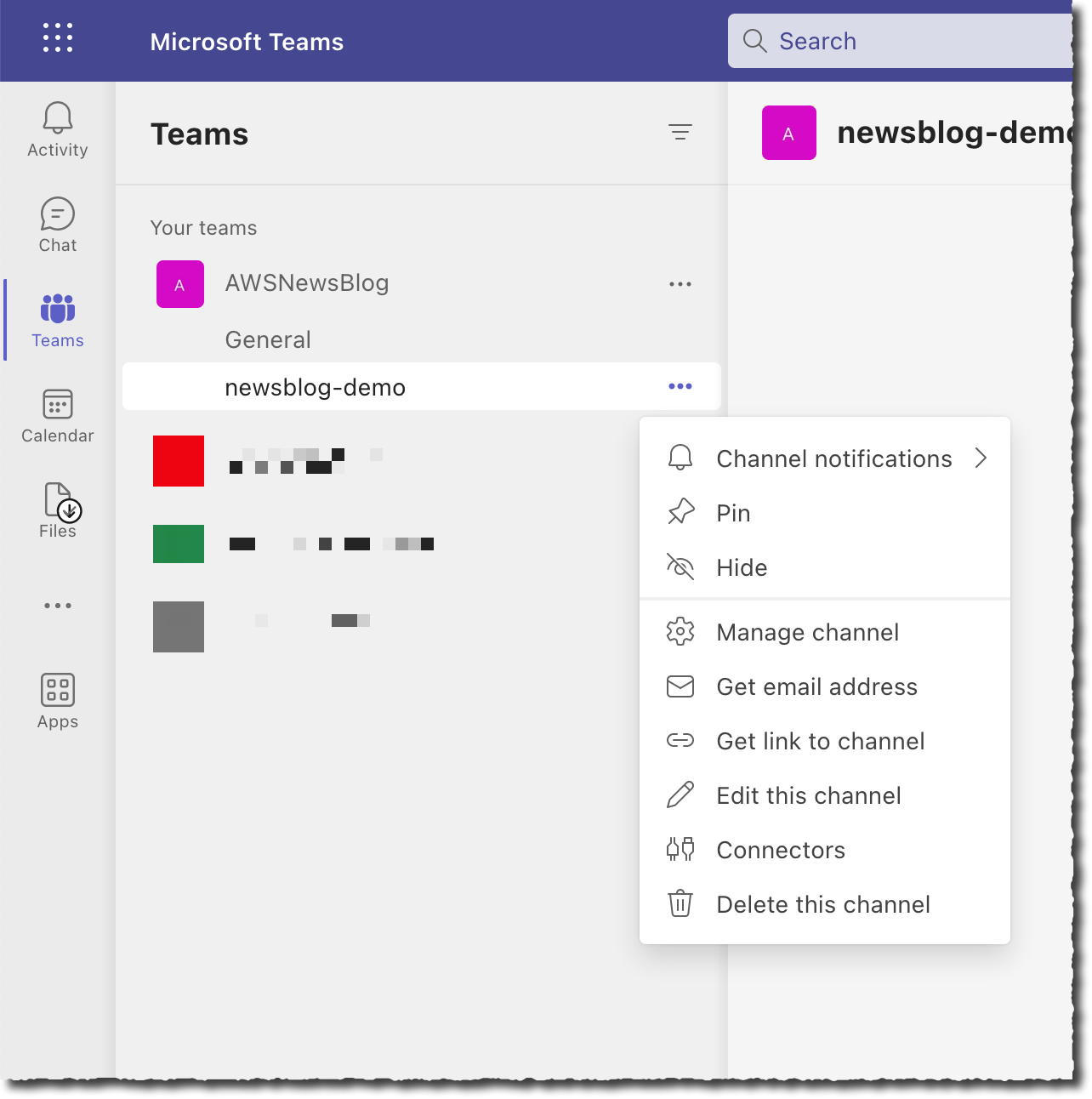
Getting started is a two-step process. First, I configure my team in Microsoft Teams. As a Teams administrator, I add the AWS Chatbot application to the team, and I take note of the URL of the channel I want to use for receiving notifications and operating AWS resources from Microsoft Teams channels.

Second, I register Microsoft Teams channels in AWS Chatbot. I also assign IAM permissions on what channel members can do in this channel and associate SNS topics to receive notifications. I may configure AWS Chatbot with the AWS Management Console, an AWS CloudFormation template, or the AWS Cloud Development Kit (AWS CDK). For this demo, I choose to use the console.

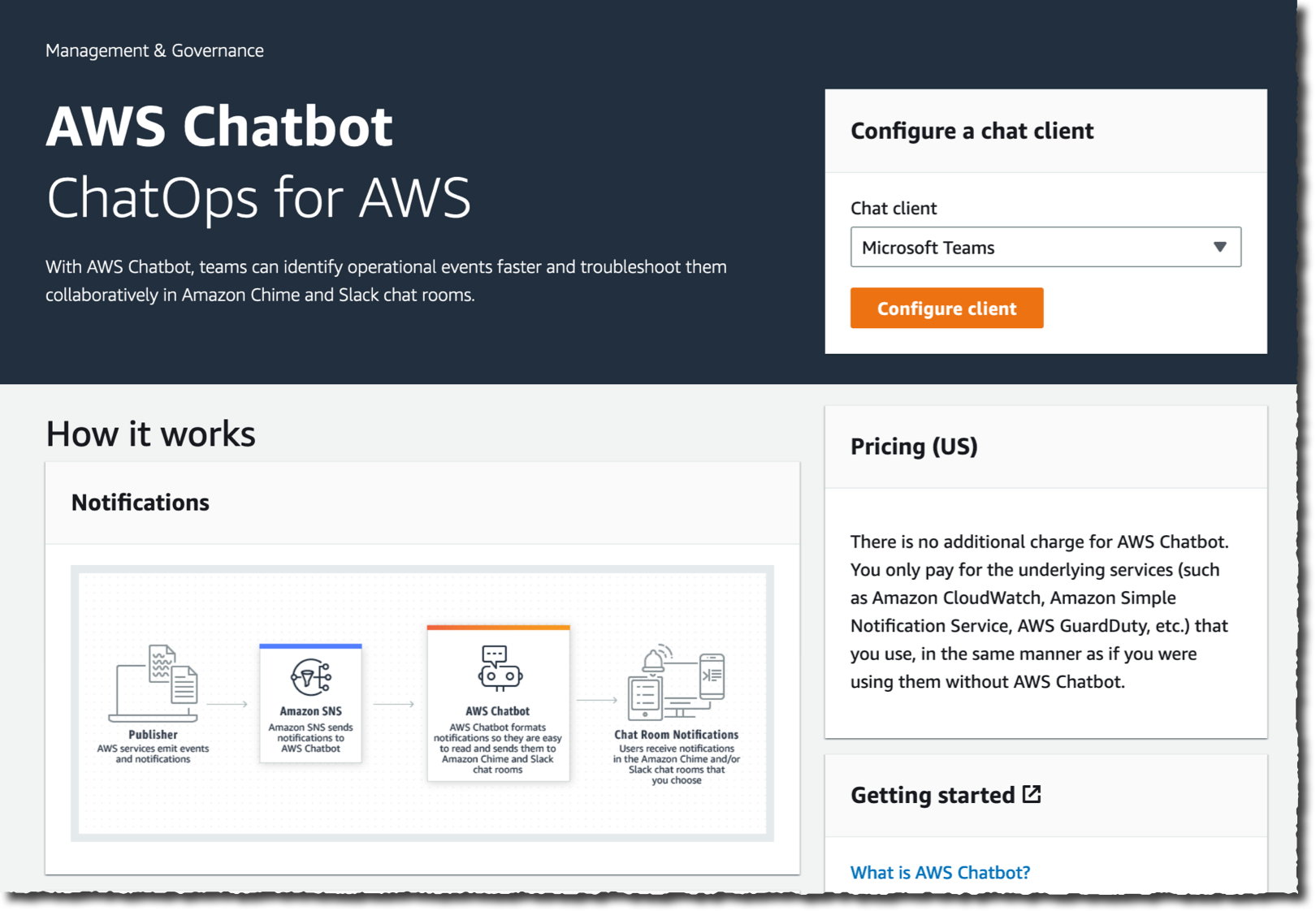
I open the Management Console and navigate to the AWS Chatbot section. On the top right side of the screen, in the Configure a chat client box, I select Microsoft Teams and then Configure client.

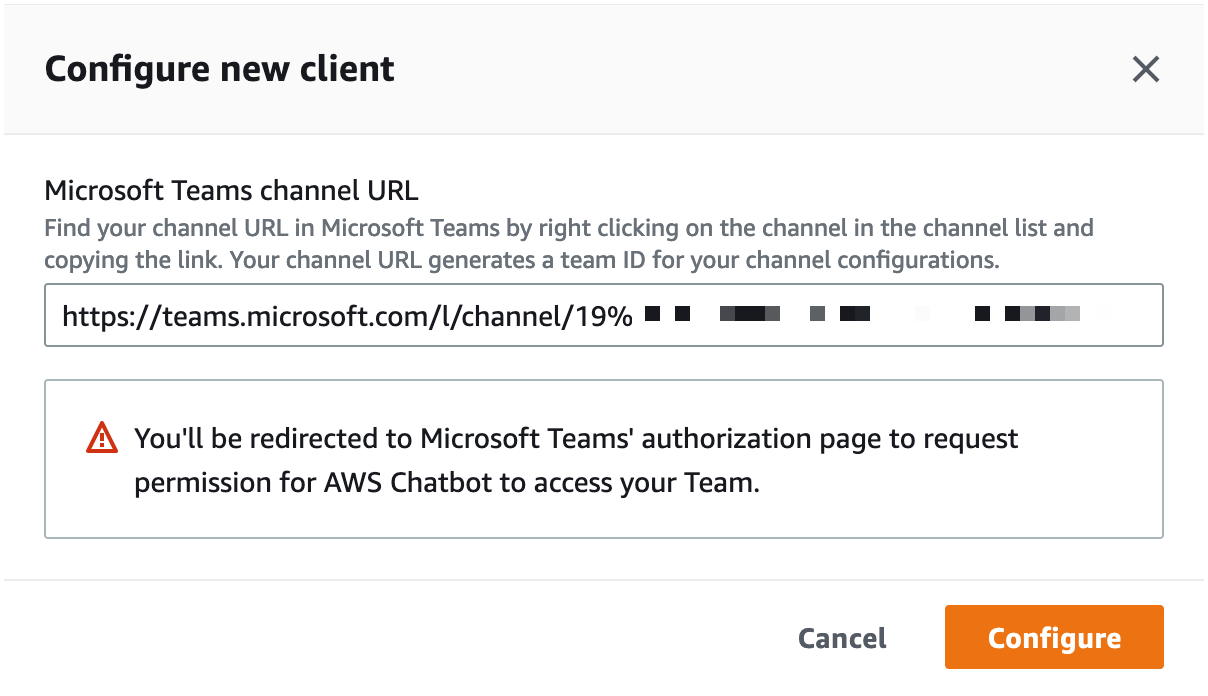
I enter the Microsoft Teams channel URL I noted in the Teams app.

Add the team channel URL to ChatbotAt this stage, Chatbot redirects my browser to Microsoft Teams for authentication. If I am already authenticated, I will be redirected back to the AWS console immediately. Otherwise, I enter my Microsoft Teams credentials and one-time password and wait to be redirected.

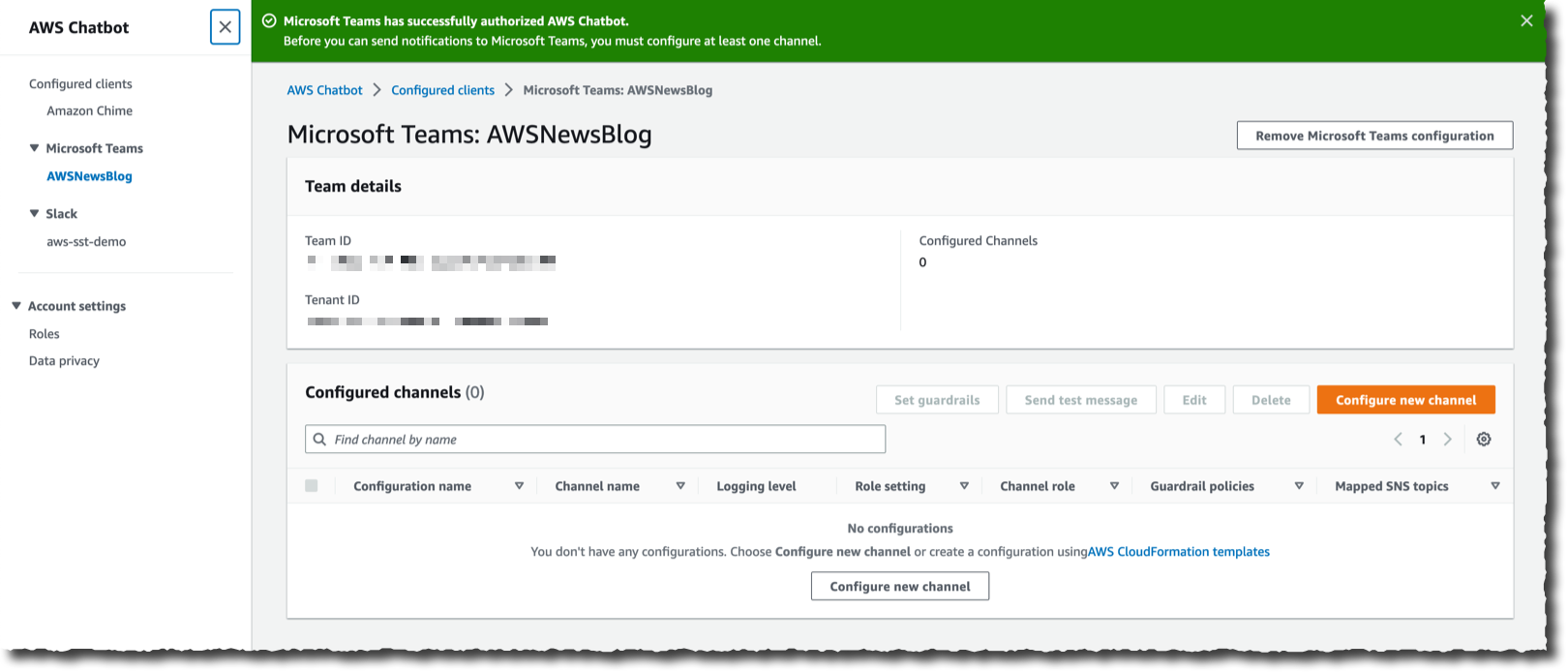
At this stage, my Microsoft Teams team is registered with AWS Chatbot and ready to add Microsoft Teams channels. I select Configure new channel.

Chabot is now linked to your Microsoft Teams There are four sections to enter the details of the configuration. In the first section, I enter a Configuration name for my channel. Optionally, I also define the Logging details. In the second section, I paste—again—the Microsoft Teams Channel URL.

Configure chatbot section one and two

In the third section, I configure the Permissions. I can choose between the same set of permissions for all Microsoft Teams users in my team, or I can set User-level roles permission to enable user-specific permissions in the channel. In this demo, I select Channel role, and I assign an IAM role to the channel. The role defines the permissions shared by all users in the channel. For example, I can assign a role that allows users to access configuration data from Amazon EC2 but not from Amazon S3. Under Channel role, I select Use an existing IAM role. Under Existing role, I select a role I created for my 2019 re:Invent talk about ChatOps: chatbot-demo. This role gives read-only access to all AWS services, but I could also assign other roles that would allow Chatbot users to take actions on their AWS resources.

To mitigate the risk that another person in your team accidentally grants more than the necessary privileges to the channel or user-level roles, you might also include Channel guardrail policies. These are the maximum permissions your users might have when using the channel. At runtime, the actual permissions are the intersection of the channel or user-level policies and the guardrail policies. Guardrail policies act like a boundary that channel users will never escape. The concept is similar to permission boundaries for IAM entities or service control policies (SCP) for AWS Organizations. In this example, I attach the ReadOnlyAccess managed policy.

Configure chatbot section three

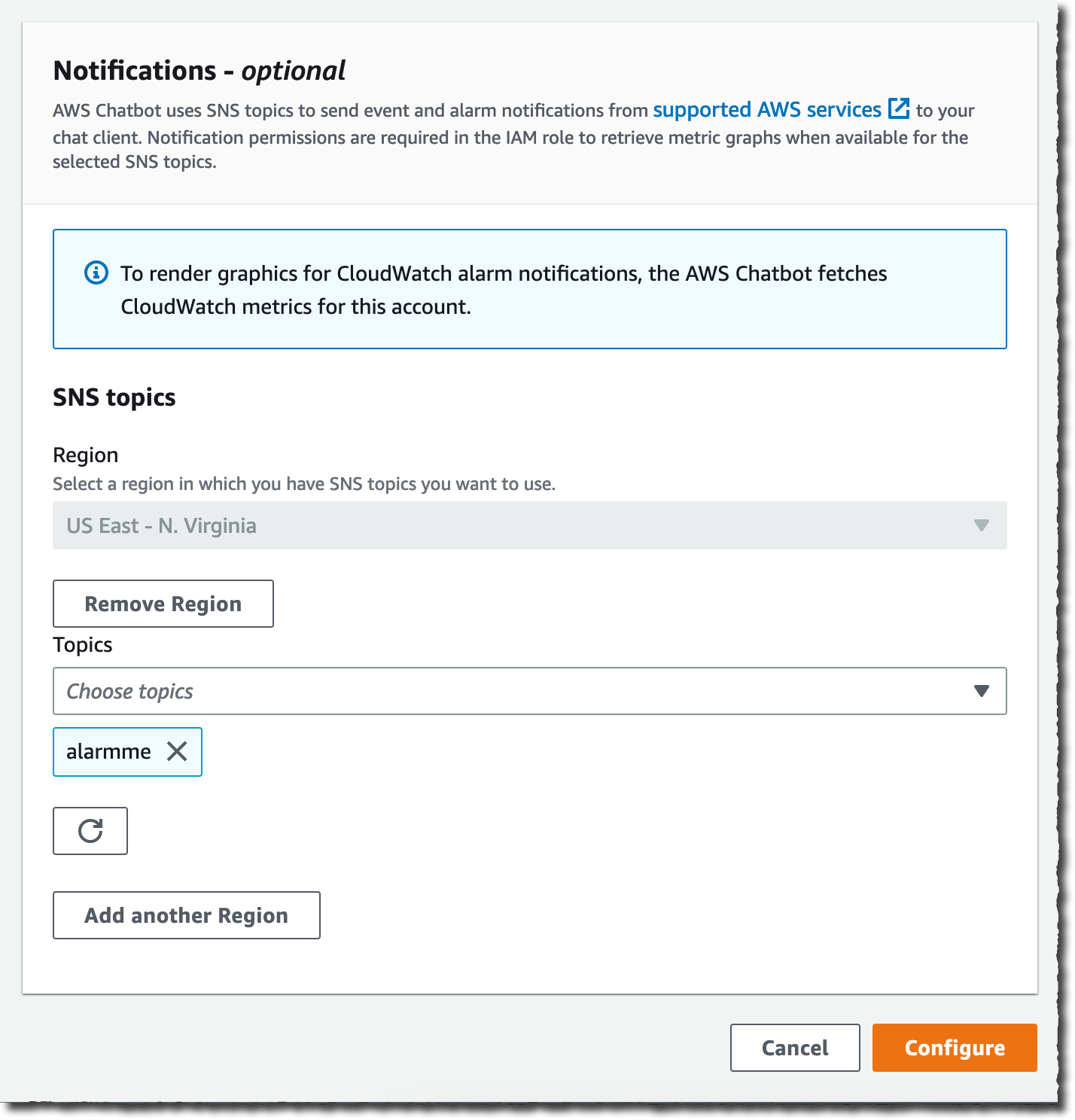
The fourth and last section allows you to specify the SNS topic that will be the source for notifications sent to your team’s channel. Your applications or AWS services, such as CloudWatch alarms, can send messages to this topic, and AWS Chatbot will relay all messages to the configured Microsoft Teams channel. Thanks to the integration between Amazon EventBridge and SNS, any application able to send a message to EventBridge is able to send a message to Microsoft Teams.

For this demo, I select an existing SNS topic: alarmme in the us-east-1 Region. You can configure multiple SNS topics to receive alarms from various Regions. I then select Configure.

Configure chatbot section fourLet’s Test the Integration
That’s it. Now I am ready to test my setup.

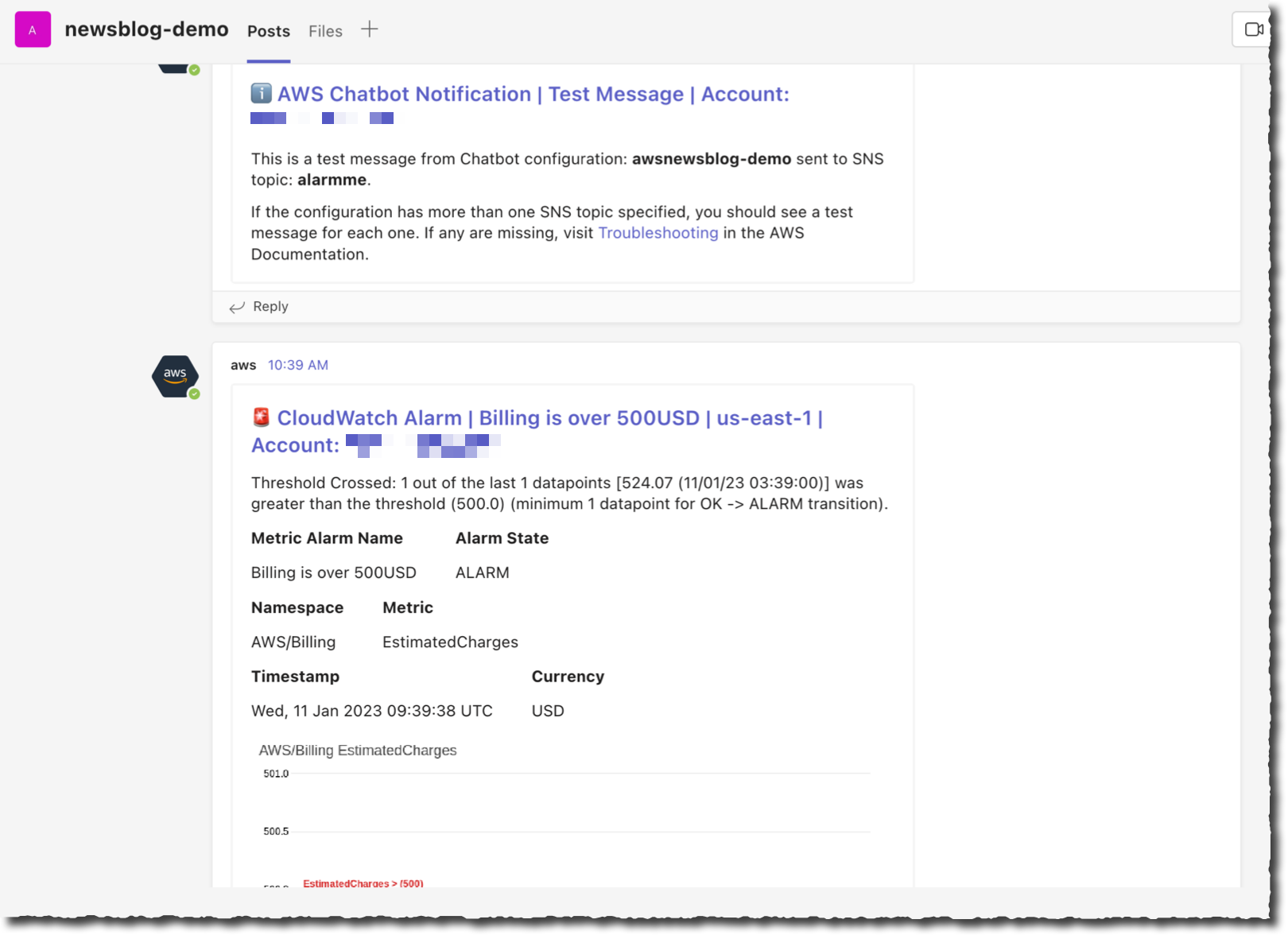
On the AWS Chatbot configuration page, I first select the Send test message. I also have an alarm defined when my estimated billing goes over $500. On the CloudWatch section of the Management Console, I configure the alarm to post a message on the SNS topic shared with Microsoft Teams.

Within seconds, I receive the test message and the alarm message on the Microsoft Teams channel.

AWS Chatbot with Microsoft Teams, first messages received on the channel

Then I type a command to understand where the billing alarm comes from. I want to understand how many EC2 instances are running.

On the chat client channel, I type @aws to select Chatbot as the destination, then the rest of the CLI command, as I would do in a terminal: ec2 describe-instances --region us-east-1 --filters "Name=architecture,Values=arm64_mac" --query "Reservations[].Instances[].InstanceId"

Chatbot answers within seconds.

AWS chatbot describe instances

I can create aliases for commands I frequently use. Aliases may have placeholder parameters that I can give at runtime, such as the Region name for example.

I create an alias to get the list of my macOS instance IDs with the command: aws alias create mac ec2 describe-instances --region $region --filters "Name=architecture,Values=arm64_mac" --query "Reservations[].Instances[].InstanceId"

Now, I can type @aws alias run mac us-east-1 as a shortcut to get the same result as above. I can also manage my aliases with the @aws alias list, @aws alias get, and @aws alias delete commands.

I don’t know about you, but for me it is hard to remember commands. When I use the terminal, I rely on auto-complete to remind me of various commands and their options. AWS Chatbot offers similar command completion and guides me to collect missing parameters.

AWS Chatbot command completion

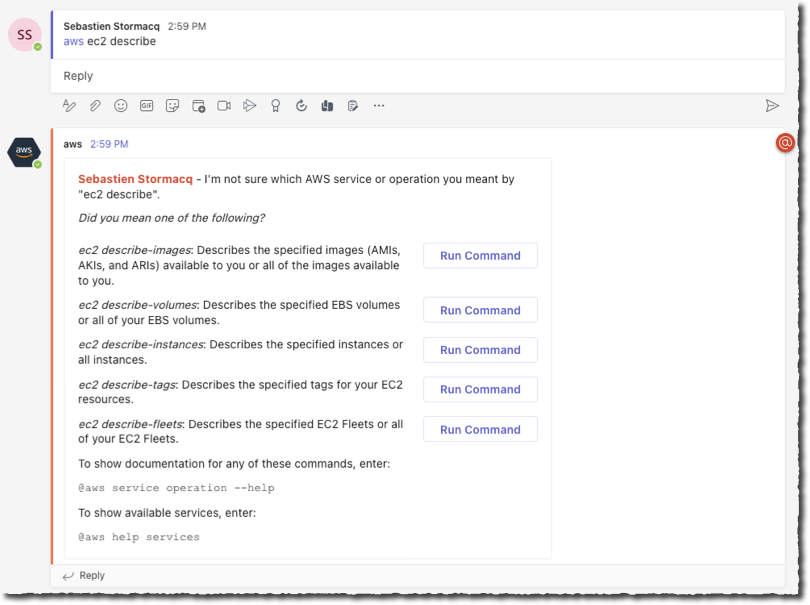
When using AWS Chatbot, I can also ask questions using natural English language. It can help to find answers from the AWS docs and from support articles by typing questions such as @aws how can I tag my EC2 instances? or @aws how do I configure Lambda concurrency setting?

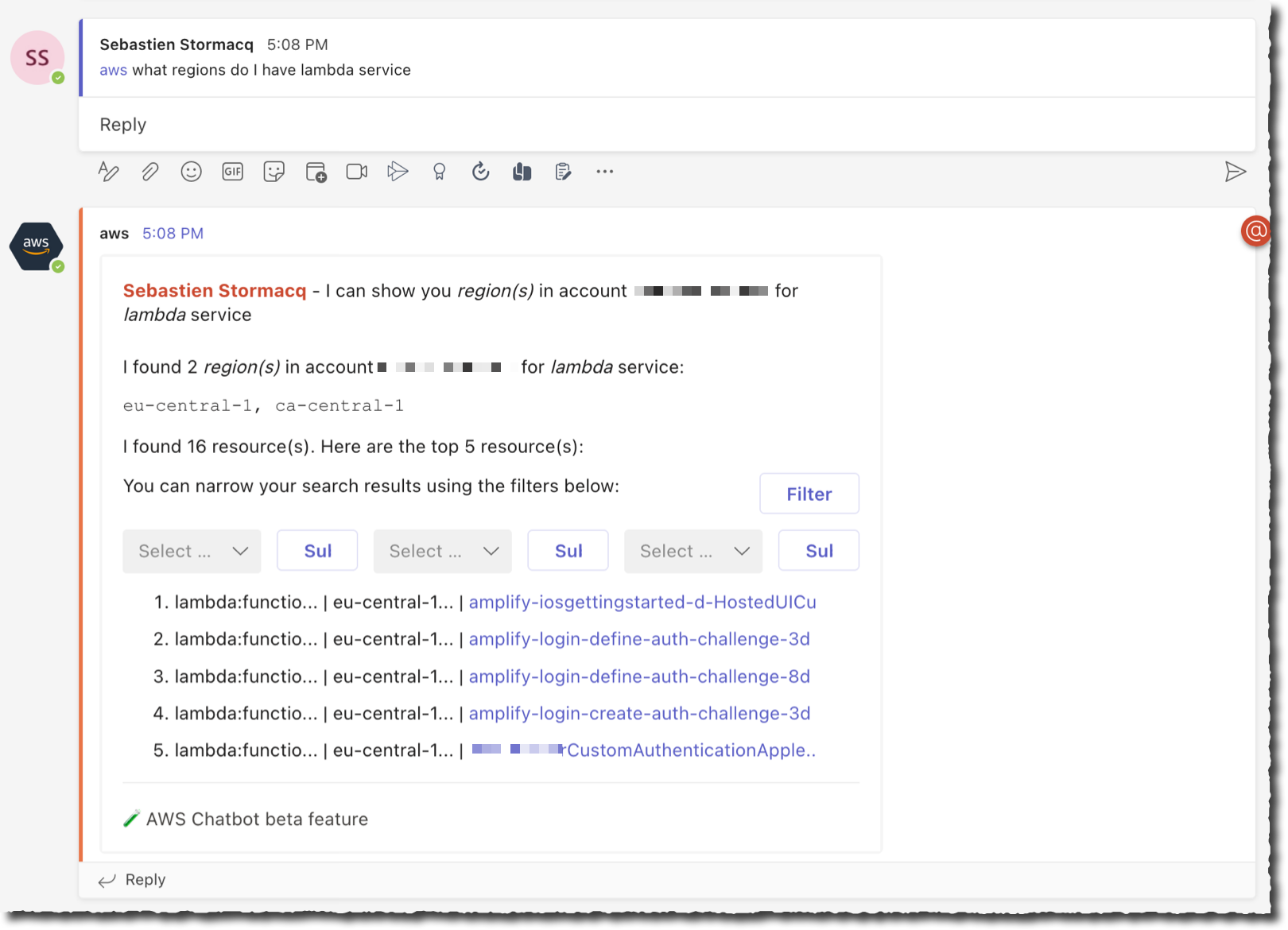
It can also find resources in my account when AWS Resource Explorer is activated. For example, I asked the bot: @aws what are the tags for my ec2 resources? and @aws what Regions do I have Lambda service?

And I received these responses.

AWS Chatbot NLP Response 1AWS Chatbot NLP Response 2Thanks to AWS Chatbot, I realized that I had a rogue Lambda function left in ca-central-1. I used the AWS console to delete it.

Available Now
You can start to use AWS Chatbot with Microsoft Teams today. AWS Chatbot for Microsoft Teams is available to download from Microsoft Teams app at no additional cost. AWS Chatbot is available in all public AWS Regions, at no additional charge. You pay for the underlying resources that you use. You might incur charges from your chat client.

Get started today and configure your first integration with Microsoft Teams.

-- seb

from AWS News Blog https://ift.tt/wb5i2a3
via IFTTT

Wednesday, March 15, 2023

Amazon Linux 2023, a Cloud-Optimized Linux Distribution with Long-Term Support

I am excited to announce the general availability of Amazon Linux 2023 (AL2023). AWS has provided you with a cloud-optimized Linux distribution since 2010. This is the third generation of our Amazon Linux distributions.

Every generation of Amazon Linux distribution is secured, optimized for the cloud, and receives long-term AWS support. We built Amazon Linux 2023 on these principles, and we go even further. Deploying your workloads on Amazon Linux 2023 gives you three major benefits: a high-security standard, a predictable lifecycle, and a consistent update experience.

Let’s look at security first. Amazon Linux 2023 includes preconfigured security policies that make it easy for you to implement common industry guidelines. You can configure these policies at launch time or run time.

For example, you can configure the system crypto policy to enforce system-wide usage of a specific set of cipher suites, TLS versions, or acceptable parameters in certificates and key exchanges. Also, the Linux kernel has many hardening features enabled by default.

Amazon Linux 2023 makes it easier to plan and manage the operating system lifecycle. New Amazon Linux major versions will be available every two years. Major releases include new features and improvements in security and performance across the stack. The improvements might include major changes to the kernel, toolchain, GLib C, OpenSSL, and any other system libraries and utilities.

During those two years, a major release will receive an update every three months. These updates include security updates, bug fixes, and new features and packages. Each minor version is a cumulative list of updates that includes security and bug fixes in addition to new features and packages. These releases might include the latest language runtimes such as Python or Java. They might also include other popular software packages such as Ansible and Docker. In addition to these quarterly updates, security updates will be provided as soon as they are available.

Each major version, including 2023, will come with five years of long-term support. After the initial two-year period, each major version enters a three-year maintenance period. During the maintenance period, it will continue to receive security bug fixes and patches as soon as they are available. This support commitment gives you the stability you need to manage long project lifecycles.

The following diagram illustrates the lifecycle of Amazon Linux distributions:

Last—and this policy is by far my favorite—Amazon Linux provides you with deterministic updates through versioned repositories, a flexible and consistent update mechanism. The distribution locks to a specific version of the Amazon Linux package repository, giving you control over how and when you absorb updates. By default, and in contrast with Amazon Linux 2, a dnf update command will not update your installed packages (dnf is the successor to yum). This helps to ensure that you are using the same package versions across your fleet. All Amazon Elastic Compute Cloud (Amazon EC2) instances launched from an Amazon Machine Image (AMI) will have the same version of packages. Deterministic updates also promote usage of immutable infrastructure, where no infrastructure is updated after deployment. When an update is required, you update your infrastructure as code scripts and redeploy a new infrastructure. Of course, if you really want to update your distribution in place, you can point dnf to an updated package repository and update your machine as you do today. But did I tell you this is not a good practice for production workloads? I’ll share more technical details later in this blog post.

How to Get Started
Getting started with Amazon Linux 2023 is no different than with other Linux distributions. You can use the EC2 run-instances API, the AWS Command Line Interface (AWS CLI), or the AWS Management Console, and one of the four Amazon Linux 2023 AMIs that we provide. We support two machine architectures (x86_64 and Arm) and two sizes (standard and minimal). Minimal AMIs contain the most basic tools and utilities to start the OS. The standard version comes with the most commonly used applications and tools installed.

To retrieve the latest AMI ID for a specific Region, you can use AWS Systems Manager get-parameter API and query the /aws/service/ami-amazon-linux-latest/<alias> parameter.

Be sure to replace <alias> with one of the four aliases available:

  • For arm64 architecture (standard AMI): al2023-ami-kernel-default-arm64
  • For arm64 architecture (minimal AMI): al2023-ami-minimal-kernel-default-arm64
  • For x86_64 architecture (standard AMI): al2023-ami-kernel-default-x86_64
  • For x86_64 architecture (minimal AMI): al2023-ami-minimal-kernel-default-x86_64

For example, to search for the latest Arm64 full distribution AMI ID, I open a terminal and enter:

~ aws ssm get-parameters --region us-east-2 --names /aws/service/ami-amazon-linux-latest/al2023-ami-kernel-default-arm64
{
    "Parameters": [
        {
            "Name": "/aws/service/ami-amazon-linux-latest/al2023-ami-kernel-default-arm64",
            "Type": "String",
            "Value": "ami-02f9b41a7af31dded",
            "Version": 1,
            "LastModifiedDate": "2023-02-24T22:54:56.940000+01:00",
            "ARN": "arn:aws:ssm:us-east-2::parameter/aws/service/ami-amazon-linux-latest/al2023-ami-kernel-default-arm64",
            "DataType": "text"
        }
    ],
    "InvalidParameters": []
}

To launch an instance, I use the run-instances API. Notice how I use Systems Manager resolution to dynamically lookup the AMI ID from the CLI.

➜ aws ec2 run-instances                                                                            \
       --image-id resolve:ssm:/aws/service/ami-amazon-linux-latest/al2023-ami-kernel-default-arm64  \
       --key-name my_ssh_key_name                                                                   \
       --instance-type c6g.medium                                                                   \
       --region us-east-2 
{
    "Groups": [],
    "Instances": [
        {
          "AmiLaunchIndex": 0,
          "ImageId": "ami-02f9b41a7af31dded",
          "InstanceId": "i-0740fe8e23f903bd2",
          "InstanceType": "c6g.medium",
          "KeyName": "my_ssh_key_name",
          "LaunchTime": "2023-02-28T14:12:34+00:00",

...(redacted for brevity)
}

When the instance is launched, and if the associated security group allows SSH (TCP 22) connections, I can connect to the machine:

~ ssh ec2-user@3.145.19.213
Warning: Permanently added '3.145.19.213' (ED25519) to the list of known hosts.
   ,     #_
   ~\_  ####_        Amazon Linux 2023
  ~~  \_#####\       Preview
  ~~     \###|
  ~~       \#/ ___   https://aws.amazon.com/linux/amazon-linux-2023
   ~~       V~' '->
    ~~~         /
      ~~._.   _/
         _/ _/
       _/m/'
Last login: Tue Feb 28 14:14:44 2023 from 81.49.148.9
[ec2-user@ip-172-31-9-76 ~]$ uname -a
Linux ip-172-31-9-76.us-east-2.compute.internal 6.1.12-19.43.amzn2023.aarch64 #1 SMP Thu Feb 23 23:37:18 UTC 2023 aarch64 aarch64 aarch64 GNU/Linux

We also distribute Amazon Linux 2023 as Docker images. The Amazon Linux 2023 container image is built from the same software components that are included in the Amazon Linux 2023 AMI. The container image is available for use in any environment as a base image for Docker workloads. If you’re using Amazon Linux for applications in EC2, you can containerize your applications with the Amazon Linux container image.

These images are available from Amazon Elastic Container Registry (Amazon ECR) and from Docker Hub. Here is a quick demo to start a Docker container using Amazon Linux 2023 from Elastic Container Registry.

$ aws ecr-public get-login-password --region us-east-1 | docker login --username AWS --password-stdin public.ecr.aws
Login Succeeded
~ docker run --rm -it public.ecr.aws/amazonlinux/amazonlinux:2023 /bin/bash
Unable to find image 'public.ecr.aws/amazonlinux/amazonlinux:2023' locally
2023: Pulling from amazonlinux/amazonlinux
b4265814d5cf: Pull complete 
Digest: sha256:bbd7a578cff9d2aeaaedf75eb66d99176311b8e3930c0430a22e0a2d6c47d823
Status: Downloaded newer image for public.ecr.aws/amazonlinux/amazonlinux:2023
bash-5.2# uname -a 
Linux 9d5b45e9f895 5.15.49-linuxkit #1 SMP PREEMPT Tue Sep 13 07:51:32 UTC 2022 aarch64 aarch64 aarch64 GNU/Linux
bash-5.2# exit 

When pulling from Docker Hub, you can use this command to pull the image: docker pull amazonlinux:2023.

What Are the Main Differences Compared to Amazon Linux 2?
Amazon Linux 2023 has some differences compared to Amazon Linux 2. The documentation explains these differences in detail. The two differences I would like to focus on are dnf and the package management policies.

AL2023 comes with Fedora’s dnf, the successor to yum. But don’t worry, dnf provides similar commands as yum to search, install, or remove packages. Where you used to run the commands yum list or yum install httpd, you may now run dnf list or dnf install httpd. For convenience, we create a symlink for /usr/bin/yum, so you can run your scripts unmodified.

$ which yum
/usr/bin/yum
$ ls -al /usr/bin/yum
lrwxrwxrwx. 1 root root 5 Jun 19 18:06 /usr/bin/yum -> dnf-3

The biggest difference, in my opinion, is the deterministic updates through versioned repositories. By default, the software repository is locked to the AMI version. This means that a dnf update command will not return any new packages to install. Versioned repositories give you the assurance that all machines started from the same AMI ID are identical. Your infrastructure will not deviate from the baseline.

$ sudo dnf update 
Last metadata expiration check: 0:14:10 ago on Tue Feb 28 14:12:50 2023.
Dependencies resolved.
Nothing to do.
Complete!

Yes, but what if you want to update a machine? You have two options to update an existing machine. The cleanest one for your production environment is to create duplicate infrastructure based on new AMIs. As I mentioned earlier, we publish updates for every security fix and a consolidated update every three months for two years after the initial release. Each update is provided as a set of AMIs and their corresponding software repository.

For smaller infrastructure, such as test or development machines, you might choose to update the operating system or individual packages in place as well. This is a three-step process:

  • first, list the available updated software repositories;
  • second, point dnf to a specific software repository;
  • and third, update your packages.

To show you how it works, I purposely launched an EC2 instance with an “old” version of Amazon Linux 2023 from February 2023. I first run dnf check-release-update to list the available updated software repositories.

$ dnf check-release-update
WARNING:
  A newer release of "Amazon Linux" is available.

  Available Versions:

  Version 2023.0.20230308:
    Run the following command to upgrade to 2023.0.20230308:

      dnf upgrade --releasever=2023.0.20230308

    Release notes:
     https://docs.aws.amazon.com/linux/al2023/release-notes/relnotes.html

Then, I might either update the full distribution using dnf upgrade --releasever=2023.0.20230308 or point dnf to the updated repository to select individual packages.

$ dnf check-update --releasever=2023.0.20230308

Amazon Linux 2023 repository                                                    28 MB/s |  11 MB     00:00
Amazon Linux 2023 Kernel Livepatch repository                                  1.2 kB/s | 243  B     00:00

amazon-linux-repo-s3.noarch                          2023.0.20230308-0.amzn2023                amazonlinux
binutils.aarch64                                     2.39-6.amzn2023.0.5                       amazonlinux
ca-certificates.noarch                               2023.2.60-1.0.amzn2023.0.1                amazonlinux
(redacted for brevity)
util-linux-core.aarch64 2.37.4-1.amzn2022.0.1 amazonlinux

Finally, I might run a dnf update <package_name> command to update a specific package.

This might look like overkill for a simple machine, but when managing enterprise infrastructure or large-scale fleets of instances, this facilitates the management of your fleet by ensuring that all instances run the same version of software packages. It also means that the AMI ID is now something that you can fully run through your CI/CD pipelines for deployment and that you have a way to roll AMI versions forward and backward according to your schedule.

Where is Fedora?
When looking for a base to serve as a starting point for Amazon Linux 2023, Fedora was the best choice. We found that Fedora’s core tenets (Freedom, Friends, Features, First) resonate well with our vision for Amazon Linux. However, Amazon Linux focuses on a long-term, stable OS for the cloud, which is a notable different release cycle and lifecycle than Fedora. Amazon Linux 2023 provides updated versions of open-source software, a larger variety of packages, and frequent releases.

Amazon Linux 2023 isn’t directly comparable to any specific Fedora release. The Amazon Linux 2023 GA version includes components from Fedora 34, 35, and 36. Some of the components are the same as the components in Fedora, and some are modified. Other components more closely resemble the components in CentOS Stream 9 or were developed independently. The Amazon Linux kernel, on its side, is sourced from the long-term support options that are on kernel.org, chosen independently from the kernel provided by Fedora.

Like every good citizen in the open-source community, we give back and contribute our changes to upstream distributions and sources for the benefit of the entire community. Amazon Linux 2023 itself is open source. The source code for all RPM packages that are used to build the binaries that we ship are available through the SRPM yum repository (sudo dnf install -y 'dnf-command(download)' && dnf download --source bash)

One More Thing: Amazon EBS Gp3 Volumes
Amazon Linux 2023 AMIs use gp3 volumes by default.

Gp3 is the latest generation general-purpose solid-state drive (SSD) volume for Amazon Elastic Block Store (Amazon EBS). Gp3 provides 20 percent lower storage costs compared to gp2. Gp3 volumes deliver a baseline performance of 3,000 IOPS and 125MB/s at any volume size. What I particularly like about gp3 volumes is that I can now provision performance independently of capacity. When using gp3 volumes, I can now increase IOPS and throughput without incurring charges for extra capacity that I don’t actually need.

With the availability of gp3-backed AL2023 AMIs, this is the first time a gp3-backed Amazon Linux AMI is available. Gp3-backed AMIs have been a common customer request since gp3 was launched in 2020. It is now available by default.

Price and Availability
Amazon Linux 2023 is provided at no additional charge. Standard Amazon EC2 and AWS charges apply for running EC2 instances and other services. This distribution includes full support for five years. When deploying on AWS, our support engineers will provide technical support according to the terms and conditions of your AWS Support plan. AMIs are available in all AWS Regions.

Amazon Linux is the most used Linux distribution on AWS, with hundreds of thousands of customers using Amazon Linux 2. Dozens of Independent Software Vendors (ISVs) and hardware partners are supporting Amazon Linux 2023 today. You can adopt this new version with the confidence that the partner tools you rely on are likely to be supported. We are excited about this release, which brings you an even higher level of security, a predictable release lifecycle, and a consistent update experience.

Now go build and deploy your workload on Amazon Linux 2023 today.

-- seb

from AWS News Blog https://ift.tt/Bcr1dlp
via IFTTT
Tuesday, March 14, 2023

Celebrate Amazon S3’s 17th birthday at AWS Pi Day 2023

AWS Pi Day 2023 is live today starting at 13:00 PDT; join us on the AWS on Air channel on Twitch.

On this day 17 years ago, we launched a very simple object storage service. It allowed developers to create, list, and delete private storage spaces (known as buckets), upload and download files, and manage their access permissions. The service was available only through a REST and SOAP API. It was designed to provide highly durable data storage with 99.999999999 percent data durability (that’s 11 nines!).

Fast forward to 2023, Amazon Simple Storage Service (Amazon S3) holds more than 280 trillion objects and averages over 100 million requests per second. To protect data integrity, Amazon S3 performs over four billion checksum computations per second. Over the years, we added many capabilities, such as a range of storage classes, to store your colder data cost effectively. Every day, you restore on average more than 1 petabyte from the S3 Glacier Flexible Retrieval and S3 Glacier Deep Archive storage classes. Since launch, you have saved $1 billion from using Amazon S3 Intelligent-Tiering. In 2015, we added the possibility of replicating your data across Regions. Every week, Amazon S3 Replication moves more than 100 petabytes of data. Amazon S3 is also at the core of hundreds of thousands of data lakes. It also has become a critical component of a growing ecosystem of serverless applications. Every day, Amazon S3 sends over 125 billion event notifications to serverless applications. Altogether, Amazon S3 is helping people around the world securely store and extract value from their data.

AWS Pi Day 2023 Small

To celebrate Amazon S3‘s birthday AWS is hosting the AWS Pi Day event for the third consecutive year. This live online event starts at 13:00 PDT today (March 14, 2023) on the AWS On Air channel on Twitch and will feature four hours of fresh educational content from AWS experts. We will discuss not only Amazon S3 best practices, we will also dive into the latest innovations across AWS data services, from storage to analytics and AI/ML. Tune in to learn how to get the most out of your data by making it more secure, available, accessible, and connected, and to help you respond to rapid growth and changing demand. You will also learn how to optimize your data costs, automate your cost savings, eliminate operational complexity, and get new insights from your data. Have a look at the full agenda on the registration page.

At AWS, we innovate on your behalf. During the last few weeks, we announced a 99.99 percent SLA for Amazon MemoryDB for Redis, enhanced I/O multiplexing for Amazon ElastiCache for Redis, and encryption by default for new objects on Amazon S3.

But we are not stopping there, and today we take the occasion of this celebration to announce seven new capabilities across our data services.

Mountpoint for Amazon S3 (alpha release): an open-source file client for Amazon S3
Mountpoint for Amazon S3 is an open-source file client for Amazon S3 that you can install on your compute instance. It translates local file storage API calls to REST API calls on objects in Amazon S3. When using Mountpoint for Amazon S3, data lake applications that access objects using file APIs can achieve high single-instance transfer rates, saving on compute costs.

You can get started with Mountpoint for Amazon S3 by mounting an Amazon S3 bucket at a local mount point on your compute instance. Once mounted, applications read objects as files available locally. Mountpoint for Amazon S3 supports sequential and random read operations on existing S3 objects. It is available to download for Linux operating systems as an alpha release and is not yet intended for production workloads. Instead, we want to collect your feedback early and incorporate your input into the design and implementation. To get started, visit the Mountpoint for Amazon S3 GitHub repo, read the technical launch blog, and share your feedback.

Now Generally Available: AWS Data Exchange for Amazon S3
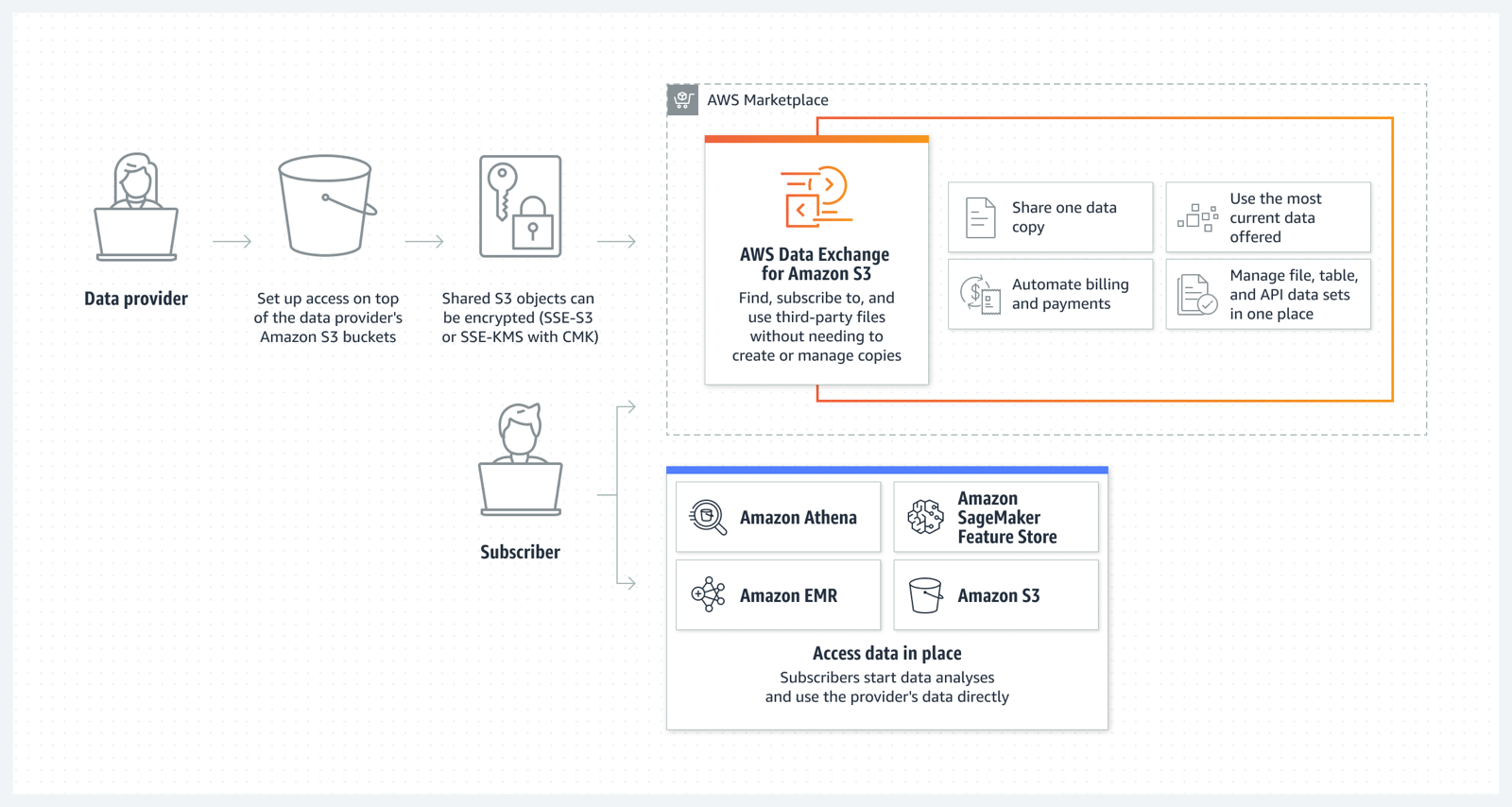
AWS Data Exchange for Amazon S3 enables you to easily find, subscribe to, and use third-party data files for faster time to insight, storage cost optimization, simplified data licensing management, and more. Data Exchange subscribers can directly use files from data providers’ Amazon S3 buckets for their analysis with AWS services without needing to create or manage copies to their account. Data providers can license in-place access to data hosted in their Amazon S3 buckets.

To learn more about how data providers can simplify and scale access management to multiple data subscribers, you can read this blog.

AWS Data Exchange for S3

Amazon S3 Multi-Region Access Points now support replicated datasets that span multiple AWS accounts
We launched Amazon S3 Multi-Region Access Points in September 2021. We added failover control in November 2022. Amazon S3 Multi-Region Access Points now support datasets that are replicated across multiple AWS accounts. Cross-account Multi-Region Access Points simplify object storage access for applications that span both AWS Regions and accounts, avoiding the need for complex request routing logic in your application. They provide a single global endpoint for your multi-Region applications and dynamically route S3 requests based on policies that you define. This helps you to easily implement multi-Region resilience, latency-based routing, and active/passive failover, even when your data is stored in multiple AWS accounts.

You can learn more about S3 Multi-Region Access Points on the Amazon S3 FAQs.

Aliases for S3 Object Lambda Access Points as CloudFront origin
Amazon S3 Object Lambda, launched in March 2021, lets you add your own code to S3 GET, HEAD, and LIST API requests to modify data as it is returned to an application. With today’s launch of aliases for S3 Object Lambda Access Points any application that requires an S3 bucket name can easily present different views of data depending on the requester. You can now use an S3 Object Lambda Access Point alias as an origin for your Amazon CloudFront distribution to modify the data requested. For example, you can dynamically transform an image depending on the device that a user is visiting from, such as a desktop or a smartphone.

If you want to learn more, my colleague Danilo wrote a blog post with more details and code examples.

Simplify private connectivity from on-premises networks
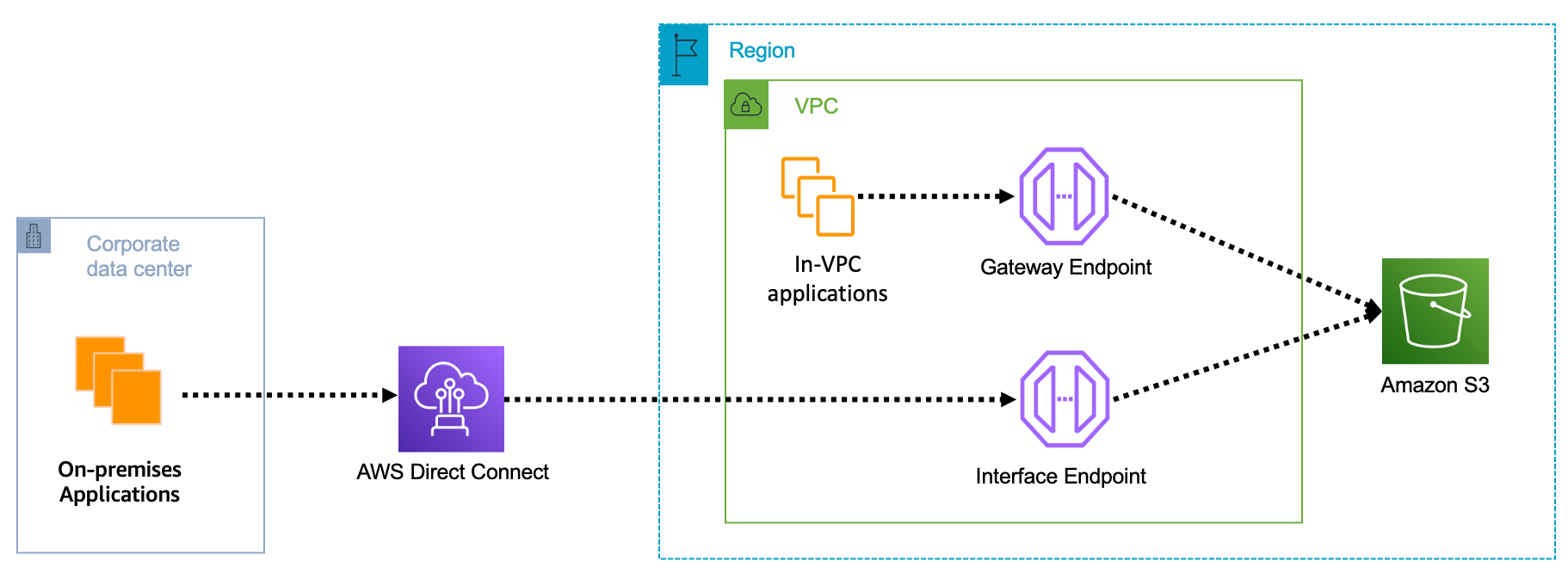
Amazon Virtual Private Cloud (Amazon VPC) interface endpoints for Amazon S3 now offer private DNS options that can help you more easily route Amazon S3 requests to the lowest-cost endpoint in your VPC. With private DNS for Amazon S3, your on-premises applications can use AWS PrivateLink to access Amazon S3 over an interface endpoint, while requests from your in-VPC applications access Amazon S3 using gateway endpoints. Routing requests like this helps you take advantage of the lowest-cost private network path without having to make code or configuration changes to your clients.

S3 private connectivity

You can learn more on the AWS PrivateLink for Amazon S3 documentation.

Local Amazon S3 Replication on Outposts
Amazon S3 on Outposts now supports S3 replication on Outposts. This extends S3’s fully managed approach to replication to S3 on Outposts buckets. It helps you meet your data residency and data redundancy requirements. With local S3 Replication on Outposts, you can create and configure replication rules to automatically replicate your S3 objects to another Outpost or to another bucket on the same Outpost. During replication, your S3 on Outposts objects are always sent over your local gateway, and objects do not travel back to the AWS Region. S3 Replication on Outposts provides an easy and flexible way to automatically replicate data within a specific data perimeter to address your data redundancy and compliance requirements.

Amazon OpenSearch Security Analytics
The new Amazon OpenSearch Service’s security analytics capability enables your Security Operations (SecOps) teams to detect potential threats quickly while having the tools to help with security investigations on historical data—all with lower data storage costs. Like many other advanced capabilities of Amazon OpenSearch Service, there is no additional charge for security analytics.

You can learn more about Amazon OpenSearch security analytics by reading this blog post.

Join Us Online Today
You will learn more about these launches and about AWS data services in general. We have also prepared some live demos. We designed the AWS Pi Day event for system administrators, engineers, developers, and architects. Our sessions will bring you the latest and greatest information on storage, security, backup, archiving, training and certification, and more.

And to dive deeper, get Pi Day started early by attending AWS Innovate: Data and AI/ML Edition to learn about cutting-edge machine learning tools, strategies for building future-proof applications, and making data-driven decisions for your organization. Don’t miss Swami Sivasubramanian‘s keynote, starting at 9:00 PDT.

Join us today on the AWS Pi Day live stream. Kevin Miller, VP and GM of Amazon S3, will kick off the event with a keynote at 13:00 PDT.

See you there!

-- seb

from AWS News Blog https://ift.tt/Ka8DvIV
via IFTTT

New – Use Amazon S3 Object Lambda with Amazon CloudFront to Tailor Content for End Users

With S3 Object Lambda, you can use your own code to process data retrieved from Amazon S3 as it is returned to an application. Over time, we added new capabilities to S3 Object Lambda, like the ability to add your own code to S3 HEAD and LIST API requests, in addition to the support for S3 GET requests that was available at launch.

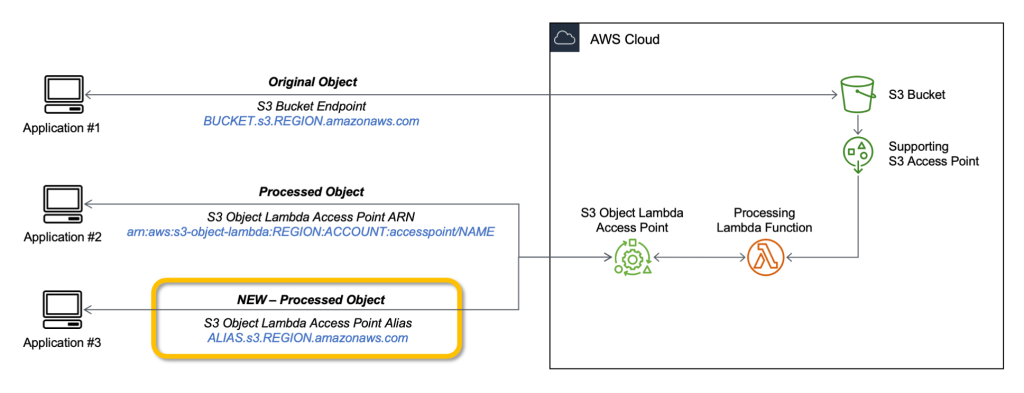
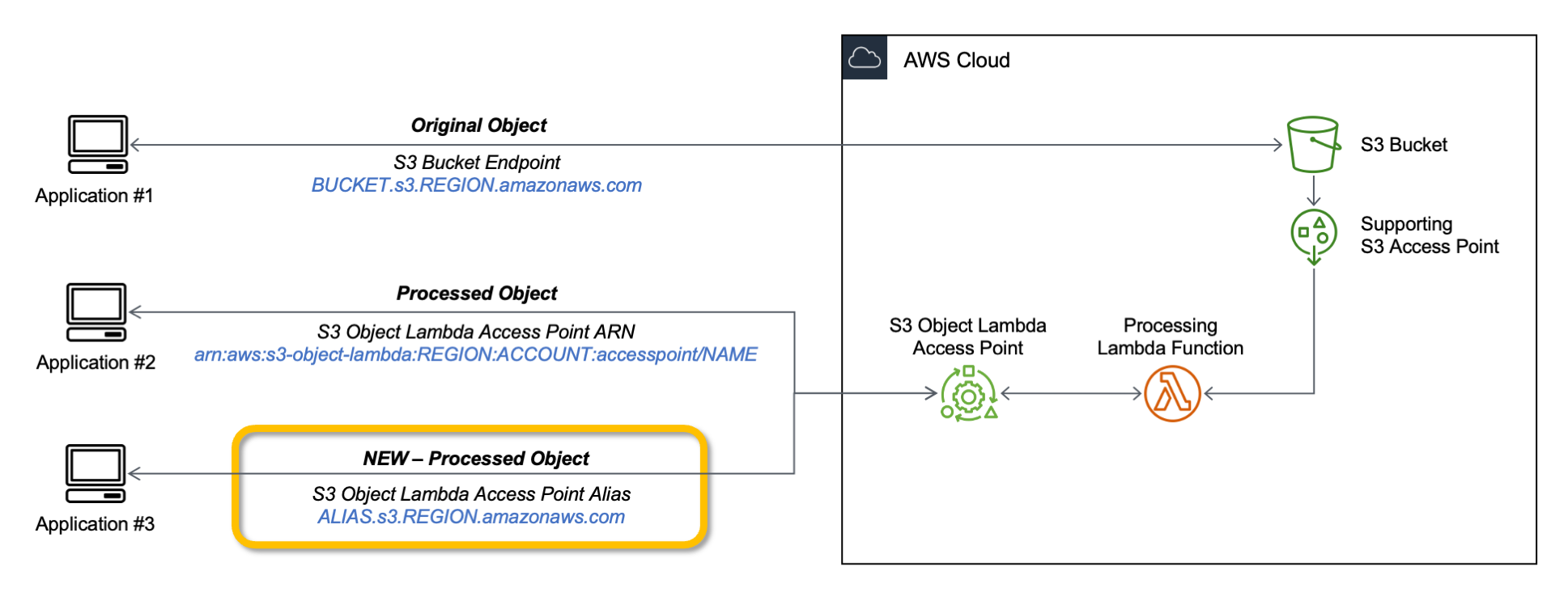
Today, we are launching aliases for S3 Object Lambda Access Points. Aliases are now automatically generated when S3 Object Lambda Access Points are created and are interchangeable with bucket names anywhere you use a bucket name to access data stored in Amazon S3. Therefore, your applications don’t need to know about S3 Object Lambda and can consider the alias to be a bucket name.

Architecture diagram.

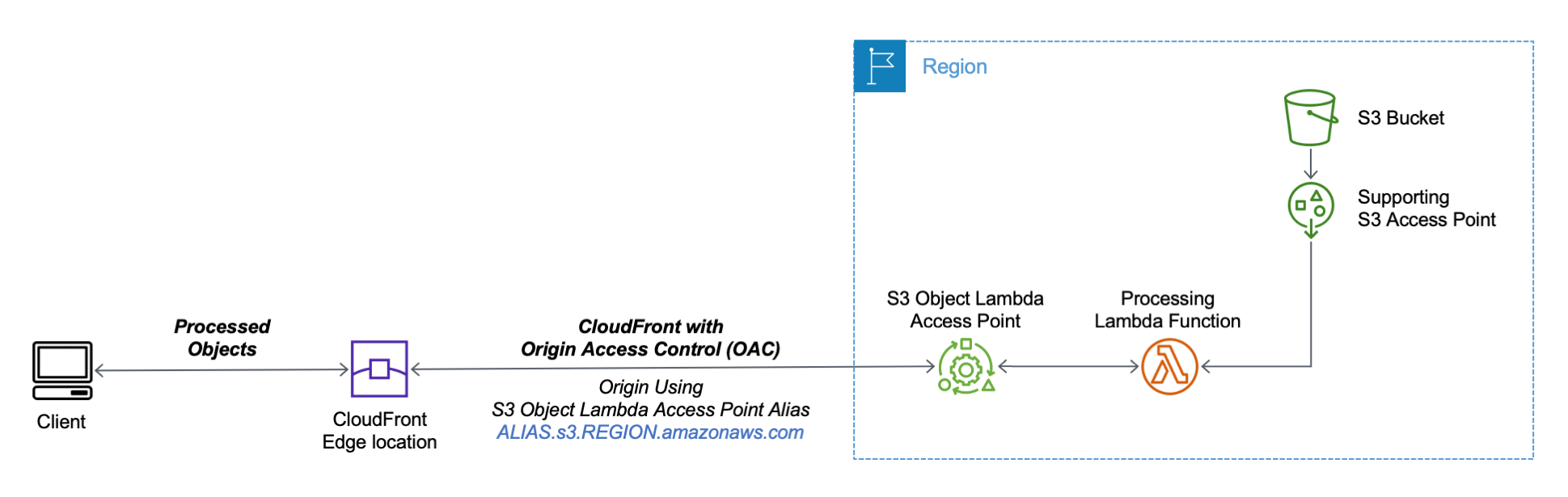
You can now use an S3 Object Lambda Access Point alias as an origin for your Amazon CloudFront distribution to tailor or customize data for end users. You can use this to implement automatic image resizing or to tag or annotate content as it is downloaded. Many images still use older formats like JPEG or PNG, and you can use a transcoding function to deliver images in more efficient formats like WebP, BPG, or HEIC. Digital images contain metadata, and you can implement a function that strips metadata to help satisfy data privacy requirements.

Architecture diagram.

Let’s see how this works in practice. First, I’ll show a simple example using text that you can follow along by just using the AWS Management Console. After that, I’ll implement a more advanced use case processing images.

Using an S3 Object Lambda Access Point as the Origin of a CloudFront Distribution
For simplicity, I am using the same application in the launch post that changes all text in the original file to uppercase. This time, I use the S3 Object Lambda Access Point alias to set up a public distribution with CloudFront.

I follow the same steps as in the launch post to create the S3 Object Lambda Access Point and the Lambda function. Because the Lambda runtimes for Python 3.8 and later do not include the requests module, I update the function code to use urlopen from the Python Standard Library:

import boto3
from urllib.request import urlopen

s3 = boto3.client('s3')

def lambda_handler(event, context):
  print(event)

  object_get_context = event['getObjectContext']
  request_route = object_get_context['outputRoute']
  request_token = object_get_context['outputToken']
  s3_url = object_get_context['inputS3Url']

  # Get object from S3
  response = urlopen(s3_url)
  original_object = response.read().decode('utf-8')

  # Transform object
  transformed_object = original_object.upper()

  # Write object back to S3 Object Lambda
  s3.write_get_object_response(
    Body=transformed_object,
    RequestRoute=request_route,
    RequestToken=request_token)

  return

To test that this is working, I open the same file from the bucket and through the S3 Object Lambda Access Point. In the S3 console, I select the bucket and a sample file (called s3.txt) that I uploaded earlier and choose Open.

Console screenshot.

A new browser tab is opened (you might need to disable the pop-up blocker in your browser), and its content is the original file with mixed-case text:

Amazon Simple Storage Service (Amazon S3) is an object storage service that offers...

I choose Object Lambda Access Points from the navigation pane and select the AWS Region I used before from the dropdown. Then, I search for the S3 Object Lambda Access Point that I just created. I select the same file as before and choose Open.

Console screenshot.

In the new tab, the text has been processed by the Lambda function and is now all in uppercase:

AMAZON SIMPLE STORAGE SERVICE (AMAZON S3) IS AN OBJECT STORAGE SERVICE THAT OFFERS...

Now that the S3 Object Lambda Access Point is correctly configured, I can create the CloudFront distribution. Before I do that, in the list of S3 Object Lambda Access Points in the S3 console, I copy the Object Lambda Access Point alias that has been automatically created:

Console screenshot.

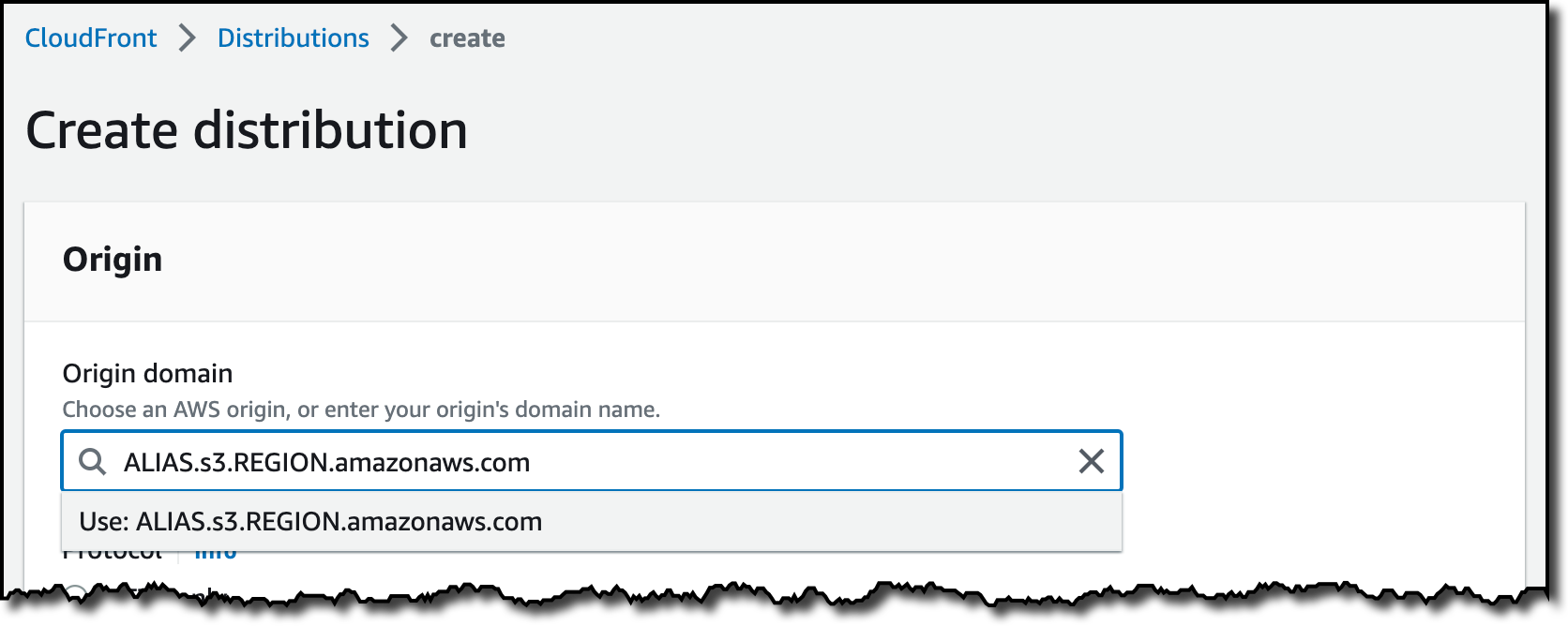
In the CloudFront console, I choose Distributions in the navigation pane and then Create distribution. In the Origin domain, I use the S3 Object Lambda Access Point alias and the Region. The full syntax of the domain is:

ALIAS.s3.REGION.amazonaws.com

Console screenshot.

S3 Object Lambda Access Points cannot be public, and I use CloudFront origin access control (OAC) to authenticate requests to the origin. For Origin access, I select Origin access control settings and choose Create control setting. I write a name for the control setting and select Sign requests and S3 in the Origin type dropdown.

Console screenshot.

Now, my Origin access control settings use the configuration I just created.

Console screenshot.

To reduce the number of requests going through S3 Object Lambda, I enable Origin Shield and choose the closest Origin Shield Region to the Region I am using. Then, I select the CachingOptimized cache policy and create the distribution. As the distribution is being deployed, I update permissions for the resources used by the distribution.

Setting Up Permissions to Use an S3 Object Lambda Access Point as the Origin of a CloudFront Distribution
First, the S3 Object Lambda Access Point needs to give access to the CloudFront distribution. In the S3 console, I select the S3 Object Lambda Access Point and, in the Permissions tab, I update the policy with the following:

{
    "Version": "2012-10-17",
    "Statement": [
        {
            "Effect": "Allow",
            "Principal": {
                "Service": "cloudfront.amazonaws.com"
            },
            "Action": "s3-object-lambda:Get*",
            "Resource": "arn:aws:s3-object-lambda:REGION:ACCOUNT:accesspoint/NAME",
            "Condition": {
                "StringEquals": {
                    "aws:SourceArn": "arn:aws:cloudfront::ACCOUNT:distribution/DISTRIBUTION-ID"
                }
            }
        }
    ]
}

The supporting access point also needs to allow access to CloudFront when called via S3 Object Lambda. I select the access point and update the policy in the Permissions tab:

{
    "Version": "2012-10-17",
    "Id": "default",
    "Statement": [
        {
            "Sid": "s3objlambda",
            "Effect": "Allow",
            "Principal": {
                "Service": "cloudfront.amazonaws.com"
            },
            "Action": "s3:*",
            "Resource": [
                "arn:aws:s3:REGION:ACCOUNT:accesspoint/NAME",
                "arn:aws:s3:REGION:ACCOUNT:accesspoint/NAME/object/*"
            ],
            "Condition": {
                "ForAnyValue:StringEquals": {
                    "aws:CalledVia": "s3-object-lambda.amazonaws.com"
                }
            }
        }
    ]
}

The S3 bucket needs to allow access to the supporting access point. I select the bucket and update the policy in the Permissions tab:

{
    "Version": "2012-10-17",
    "Statement": [
        {
            "Effect": "Allow",
            "Principal": {
                "AWS": "*"
            },
            "Action": "*",
            "Resource": [
                "arn:aws:s3:::BUCKET",
                "arn:aws:s3:::BUCKET/*"
            ],
            "Condition": {
                "StringEquals": {
                    "s3:DataAccessPointAccount": "ACCOUNT"
                }
            }
        }
    ]
}

Finally, CloudFront needs to be able to invoke the Lambda function. In the Lambda console, I choose the Lambda function used by S3 Object Lambda, and then, in the Configuration tab, I choose Permissions. In the Resource-based policy statements section, I choose Add permissions and select AWS Account. I enter a unique Statement ID. Then, I enter cloudfront.amazonaws.com as Principal and select lambda:InvokeFunction from the Action dropdown and Save. We are working to simplify this step in the future. I’ll update this post when that’s available.

Testing the CloudFront Distribution
When the distribution has been deployed, I test that the setup is working with the same sample file I used before. In the CloudFront console, I select the distribution and copy the Distribution domain name. I can use the browser and enter https://DISTRIBUTION_DOMAIN_NAME/s3.txt in the navigation bar to send a request to CloudFront and get the file processed by S3 Object Lambda. To quickly get all the info, I use curl with the -i option to see the HTTP status and the headers in the response:

curl -i https://DISTRIBUTION_DOMAIN_NAME/s3.txt

HTTP/2 200 
content-type: text/plain
content-length: 427
x-amzn-requestid: a85fe537-3502-4592-b2a9-a09261c8c00c
date: Mon, 06 Mar 2023 10:23:02 GMT
x-cache: Miss from cloudfront
via: 1.1 a2df4ad642d78d6dac65038e06ad10d2.cloudfront.net (CloudFront)
x-amz-cf-pop: DUB56-P1
x-amz-cf-id: KIiljCzYJBUVVxmNkl3EP2PMh96OBVoTyFSMYDupMd4muLGNm2AmgA==

AMAZON SIMPLE STORAGE SERVICE (AMAZON S3) IS AN OBJECT STORAGE SERVICE THAT OFFERS...

It works! As expected, the content processed by the Lambda function is all uppercase. Because this is the first invocation for the distribution, it has not been returned from the cache (x-cache: Miss from cloudfront). The request went through S3 Object Lambda to process the file using the Lambda function I provided.

Let’s try the same request again:

curl -i https://DISTRIBUTION_DOMAIN_NAME/s3.txt

HTTP/2 200 
content-type: text/plain
content-length: 427
x-amzn-requestid: a85fe537-3502-4592-b2a9-a09261c8c00c
date: Mon, 06 Mar 2023 10:23:02 GMT
x-cache: Hit from cloudfront
via: 1.1 145b7e87a6273078e52d178985ceaa5e.cloudfront.net (CloudFront)
x-amz-cf-pop: DUB56-P1
x-amz-cf-id: HEx9Fodp184mnxLQZuW62U11Fr1bA-W1aIkWjeqpC9yHbd0Rg4eM3A==
age: 3

AMAZON SIMPLE STORAGE SERVICE (AMAZON S3) IS AN OBJECT STORAGE SERVICE THAT OFFERS...

This time the content is returned from the CloudFront cache (x-cache: Hit from cloudfront), and there was no further processing by S3 Object Lambda. By using S3 Object Lambda as the origin, the CloudFront distribution serves content that has been processed by a Lambda function and can be cached to reduce latency and optimize costs.

Resizing Images Using S3 Object Lambda and CloudFront
As I mentioned at the beginning of this post, one of the use cases that can be implemented using S3 Object Lambda and CloudFront is image transformation. Let’s create a CloudFront distribution that can dynamically resize an image by passing the desired width and height as query parameters (w and h respectively). For example:

https://DISTRIBUTION_DOMAIN_NAME/image.jpg?w=200&h=150

For this setup to work, I need to make two changes to the CloudFront distribution. First, I create a new cache policy to include query parameters in the cache key. In the CloudFront console, I choose Policies in the navigation pane. In the Cache tab, I choose Create cache policy. Then, I enter a name for the cache policy.

Console screenshot.

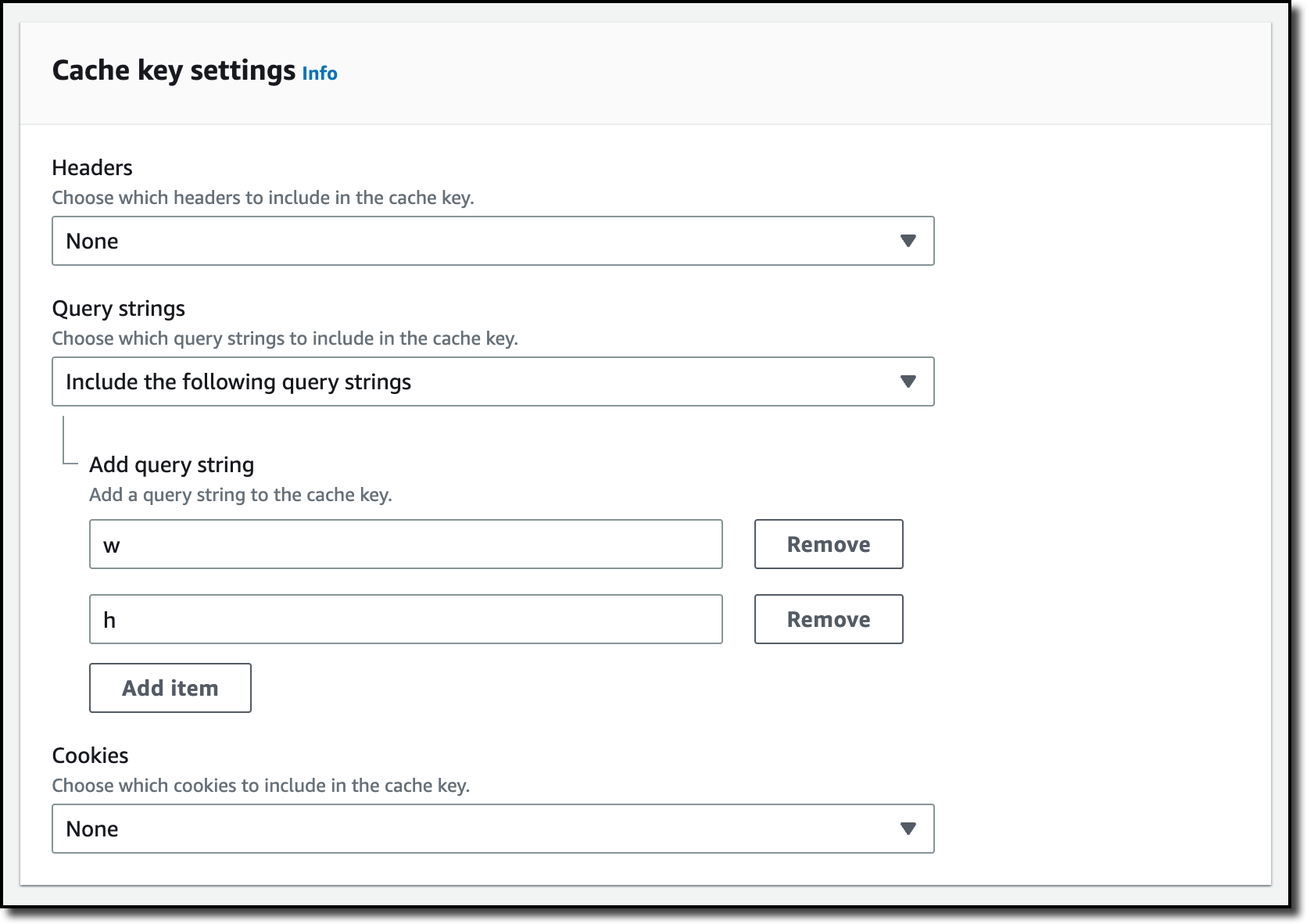
In the Query settings of the Cache key settings, I select the option to Include the following query parameters and add w (for the width) and h (for the height).

Console screenshot.

Then, in the Behaviors tab of the distribution, I select the default behavior and choose Edit.

There, I update the Cache key and origin requests section:

  • In the Cache policy, I use the new cache policy to include the w and h query parameters in the cache key.
  • In the Origin request policy, use the AllViewerExceptHostHeader managed policy to forward query parameters to the origin.

Console screenshot.

Now I can update the Lambda function code. To resize images, this function uses the Pillow module that needs to be packaged with the function when it is uploaded to Lambda. You can deploy the function using a tool like the AWS SAM CLI or the AWS CDK. Compared to the previous example, this function also handles and returns HTTP errors, such as when content is not found in the bucket.

import io
import boto3
from urllib.request import urlopen, HTTPError
from PIL import Image

from urllib.parse import urlparse, parse_qs

s3 = boto3.client('s3')

def lambda_handler(event, context):
    print(event)

    object_get_context = event['getObjectContext']
    request_route = object_get_context['outputRoute']
    request_token = object_get_context['outputToken']
    s3_url = object_get_context['inputS3Url']

    # Get object from S3
    try:
        original_image = Image.open(urlopen(s3_url))
    except HTTPError as err:
        s3.write_get_object_response(
            StatusCode=err.code,
            ErrorCode='HTTPError',
            ErrorMessage=err.reason,
            RequestRoute=request_route,
            RequestToken=request_token)
        return

    # Get width and height from query parameters
    user_request = event['userRequest']
    url = user_request['url']
    parsed_url = urlparse(url)
    query_parameters = parse_qs(parsed_url.query)

    try:
        width, height = int(query_parameters['w'][0]), int(query_parameters['h'][0])
    except (KeyError, ValueError):
        width, height = 0, 0

    # Transform object
    if width > 0 and height > 0:
        transformed_image = original_image.resize((width, height), Image.ANTIALIAS)
    else:
        transformed_image = original_image

    transformed_bytes = io.BytesIO()
    transformed_image.save(transformed_bytes, format='JPEG')

    # Write object back to S3 Object Lambda
    s3.write_get_object_response(
        Body=transformed_bytes.getvalue(),
        RequestRoute=request_route,
        RequestToken=request_token)

    return

I upload a picture I took of the Trevi Fountain in the source bucket. To start, I generate a small thumbnail (200 by 150 pixels).

https://DISTRIBUTION_DOMAIN_NAME/trevi-fountain.jpeg?w=200&h=150

Picture of the Trevi Fountain with size 200x150 pixels.

Now, I ask for a slightly larger version (400 by 300 pixels):

https://DISTRIBUTION_DOMAIN_NAME/trevi-fountain.jpeg?w=400&h=300

Picture of the Trevi Fountain with size 400x300 pixels.

It works as expected. The first invocation with a specific size is processed by the Lambda function. Further requests with the same width and height are served from the CloudFront cache.

Availability and Pricing
Aliases for S3 Object Lambda Access Points are available today in all commercial AWS Regions. There is no additional cost for aliases. With S3 Object Lambda, you pay for the Lambda compute and request charges required to process the data, and for the data S3 Object Lambda returns to your application. You also pay for the S3 requests that are invoked by your Lambda function. For more information, see Amazon S3 Pricing.

Aliases are now automatically generated when an S3 Object Lambda Access Point is created. For existing S3 Object Lambda Access Points, aliases are automatically assigned and ready for use.

It’s now easier to use S3 Object Lambda with existing applications, and aliases open many new possibilities. For example, you can use aliases with CloudFront to create a website that converts content in Markdown to HTML, resizes and watermarks images, or masks personally identifiable information (PII) from text, images, and documents.

Customize content for your end users using S3 Object Lambda with CloudFront.

— Danilo


from AWS News Blog https://ift.tt/gxJuDtd
via IFTTT