Tuesday, November 28, 2023

Amazon Retail Analytics (ARA): Amazon Marketing Cloud Explained

 a cloud-shaped data center connected to various retail elements like shopping carts, barcodes, and price tags, symbolizing the Amazon Marketing Cloud's role in retail analytics, hand-drawn abstract illustration for a company blog, in style of corporate memphis, faded colors, white background, professional, minimalist, clean lines

Amazon Retail Analytics (ARA): Amazon Marketing Cloud Explained

Amazon Retail Analytics (ARA) is a powerful tool provided by Amazon to its vendors. It offers a comprehensive understanding of how products are performing on Amazon's platform. This data-driven approach allows vendors to make informed decisions about their marketing strategies, inventory management, and overall business operations.

Amazon Marketing Cloud (AMC) is a subset of ARA, providing a more advanced and detailed analytics platform. It provides vendors with the ability to analyze large datasets, generate insights, and create customized reports. This article will delve into the intricacies of ARA and AMC, explaining their functionalities, benefits, and how they can be utilized for business growth.

Understanding Amazon Retail Analytics (ARA)

Amazon Retail Analytics (ARA) is a suite of tools provided by Amazon to its vendors. It provides a wealth of data about the vendors' product performance, customer behavior, and market trends. This data can be used to make informed decisions about product pricing, inventory management, and marketing strategies.

ARA provides a variety of reports, including sales reports, inventory reports, and customer behavior reports. These reports provide detailed insights into various aspects of a vendor's business, allowing them to identify areas of improvement and capitalize on opportunities for growth.

Key Features of ARA

ARA offers a variety of features that help vendors manage their business on Amazon. One of the key features is the sales dashboard, which provides a comprehensive overview of a vendor's sales performance. It includes data on sales volume, revenue, and sales rank, among other metrics.

Another important feature is the inventory management tool, which helps vendors track their inventory levels and identify potential stock-out situations. It provides data on inventory turnover, out-of-stock rates, and lost sales due to stock-outs.

Benefits of Using ARA

ARA provides numerous benefits to Amazon vendors. It allows vendors to gain a deep understanding of their business performance on Amazon, identify areas of improvement, and make data-driven decisions. This can lead to increased sales, improved customer satisfaction, and overall business growth.

Furthermore, ARA provides vendors with the ability to track their performance against their competitors. This can help vendors identify competitive advantages and develop strategies to capitalize on them.

Delving into Amazon Marketing Cloud (AMC)

Amazon Marketing Cloud (AMC) is an advanced analytics platform provided by Amazon to its vendors. It is a part of the ARA suite of tools, but offers more advanced features and capabilities. AMC allows vendors to analyze large datasets, generate insights, and create customized reports.

AMC provides a variety of data sources, including sales data, customer behavior data, and market trend data. This data can be analyzed using a variety of tools and techniques, allowing vendors to generate deep insights into their business performance.

Key Features of AMC

AMC offers a variety of features that help vendors analyze their data and generate insights. One of the key features is the data explorer, which allows vendors to explore their data in a visual and interactive way. It includes a variety of data visualization tools, such as charts, graphs, and maps.

Another important feature is the report builder, which allows vendors to create customized reports based on their specific needs. It includes a variety of report templates, as well as the ability to create custom reports from scratch.

Benefits of Using AMC

AMC provides numerous benefits to Amazon vendors. It allows vendors to analyze large datasets, generate deep insights, and make data-driven decisions. This can lead to increased sales, improved customer satisfaction, and overall business growth.

Furthermore, AMC provides vendors with the ability to track their performance against their competitors. This can help vendors identify competitive advantages and develop strategies to capitalize on them.

Comparing ARA and AMC

While both ARA and AMC are powerful analytics tools provided by Amazon, they have some key differences. ARA is a more basic tool, providing a variety of reports and dashboards to help vendors manage their business. AMC, on the other hand, is a more advanced tool, providing a variety of data analysis and visualization tools.

ARA is best suited for vendors who need a basic understanding of their business performance on Amazon. It provides a variety of reports and dashboards that provide a comprehensive overview of a vendor's sales performance, inventory levels, and customer behavior.

When to Use ARA

ARA is best suited for vendors who need a basic understanding of their business performance on Amazon. It provides a variety of reports and dashboards that provide a comprehensive overview of a vendor's sales performance, inventory levels, and customer behavior.

ARA is also useful for vendors who want to track their performance against their competitors. It provides data on sales rank, market share, and other competitive metrics, allowing vendors to identify competitive advantages and develop strategies to capitalize on them.

When to Use AMC

AMC is best suited for vendors who need a more advanced understanding of their business performance on Amazon. It provides a variety of data analysis and visualization tools, allowing vendors to analyze large datasets and generate deep insights.

AMC is also useful for vendors who want to create customized reports based on their specific needs. It provides a variety of report templates, as well as the ability to create custom reports from scratch.

Conclusion

In conclusion, both Amazon Retail Analytics (ARA) and Amazon Marketing Cloud (AMC) are powerful tools that can help vendors manage their business on Amazon. By providing a wealth of data and analytics capabilities, these tools can help vendors make data-driven decisions, identify areas of improvement, and capitalize on opportunities for growth.

Whether a vendor chooses to use ARA, AMC, or both, will depend on their specific needs and capabilities. However, regardless of the tool they choose, the key to success is to use the data and insights provided by these tools to make informed decisions and drive business growth.

Ready to elevate your Amazon Retail Analytics and Marketing Cloud data to the next level? With Openbridge, say goodbye to time-consuming, manual workflows and hello to automated, analytics-ready data solutions. Harness the full potential of your data with our code-free pipelines, and make informed decisions using tools like Tableau, Power BI, and more. Own your data with our private, trusted storage options, and measure your business exactly how you want. Don't let data silos hold you back. Start today and unlock the power of a flexible, integrated data platform with Openbridge.

Amazon Marketing Cloud (AMC): Amazon Marketing Cloud Explained

 a cloud composed of various marketing icons such as graphs, charts, digital devices, and shopping carts, subtly hinting at Amazon's color scheme, hand-drawn abstract illustration for a company blog, in style of corporate memphis, faded colors, white background, professional, minimalist, clean lines

Amazon Marketing Cloud (AMC): Amazon Marketing Cloud Explained

The Amazon Marketing Cloud (AMC) is a powerful data analysis tool provided by Amazon to help advertisers gain insights into their marketing performance on the platform. It is a part of Amazon Advertising's suite of services, designed to empower businesses to make data-driven decisions and optimize their advertising strategies.

AMC provides a wealth of data and analytics capabilities, enabling advertisers to dive deep into their campaign performance, customer behavior, sales trends, and more. This comprehensive tool offers a holistic view of advertising and retail operations, making it an indispensable resource for businesses advertising on Amazon.

Understanding Amazon Marketing Cloud

The Amazon Marketing Cloud is a data warehouse that provides a vast array of metrics and data points related to a business's advertising activities on Amazon. It is designed to help advertisers understand their performance and make informed decisions about their marketing strategies.

AMC offers a range of pre-built reports that provide insights into various aspects of advertising performance, such as sales, conversions, and customer behavior. Additionally, advertisers can create custom reports to analyze specific aspects of their campaigns.

Key Features of AMC

AMC is packed with features that provide deep insights into advertising performance. One of its key features is the ability to analyze data at a granular level. This allows advertisers to drill down into their data and understand the performance of individual products, campaigns, and customer segments.

Another notable feature of AMC is its ability to provide historical data. This enables advertisers to track their performance over time and identify trends and patterns. This can be particularly useful for businesses that want to understand the impact of seasonal trends on their sales and advertising performance.

Benefits of Using AMC

There are several benefits to using AMC. Firstly, it provides a wealth of data that can help businesses understand their advertising performance in great detail. This can help them identify areas of improvement and optimize their advertising strategies.

Secondly, AMC provides a holistic view of advertising and retail operations. This can help businesses understand the impact of their advertising activities on their overall business performance. This can be particularly useful for businesses that sell multiple products on Amazon and want to understand how their advertising activities are impacting their overall sales.

Getting Started with Amazon Marketing Cloud

Getting started with AMC is a straightforward process. It is available to all Amazon advertisers and can be accessed through the Amazon Advertising console. Once you have access to AMC, you can start creating reports and analyzing your data.

It's important to note that while AMC is a powerful tool, it does require a certain level of expertise to use effectively. It's recommended that businesses have a dedicated team or individual who is familiar with data analysis and Amazon's advertising platform to manage their AMC account.

Creating Reports in AMC

Creating reports in AMC is a simple process. The platform provides a range of pre-built reports that can provide insights into various aspects of your advertising performance. These reports can be customized to suit your specific needs.

Additionally, AMC allows you to create custom reports. This can be particularly useful if you want to analyze specific aspects of your advertising performance that are not covered by the pre-built reports. Creating custom reports requires a certain level of expertise, but it can provide valuable insights that can help you optimize your advertising strategies.

Interpreting Data in AMC

Interpreting data in AMC can be a complex process, particularly if you're new to data analysis. The platform provides a wealth of data, and it can be challenging to understand what all of it means. However, with some practice and expertise, you can learn to interpret the data and gain valuable insights into your advertising performance.

One of the key things to remember when interpreting data in AMC is to focus on the metrics that are most relevant to your business goals. For example, if your goal is to increase sales, you might want to focus on metrics like conversion rate and sales volume. On the other hand, if your goal is to increase brand awareness, you might want to focus on metrics like impressions and click-through rate.

Optimizing Advertising Strategies with AMC

AMC is a powerful tool that can help businesses optimize their advertising strategies on Amazon. By providing a wealth of data and analytics capabilities, it enables businesses to understand their performance and make data-driven decisions.

There are several ways in which businesses can use AMC to optimize their advertising strategies. For example, they can use the data to identify high-performing products and campaigns and allocate more budget to these areas. Alternatively, they can use the data to identify areas of improvement and make necessary adjustments to their strategies.

Identifying High-Performing Products and Campaigns

One of the key ways in which businesses can use AMC to optimize their advertising strategies is by identifying high-performing products and campaigns. By analyzing the data, businesses can identify which products and campaigns are driving the most sales and conversions.

This information can be incredibly valuable, as it can help businesses allocate their advertising budget more effectively. By investing more in high-performing products and campaigns, businesses can maximize their return on investment and increase their sales.

Identifying Areas of Improvement

Another way in which businesses can use AMC to optimize their advertising strategies is by identifying areas of improvement. By analyzing the data, businesses can identify which products and campaigns are underperforming and why.

This can help businesses identify issues with their advertising strategies and make necessary adjustments. For example, if a product is not selling well, it could be due to a lack of visibility in search results. In this case, businesses could adjust their advertising strategy to increase the visibility of the product.

Conclusion

In conclusion, the Amazon Marketing Cloud is a powerful tool that can help businesses optimize their advertising strategies on Amazon. By providing a wealth of data and analytics capabilities, it enables businesses to make data-driven decisions and improve their performance.

Whether you're a small business owner or a large corporation, AMC can provide valuable insights that can help you optimize your advertising strategies and achieve your business goals. With its powerful features and easy-to-use interface, AMC is an indispensable resource for any business advertising on Amazon.

Ready to elevate your Amazon advertising strategy with data-driven insights? Openbridge is here to streamline your journey. Say goodbye to time-consuming, manual workflows and embrace the power of automated, unified data to boost productivity. With Openbridge, you can effortlessly analyze your Amazon Marketing Cloud data using your preferred tools like Tableau, Microsoft Power BI, and more. Take control of your data with private, trusted storage, and unlock new opportunities for growth. Don't let data silos hold you back. Start today and transform the way you measure and manage your business with Openbridge.

Amazon Demand Side Platform (DSP): Amazon Marketing Cloud Explained

 a cloud-shaped platform filled with various marketing tools and symbols, hovering over a stylized representation of an Amazon jungle landscape, hand-drawn abstract illustration for a company blog, in style of corporate memphis, faded colors, white background, professional, minimalist, clean lines

Amazon Demand Side Platform (DSP): Amazon Marketing Cloud Explained

Amazon Demand Side Platform (DSP) is a powerful advertising tool offered by Amazon that allows advertisers to programmatically buy display, video, and audio ads. It provides advertisers with the ability to reach and engage their target audience across the web on both Amazon's sites and apps as well as through its publishing partners. Amazon DSP is part of the larger Amazon Marketing Cloud, a suite of tools and services designed to help businesses market their products and services more effectively.

Amazon DSP is designed to help advertisers reach their target audience with precision and efficiency. It uses Amazon's vast troves of data to target ads based on a variety of factors, including browsing history, purchase history, and demographic information. This allows advertisers to deliver highly relevant ads to their target audience, increasing the likelihood of engagement and conversion.

Understanding Amazon DSP

Amazon DSP is a demand-side platform, which is a type of software used by advertisers to buy ads in an automated fashion. Demand-side platforms are part of the larger programmatic advertising ecosystem, which also includes supply-side platforms (used by publishers to sell ads) and ad exchanges (where ads are bought and sold).

Amazon DSP stands out from other demand-side platforms in several ways. Firstly, it has access to Amazon's vast amounts of data, which allows for highly precise targeting. Secondly, it allows advertisers to buy ads not just on Amazon's sites and apps, but also on other websites and apps that partner with Amazon. This means that advertisers can reach their target audience wherever they are on the web.

Key Features of Amazon DSP

Amazon DSP offers a range of features designed to help advertisers reach their target audience and achieve their marketing goals. These include advanced targeting options, a variety of ad formats, and detailed reporting and analytics tools.

One of the key features of Amazon DSP is its advanced targeting options. Advertisers can target their ads based on a variety of factors, including demographic information, browsing history, and purchase history. This allows advertisers to deliver highly relevant ads to their target audience, increasing the likelihood of engagement and conversion.

Benefits of Using Amazon DSP

There are several benefits to using Amazon DSP. Firstly, it allows advertisers to reach a large and engaged audience. Amazon has millions of active users, and with Amazon DSP, advertisers can reach these users wherever they are on the web. This can help to increase brand awareness and drive more traffic to their website or product pages.

Secondly, Amazon DSP allows for highly precise targeting. By leveraging Amazon's vast amounts of data, advertisers can target their ads to the right people at the right time. This can help to increase the effectiveness of their advertising campaigns and improve their return on investment.

Understanding Amazon Marketing Cloud

Amazon Marketing Cloud (AMC) is a suite of tools and services offered by Amazon to help businesses market their products and services more effectively. It includes a variety of tools for managing and optimizing advertising campaigns, including Amazon DSP.

AMC is designed to provide businesses with the insights and tools they need to understand their audience, optimize their advertising campaigns, and achieve their marketing goals. It leverages Amazon's vast amounts of data to provide detailed insights into customer behavior and campaign performance.

Key Features of Amazon Marketing Cloud

Amazon Marketing Cloud offers a range of features designed to help businesses market their products and services more effectively. These include detailed reporting and analytics tools, advanced targeting options, and a variety of ad formats.

One of the key features of AMC is its detailed reporting and analytics tools. These tools allow businesses to track the performance of their advertising campaigns in real-time, providing them with the insights they need to optimize their campaigns and achieve their marketing goals.

Benefits of Using Amazon Marketing Cloud

There are several benefits to using Amazon Marketing Cloud. Firstly, it provides businesses with the tools and insights they need to understand their audience and optimize their advertising campaigns. This can help to increase the effectiveness of their advertising efforts and improve their return on investment.

Secondly, AMC allows businesses to leverage Amazon's vast amounts of data. This can provide businesses with valuable insights into customer behavior, helping them to deliver more relevant and effective ads.

How Amazon DSP and Amazon Marketing Cloud Work Together

Amazon DSP and Amazon Marketing Cloud are designed to work together to help businesses market their products and services more effectively. Amazon DSP provides the tools and services for buying and managing ads, while Amazon Marketing Cloud provides the insights and analytics needed to optimize these campaigns.

By using these two tools together, businesses can create more effective advertising campaigns that reach their target audience with precision and efficiency. This can help to increase brand awareness, drive more traffic to their website or product pages, and ultimately, increase sales.

Creating a Unified Marketing Strategy with Amazon DSP and AMC

By using Amazon DSP and Amazon Marketing Cloud together, businesses can create a unified marketing strategy that leverages the strengths of both tools. This can help to create a more cohesive and effective marketing strategy that drives results.

For example, a business could use Amazon DSP to target ads based on demographic information, browsing history, and purchase history. They could then use Amazon Marketing Cloud to track the performance of these ads, providing them with the insights they need to optimize their campaigns and achieve their marketing goals.

Optimizing Campaigns with Amazon DSP and AMC

Amazon DSP and Amazon Marketing Cloud also provide businesses with the tools they need to optimize their advertising campaigns. This includes detailed reporting and analytics tools, as well as advanced targeting options.

By leveraging these tools, businesses can ensure that their ads are reaching the right people at the right time, increasing the likelihood of engagement and conversion. This can help to increase the effectiveness of their advertising campaigns and improve their return on investment.

Conclusion

Amazon DSP and Amazon Marketing Cloud are powerful tools that can help businesses market their products and services more effectively. By leveraging these tools, businesses can reach a large and engaged audience, deliver highly relevant ads, and track the performance of their advertising campaigns in real-time.

Whether a business is looking to increase brand awareness, drive more traffic to their website or product pages, or increase sales, Amazon DSP and Amazon Marketing Cloud can provide the tools and insights needed to achieve these goals.

Ready to take your Amazon DSP campaigns to the next level? With Openbridge, say goodbye to time-consuming, manual workflows and hello to automated, unified data that boosts productivity for all your marketing efforts. Transform your Amazon Marketing Cloud data into actionable insights with ease, using your preferred tools like Tableau, Microsoft Power BI, and more. Own your data with private, trusted storage, and measure your business the way you want. Don't let messy data silos hold you back. Start today and unleash the full potential of your data with Openbridge.

Monday, November 27, 2023

Reserve quantum computers, get guidance and cutting-edge capabilities with Amazon Braket Direct

Today, we are announcing the availability of Braket Direct, a new Amazon Braket program that helps quantum researchers dive deeper into quantum computing. This program lets you get dedicated, private access to the full capacity of various quantum processing units (QPUs) without any queues or wait times, connect with quantum computing specialists to receive expert guidance for your workloads, and get early access to features and devices with limited availability to conduct cutting-edge research on today’s noisy quantum devices.

Since its launch in 2020, Amazon Braket has democratized access to quantum computing by offering on-demand access to various QPUs using shared, public availability windows, where you only pay for the duration of your reservation.

You can now use Braket Direct to reserve the entire dedicated machine for a period of time on IonQ Aria, QuEra Aquila, and Rigetti Aspen-M-3 devices for running your most complex, long-running, time-sensitive workloads, or conducting live events such as training workshops and hackathons, where you pay only for what you reserve.

To further your research, you can now engage directly with Braket’s experts through free office hours or one-on-one, hands-on reservation prep sessions. For deeper research collaborations, you can connect with specialists from quantum hardware providers such as IonQ, Oxford Quantum Circuits, QuEra, Rigetti, or Amazon Quantum Solutions Lab, our dedicated professional services team.

Finally, to truly push the boundaries, you can gain access to experimental capabilities that have limited or reduced availability starting with IonQ’s highest fidelity, 30-qubit Forte device.

Braket Direct expands on our commitment to accelerate research and innovation in quantum computing without requiring any upfront fees or long-term commitments.

Getting started with Braket Direct
To get started, go to the Amazon Braket console and choose Braket Direct in the left pane. You can see new features such as quantum hardware reservation, expert advice and get access to next-generation quantum hardware and features.

1. Request a quantum hardware reservation
To create a reservation, choose Reserve device and select the Device that you would like to reserve. Provide your contact information, including your name and email address, any details about the workload that you would like to execute using your reservation, such as desired reservation length, relevant constraints, and desired schedule.

Braket Direct assures that you have the full capacity of the QPU during your reservation and the predictability that your workloads will execute when your reservation begins.

If you are interested in connecting with a Braket expert for a one-on-one reservation prep session after your reservation is confirmed, you can select that option at no additional cost.

Choose Submit to complete your reservation request. A Braket team member will email you within 2–3 business days, pending request verification. To make the most of your reservation, you can choose to pre-create your tasks and jobs prior to a reservation to maximize use of the time.

To learn more about your quantum tasks and hybrid jobs to execute in a device reservation, see Get started with Braket Direct in the AWS documentation.

2. Get support from quantum computing experts
You can get in touch with quantum experts and get advice about your workload. With Braket office hours, Braket experts can help you go from ideation to execution faster at no additional cost. Explore your device to fit your use case, identify options to make best use of Braket for your algorithm, and get recommendations on how to use certain Braket features like Hybrid Jobs, Braket Pulse, or Analog Hamiltonian Simulation.

To book an upcoming Braket office hours slot, choose Sign up and fill out your contact information, workload details, and any desired discussion topics. You will receive a calendar invitation to the next available slot by email.

To take advantage of experts from quantum hardware providers, choose Connect and browse their professional services listings on AWS Marketplace.

The Amazon Quantum Solutions Lab is a collaborative research and professional services team staffed with quantum computing experts who can assist you in more effectively exploring quantum computing, engaging in quantum research, and assessing the current performance of this technology. To contact the Quantum Solutions Lab, select Connect and fill out contact information and use case details. The team will email you with next steps.

3. Access to cutting-edge capabilities
To move your research quicker, you can get early access to innovative new capabilities. With Braket Direct, you can easily request access to cutting-edge capabilities, such as new quantum devices with limited availability, directly in the Braket console. Today, you can get reservation-only access to IonQ’s highest-fidelity Forte QPU. Due to its limited availability, this device is currently only available through Braket Direct reservations.

Now available
Braket Direct is now generally available in all AWS Regions where Amazon Braket is available. To learn more, see the Braket Direct page and pricing page.

Give it a try and send feedback to AWS re:Post for Amazon Braket, Quantum Computing Stack Exchange, or through your usual AWS Support contacts.

Channy


from AWS News Blog https://ift.tt/ejqP8tl
via IFTTT

AWS Step Functions Workflow Studio is now available in AWS Application Composer

Today, we’re announcing that AWS Step Functions Workflow Studio is now available in AWS Application Composer. This new integration brings together the development of workflows and application resources into a unified visual infrastructure as code (IaC) builder.

Now, you can have a seamless transition between authoring workflows with AWS Step Functions Workflow Studio and defining resources with AWS Application Composer. This announcement allows you to create and manage all resources at any stage of your development journey. You can visualize the full application in AWS Application Composer, then zoom into the workflow details with AWS Step Functions Workflow Studio—all within a single interface.

Seamlessly build workflow and modern application
To help you design and build modern applications, we launched AWS Application Composer in March 2023. With AWS Application Composer, you can use a visual builder to compose and configure serverless applications from AWS services backed by deployment-ready IaC.

In various use cases of building modern applications, you may also need to orchestrate microservices, automate mission-critical business processes, create event-driven applications that respond to infrastructure changes, or build machine learning (ML) pipelines. To solve these challenges, you can use AWS Step Functions, a fully managed service that makes it easier to coordinate distributed application components using visual workflows. To simplify workflow development, in 2021 we introduced AWS Step Functions Workflow Studio, a low-code visual tool for rapid workflow prototyping and development across 12,000+ API actions from over 220 AWS services.

While AWS Step Functions Workflow Studio brings simplicity to building workflows, customers that want to deploy workflows using IaC had to manually define their state machine resource and migrate their workflow definitions to the IaC template.

Better together: AWS Step Functions Workflow Studio in AWS Application Composer
With this new integration, you can now design AWS Step Functions workflows in AWS Application Composer using a drag-and-drop interface. This accelerates the path from prototyping to production deployment and iterating on existing workflows.

You can start by composing your modern application with AWS Application Composer. Within the canvas, you can add a workflow by adding an AWS Step Functions state machine resource. This new capability provides you with the ability to visually design and build a workflow with an intuitive interface to connect workflow steps to resources.

How it works
Let me walk you through how you can use AWS Step Functions Workflow Studio in AWS Application Composer. For this demo, let’s say that I need to improve handling e-commerce transactions by building a workflow and integrating with my existing serverless APIs.

First, I navigate to AWS Application Composer. Because I already have an existing project that includes application code and IaC templates from AWS Application Composer, I don’t need to build anything from scratch.

I open the menu and select Project folder to open the files in my local development machine.

Then, I select the path of my local folder, and AWS Application Composer automatically detects the IaC template that I currently have.

Then, AWS Application Composer visualizes the diagram in the canvas. What I really like about using this approach is that AWS Application Composer activates Local sync mode, which automatically syncs and saves any changes in IaC templates into my local project.

Here, I have a simple serverless API running on Amazon API Gateway, which invokes an AWS Lambda function and integrates with Amazon DynamoDB.

Now, I’m ready to make some changes to my serverless API. I configure another route on Amazon API Gateway and add AWS Step Functions state machine to start building my workflow.

When I configure my Step Functions state machine, I can start editing my workflow by selecting Edit in Workflow Studio.

This opens Step Functions Workflow Studio within the AWS Application Composer canvas. I have the same experience as Workflow Studio in the AWS Step Functions console. I can use the canvas to add actions, flows , and patterns into my Step Functions state machine.

I start building my workflow, and here’s the result that I exported using Export PNG image in Workflow Studio.

But here’s where this new capability really helps me as a developer. In the workflow definition, I use various AWS resources, such as AWS Lambda functions and Amazon DynamoDB. If I need to reference the AWS resources I defined in AWS Application Composer, I can use an AWS CloudFormation substitution.

With AWS CloudFormation substitutions, I can add a substitution using an AWS CloudFormation convention, which is a dynamic reference to a value that is provided in the IaC template. I am using a placeholder substitution here so I can map it with an AWS resource in the AWS Application Composer canvas in a later step.

I can also define the AWS CloudFormation substitution for my Amazon DynamoDB table.

At this stage, I’m happy with my workflow. To review the Amazon States Language as my AWS Step Functions state machine definition, I can also open the Code tab. Now I don’t need to manually copy and paste this definition into IaC templates. I only need to save my work and choose Return to Application Composer.

Here, I can see that my AWS Step Functions state machine is updated both in the visual diagram and in the state machine definition section.

If I scroll down, I will find AWS Cloudformation Definition Substitutions for resources that I defined in Workflow Studio. I can manually replace the mapping here, or I can use the canvas.

To use the canvas, I simply drag and drop the respective resources in my Step Functions state machine and in the Application Composer canvas. Here, I connect the Inventory Process task state with a new AWS Lambda function. Also, my Step Functions state machine tasks can reference existing resources.

When I choose Template, the state machine definition is integrated with other AWS Application Composer resources. With this IaC template I can easily deploy using AWS Serverless Application Model Command Line Interface (AWS SAM CLI) or CloudFormation.

Things to know
Here is some additional information for you:

Pricing – The AWS Step Functions Workflow Studio in AWS Application Composer comes at no additional cost.

Availability – This feature is available in all AWS Regions where Application Composer is available.

AWS Step Functions Workflow Studio in AWS Application Composer provides you with an easy-to-use experience to integrate your workflow into modern applications. Get started and learn more about this feature on the AWS Application Composer page.

Happy building!
— Donnie


from AWS News Blog https://ift.tt/cwomEaA
via IFTTT

Amazon CodeCatalyst introduces custom blueprints and a new enterprise tier

Today, I’m excited to introduce the new Amazon CodeCatalyst enterprise tier and custom blueprints.

Amazon CodeCatalyst enterprise tier is a new pricing tier that offers features like custom blueprints and project lifecycle management. The enterprise tier is $20/user per month, and each enterprise tier space gets 1,500 compute minutes, 160 Dev Environment hours, and 64GB of Dev Environment storage per paying user. You can use custom blueprints to define best practices for your application code, workflows, and infrastructure. You can publish these blueprints to your CodeCatalyst space, utilizing them for project creation or applying standards to existing projects.

Blueprints help you set up projects in minutes so you can get to work on code immediately. With just a few clicks, you can set up project files and configure built-in, fully integrated tools (for example, source repository, issue management, and continuous integration and delivery (CI/CD) pipeline) with best practices for your particular type of project. You can swap in popular tools like GitHub if needed, while maintaining the unified experience. You spend less time on building, integrating, or operating developer tools over the project’s lifetime.

With custom blueprints, you can define various elements of your CodeCatalyst project, like workflow definitions, infrastructure as code (IaC), and application code. When custom blueprints are updated, those changes are reflected in any project using the blueprint as a pull request update. This streamlined process reduces overhead in setting up your projects and ensures that best practices are consistently applied across your projects. As an admin, you can easily view details about which projects are using each blueprint in your CodeCatalyst space, giving you visibility into how standards are being applied across your projects.

Creating a custom blueprint in CodeCatalyst
I open the CodeCatalyst console and then I navigate to my space. On the Settings tab, I choose Blueprints on the left navigation pane, and then I select Create blueprint. At this point, I codify my best practices in this blueprint. When ready, I’ll publish it back to my space so my teams can use it to create projects.

create-blueprint

After I publish my blueprint, I can view and manage it in my CodeCatalyst space in the Settings tab. In the left panel, I choose Blueprints. Then I select Space blueprints.

manage-blueprint

I select Create project > Space blueprints to create a CodeCatalyst project from my custom blueprint.

create-project

Availability

The Amazon CodeCatalyst enterprise tier is available in US West (Oregon) and Europe (Ireland) Regions, but you can deploy to any commercial Region. To learn more, visit the Amazon CodeCatalyst webpage.

Go build!

— Irshad


from AWS News Blog https://ift.tt/nl6fZwW
via IFTTT

Automatic restore testing and validation now available in AWS Backup

Performing automatic game day testing of all your critical resources is an important step in determining that you are prepared to respond to ransomware or any data loss event. This gives you the opportunity to take appropriate corrective actions based on the results and monitor results such as success or failure from these tests. Ultimately, you will be able to ascertain if the restore times meet your expected organization’s recovery time objective (RTO) goals, helping you develop improved recovery strategies.

Today, we’re announcing restore testing, a new capability in AWS Backup that allows you to perform restore testing of your AWS resources across storage, compute, and databases. With this feature, you can automate the entire restore testing process and avoid surprises later by determining now whether you can successfully recover using your backups in the event of a data loss such as ransomware. As an additional option, to demonstrate compliance with your organizational and regulatory data governance requirements, you can use the restore job results.

How it works
Restore testing in AWS Backup supports restore testing of resources for which the recovery points are created by AWS Backup, and the following services are supported: Amazon Elastic Block Store (Amazon EBS), Amazon Elastic Compute Cloud (Amazon EC2), Amazon Aurora, Amazon Relational Database Service (Amazon RDS), Amazon Elastic File Store (Amazon EFS), Amazon Simple Storage Service (Amazon S3), Amazon DynamoDB, Amazon FSx, Amazon DocumentDB, and Amazon Neptune. You can get started with restore testing from the AWS Backup console, AWS CLI, or AWS SDK.

Earlier, I created EC2 instances and a backup of these instances. Then, I created my restore testing plan in the AWS Backup console.

Create restore testing plan

In this General section, I enter the name of the plan, a test frequency, a Start time, and a Start within. Start time sets the time for the test to begin, for example, if you have a daily test frequency set, you specify what time the plan will run each day. Start within is the period of time in which the restore test is designated to begin. AWS Backup makes a best effort to commence all designated restore jobs during the Start within time window. You have a choice to keep this very minimal or very large based on your preference.

Figure 2: Section 1 Create restore testing plan

In the Recovery point selection section, I specify the vaults that the recovery points should come from, and a timeframe of eligible recovery points as part of this restore testing plan. I left the criteria for a recovery point at the default selection. I also didn’t opt to include recovery points generated by point-in-time recovery (PITR) in this restore testing plan.

section2_create

Tagging is optional so for the purposes of this test I didn’t add a tag. I was then finished with setup, and it was time for me to choose Create restore testing plan to proceed with creating this restore testing plan.

Figure 4: Finalize creation of restore testing plan

Once the restore testing plan has been created, it is time to assign resources. I start by specifying the IAM role that AWS Backup will assume when running the restore test. In terms of retention period before cleanup, I kept the default selection of deleting the restored resources immediately, to optimize costs. Alternatively, by specifying a retention period I could have also configured to integrate my own tests (for example, AWS Lambda) using Amazon EventBridge (CloudWatch Events) and send back validation status using the new PutRestoreValidationResult API so that it is reported in the restore job.

add_resource1

I have EC2 instances that I created and backed up earlier, and I specify that this plan is for Amazon EC2 resource types. I include all protected resources of this EC2 resource type in the selection scope. I have very few resources, so I didn’t add the optional tags.

add_resource2

I opted to use the default instance type for the restore. I also didn’t specify any additional parameters. It’s then time to choose Assign resources.

add_resource3

Once the resources have been assigned, all information related to the restore testing plan will be presented in a summarized form where you’ll be able to see when the restore testing jobs have executed.

Once I have enough restores performed over time, I can also view the Restore time history for every resource restored from the Protected resources tab.

Now available
Restore testing in AWS Backup is available in all AWS Regions where AWS Backup is available except AWS China Regions, AWS GovCloud (US), and Israel (Tel Aviv).
To learn more, visit the AWS Backup user guide. You can submit your questions to AWS re:Post for AWS Backup or through your usual AWS Support contacts.

— Veliswa


from AWS News Blog https://ift.tt/1ORaH5M
via IFTTT

Sunday, November 26, 2023

New Amazon CloudWatch log class for infrequent access logs at a reduced price

Amazon CloudWatch Logs announces today a new log class called Infrequent Access. This new log class offers a tailored set of capabilities at a lower cost for infrequently accessed logs, enabling customers to consolidate all their logs in one place in a cost-effective manner.

As customers’ applications continue to scale and grow, so does the volume of logs generated. To limit the increase of logging costs, many customers are forced to make hard trade-offs. For example, some customers limit the logs generated by their applications, which can hinder the visibility of the application, or choose a different solution for different log types, which adds complexity and inefficiencies in managing different logging solutions. For instance, customers may send logs needed for real-time analytics and alerting to CloudWatch Logs and send more detailed logs needed for debugging and troubleshooting to a lower-cost solution that doesn’t have as many features as CloudWatch. In the end, these workarounds can impact the observability of the application, because customers need to navigate across multiple solutions to see their logs.

The Infrequent Access log class allows you to build a holistic observability solution using CloudWatch by centralizing all your logs in one place to ingest, query, and store your logs in a cost-efficient way. Infrequent Access is 50 percent lower per GB ingestion price than Standard log class. It provides a tailored set of capabilities for customers that don’t need advanced features like Live Tail, metric extraction, alarming, or data protection that the Standard log class provides. With Infrequent Access, you can still get the benefits of fully managed ingestion, storage, and the ability to deep dive using CloudWatch Logs Insights.

The following table shows a side-by-side comparison of the features that the new Infrequent Access and the Standard log classes have.

Feature Infrequent Access log class Standard log class
Fully managed ingestion and storage Available Available
Cross-account Available Available
Encryption with KMS Available Available
Logs Insights Available Available
Subscription filters / Export to S3 Not available Available
GetLogEvents / FilterLogEvents Not available Available
Contributor, Container, and Lambda Insights Not available Available
Metric filter and alerting Not available Available
Data protection Not available Available
Embedded metric format (EMF) Not available Available
Live Tail Not available Available

When to use the new Infrequent Access log class
Use the Infrequent Access log class when you have a new workload that doesn’t require advanced features provided by the Standard log class. One important consideration is that when you create a log group with a specific log class, you cannot change that log group log class afterward.

The Infrequent Access log class is suitable for debug logs or web server logs because they are quite verbose and rarely require any of the advanced functionality that the Standard log class provides.

Another good workload for the Infrequent Access log class is an Internet of Things (IoT) fleet sending detailed logs that are only accessed for after the fact forensic analysis after the event. In addition, the Infrequent Access log class is a good choice for workloads where logs need to be stored for compliance because they will be queried infrequently.

Getting started
To get started using the new Infrequent Access log class, create a new log group in the CloudWatch Logs console and select the new Infrequent Access log class. You can create logs groups with the new Infrequent Access log class not only from the AWS Management Console but also from the AWS Command Line Interface (AWS CLI), AWS CloudFormation, AWS Cloud Development Kit (AWS CDK), and AWS SDKs.

Create log group

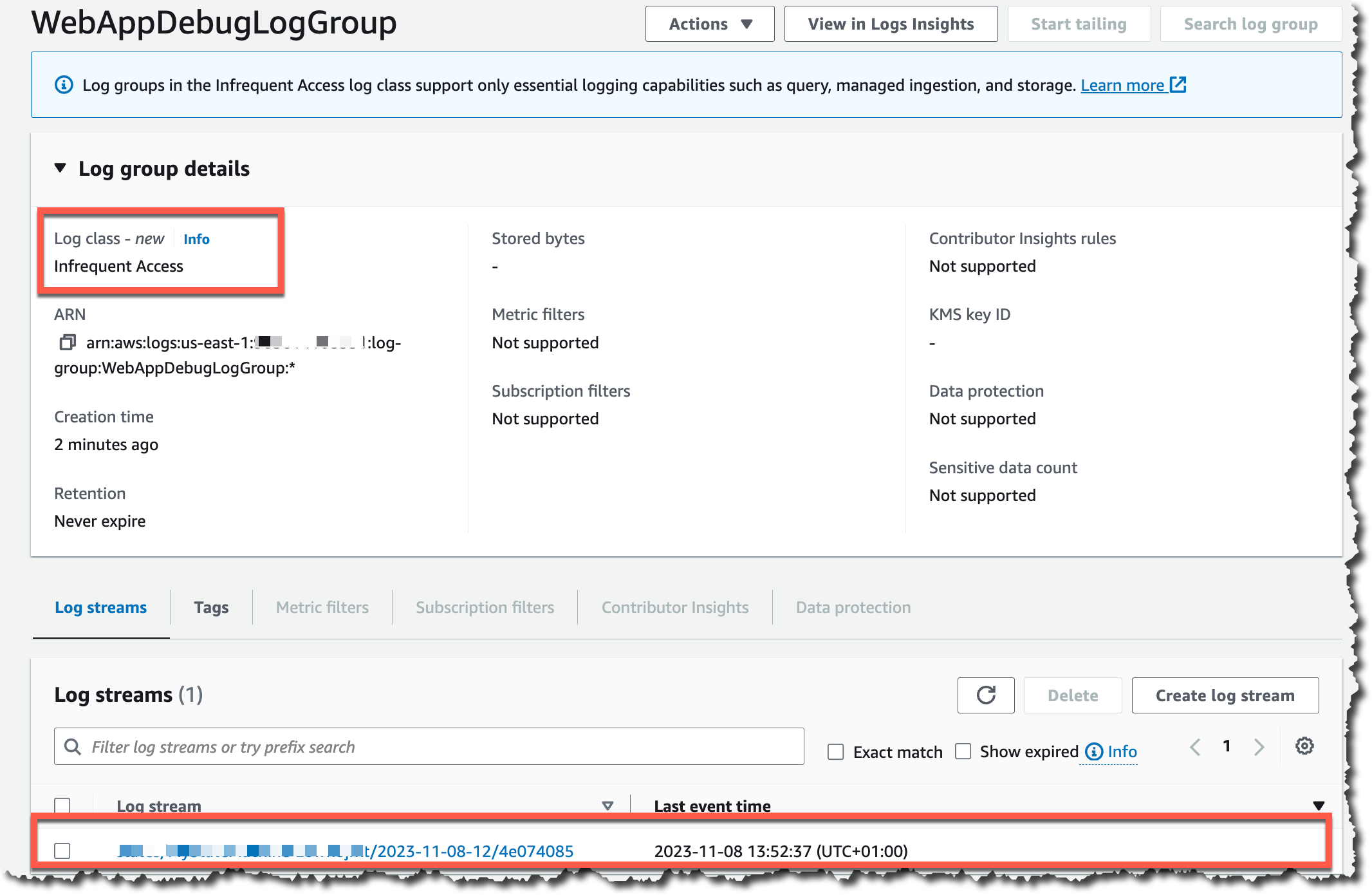
Once you have the new log group created, you can start using it in your workloads. For this example, I will configure a web application to send debug logs to this log group. After a while of the web application executes for a while, you can go back to the log group, where you see a new log stream.

View log group

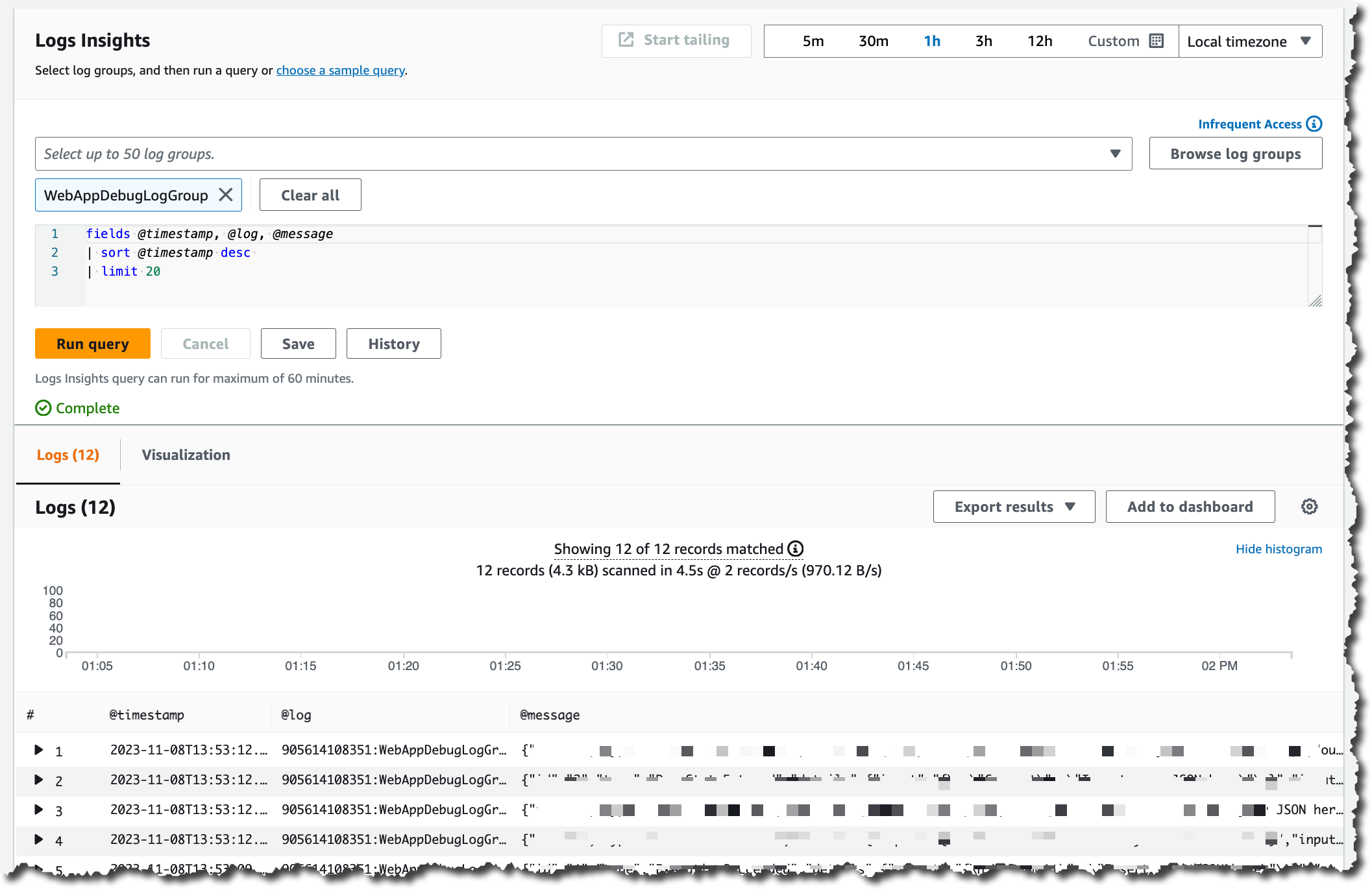
When you select a log stream, you will be directed to CloudWatch Logs Insights.

Log insights

Using the same familiar CloudWatch Logs Insights experience you get with Standard Class, you can create queries and search those logs to find relevant information, and you can analyze all the logs quickly in one place.

Available now
The new Infrequent Access log class is now available in all AWS Regions except the China and GovCloud Regions. You can start using it and enjoy a more cost-effective way to collect, store, and analyze your logs in a fully managed experience.

To learn more about the new log class, you can check the CloudWatch Logs user guide dedicated page for the Infrequent Access log class.

Marcia


from AWS News Blog https://ift.tt/n1eFoaQ
via IFTTT

Wednesday, November 22, 2023

Tuesday, November 21, 2023

Introducing Amazon CloudFront KeyValueStore: A low-latency datastore for CloudFront Functions

Amazon CloudFront allows you to securely deliver static and dynamic content with low latency and high transfer speeds. With CloudFront Functions, you can perform latency-sensitive customizations for millions of requests per second. For example, you can use CloudFront Functions to modify headers, normalize cache keys, rewrite URLs, or authorize requests.

Today, we are introducing CloudFront KeyValueStore, a secure global low-latency key value datastore that allows read access from within CloudFront Functions, enabling advanced customizable logic at the CloudFront edge locations.

Previously, you had to embed configuration data inside the function code. For example, data for determining if a URL should be redirected and which URL to redirect the viewer to. When embedding configuration data with the function code, every small change in configuration requires a code change and a redeployment of the function code. Updating and deploying code for every new lookup addition introduces the risk of making inadvertent changes to code. Also, the maximum function size is 10 KB, making it difficult for many use cases to fit all the data within the code.

With CloudFront KeyValueStore, you can now update the data associated with a function and the function code independently from each other. This simplifies function code and makes it easy to update data without the need to deploy code changes.

Let’s see how this works in practice.

Creating a CloudFront key value store
In the CloudFront console, I choose Functions from the navigation pane. In the KeyValueStores tab, I choose Create KeyValueStore.

Here, I have the option to import key value pairs from a JSON file in an Amazon Simple Storage Service (Amazon S3) bucket. I am not doing that now because I want to start with no keys. I enter a name and description and complete the creation of the key value store.

Console screenshot.

When the key value store has been created, I choose Edit in the Key value pairs section and then Add pair. I type hello for the key and Hello World for the value and save the changes. I can add more keys and values, but one key is enough for now.

Console screenshot.

When I update a key value store, changes are propagated to all CloudFront edge locations in a few seconds so that it can be used with low latency by the functions that are associated with the key value store. Let’s see how that works.

Using CloudFront KeyValueStore from CloudFront Functions
In the CloudFront console, I choose Functions in the navigation pane and then Create function. I type a name for the function, select the cloudfront-js-2.0 runtime, and complete the creation of the function. Then, I use the new option to associate the key value store with this function.

Console screenshot.

I copy the key value store ID from the console to use it in the following function code:

import cf from 'cloudfront';

const kvsId = '<KEY_VALUE_STORE_ID>';

// This fails if the key value store is not associated with the function
const kvsHandle = cf.kvs(kvsId);

async function handler(event) {
    // Use the first part of the pathname as key, for example http(s)://domain/<key>/something/else
    const key = event.request.uri.split('/')[1]
    let value = "Not found" // Default value
    try {
        value = await kvsHandle.get(key);
    } catch (err) {
        console.log(`Kvs key lookup failed for ${key}: ${err}`);
    }
    var response = {
        statusCode: 200,
        statusDescription: 'OK',
        body: {
            encoding: 'text',
            data: `Key: ${key} Value: ${value}\n`
        }
    };
    return response;
}

This function uses the first part of the path of the request as key and responds with the name of the key and its value.

I save the changes and publish the function. In the Publish tab of the function, I associate the function with a CloudFront distribution that I created before. I use the Viewer Request event type and Default (*) cache behavior to intercept all requests to the distribution.

In the console, I go back to the list of functions and wait for the function to be deployed. Then, I use curl from the command line to download content from the distribution and test the result of the function.

First, I try with a couple of paths that invoke the function and look up the key I created before (hello):

curl https://distribution-domain.cloudfront.net/hello
Key: hello Value: Hello World

curl https://distribution-domain.cloudfront.net/hello/world
Key: hello Value: Hello World

It works! Then, I try with a different path to see that the default value I use in the code is returned when the key is not found.

curl https://distribution-domain.cloudfront.net/hi
Key: hi Value: Not found

Now that this first example works, let’s try something more advanced and useful.

Rewriting the URL using configuration data in CloudFront KeyValueStore
Let’s build a function that uses the content of the URL in the HTTP request to look up in a key value store the custom path that CloudFront should use to make the actual request. This function can help manage the multiple services that are part of a website.

For example, I want to update the blog platform I use for my website. The old blog has origin path /blog-v1 while the new blog has origin path /blog-v2.

Architectural diagram.

At first, I am still using the old blog. In the CloudFormation console, I add the blog key to the key value store with value blog-v1.

Then, I create the following function and associate it with the distribution using Viewer Request event and Default (*) cache behavior to intercept all requests to the distribution.

import cf from 'cloudfront';

const kvsId = "<KEY_VALUE_STORE_ID>";

// This fails if the key value store is not associated with the function
const kvsHandle = cf.kvs(kvsId);

async function handler(event) {
    const request = event.request;
    // Use the first segment of the pathname as key
    // For example http(s)://domain/<key>/something/else
    const pathSegments = request.uri.split('/')
    const key = pathSegments[1]
    try {
        // Replace the first path of the pathname with the value of the key
        // For example http(s)://domain/<value>/something/else
        pathSegments[1] = await kvsHandle.get(key);
        const newUri = pathSegments.join('/');
        console.log(`${request.uri} -> ${newUri}`)
        request.uri = newUri;
    } catch (err) {
        // No change to the pathname if the key is not found
        console.log(`${request.uri} | ${err}`);
    }
    return request;
}

Now, when I type blog at the beginning of the URL path, the request will actually go to the blog-v1 path. CloudFront will make the HTTP request to the old blog because blog-v1 is the origin path used by the old blog.

For example, if I type https://distribution-domain.cloudfront.net/blog/index.html in a browser, I see the old blog (V1).

Browser screenshot showing blog V1.

In the console, I update the blog key with value blog-v2. I access the same URL after a few seconds, and now I reach the new blog (V2).

Browser screenshot showing blog V2.

As you can see, the public URL is the same, but the content has changed. More generally, this function assumes that URLs do not change between the two blog versions.

I can now add more keys for the different services that are part of my website (blog, support, help, commerce, and so on) and set their values to use the correct URL path for each of them. When I add a new version for one of them (for example, I migrate to a new commerce platform), I can configure a new origin and update the corresponding key to use the new origin path.

This is just an example of the flexibility you get when you separate configuration data from code. If you are already using CloudFront Functions, you can simplify your code by using CloudFront KeyValueStore.

Things to know
CloudFront KeyValueStore is available today in all edge locations globally. With CloudFront KeyValueStore, you pay only for what you use based on the read/write operations from the public API and the read operations from within CloudFront Functions. For more information, see CloudFront pricing.

You can manage a key value store using the AWS Management Console, AWS Command Line Interface (AWS CLI), and AWS SDKs. AWS CloudFormation support is coming soon. The maximum size of a key value store is 5 MB, and you can associate a single key value store to each function. The maximum size of a key is 512 bytes. Values can be up to 1KB in size. When creating a key value store, you can import key/value data during creation using a source file on Amazon S3 with this JSON structure:

{
  "data":[
    {
      "key":"key1",
      "value":"val1"
    },
    {
      "key":"key2",
      "value":"val2"
    }
  ]
}

Importing key/value data at creation can help automate the setup of a new environment (such as test or dev) and easily replicate the configuration from one environment to another (such as preproduction to production).

Simplify the way you add custom logic at the edge using CloudFront KeyValueStore.

Danilo


from AWS News Blog https://ift.tt/AfSZ3ky
via IFTTT

Monday, November 20, 2023

AWS Weekly Roundup – EC2 DL2q instances, PartyRock, Amplify’s 6th birthday, and more – November 20, 2023

Last week I saw an astonishing 160+ new service launches. There were so many updates that we decided to publish a weekly roundup again. This continues the same innovative pace of the previous week as we are getting closer to AWS re:Invent 2023.

Our News Blog team is also finalizing new blog posts for re:Invent to introduce awesome launches with service teams for your reading pleasure. Jeff Barr shared The Road to AWS re:Invent 2023 to explain our blogging journey and process. Please stay tuned in the next week!

Last week’s launches
Here are some of the launches that caught my attention last week:

Amazon EC2 DL2q instances – New DL2q instances are powered by Qualcomm AI 100 Standard accelerators and are the first to feature Qualcomm’s AI technology in the public cloud. With eight Qualcomm AI 100 Standard accelerators and 128 GiB of total accelerator memory, you can run popular generative artificial intelligence (AI) applications and extend to edge devices across smartphones, autonomous driving, personal compute, and extended reality headsets to develop and validate these AI workloads before deploying.

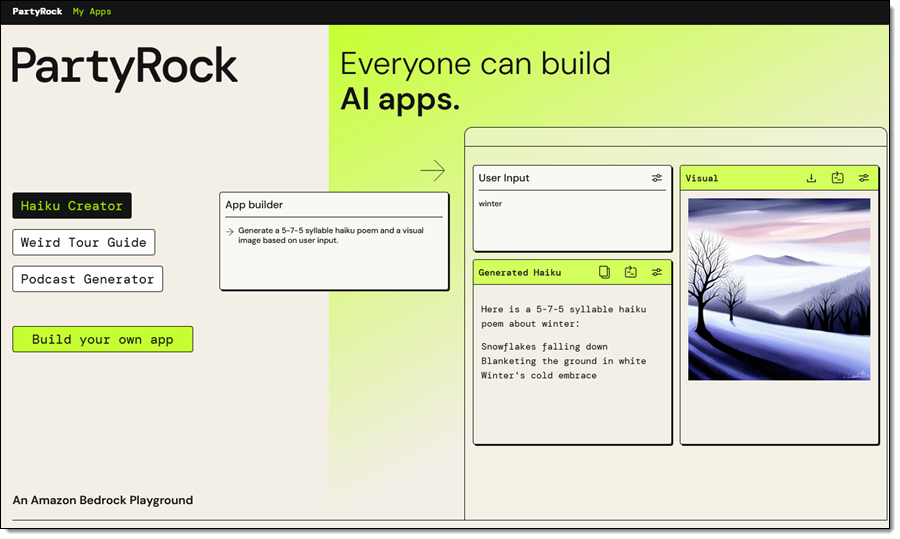
PartyRock for Amazon Bedrock – We introduced PartyRock, a fun and intuitive hands-on, generative AI app-building playground powered by Amazon Bedrock. You can experiment, learn all about prompt engineering, build mini-apps, and share them with your friends—all without writing any code or creating an AWS account.

You also can now access the Meta Llama 2 Chat 13B foundation model and Cohere Command Light, Embed English, and multilingual models for Amazon Bedrock.

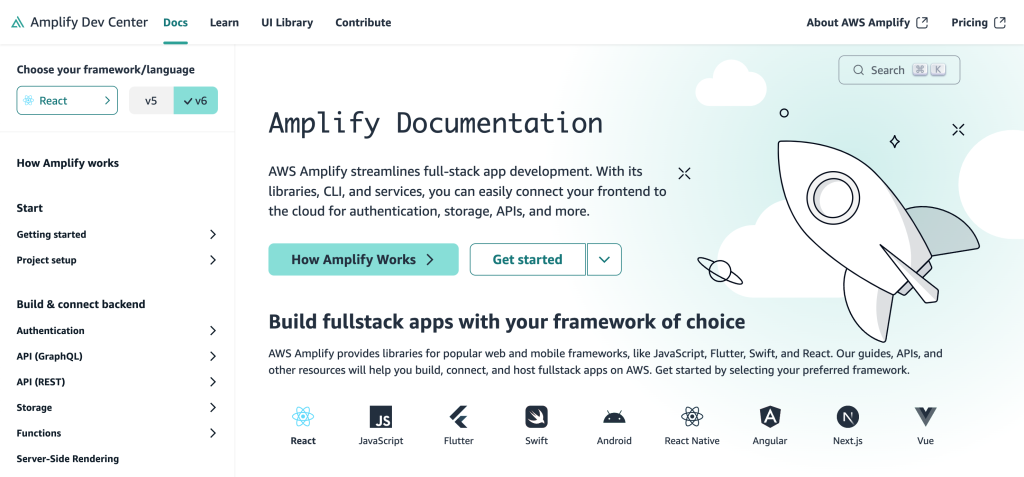
AWS Amplify celebrates its sixth birthday – We announced six new launches; a new documentation site, support for Next.js 14 with our hosting and JavaScript library, added custom token providers and an automatic React Native social sign-in update to Amplify Auth, new ChangePassword and DeleteUser account settings components, and updated all Amplify UI packages to use new Amplify JavaScript v6. You can also use wildcard subdomains when using a custom domain with your Amplify application deployed to AWS Amplify Hosting.

Amplify docs site UI

Also check out other News Blog posts about major launches published in the past week:

Other AWS service launches
Here are some other bundled feature launches per AWS service:

Amazon Athena  – You can use a new cost-based optimizer (CBO) to enhance query performance based on table and column statistics, collected by AWS Glue Data Catalog and Athena JDBC 3.x driver, a new alternative that supports almost all authentication plugins. You can also use Amazon EMR Studio to develop and run interactive queries on Amazon Athena.

Amazon CloudWatch – You can use a new CloudWatch metric called EBS Stalled I/O Check to monitor the health of your Amazon EBS volumes, the regular expression for Amazon CloudWatch Logs Live Tail filter pattern syntax to search and match relevant log events, observability of SAP Sybase ASE database in CloudWatch Application Insights, and up to two stats commands in a Log Insights query to perform aggregations on the results.

Amazon CodeCatalyst – You can connect to a Amazon Virtual Private Cloud (Amazon VPC) from CodeCatalyst Workflows, provision infrastructure using Terraform within CodeCatalyst Workflows, access CodeCatalyst with your workforce identities configured in IAM Identity Center, and create teams made up of members of the CodeCatalyst space.

Amazon Connect – You can use a pre-built queue performance dashboard and Contact Lens conversational analytics dashboard to view and compare real-time and historical aggregated queue performance. You can use quick responses for chats, previously written formats such as typing in ‘/#greet’ to insert a personalized response, and scanning attachments to detect malware or other unwanted content.

AWS Glue – AWS Glue for Apache Spark added new six database connectors: Teradata, SAP HANA, Azure SQL, Azure Cosmos DB, Vertica, and MongoDB, as well as the native connectivity to Amazon OpenSearch Service.

AWS Lambda – You can see single pane view of metrics, logs, and traces in the AWS Lambda console and advanced logging controls to natively capture logs in JSON structured format. You can view the SAM template on the Lambda console and export the function’s configuration to AWS Application Composer. AWS Lambda also supports Java 21 and NodeJS 20 versions built on the new Amazon Linux 2023 runtime.

AWS Local Zones in Dallas – You can enable the new Local Zone in Dallas, Texas, us-east-1-dfw-2a, with Amazon EC2 C6i, M6i, R6i, C6gn, and M6g instances and Amazon EBS volume types gp2, gp3, io1, sc1, and st1. You can also access Amazon ECS, Amazon EKS, Application Load Balancer, and AWS Direct Connect in this new Local Zone to support a broad set of workloads at the edge.

Amazon Managed Streaming for Apache Kafka (Amazon MSK) – You can standardize access control to Kafka resources using AWS Identity and Access Management (IAM) and build Kafka clients for Amazon MSK Serverless written in all programming languages. These are open source client helper libraries and code samples for popular languages, including Java, Python, Go, and JavaScript. Also, Amazon MSK now supports an enhanced version of Apache Kafka 3.6.0 that offers generally available Tiered Storage and automatically sends you storage capacity alerts when you are at risk of exhausting your storage.

Amazon OpenSearch Service Ingestion – You can migrate your data from Elasticsearch version 7.x clusters to the latest versions of Amazon OpenSearch Service and use persistent buffering to protect the durability of incoming data.

Amazon RDS –Amazon RDS for MySQL now supports creating active-active clusters using the Group Replication plugin, upgrading MySQL 5.7 snapshots to MySQL 8.0, and Innovation Release version of MySQL 8.1.

Amazon RDS Custom for SQL Server extends point-in-time recovery support for up to 1,000 databases, supports Service Master Key Retention to use transparent data encryption (TDE), table- and column-level encryption, DBMail and linked servers, and use SQL Server Developer edition with the bring your own media (BYOM).

Additionally, Amazon RDS Multi-AZ deployments with two readable standbys now supports minor version upgrades and system maintenance updates with typically less than one second of downtime when using Amazon RDS Proxy.

AWS Partner Central – You can use an improved user experience in AWS Partner Central to build and promote your offerings and the new Investments tab in the Partner Analytics Dashboard to gain actionable insights. You can now link accounts and associated users between Partner Central and AWS Marketplace and use an enhanced co-sell experience with APN Customer Engagements (ACE) manager.

Amazon QuickSight – You can programmatically manage user access and custom permissions support for roles to restrict QuickSight functionality to the QuickSight account for IAM Identity Center and Active Directory using APIs. You can also use shared restricted folders, a Contributor role and support for data source asset types in folders and the Custom Week Start feature, an addition designed to enhance the data analysis experience for customers across diverse industries and social contexts.

AWS Trusted Advisor – You can use new APIs to programmatically access Trusted Advisor best practices checks, recommendations, and prioritized recommendations and 37 new Amazon RDS checks that provide best practices guidance by analyzing DB instance configuration, usage, and performance data.

There’s a lot more launch news that I haven’t covered. See AWS What’s New for more details.

See you virtually in AWS re:Invent
AWS re:Invent 2023Next week we’ll hear the latest from AWS, learn from experts, and connect with the global cloud community in Las Vegas. If you come, check out the agenda, session catalog, and attendee guides before your departure.

If you’re not able to attend re:Invent in person this year, we’re offering the option to livestream our Keynotes and Innovation Talks. With the registration for online pass, you will have access to on-demand keynote, Innovation Talks, and selected breakout sessions after the event.

Channy


from AWS News Blog https://ift.tt/jgNYlHt
via IFTTT