Monday, April 22, 2024

AWS Weekly Roundup: Anthropic’s Claude 3 Opus in Amazon Bedrock, Meta Llama 3 in Amazon SageMaker JumpStart, and more (April 22, 2024)

AWS Summits continue to rock the world, with events taking place in various locations around the globe. AWS Summit London (April 24) is the last one in April, and there are nine more in May, including AWS Summit Berlin (May 15–16), AWS Summit Los Angeles (May 22), and AWS Summit Dubai (May 29). Join us to connect, collaborate, and learn about AWS!

While you decide which summit to attend, let’s look at the last week’s new announcements.

Last week’s launches
Last week was another busy one in the world of artificial intelligence (AI). Here are some launches that got my attention.

Anthropic’s Claude 3 Opus now available in Amazon Bedrock – After Claude 3 Sonnet and Claude 3 Haiku, two of the three state-of-the-art models of Anthropic’s Claude 3, Opus is now available in Amazon Bedrock. Cluade 3 Opus is at the forefront of generative AI, demonstrating comprehension and fluency on complicated tasks at nearly human levels. Like the rest of the Claude 3 family, Opus can process images and return text outputs. Claude 3 Opus shows an estimated twofold gain in accuracy over Claude 2.1 on difficult open-ended questions, reducing the likelihood of faulty responses.

Meta Llama 3 now available in Amazon SageMaker JumpStart – Meta Llama 3 is now available in Amazon SageMaker JumpStart, a machine learning (ML) hub that can help you accelerate your ML journey. You can deploy and use Llama 3 foundation models (FMs) with a few steps in Amazon SageMaker Studio or programmatically through the Amazon SageMaker Python SDK. Llama is available in two parameter sizes, 8B and 70B, and can be used to support a broad range of use cases, with improvements in reasoning, code generation, and instruction following. The model will be deployed in an AWS secure environment under your VPC controls, helping ensure data security.

Built-in SQL extension with Amazon SageMaker Studio Notebooks – SageMaker Studio’s JupyterLab now includes a built-in SQL extension to discover, explore, and transform data from various sources using SQL and Python directly within the notebooks. You can now seamlessly connect to popular data services and easily browse and search databases, schemas, tables, and views. You can also preview data within the notebook interface. New features such as SQL command completion, code formatting assistance, and syntax highlighting improve developer productivity. To learn more, visit Explore data with ease: Use SQL and Text-to-SQL in Amazon SageMaker Studio JupyterLab notebooks and the SageMaker Developer Guide.

AWS Split Cost Allocation Data for Amazon EKS – You can now receive granular cost visibility for Amazon Elastic Kubernetes Service (Amazon EKS) in the AWS Cost and Usage Reports (CUR) to analyze, optimize, and chargeback cost and usage for your Kubernetes applications. You can allocate application costs to individual business units and teams based on how Kubernetes applications consume shared Amazon EC2 CPU and memory resources. You can aggregate these costs by cluster, namespace, and other Kubernetes primitives to allocate costs to individual business units or teams. These cost details will be accessible in the CUR 24 hours after opt-in. You can use the Containers Cost Allocation dashboard to visualize the costs in Amazon QuickSight and the CUR query library to query the costs using Amazon Athena.

AWS KMS automatic key rotation enhancementsAWS Key Management Service (AWS KMS) introduces faster options for automatic symmetric key rotation. You can now customize rotation frequency between 90 days to 7 years, invoke key rotation on demand for customer-managed AWS KMS keys, and view the rotation history for any rotated AWS KMS key. There is a nice post on the Security Blog you can visit to learn more about this feature, including a little bit of history about cryptography.

Amazon Personalize automatic solution trainingAmazon Personalize now offers automatic training for solutions. With automatic training, you can set a cadence for your Amazon Personalize solutions to automatically retrain using the latest data from your dataset group. This process creates a newly trained machine learning (ML) model, also known as a solution version, and maintains the relevance of Amazon Personalize recommendations for end users. Automatic training mitigates model drift and makes sure recommendations align with users’ evolving behaviors and preferences. With Amazon Personalize, you can personalize your website, app, ads, emails, and more, using the same machine learning technology used by Amazon, without requiring any prior ML experience. To get started with Amazon Personalize, visit our documentation.

For a full list of AWS announcements, be sure to keep an eye on the What's New at AWS page.

We launched existing services and instance types in additional Regions:

Other AWS news
Here are some additional news that you might find interesting:

The PartyRock Generative AI Hackathon winners – The PartyRock Generative AI Hackathon concluded with over 7,650 registrants submitting 1,200 projects across four challenge categories, featuring top winners like Parable Rhythm – The Interactive Crime Thriller, Faith – Manga Creation Tools, and Arghhhh! Zombie. Participants showed remarkable creativity and technical prowess, with prizes totaling $60,000 in AWS credits.

I tried the Faith – Manga Creation Tools app using my daughter Arya’s made-up stories and ideas and the result was quite impressive.

Visit Jeff Barr’s post to learn more about how to try the apps for yourself.

AWS open source news and updates – My colleague Ricardo writes about open source projects, tools, and events from the AWS Community. Check out Ricardo’s page for the latest updates.

Upcoming AWS events
Check your calendars and sign up for upcoming AWS events:

AWS Summits – Join free online and in-person events that bring the cloud computing community together to connect, collaborate, and learn about AWS. Register in your nearest city: Singapore (May 7), Seoul (May 16–17), Hong Kong (May 22), Milan (May 23), Stockholm (June 4), and Madrid (June 5).

AWS re:Inforce – Explore cloud security in the age of generative AI at AWS re:Inforce, June 10–12 in Pennsylvania for 2.5 days of immersive cloud security learning designed to help drive your business initiatives.

AWS Community Days – Join community-led conferences that feature technical discussions, workshops, and hands-on labs led by expert AWS users and industry leaders from around the world: Turkey (May 18), Midwest | Columbus (June 13), Sri Lanka (June 27), Cameroon (July 13), Nigeria (August 24), and New York (August 28).

You can browse all upcoming AWS led in-person and virtual events and developer-focused events here.

That’s all for this week. Check back next Monday for another Weekly Roundup!

— Esra

This post is part of our Weekly Roundup series. Check back each week for a quick roundup of interesting news and announcements from AWS!


from AWS News Blog https://ift.tt/PQHUgl5
via IFTTT

Tuesday, April 16, 2024

Amazon CloudWatch Internet Weather Map – View and analyze internet health

The Internet has a plethora of moving parts: routers, switches, hubs, terrestrial and submarine cables, and connectors on the hardware side, and complex protocol stacks and configurations on the software side. When something goes wrong that slows or disrupts the Internet in a way that affects your customers, you want to be able to localize and understand the issue as quickly as possible.

New Map
The new Amazon CloudWatch Internet Weather Map is here to help! Built atop of collection of global monitors operated by AWS, you get a broad, global view of Internet weather, with the ability to zoom in and understand performance and availability issues that affect a particular city. To access the map, open the CloudWatch Console, expand Network monitoring on the left, and click Internet Monitor. The map appears and displays weather for the entire world:

The red and yellow circles indicate current, active issues that affect availability or performance, respectively. The grey circles represent issues that have been resolved within the last 24 hours, and the blue diamonds represent AWS regions. The map will automatically refresh every 15 minutes if you leave it on the screen.

Each issue affects a specific city-network, representing a combination of a location where clients access AWS resources, and the Autonomous System Number (ASN) that was used to access the resources. ASNs typically represent individual Internet Service Providers (ISPs).

The list to the right of the map shows active events at the top, followed by events that have been resolved in the recent past, looking back up to 24 hours:

I can hover my mouse over any of the indicators to see the list of city-networks in the geographic area:

If I zoom in a step or two, I can see that those city-networks are spread out over the United States:

I can zoom in even further and see a single city-network:

This information is also available programmatically. The new ListInternetEvents function returns up to 100 performance or availability events per call, with optional filtering by time range, status (ACTIVE or RESOLVED), or type (PERFORMANCE or AVAILABILITY). Each event includes full details including latitude and longitude.

The new map is accessible from all AWS regions and there is no charge to use it. Going forward, we have a lot of powerful additions on the roadmap, subject to prioritization based on your feedback. Right now we are thinking about:

  1. Displaying causes of certain types of outages such as DDoS attacks, BGP route leaks, and issues with route interconnects.
  2. Adding a view that is specific to a chosen ISP.
  3. Displaying the impact to public SaaS applications.

Please feel free to send feedback on this feature to internet-monitor@amazon.com .

CloudWatch Internet Monitor
The information in the map applies to everyone who makes use of applications built on AWS. If you want to understand how internet weather affects your particular AWS applications and to take advantage of other features such as health event notification and traffic insights, you can make use of CloudWatch Internet Monitor. As my colleague Sébastien wrote when he launched this feature in late 2022:

You told us one of your challenges when monitoring internet-facing applications is to gather data outside of AWS to build a realistic picture of how your application behaves for your customers connected to multiple and geographically distant internet providers. Capturing and monitoring data about internet traffic before it reaches your infrastructure is either difficult or very expensive.

After you review the map, you can click Create monitor to get started with CloudWatch Internet Monitor:

After that you enter a name for your monitor, choose the AWS resources (VPCs, CloudFront distributions, Network Load Balancers, and Amazon WorkSpace Directories) to monitor, then select the desired percentage of internet-facing traffic to monitor. The monitor will begin to operate within minutes, using entries from your VPC Flow Logs, CloudFront Access Logs, and other telemetry to identify the most relevant city-networks.

Here are some resources to help you learn more about this feature:

Jeff;


from AWS News Blog https://ift.tt/pKw4k7A
via IFTTT

Anthropic’s Claude 3 Opus model is now available on Amazon Bedrock

We are living in the generative artificial intelligence (AI) era; a time of rapid innovation. When Anthropic announced its Claude 3 foundation models (FMs) on March 4, we made Claude 3 Sonnet, a model balanced between skills and speed, available on Amazon Bedrock the same day. On March 13, we launched the Claude 3 Haiku model on Amazon Bedrock, the fastest and most compact member of the Claude 3 family for near-instant responsiveness.

Today, we are announcing the availability of Anthropic’s Claude 3 Opus on Amazon Bedrock, the most intelligent Claude 3 model, with best-in-market performance on highly complex tasks. It can navigate open-ended prompts and sight-unseen scenarios with remarkable fluency and human-like understanding, leading the frontier of general intelligence.

With the availability of Claude 3 Opus on Amazon Bedrock, enterprises can build generative AI applications to automate tasks, generate revenue through user-facing applications, conduct complex financial forecasts, and accelerate research and development across various sectors. Like the rest of the Claude 3 family, Opus can process images and return text outputs.

Claude 3 Opus shows an estimated twofold gain in accuracy over Claude 2.1 on difficult open-ended questions, reducing the likelihood of faulty responses. As enterprise customers rely on Claude across industries like healthcare, finance, and legal research, improved accuracy is essential for safety and performance.

How does Claude 3 Opus perform?
Claude 3 Opus outperforms its peers on most of the common evaluation benchmarks for AI systems, including undergraduate-level expert knowledge (MMLU), graduate-level expert reasoning (GPQA), basic mathematics (GSM8K), and more. It exhibits high levels of comprehension and fluency on complex tasks, leading the frontier of general intelligence.


Source: https://www.anthropic.com/news/claude-3-family

Here are a few supported use cases for the Claude 3 Opus model:

  • Task automation: planning and execution of complex actions across APIs, databases, and interactive coding
  • Research: brainstorming and hypothesis generation, research review, and drug discovery
  • Strategy: advanced analysis of charts and graphs, financials and market trends, and forecasting

To learn more about Claude 3 Opus’s features and capabilities, visit Anthropic’s Claude on Bedrock page and Anthropic Claude models in the Amazon Bedrock documentation.

Claude 3 Opus in action
If you are new to using Anthropic models, go to the Amazon Bedrock console and choose Model access on the bottom left pane. Request access separately for Claude 3 Opus.

2024-claude3-opus-2-model-access

To test Claude 3 Opus in the console, choose Text or Chat under Playgrounds in the left menu pane. Then choose Select model and select Anthropic as the category and Claude 3 Opus as the model.

To test more Claude prompt examples, choose Load examples. You can view and run examples specific to Claude 3 Opus, such as analyzing a quarterly report, building a website, and creating a side-scrolling game.

By choosing View API request, you can also access the model using code examples in the AWS Command Line Interface (AWS CLI) and AWS SDKs. Here is a sample of the AWS CLI command:

aws bedrock-runtime invoke-model \
     --model-id anthropic.claude-3-opus-20240229-v1:0 \
     --body "{\"messages\":[{\"role\":\"user\",\"content\":[{\"type\":\"text\",\"text\":\" Your task is to create a one-page website for an online learning platform.\\n\"}]}],\"anthropic_version\":\"bedrock-2023-05-31\",\"max_tokens\":2000,\"temperature\":1,\"top_k\":250,\"top_p\":0.999,\"stop_sequences\":[\"\\n\\nHuman:\"]}" \
     --cli-binary-format raw-in-base64-out \
     --region us-east-1 \
     invoke-model-output.txt

As I mentioned in my previous Claude 3 model launch posts, you need to use the new Anthropic Claude Messages API format for some Claude 3 model features, such as image processing. If you use Anthropic Claude Text Completions API and want to use Claude 3 models, you should upgrade from the Text Completions API.

My colleagues, Dennis Traub and Francois Bouteruche, are building code examples for Amazon Bedrock using AWS SDKs. You can learn how to invoke Claude 3 on Amazon Bedrock to generate text or multimodal prompts for image analysis in the Amazon Bedrock documentation.

Here is sample JavaScript code to send a Messages API request to generate text:

// claude_opus.js - Invokes Anthropic Claude 3 Opus using the Messages API.
import {
  BedrockRuntimeClient,
  InvokeModelCommand
} from "@aws-sdk/client-bedrock-runtime";

const modelId = "anthropic.claude-3-opus-20240229-v1:0";
const prompt = "Hello Claude, how are you today?";

// Create a new Bedrock Runtime client instance
const client = new BedrockRuntimeClient({ region: "us-east-1" });

// Prepare the payload for the model
const payload = {
  anthropic_version: "bedrock-2023-05-31",
  max_tokens: 1000,
  messages: [{
    role: "user",
    content: [{ type: "text", text: prompt }]
  }]
};

// Invoke Claude with the payload and wait for the response
const command = new InvokeModelCommand({
  contentType: "application/json",
  body: JSON.stringify(payload),
  modelId
});
const apiResponse = await client.send(command);

// Decode and print Claude's response
const decodedResponseBody = new TextDecoder().decode(apiResponse.body);
const responseBody = JSON.parse(decodedResponseBody);
const text = responseBody.content[0].text;
console.log(`Response: ${text}`);

Now, you can install the AWS SDK for JavaScript Runtime Client for Node.js and run claude_opus.js.

npm install @aws-sdk/client-bedrock-runtime
node claude_opus.js

For more examples in different programming languages, check out the code examples section in the Amazon Bedrock User Guide, and learn how to use system prompts with Anthropic Claude at Community.aws.

Now available
Claude 3 Opus is available today in the US West (Oregon) Region; check the full Region list for future updates.

Give Claude 3 Opus a try in the Amazon Bedrock console today and send feedback to AWS re:Post for Amazon Bedrock or through your usual AWS Support contacts.

Channy


from AWS News Blog https://ift.tt/v9OGRZW
via IFTTT

Monday, April 15, 2024

Congratulations to the PartyRock generative AI hackathon winners

The PartyRock Generative AI Hackathon wrapped up earlier this month. Entrants were asked to use PartyRock to build a functional app based on one of four challenge categories, with the option to remix an existing app as well. The hackathon attracted 7,650 registrants who submitted over 1,200 projects, and published over 250 project blog posts on community.aws .

As a member of the judging panel, I was blown away by the creativity and sophistication of the entries that I was asked to review. The participants had the opportunity to go hands-on with prompt engineering and to learn about Foundation Models, and pushed the bounds of what was possible.

Let’s take a quick look at the winners of the top 3 prizes…

First Place
First up, taking home the top overall prize of $20,000 in AWS credits is Parable Rhythm – The Interactive Crime Thriller by Param Birje. This project immerses you in a captivating interactive story using PartyRock’s generative capabilities. Just incredible stuff.

To learn more, read the hackathon submission and the blog post.

Second Place
In second place, earning $10,000 in credits, is Faith – Manga Creation Tools by Michael Oswell. This creative assistant app lets you generate original manga panels and panels with the click of a button. So much potential there.

To learn more, read the hackathon submission.

Third Place
And rounding out the top 3 overall is Arghhhh! Zombie by Michael Eziamaka. This is a wildly entertaining generative AI-powered zombie game that had the judges on the edge of their seats. Great work, Michael!

To learn more, read the hackathon submission.

Round of Applause
I want to give a huge round of applause to all our category winners as well:

Category / Place Submission Prize (USD) AWS Credits
Overall 1st Place Parable Rhythm $20,000
Overall 2nd Place Faith – Manga Creation Tools $10,000
Overall 3rd Place Arghhhh! Zombie $5,000
Creative Assistants 1st Place Faith – Manga Creation Tools $4,000 $1,000
Creative Assistants 2nd Place MovieCreator $1,500 $1,000
Creative Assistants 3rd Place WingPal $500 $1,000
Experimental Entertainment 1st Place Parable Rhythm $4,000 $1,000
Experimental Entertainment 2nd Place Arghhhh! Zombie $1,500 $1,000
Experimental Entertainment 3rd Place Find your inner potato $500 $1,000
Interactive Learning 1st Place DeBeat Coach $4,000 $1,000
Interactive Learning 2nd Place Asteroid Mining Assistant $1,500 $1,000
Interactive Learning 3rd Place Unlock your pet’s language $500 $1,000
Freestyle 1st Place MindMap Party $1,000 $1,000
Freestyle 2nd Place Angler Advisor $750 $1,000
Freestyle 3rd Place SafeScares $250 $1,000
BONUS: Remix ChatRPG Inferno $2,500
BONUS: Remix ChatRPG Chat RPG Generator $2,500

From interactive learning experiences to experimental entertainment, the creativity and technical execution on display was off the charts.

And of course, a big thank you to all 7,650 participants who dove in and pushed the boundaries of what’s possible with generative AI. You all should be extremely proud.

Join the Party
You can click on any of the images above and try out the apps for yourself. You can remix and customize them, and you can build your own apps as well (read my post, Build AI apps with PartyRock and Amazon Bedrock to see how to get started).

Alright, that’s a wrap. Congrats again to our winners, and a huge thanks to the PartyRock team and all our amazing sponsors. I can’t wait to see what you all build next. Until then, keep building, keep learning, and keep having fun!

Jeff;


from AWS News Blog https://ift.tt/FNnUSB3
via IFTTT

AWS Weekly Roundup: New features on Knowledge Bases for Amazon Bedrock, OAC for Lambda function URL origins on Amazon CloudFront, and more (April 15, 2024)

AWS Community Days conferences are in full swing with AWS communities around the globe. The AWS Community Day Poland was hosted last week with more than 600 cloud enthusiasts in attendance. Community speakers Agnieszka Biernacka, Krzysztof Kąkol, and more, presented talks which captivated the audience and resulted in vibrant discussions throughout the day. My teammate, Wojtek Gawroński, was at the event and he’s already looking forward to attending again next year!

Last week’s launches
Here are some launches that got my attention during the previous week.

Amazon CloudFront now supports Origin Access Control (OAC) for Lambda function URL origins – Now you can protect your AWS Lambda URL origins by using Amazon CloudFront Origin Access Control (OAC) to only allow access from designated CloudFront distributions. The CloudFront Developer Guide has more details on how to get started using CloudFront OAC to authenticate access to Lambda function URLs from your designated CloudFront distributions.

AWS Client VPN and AWS Verified Access migration and interoperability patterns – If you’re using AWS Client VPN or a similar third-party VPN-based solution to provide secure access to your applications today, you’ll be pleased to know that you can now combine the use of AWS Client VPN and AWS Verified Access for your new or existing applications.

These two announcements related to Knowledge Bases for Amazon Bedrock caught my eye:

Metadata filtering to improve retrieval accuracy – With metadata filtering, you can retrieve not only semantically relevant chunks but a well-defined subset of those relevant chunks based on applied metadata filters and associated values.

Custom prompts for the RetrieveAndGenerate API and configuration of the maximum number of retrieved results – These are two new features which you can now choose as query options alongside the search type to give you control over the search results. These are retrieved from the vector store and passed to the Foundation Models for generating the answer.

For a full list of AWS announcements, be sure to keep an eye on the What’s New at AWS page.

Other AWS news
AWS open source news and updates – My colleague Ricardo writes this weekly open source newsletter in which he highlights new open source projects, tools, and demos from the AWS Community.

Upcoming AWS events
AWS Summits – These are free online and in-person events that bring the cloud computing community together to connect, collaborate, and learn about AWS. Whether you’re in the Americas, Asia Pacific & Japan, or EMEA region, learn here about future AWS Summit events happening in your area.

AWS Community Days – Join an AWS Community Day event just like the one I mentioned at the beginning of this post to participate in technical discussions, workshops, and hands-on labs led by expert AWS users and industry leaders from your area. If you’re in Kenya, or Nepal, there’s an event happening in your area this coming weekend.

You can browse all upcoming in-person and virtual events here.

That’s all for this week. Check back next Monday for another Weekly Roundup!

– Veliswa

This post is part of our Weekly Roundup series. Check back each week for a quick roundup of interesting news and announcements from AWS.


from AWS News Blog https://ift.tt/BONQjXx
via IFTTT

Monday, April 8, 2024

AWS Weekly Roundup: Amazon EC2 G6 instances, Mistral Large on Amazon Bedrock, AWS Deadline Cloud, and more (April 8, 2024)

We’re just two days away from AWS Summit Sydney (April 10–11) and a month away from the AWS Summit season in Southeast Asia, starting with the AWS Summit Singapore (May 7) and the AWS Summit Bangkok (May 30). If you happen to be in Sydney, Singapore, or Bangkok around those dates, please join us.

Last Week’s Launches
If you haven’t read last week’s Weekly Roundup yet, Channy wrote about the AWS Chips Taste Test, a new initiative from Jeff Barr as part of April’ Fools Day.

Here are some launches that caught my attention last week:

New Amazon EC2 G6 instances — We announced the general availability of Amazon EC2 G6 instances powered by NVIDIA L4 Tensor Core GPUs. G6 instances can be used for a wide range of graphics-intensive and machine learning use cases. G6 instances deliver up to 2x higher performance for deep learning inference and graphics workloads compared to Amazon EC2 G4dn instances. To learn more, visit the Amazon EC2 G6 instance page.

Mistral Large is now available in Amazon Bedrock — Veliswa wrote about the availability of the Mistral Large foundation model, as part of the Amazon Bedrock service. You can use Mistral Large to handle complex tasks that require substantial reasoning capabilities. In addition, Amazon Bedrock is now available in the Paris AWS Region.

Amazon Aurora zero-ETL integration with Amazon Redshift now in additional Regions — Zero-ETL integration announcements were my favourite launches last year. This Zero-ETL integration simplifies the process of transferring data between the two services, allowing customers to move data between Amazon Aurora and Amazon Redshift without the need for manual Extract, Transform, and Load (ETL) processes. With this announcement, Zero-ETL integrations between Amazon Aurora and Amazon Redshift is now supported in 11 additional Regions.

Announcing AWS Deadline Cloud — If you’re working in films, TV shows, commercials, games, and industrial design and handling complex rendering management for teams creating 2D and 3D visual assets, then you’ll be excited about AWS Deadline Cloud. This new managed service simplifies the deployment and management of render farms for media and entertainment workloads.

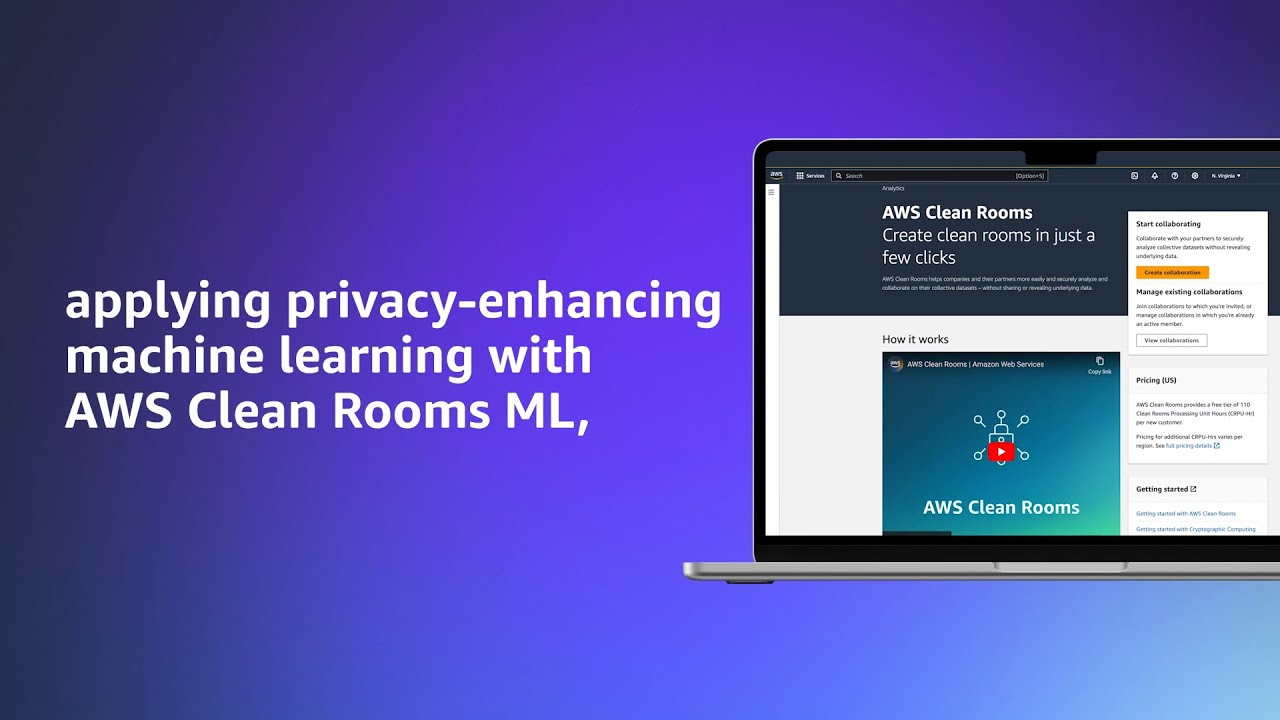
AWS Clean Rooms ML is Now Generally Available — Last year, I wrote about the preview of AWS Clean Rooms ML. In that post, I elaborated a new capability of AWS Clean Rooms that helps you and your partners apply machine learning (ML) models on your collective data without copying or sharing raw data with each other. Now, AWS Clean Rooms ML is available for you to use.

Knowledge Bases for Amazon Bedrock now supports private network policies for OpenSearch Serverless — Here’s exciting news for you who are building with Amazon Bedrock. Now, you can implement Retrieval-Augmented Generation (RAG) with Knowledge Bases for Amazon Bedrock using Amazon OpenSearch Serverless (OSS) collections that have a private network policy.

Amazon EKS extended support for Kubernetes versions now generally available — If you’re running Kubernetes version 1.21 and higher, with this Extended Support for Kubernetes, you can stay up-to-date with the latest Kubernetes features and security improvements on Amazon EKS.

AWS Lambda Adds Support for Ruby 3.3 — Coding in Ruby? Now, AWS Lambda supports Ruby 3.3 as its runtime. This update allows you to take advantage of the latest features and improvements in the Ruby language.

Amazon EventBridge Console Enhancements — The Amazon EventBridge console has been updated with new features and improvements, making it easier for you to manage your event-driven applications with a better user experience.

Private Access to the AWS Management Console in Commercial Regions — If you need to restrict access to personal AWS accounts from the company network, you can use AWS Management Console Private Access. With this launch, you can use AWS Management Console Private Access in all commercial AWS Regions.

From community.aws 
The community.aws is a home for us, builders, to share our learnings with building on AWS. Here’s my Top 3 posts from last week:

Other AWS News 
Here are some additional news items, open-source projects, and Twitch shows that you might find interesting:

Build On Generative AI – Join Tiffany and Darko to learn more about generative AI, see their demos and discuss different aspects of generative AI with the guest speakers. Streaming every Monday on Twitch, 9:00 AM US PT.

AWS open source news and updates – If you’re looking for various open-source projects and tools from the AWS community, please read the AWS open-source newsletter maintained by my colleague, Ricardo.

Upcoming AWS events
Check your calendars and sign up for these AWS events:

AWS Summits – Join free online and in-person events that bring the cloud computing community together to connect, collaborate, and learn about AWS. Register in your nearest city: Amsterdam (April 9), Sydney (April 10–11), London (April 24), Singapore (May 7), Berlin (May 15–16), Seoul (May 16–17), Hong Kong (May 22), Milan (May 23), Dubai (May 29), Thailand (May 30), Stockholm (June 4), and Madrid (June 5).

AWS re:Inforce – Explore cloud security in the age of generative AI at AWS re:Inforce, June 10–12 in Pennsylvania for two-and-a-half days of immersive cloud security learning designed to help drive your business initiatives.

AWS Community Days – Join community-led conferences that feature technical discussions, workshops, and hands-on labs led by expert AWS users and industry leaders from around the world: Poland (April 11), Bay Area (April 12), Kenya (April 20), and Turkey (May 18).

You can browse all upcoming in-person and virtual events.

That’s all for this week. Check back next Monday for another Weekly Roundup!

— Donnie

This post is part of our Weekly Roundup series. Check back each week for a quick roundup of interesting news and announcements from AWS!


from AWS News Blog https://ift.tt/Ulj43zo
via IFTTT

Thursday, April 4, 2024

Amazon Attribution Links Advertising To Sales

Closing the loop between advertising efforts and sales has been the holy grail for marketers.

Surprisingly, many Amazon sellers and vendors have yet to fully embrace the tool's power to help deliver those insights: Amazon Attribution.

What is Amazon Advertising Attribution?

Amazon Attribution allows you to measure the impact of your non-Amazon advertising investments and link them directly to e-commerce outcomes, such as sales and conversions.

Despite these opportunities, many on Amazon Seller Central and Amazon Vendor Central have yet to capitalize on the potential of Amazon Attribution.

Who can use Amazon Attribution?

The service caters to many users, including sellers, vendors, agencies, brands, and consultants. Let’s explore how each group can benefit from using it.

  • Sellers: Amazon sellers, whether part of the Fulfilled by Amazon (FBA) program or handling their fulfillment, can use Amazon Attribution to measure the impact of their off-Amazon marketing efforts. By implementing attribution tags in their non-Amazon campaigns, sellers can gain valuable insights into which channels, tactics, and creatives drive the most sales on Amazon. This information allows sellers to optimize their advertising strategy, allocate budgets more effectively, and ultimately increase their return on advertising spend (ROAS).
  • Vendors: Amazon vendors who sell their products directly to Amazon can also leverage Amazon Attribution to understand the effectiveness of their non-Amazon advertising campaigns. By linking their off-Amazon marketing investments to sales and conversions on Amazon, vendors can make data-driven decisions to improve their advertising performance. Amazon Attribution provides vendors with a comprehensive view of their customer’s journey, enabling them to identify which touchpoints are most influential in driving sales.
  • Agencies: Marketing and advertising agencies that manage campaigns for their clients can use Amazon Attribution to demonstrate the value of their services. By implementing attribution tags in their clients’ non-Amazon campaigns, agencies can provide concrete evidence of how their efforts contribute to sales and conversions on Amazon. This transparency strengthens the agency-client relationship and helps agencies justify their strategies and budgets. Additionally, agencies can use the insights gained from Amazon Attribution to refine and continually optimize their clients’ advertising campaigns.
  • Brands: Brands that sell their products on Amazon, either directly or through third-party sellers, can benefit from using Amazon Attribution to understand the impact of their off-Amazon marketing efforts. By measuring the effectiveness of their campaigns across various channels, such as social media, email marketing, and display advertising, brands can identify which strategies resonate best with their target audience. This knowledge empowers brands to make informed decisions about marketing investments and develop more targeted, effective campaigns.
  • Consultants: E-commerce consultants who advise businesses on their Amazon strategy can use Amazon Attribution to provide data-driven recommendations to their clients. By analyzing the insights gained from attribution data, consultants can identify areas for improvement in their clients’ off-Amazon marketing efforts. This expertise helps consultants deliver tangible results and demonstrate the value of their services. Moreover, consultants can use Amazon Attribution to benchmark their clients’ performance against industry standards and provide strategic guidance for growth.

It starts with the Amazon Attribution links, tags, and campaigns

Amazon Attribution enables you to measure the impact of your advertising by including a unique tag directly in your non-Amazon ads. This tag contains URL parameters that associate future customer activity with the ad click, providing a comprehensive view of your advertising performance.

How do you get to Amazon Attribution on Seller Central? How about Vendor Central?

For both Sellers and Vendors, it’s essential to create a specific Amazon Attribution tag for each individual ad, link, or button within your non-Amazon media. Apply the tag as the destination URL for each tactic, and avoid making any changes to the tags, as this can impact measurement accuracy.

Note: Keep in mind that Amazon Attribution tags should not be combined with Amazon Affiliates links, and only product detail pages and brand store pages are supported as landing pages.

Campaign Creation Methods

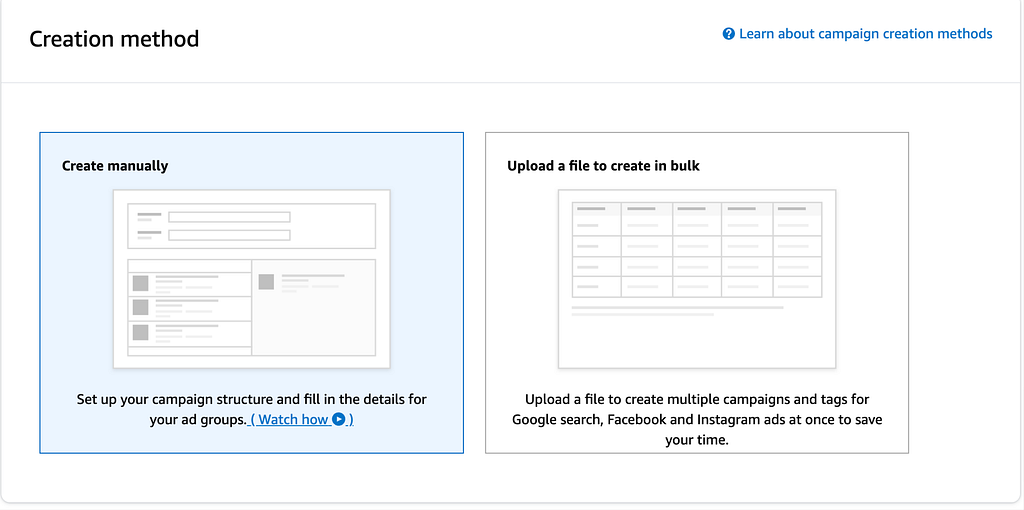
Amazon Attribution offers two methods for creating campaigns:

  1. Manual Creation: Input all campaign settings manually, including campaign structure and details.
  2. Bulk Upload: For Google search, Facebook, and Instagram ads campaigns, you can create Amazon Attribution campaigns in bulk by uploading a file. This feature allows you to easily tag and measure up to 100,000 Google search keywords or 8,500 Facebook ads with a single file upload.

For bulk uploads, select the publisher that corresponds to your ad or post. Before getting started, determine which products to associate with your campaigns. The products you choose will apply to all campaigns created through the bulk upload. You can adjust products later in the settings or prepare separate bulk files for campaigns with different product associations.

Download the bulk file template and follow the instructions to create a report with the required columns. Copy the information into your downloaded template, upload the completed file, and ensure no errors.

Campaign Settings and Product Selection

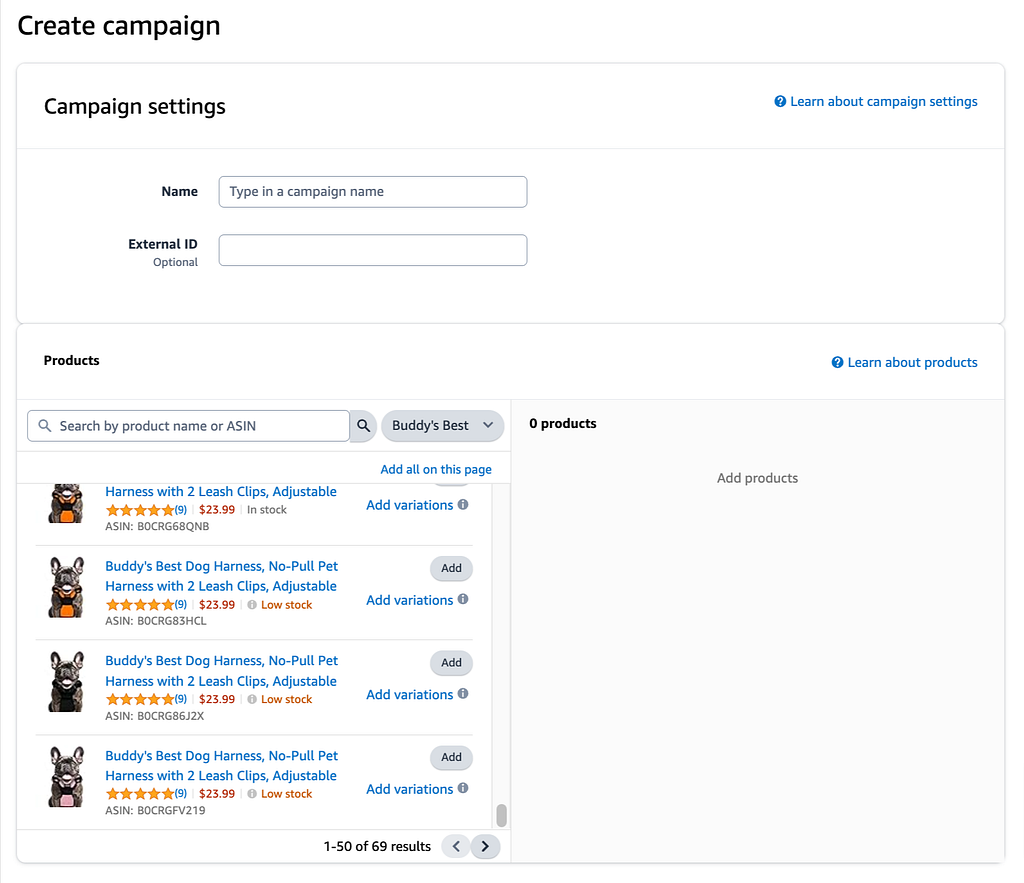
When setting up your Amazon Attribution campaign, choose a name that reflects the type of products you’re advertising or your campaign goal. This name will be visible only to you in the campaign manager.

Under the Products section, you’ll see all the products you sell on Amazon. Select the specific products you’re promoting and any associated variations.

If a product is out of stock, lacks a photo, or doesn’t have a price, it won’t be eligible for measurement. Performance for all other products under the same brand will be captured within the “Total” metrics in reporting.

Ad Group Creation

We recommend creating one ad group per non-Amazon media strategy, tactic, or creative. Each ad group receives a unique attribution tag, allowing you to measure Amazon conversions for the selected products. When naming your ad group, choose a name that reflects the strategy or tactic for the tag.

Select the publisher and channel that correspond to your ad or post. If the publisher isn’t listed, choose “New” and enter the publisher’s name. Remember that the publisher selection doesn’t impact tag performance; it’s just for your reference.

Enter the Amazon store or product detail page URL to which customers want to be directed when they click your ad. When choosing the destination URL, consider your goals and the products you selected during campaign creation.

Validating and Troubleshooting

Once you’ve applied Amazon Attribution tags to your non-Amazon campaigns, clicks will be recorded. Due to differences in click-counting methodology, you may notice a 10–20% discrepancy when comparing Amazon Attribution metrics to publisher or ad server traffic metrics.

If you encounter a click variance more significant than 20%, follow these troubleshooting tips:

  1. Ensure the date range matches for Amazon Attribution and publisher reporting.
  2. Verify that the attribution tag isn’t shared across other creatives, URLs, or event trackers.
  3. Confirm that you’re comparing publisher reporting only for ads with Amazon Attribution tags appended.

If you’re not seeing any clicks or conversions in Amazon Attribution, ensure that you’ve correctly implemented your tags and that the landing page is active on Amazon. Also, check that product ASINs have been assigned to your campaigns.

Remember that Amazon Attribution reporting will mask all clicks and conversions for data rows with fewer than 10 clicks. Once the corresponding tags have been clicked 10 times, all metrics should appear within 48 hours.

Amazon Advertising Attribution Window: It’s important to note that Amazon Attribution and Stores use different attribution methodologies, which may account for discrepancies between their respective reporting.

Getting Started with Amazon Ads Attribution API Automation

Ditch the messy, manual reporting for Amazon Attribution. Automated data feeds guide data-driven decision-making to improve off-Amazon digital marketing campaigns. Leverage attribution insights to refine strategies, allocate resources efficiently, and enhance customer engagement across all touchpoints.

Openbridge will unify and deliver performance data to leading data lakes or cloud warehouses like Redshift, Google BigQuery, Snowflake, Azure Data Lake, and Amazon Athena for an analytics-ready single source of truth to fuel informed decisions on brand building strategy, media, and customer demand for Amazon.

With your data unified, start to turbocharge reporting, analytics, and business intelligence tools like Google Data Studio, Tableau, Microsoft Power BI, Looker, Amazon QuickSight, SAP, Alteryx, dbt, Azure Data Factory, Qlik Sense, and many others.

Get a 30-day free trial to try Amazon Attribution API automation for yourself.


Amazon Attribution Links Advertising To Sales was originally published in Openbridge on Medium, where people are continuing the conversation by highlighting and responding to this story.


from Openbridge - Medium https://ift.tt/7BQcRLb
via Openbridge

Tuesday, April 2, 2024

Tackle complex reasoning tasks with Mistral Large, now available on Amazon Bedrock

Last month, we announced the availability of two high-performing Mistral AI models, Mistral 7B and Mixtral 8x7B on Amazon Bedrock. Mistral 7B, as the first foundation model of Mistral, supports English text generation tasks with natural coding capabilities. Mixtral 8x7B is a popular, high-quality, sparse Mixture-of-Experts (MoE) model, that is ideal for text summarization, question and answering, text classification, text completion, and code generation.

Today, we’re announcing the availability of Mistral Large on Amazon Bedrock. Mistral Large is ideal for complex tasks that require substantial reasoning capabilities, or ones that are highly specialized, such as Synthetic Text Generation or Code Generation.

What you need to know about Mistral Large:

  • It’s natively fluent in English, French, Spanish, German, and Italian, with a nuanced understanding of grammar and cultural context.
  • It has a 32K token context window allows precise information recall from large documents.
  • Its precise instruction-following enables you to design your moderation policies – the folks at Mistral AI used it to set up the system-level moderation of their beta assistant demonstrator le Chat. Your first interaction with Large Language Models (LLMs) revolves around prompts. The art of crafting effective prompts is essential for generating desirable responses from LLMs and Mistral AI has a guide with example prompts showing different prompting capabilities.

Getting started with Mistral Large
To get started with Mistral Large on Bedrock, you first need to get access to the model. On the Amazon Bedrock console, select Model access, and then select Manage model access. Next, select Mistral Large, and then select Save changes.

Model-access-Mistral-Large-screenshot2

Once you have access to Mistral Large, you can use the model on Bedrock. Refresh the base models table to view the updated status.

To see the complex reasoning aspect of Mistral Large in action I tried the following prompt in the Playgrounds section:

Playground-screenshot-Mistral-Large

Prompt

Calculate the difference in payment dates between the two customers whose payment amounts are closest to each other in the given dataset:

'{
"transaction_id":{"0":"T1001","1":"T1002","2":"T1003","3":"T1004","4":"T1005"},
"customer_id":{"0":"C001","1":"C002","2":"C003","3":"C002","4":"C001"},
"payment_amount":{"0":125.5,"1":89.99,"2":120.0,"3":54.3,"4":210.2},
"payment_date":{"0":"2021-10-05","1":"2021-10-06","2":"2021-10-07","3":"2021-10-05","4":"2021-10-08"},
"payment_status":{"0":"Paid","1":"Unpaid","2":"Paid","3":"Paid","4":"Pending"}
}'

Output

To find the difference in payment dates between the two customers whose payment amounts are closest to each other, we first need to identify the two closest payment amounts and then find their respective payment dates.

The payment amounts are: 125.5, 89.99, 120.0, 54.3, 210.2

The two closest payment amounts are 125.5 and 120.0. The payment date for the payment amount 125.5 is '2021-10-05' and for the payment amount 120.0 is '2021-10-07'.

The difference in payment dates can be calculated as follows:

Date difference = |'2021-10-07' - '2021-10-05'| = 2 days

So, the difference in payment dates between the two customers whose payment amounts are closest to each other is 2 days.

Earlier in this post I mentioned that Mistral Large is natively fluent in several languages, with a nuanced understanding of grammar and cultural context. I tested the model’s understanding of the French language:

Prompt

Lequel est le plus lourd une livre de fer ou un kilogramme de plume

Output

Un kilogramme de plumes est plus lourd qu'une livre de fer.

Pour comprendre cela, il est important de se rappeler que :

1. Une livre (lb) est une unité de mesure de masse principalement utilisée aux États-Unis et dans d'autres systèmes de mesure impériaux, tandis qu'un kilogramme (kg) est l'unité de base de masse dans le système international d'unités (SI).

2. 1 kilogramme est approximativement égal à 2,2 livres.

Donc, un kilogramme de plumes est plus lourd qu'une livre de fer, car il correspond à environ 2,2 livres de plumes.

Programmatically interact with Mistral Large
You can also use AWS Command Line Interface (CLI) and AWS Software Development Kit (SDK) to make various calls using Amazon Bedrock APIs. Following, is a sample code in Python that interacts with Amazon Bedrock Runtime APIs with AWS SDK. If you specify in the prompt that “You will only respond with a JSON object with the key X, Y, and Z.”, you can use JSON format output in easy downstream tasks:

import boto3
import json

bedrock = boto3.client(service_name="bedrock-runtime")

prompt = "<s>[INST]You are a summarization system that can provide summaries with associated confidence 
scores. In clear and concise language, provide three short summaries of the following essay, 
along with their confidence scores. You will only respond with a JSON object with the key Summary 
and Confidence. Do not provide explanations.[/INST]" 

# Essay: 
{insert essay text here}"

body = json.dumps({
    "prompt": prompt,
    "max_tokens": 512,
    "top_p": 0.8,
    "temperature": 0.5,
})

modelId = "mistral.mistral-large-instruct-v0:2"

accept = "application/json"
contentType = "application/json"

response = bedrock.invoke_model(
    body=body,
    modelId=modelId,
    accept=accept,
    contentType=contentType
)

print(json.loads(response.get('body').read()))

You can get JSON formatted output as like:

{ 
   "Summaries": [ 
      { 
         "Summary": "The author discusses their early experiences with programming and writing, 
starting with writing short stories and programming on an IBM 1401 in 9th grade. 
They then moved on to working with microcomputers, building their own from a Heathkit, 
and eventually convincing their father to buy a TRS-80 in 1980. They wrote simple games, 
a program to predict rocket flight trajectories, and a word processor.", 
         "Confidence": 0.9 
      }, 
      { 
         "Summary": "The author began college as a philosophy major, but found it to be unfulfilling 
and switched to AI. They were inspired by a novel and a PBS documentary, as well as the 
potential for AI to create intelligent machines like those in the novel. Despite this 
excitement, they eventually realized that the traditional approach to AI was flawed and 
shifted their focus to Lisp.", 
         "Confidence": 0.85 
      }, 
      { 
         "Summary": "The author briefly worked at Interleaf, where they found that their Lisp skills 
were highly valued. They eventually left Interleaf to return to RISD, but continued to work 
as a freelance Lisp hacker. While at RISD, they started painting still lives in their bedroom 
at night, which led to them applying to art schools and eventually attending the Accademia 
di Belli Arti in Florence.", 
         "Confidence": 0.9 
      } 
   ] 
}

To learn more prompting capabilities in Mistral AI models, visit Mistral AI documentation.

Now Available
Mistral Large, along with other Mistral AI models (Mistral 7B and Mixtral 8x7B), is available today on Amazon Bedrock in the US East (N. Virginia), US West (Oregon), and Europe (Paris) Regions; check the full Region list for future updates.

Share and learn with our generative AI community at community.aws. Give Mistral Large a try in the Amazon Bedrock console today and send feedback to AWS re:Post for Amazon Bedrock or through your usual AWS Support contacts.

Read about our collaboration with Mistral AI and what it means for our customers.

Veliswa.


from AWS News Blog https://ift.tt/rGcQuOw
via IFTTT

Introducing AWS Deadline Cloud: Set up a cloud-based render farm in minutes

Customers in industries such as architecture, engineering, & construction (AEC) and media & entertainment (M&E) generate the final frames for film, TV, games, industrial design visualizations, and other digital media with a process called rendering, which takes 2D/3D digital content data and computes an output, such as an image or video file. Rendering also requires significant compute power, especially to generate 3D graphics and visual effects (VFX) with resolutions as high as 16K for films and TV. This constrains the number of rendering projects that customers can take on at once.

To address this growing demand for rendering high-resolution content, customers often build what are called “render farms” which combine the power of hundreds or thousands of computing nodes to process their rendering jobs. Render farms can traditionally take weeks or even months to build and deploy, and they require significant planning and upfront commitments to procure hardware.

As a result, customers increasingly are transitioning to scalable, cloud-based render farms for efficient production instead of a dedicated render farm on-premises, which can require extremely high fixed costs. But, rendering in the cloud still requires customers to manage their own infrastructure, build bespoke tooling to manage costs on a project-by-project basis, and monitor software licensing costs with their preferred partners themselves.

Today, we are announcing the general availability of AWS Deadline Cloud, a new fully managed service that enables creative teams to easily set up a render farm in minutes, scale to run more projects in parallel, and only pay for what resources they use. AWS Deadline Cloud provides a web-based portal with the ability to create and manage render farms, preview in-progress renders, view and analyze render logs, and easily track these costs.

With Deadline Cloud, you can go from zero to render faster with integrations of digital content creation (DCC) tools and customization tools are built-in. You can reduce the effort and development time required to tailor your rendering pipeline to the needs of each job. You also have the flexibility to use licenses you already own or they are provided by the service for third-party DCC software and renderers such as Maya, Nuke, and Houdini.

Concepts of AWS Deadline Cloud
AWS Deadline Cloud allows you to create and manage rendering projects and jobs on Amazon Elastic Compute Cloud (Amazon EC2) instances directly from DCC pipelines and workstations. You can create a rendering farm, a collection of queues, and fleets. A queue is where your submitted jobs are located and scheduled to be rendered. A fleet is a group of worker nodes that can support multiple queues. A queue can be processed by multiple fleets.

Before you can work on a project, you should have access to the required resources, and the associated farm must be integrated with AWS IAM Identity Center to manage workforce authentication and authorization. IT administrators can create and grant access permissions to users and groups at different levels, such as viewers, contributors, managers, or owners.

Here are four key components of Deadline Cloud:

  • Deadline Cloud monitor – You can access statuses, logs, and other troubleshooting metrics for jobs, steps, and tasks. The Deadline Cloud monitor provides real-time access and updates to job progress. It also provides access to logs and other troubleshooting metrics, and you can browse multiple farm, fleet, and queue listings to view system utilization.
  • Deadline Cloud submitter – You can submit a rendering job directly using AWS SDK or AWS Command Line Interface (AWS CLI). You can also submit from DCC software using a Deadline Cloud submitter, which is a DCC-integrated plugin that supports Open Job Description (OpenJD), an open source template specification. With it, artists can submit rendering jobs from a third-party DCC interface they are more familiar with, such as Maya or Nuke, to Deadline Cloud, where project resources are managed and jobs are monitored in one location.
  • Deadline Cloud budget manager – You can create and edit budgets to help manage project costs and view how many AWS resources are used and the estimated costs for those resources.
  • Deadline Cloud usage explorer – You can use the usage explorer to track approximate compute and licensing costs based on public pricing rates in Amazon EC2 and Usage-Based Licensing (UBL).

Get started with AWS Deadline Cloud
To get started with AWS Deadline Cloud, define and create a farm with Deadline Cloud monitor, download the Deadline Cloud submitter, and install plugins for your favorite DCC applications with just a few clicks. You can define your rendering jobs in your DCC application and submit them to your created farm within the plugin’s user interfaces.

The DCC plugins detect the necessary input scene data and build a job bundle that uploads to the Amazon Simple Storage Service (Amazon S3) bucket in your account, transfer to Deadline Cloud for rendering the job, and provide completed frames to the S3 bucket for your customers to access.

1. Define a farm with Deadline Cloud monitor
Let’s create your Deadline Cloud monitor infrastructure and define your farm first. In the Deadline Cloud console, choose Set up Deadline Cloud to define a farm with a guided experience, including queues and fleets, adding groups and users, choosing a service role, and adding tags to your resources.

In this step, to choose all the default settings for your Deadline Cloud resources, choose Skip to Review in Step 3 after monitor setup. Otherwise choose Next and customize your Deadline Cloud resources.

Set up your monitor’s infrastructure and enter your Monitor display name. This name makes the Monitor URL, a web portal to manage your farms, queues, fleets, and usages. You can’t change the monitor URL after you finish setting up. The AWS Region is the physical location of your rendering farm, so you should choose the closest Region from your studio to reduce the latency and improve data transfer speeds.

To access the monitor, you can create new users and groups and manage users (such as by assigning them groups, permissions, and applications) or delete users from your monitor. Users, groups, and permissions can also be managed in the IAM Identity Center. So, if you don’t set up the IAM Identity Center in your Region, you should enable it first. To learn more, visit Managing users in Deadline Cloud in the AWS documentation.

In Step 2, you can define farm details such as the name and description of your farm. In Additional farm settings, you can set an AWS Key Management Service (AWS KMS) key to encrypt your data and tags to assign AWS resources for filtering your resources or tracking your AWS costs. Your data is encrypted by default with a key that AWS owns and manages for you. To choose a different key, customize your encryption settings.

You can choose Skip to Review and Create to finish the quick setup process with the default settings.

Let’s look at more optional configurations! In the step for defining queue details, you can set up an S3 bucket for your queue. Job assets are uploaded as job attachments during the rendering process. Job attachments are stored in your defined S3 bucket. Additionally, you can set up the default budget action, service access roles, and environment variables for your queue.

In the step for defining fleet details, set the fleet name, description, Instance option (either Spot or On-Demand Instance), and Auto scaling configuration to define the number of instances and the fleet’s worker requirements. We set conservative worker requirements by default. These values can be updated at any time after setting up your render farm. To learn more, visit Manage Deadline Cloud fleets in the AWS documentation.

Worker instances define EC2 instance types with vCPUs and memory size, for example, c5.large, c5a.large, and c6i.large. You can filter up to 100 EC2 instance types by either allowing or excluding types of worker instances.

Review all of the information entered to create your farm and choose Create farm.

The progress of your Deadline Cloud onboarding is displayed, and a success message displays when your monitor and farm are ready for use. To learn more details about the process, visit Set up a Deadline Cloud monitor in the AWS documentation.

In the Dashboard in the left pane, you can visit the overview of the monitor, farms, users, and groups that you created.

Choose Monitor to visit a web portal to manage your farms, queues, fleets, usages, and budgets. After signing in to your user account, you can enter a web portal and explore the Deadline Cloud resources you created. You can also download a Deadline Cloud monitor desktop application with the same user experiences from the Downloads page.

To learn more about using the monitor, visit Using the Deadline Cloud monitor in the AWS documentation.

2. Set up a workstation and submit your render job to Deadline Cloud
Let’s set up a workstation for artists on their desktops by installing the Deadline Cloud submitter application so they can easily submit render jobs from within Maya, Nuke, and Houdini. Choose Downloads in the left menu pane and download the proper submitter installer for your operating system to test your render farm.

This program installs the latest integrated plugin for Deadline Cloud submitter for Maya, Nuke, and Houdini.

For example, open a Maya on your desktop and your asset. I have an example of a wrench file I’m going to test with. Choose Windows in the menu bar and Settings/Preferences in the sub menu. In the Plugin Manager, search for DeadlineCloudSubmitter. Select Loaded to load the Deadline Cloud submitter plugin.

If you are not already authenticated in the Deadline Cloud submitter, the Deadline Cloud Status tab will display. Choose Login and sign in with your user credentials in a browser sign-in window.

Now, select the Deadline Cloud shelf, then choose the orange deadline cloud logo on the ‘Deadline’ shelf to launch the submitter. From the submitter window, choose the farm and queue you want your render submitted to. If desired, in the Scene Settings tab, you can override the frame range, change the Output Path, or both.

If you choose Submit, the wrench turntable Maya file, along with all of the necessary textures and alembic caches, will be uploaded to Deadline Cloud and rendered on the farm. You can monitor rendering jobs in your Deadline Cloud monitor.

When your render is finished, as indicated by the Succeeded status in the job monitor, choose the job, Job Actions, and Download Output. To learn more about scheduling and monitoring jobs, visit Deadline Cloud jobs in the AWS documentation.

View your rendered image with an image viewing application such as DJView. The image will look like this:

To learn more in detail about the developer-side setup process using the command line, visit Setting up a developer workstation for Deadline Cloud in the AWS documentation.

3. Managing budgets and usage for Deadline Cloud
To help you manage costs for Deadline Cloud, you can use a budget manager to create and edit budgets. You can also use a usage explorer to view how many AWS resources are used and the estimated costs for those resources.

Choose Budgets on the Deadline Cloud monitor page to create your budget for your farm.

You can create budget amounts and limits and set automated actions to help reduce or stop additional spend against the budget.

Choose Usage in the Deadline Cloud monitor page to find real-time metrics on the activity happening on each farm. You can look at the farm’s costs by different variables, such as queue, job, or user. Choose various time frames to find usage during a specific period and look at usage trends over time.

The costs displayed in the usage explorer are approximate. Use them as a guide for managing your resources. There may be other costs from using other connected AWS resources, such as Amazon S3, Amazon CloudWatch, and other services that are not accounted for in the usage explorer.

To learn more, visit Managing budgets and usage for Deadline Cloud in the AWS documentation.

Now available
AWS Deadline Cloud is now available in US East (Ohio), US East (N. Virginia), US West (Oregon), Asia Pacific (Singapore), Asia Pacific (Sydney), Asia Pacific (Tokyo), Europe (Frankfurt), and Europe (Ireland) Regions.

Give AWS Deadline Cloud a try in the Deadline Cloud console. For more information, visit the Deadline Cloud product page, Deadline Cloud User Guide in the AWS documentation, and send feedback to AWS re:Post for AWS Deadline Cloud or through your usual AWS support contacts.

Channy


from AWS News Blog https://ift.tt/MV9rbRz
via IFTTT