Thursday, March 13, 2025

Collaborate and build faster with Amazon SageMaker Unified Studio, now generally available

Today, we’re announcing the general availability of Amazon SageMaker Unified Studio, a single data and AI development environment where you can find and access all of the data in your organization and act on it using the best tool for the job across virtually any use case. Introduced as preview during AWS re:Invent 2024, my colleague, Antje, summarized it as:

SageMaker Unified Studio (preview) is a single data and AI development environment. It brings together functionality and tools from the range of standalone “studios,” query editors, and visual tools that we have today in Amazon Athena, Amazon EMR, AWS Glue, Amazon Redshift, Amazon Managed Workflows for Apache Airflow (Amazon MWAA), and the existing SageMaker Studio.

Here’s a video to see Amazon SageMaker Unified Studio in action:

SageMaker Unified Studio breaks down silos in data and tools, giving data engineers, data scientists, data analysts, ML developers and other data practitioners a single development experience. This saves development time and simplifies access control management so data practitioners can focus on what really matters to them—building data products and AI applications.

This post focuses on several important announcements that we’re excited to share:

To get started, go to the Amazon SageMaker console and create a SageMaker Unified Studio domain. To learn more, visit Create an Amazon SageMaker Unified Studio domain in the AWS documentation.

New capabilities for Amazon Bedrock in SageMaker Unified Studio
The capabilities of Amazon Bedrock within Amazon SageMaker Unified Studio offer a governed collaborative environment for developers to rapidly create and customize generative AI applications. This intuitive interface caters to developers of all skill levels, providing seamless access to the high-performance FMs offered in Amazon Bedrock and advanced customization tools for collaborative development of tailored generative AI applications.

Since the preview launch, several new FMs have become available in Amazon Bedrock and are fully integrated with SageMaker Unified Studio, including Anthropic’s Claude 3.7 Sonnet and DeepSeek-R1. These models can be used for building generative AI apps and chatting in the playground in SageMaker Unified Studio.

Here’s how you can choose Anthropic’s Claude 3.7 Sonnet on the model selection in your project.

You can also source data or documents from S3 folders within your project and select specific FMs when creating knowledge bases. 

During preview, we introduced Amazon Bedrock Guardrails to help you implement safeguards for your Amazon Bedrock application based on your use cases and responsible AI policies. Now, Amazon Bedrock Guardrails is extended to Amazon Bedrock Flows with this general availability release.

Additionally, we have streamlined generative AI setup for associated accounts with a new user management interface in SageMaker Unified Studio, making it straightforward for domain administrators to grant associated account admins access to model governance projects. This enhancement eliminates the need for command line operations, streamlining the process of configuring generative AI capabilities across multiple AWS accounts.

These new features eliminate barriers between data, tools, and builders in the generative AI development process. You and your team will gain a unified development experience by incorporating the powerful generative AI capabilities of Amazon Bedrock — all within the same workspace.

Amazon Q Developer is now generally available in SageMaker Unified Studio
Amazon Q Developer is now generally available in Amazon SageMaker Unified Studio, providing data professionals with generative AI–powered assistance across the entire data and AI development lifecycle.

Amazon Q Developer integrates with the full suite of AWS analytics and AI/ML tools and services within SageMaker Unified Studio, including data processing, SQL analytics, machine learning model development, and generative AI application development, to accelerate collaboration and help teams build data and AI products faster. To get started, you can select Amazon Q Developer icon.

For new users of SageMaker Unified Studio, Amazon Q Developer serves as an invaluable onboarding assistant. It can explain core concepts such as domains and projects, provide guidance on setting up environments, and answer your questions.

Amazon Q Developer helps you discover and understand data using powerful natural language interactions with SageMaker Catalog. What makes this implementation particularly powerful is how Amazon Q Developer combines broad knowledge of AWS analytics and AI/ML services with the user’s context to provide personalized guidance.

You can chat about your data assets through a conversational interface, asking questions such as “Show all payment related datasets” without needing to navigate complex metadata structures.

Amazon Q Developer offers SQL query generation through its integration with the built-in query editor available in SageMaker Unified Studio. Data professionals of varying skill levels can now express their analytical needs in natural language, receiving properly formatted SQL queries in return.

For example, you can ask, “Analyze payment method preferences by age group and region” and Amazon Q Developer will generate the appropriate SQL with proper joins across multiple tables.

Additionally, Amazon Q Developer is also available to assist with troubleshooting and generating real-time code suggestions in SageMaker Unified Studio Jupyter notebooks, as well as building ETL jobs.

Now available

  • Availability — Amazon SageMaker Unified Studio is now available in the following AWS Regions: US East (N. Virginia, Ohio), US West (Oregon), Asia Pacific (Seoul, Singapore, Sydney, Tokyo), Canada (Central), Europe (Frankfurt, Ireland, London), South America (São Paulo). Learn more about the availability of these capabilities on supported Region documentation page.
  • Amazon Q Developer subscription — The free tier of Amazon Q Developer is available by default in SageMaker Unified Studio, requiring no additional setup or configuration. If you already have Amazon Q Developer Pro Tier subscriptions, you can use those enhanced capabilities within the SageMaker Unified Studio environment. For more information, visit the documentation page.
  • Amazon Bedrock capabilities — To learn more about the capabilities of Amazon Bedrock in Amazon SageMaker Unified Studio, refer to this documentation page. 

Start building with Amazon SageMaker Unified Studio today. For more information, visit the Amazon SageMaker Unified Studio page.

Happy building!

— Donnie Prakoso

— How is the News Blog doing? Take this 1 minute survey! (This survey is hosted by an external company. AWS handles your information as described in the AWS Privacy Notice. AWS will own the data gathered via this survey and will not share the information collected with survey respondents.)


from AWS News Blog https://ift.tt/AJtgBd2
via IFTTT

Amazon S3 Tables integration with Amazon SageMaker Lakehouse is now generally available

At re:Invent 2024, we launched Amazon S3 Tables, the first cloud object store with built-in Apache Iceberg support to streamline storing tabular data at scale, and Amazon SageMaker Lakehouse to simplify analytics and AI with a unified, open, and secure data lakehouse. We also previewed S3 Tables integration with Amazon Web Services (AWS) analytics services for you to stream, query, and visualize S3 Tables data using Amazon Athena, Amazon Data Firehose, Amazon EMR, AWS Glue, Amazon Redshift, and Amazon QuickSight.

Our customers wanted to simplify the management and optimization of their Apache Iceberg storage, which led to the development of S3 Tables. They were simultaneously working to break down data silos that impede analytics collaboration and insight generation using the SageMaker Lakehouse. When paired with S3 Tables and SageMaker Lakehouse in addition to built-in integration with AWS analytics services, they can gain a comprehensive platform unifying access to multiple data sources enabling both analytics and machine learning (ML) workflows.

Today, we’re announcing the general availability of Amazon S3 Tables integration with Amazon SageMaker Lakehouse to provide unified S3 Tables data access across various analytics engines and tools. You can access SageMaker Lakehouse from Amazon SageMaker Unified Studio, a single data and AI development environment that brings together functionality and tools from AWS analytics and AI/ML services. All S3 tables data integrated with SageMaker Lakehouse can be queried from SageMaker Unified Studio and engines such as Amazon Athena, Amazon EMR, Amazon Redshift, and Apache Iceberg-compatible engines like Apache Spark or PyIceberg.

With this integration, you can simplify building secure analytic workflows where you can read and write to S3 Tables and join with data in Amazon Redshift data warehouses and third-party and federated data sources, such as Amazon DynamoDB or PostgreSQL.

You can also centrally set up and manage fine-grained access permissions on the data in S3 Tables along with other data in the SageMaker Lakehouse and consistently apply them across all analytics and query engines.

S3 Tables integration with SageMaker Lakehouse in action
To get started, go to the Amazon S3 console and choose Table buckets from the navigation pane and select Enable integration to access table buckets from AWS analytics services.

Now you can create your table bucket to integrate with SageMaker Lakehouse. To learn more, visit Getting started with S3 Tables in the AWS documentation.

1. Create a table with Amazon Athena in the Amazon S3 console
You can create a table, populate it with data, and query it directly from the Amazon S3 console using Amazon Athena with just a few steps. Select a table bucket and select Create table with Athena, or you can select an existing table and select Query table with Athena.

2. Create tables with Athena

When you want to create a table with Athena, you should first specify a namespace for your table. The namespace in an S3 table bucket is equivalent to a database in AWS Glue, and you use the table namespace as the database in your Athena queries.

Choose a namespace and select Create table with Athena. It goes to the Query editor in the Athena console. You can create a table in your S3 table bucket or query data in the table.

2. Query with Athena

2. Query with SageMaker Lakehouse in the SageMaker Unified Studio
Now you can access unified data across S3 data lakes, Redshift data warehouses, third-party and federated data sources in SageMaker Lakehouse directly from SageMaker Unified Studio.

To get started, go to the SageMaker console and create a SageMaker Unified Studio domain and project using a sample project profile: Data Analytics and AI-ML model development. To learn more, visit Create an Amazon SageMaker Unified Studio domain in the AWS documentation.

After the project is created, navigate to the project overview and scroll down to project details to note down the project role Amazon Resource Name (ARN).

3. Project details in SageMaker Unified Studio

Go to the AWS Lake Formation console and grant permissions for AWS Identity and Access Management (IAM) users and roles. In the in the Principals section, select the <project role ARN> noted in the previous paragraph. Choose Named Data Catalog resources in the LF-Tags or catalog resources section and select the table bucket name you created for Catalogs. To learn more, visit Overview of Lake Formation permissions in the AWS documentation.

4. Grant permissions in Lake Formation console

When you return to SageMaker Unified Studio, you can see your table bucket project under Lakehouse in the Data menu in the left navigation pane of project page. When you choose Actions, you can select how to query your table bucket data in Amazon Athena, Amazon Redshift, or JupyterLab Notebook.

5. S3 Tables in Unified Studio

When you choose Query with Athena, it automatically goes to Query Editor to run data query language (DQL) and data manipulation language (DML) queries on S3 tables using Athena.

Here is a sample query using Athena:

select * from "s3tablecatalog/s3tables-integblog-bucket”.”proddb"."customer" limit 10;

6. Athena query in Unified Studio

To query with Amazon Redshift, you should set up Amazon Redshift Serverless compute resources for data query analysis. And then you choose Query with Redshift and run SQL in the Query Editor. If you want to use JupyterLab Notebook, you should create a new JupyterLab space in Amazon EMR Serverless.

3. Join data from other sources with S3 Tables data
With S3 Tables data now available in SageMaker Lakehouse, you can join it with data from data warehouses, online transaction processing (OLTP) sources like relational or non-relational database, Iceberg tables, and other third party sources to gain more comprehensive and deeper insights.

For example, you can add connections to data sources such as Amazon DocumentDB, Amazon DynamoDB, Amazon Redshift, PostgreSQL, MySQL, Google BigQuery, or Snowflake and combine data using SQL without extract, transform, and load (ETL) scripts.

Now you can run the SQL query in the Query editor to join the data in the S3 Tables with the data in the DynamoDB.

Here is a sample query to join between Athena and DynamoDB:

select * from "s3tablescatalog/s3tables-integblog-bucket"."blogdb"."customer", 
              "dynamodb1"."default"."customer_ddb" where cust_id=pid limit 10;

To learn more about this integration, visit Amazon S3 Tables integration with Amazon SageMaker Lakehouse in the AWS documentation.

Now available
S3 Tables integration with SageMaker Lakehouse is now generally available in all AWS Regions where S3 Tables are available. To learn more, visit the S3 Tables product page and the SageMaker Lakehouse page.

Give S3 Tables a try in the SageMaker Unified Studio today and send feedback to AWS re:Post for Amazon S3 and AWS re:Post for Amazon SageMaker or through your usual AWS Support contacts.

In the annual celebration of the launch of Amazon S3, we will introduce more awesome launches for Amazon S3 and Amazon SageMaker. To learn more, join the AWS Pi Day event on March 14.

— Channy

—

How is the News Blog doing? Take this 1 minute survey!

(This survey is hosted by an external company. AWS handles your information as described in the AWS Privacy Notice. AWS will own the data gathered via this survey and will not share the information collected with survey respondents.)


from AWS News Blog https://ift.tt/jPpOkLN
via IFTTT

Monday, March 10, 2025

DeepSeek-R1 now available as a fully managed serverless model in Amazon Bedrock

As of January 30, DeepSeek-R1 models became available in Amazon Bedrock through the Amazon Bedrock Marketplace and Amazon Bedrock Custom Model Import. Since then, thousands of customers have deployed these models in Amazon Bedrock. Customers value the robust guardrails and comprehensive tooling for safe AI deployment. Today, we’re making it even easier to use DeepSeek in Amazon Bedrock through an expanded range of options, including a new serverless solution.

The fully managed DeepSeek-R1 model is now generally available in Amazon Bedrock. Amazon Web Services (AWS) is the first cloud service provider (CSP) to deliver DeepSeek-R1 as a fully managed, generally available model. You can accelerate innovation and deliver tangible business value with DeepSeek on AWS without having to manage infrastructure complexities. You can power your generative AI applications with DeepSeek-R1’s capabilities using a single API in the Amazon Bedrock’s fully managed service and get the benefit of its extensive features and tooling.

According to DeepSeek, their model is publicly available under MIT license and offers strong capabilities in reasoning, coding, and natural language understanding. These capabilities power intelligent decision support, software development, mathematical problem-solving, scientific analysis, data insights, and comprehensive knowledge management systems.

As is the case for all AI solutions, give careful consideration to data privacy requirements when implementing in your production environments, check for bias in output, and monitor your results. When implementing publicly available models like DeepSeek-R1, consider the following:

  • Data security – You can access the enterprise-grade security, monitoring, and cost control features of Amazon Bedrock that are essential for deploying AI responsibly at scale, all while retaining complete control over your data. Users’ inputs and model outputs aren’t shared with any model providers. You can use these key security features by default, including data encryption at rest and in transit, fine-grained access controls, secure connectivity options, and download various compliance certifications while communicating with the DeepSeek-R1 model in Amazon Bedrock.
  • Responsible AI – You can implement safeguards customized to your application requirements and responsible AI policies with Amazon Bedrock Guardrails. This includes key features of content filtering, sensitive information filtering, and customizable security controls to prevent hallucinations using contextual grounding and Automated Reasoning checks. This means you can control the interaction between users and the DeepSeek-R1 model in Bedrock with your defined set of policies by filtering undesirable and harmful content in your generative AI applications.
  • Model evaluation – You can evaluate and compare models to identify the optimal model for your use case, including DeepSeek-R1, in a few steps through either automatic or human evaluations by using Amazon Bedrock model evaluation tools. You can choose automatic evaluation with predefined metrics such as accuracy, robustness, and toxicity. Alternatively, you can choose human evaluation workflows for subjective or custom metrics such as relevance, style, and alignment to brand voice. Model evaluation provides built-in curated datasets, or you can bring in your own datasets.

We strongly recommend integrating Amazon Bedrock Guardrails and using Amazon Bedrock model evaluation features with your DeepSeek-R1 model to add robust protection for your generative AI applications. To learn more, visit Protect your DeepSeek model deployments with Amazon Bedrock Guardrails and Evaluate the performance of Amazon Bedrock resources.

Get started with the DeepSeek-R1 model in Amazon Bedrock
If you’re new to using DeepSeek-R1 models, go to the Amazon Bedrock console, choose Model access under Bedrock configurations in the left navigation pane. To access the fully managed DeepSeek-R1 model, request access for DeepSeek-R1 in DeepSeek. You’ll then be granted access to the model in Amazon Bedrock.

Next, to test the DeepSeek-R1 model in Amazon Bedrock, choose Chat/Text under Playgrounds in the left menu pane. Then choose Select model in the upper left, and select DeepSeek as the category and DeepSeek-R1 as the model. Then choose Apply.

Using the selected DeepSeek-R1 model, I run the following prompt example:

A family has $5,000 to save for their vacation next year. They can place the money in a savings account earning 2% interest annually or in a certificate of deposit earning 4% interest annually but with no access to the funds until the vacation. If they need $1,000 for emergency expenses during the year, how should they divide their money between the two options to maximize their vacation fund?

This prompt requires a complex chain of thought and produces very precise reasoning results.

To learn more about usage recommendations for prompts, refer to the README of the DeepSeek-R1 model in its GitHub repository.

By choosing View API request, you can also access the model using code examples in the AWS Command Line Interface (AWS CLI) and AWS SDK. You can use us.deepseek.r1-v1:0 as the model ID.

Here is a sample of the AWS CLI command:

aws bedrock-runtime invoke-model \
     --model-id us.deepseek-r1-v1:0 \
     --body "{\"messages\":[{\"role\":\"user\",\"content\":[{\"type\":\"text\",\"text\":\"[n\"}]}],max_tokens\":2000,\"temperature\":0.6,\"top_k\":250,\"top_p\":0.9,\"stop_sequences\":[\"\\n\\nHuman:\"]}" \
     --cli-binary-format raw-in-base64-out \
     --region us-west-2 \
     invoke-model-output.txt

The model supports both the InvokeModel and Converse API. The following Python code examples show how to send a text message to the DeepSeek-R1 model using the Amazon Bedrock Converse API for text generation.

import boto3
from botocore.exceptions import ClientError

# Create a Bedrock Runtime client in the AWS Region you want to use.
client = boto3.client("bedrock-runtime", region_name="us-west-2")

# Set the model ID, e.g., Llama 3 8b Instruct.
model_id = "us.deepseek.r1-v1:0"

# Start a conversation with the user message.
user_message = "Describe the purpose of a 'hello world' program in one line."
conversation = [
    {
        "role": "user",
        "content": [{"text": user_message}],
    }
]

try:
    # Send the message to the model, using a basic inference configuration.
    response = client.converse(
        modelId=model_id,
        messages=conversation,
        inferenceConfig={"maxTokens": 2000, "temperature": 0.6, "topP": 0.9},
    )

    # Extract and print the response text.
    response_text = response["output"]["message"]["content"][0]["text"]
    print(response_text)

except (ClientError, Exception) as e:
    print(f"ERROR: Can't invoke '{model_id}'. Reason: {e}")
    exit(1)

To enable Amazon Bedrock Guardrails on the DeepSeek-R1 model, select Guardrails under Safeguards in the left navigation pane, and create a guardrail by configuring as many filters as you need. For example, if you filter for “politics” word, your guardrails will recognize this word in the prompt and show you the blocked message.

4. Apply the Bedrock Guardrails to the DeepSeek-R1 model

You can test the guardrail with different inputs to assess the guardrail’s performance. You can refine the guardrail by setting denied topics, word filters, sensitive information filters, and blocked messaging until it matches your needs.

To learn more about Amazon Bedrock Guardrails, visit Stop harmful content in models using Amazon Bedrock Guardrails in the AWS documentation or other deep dive blog posts about Amazon Bedrock Guardrails on the AWS Machine Learning Blog channel.

Here’s a demo walkthrough highlighting how you can take advantage of the fully managed DeepSeek-R1 model in Amazon Bedrock:

Now available
DeepSeek-R1 is now available fully managed in Amazon Bedrock in the US East (N. Virginia), US East (Ohio), and US West (Oregon) AWS Regions through cross-Region inference. Check the full Region list for future updates. To learn more, check out the DeepSeek in Amazon Bedrock product page and the Amazon Bedrock pricing page.

Give the DeepSeek-R1 model a try in the Amazon Bedrock console today and send feedback to AWS re:Post for Amazon Bedrock or through your usual AWS Support contacts.

— Channy

Updated on March 10, 2025 — Fixed a screenshot of model selection and model ID.


from AWS News Blog https://ift.tt/fDh97rj
via IFTTT

AWS Weekly Roundup: Amazon Q CLI agent, AWS Step Functions, AWS Lambda, and more (March 10, 2025)

As the weather improves in the Northern hemisphere, there are more opportunities to learn and connect. This week, I’ll be in San Francisco, and we can meet at the Nova Networking Night at the AWS GenAI Loft where we’ll dive into the world of Amazon Nova foundation models (FMs) with live demos and real-world implementations.

AWS Pi Day is now a yearly tradition. It started in 2021 as a celebration of the 15th anniversary of Amazon S3. This year, there will be in-depth discussions with AWS product teams on how to build a data foundation for a unified seamless experience, managing and using data for analytics and AI workloads. Join us online to learn about the latest innovations through hands-on demos, and ask questions during our interactive livestream.

Last week’s launches
Another busy week, here are the launches that got my attention.

Amazon Q Developer – You can now use an enhanced agent within the Amazon Q command line interface (CLI) to give you more dynamic conversations, help you read and write files locally, query AWS resources, or create code. This enhanced CLI agent is powered by Anthropic’s most intelligent model to date, Claude 3.7 Sonnet. Read more about this agenic coding experience and how to try it out. Here’s a visual demo of the new capabilities of Amazon Q CLI, by Nathan Peck.

Amazon Q Business – Now supports the ingestion of audio and video data. This capability streamlines information retrieval, enhances knowledge sharing, and improves decision-making processes, by making multimedia content as searchable and accessible as text-based documents.

Amazon Bedrock – Bedrock Data Automation is now generally available, so you can automate the generation of valuable insights from unstructured multimodal content such as documents, images, video, and audio files. Learn more and see code examples in my blog post. Amazon Bedrock Knowledge Bases support for GraphRAG is now also generally available. GraphRAG is a capability that enhances Retrieval-Augmented Generation (RAG) by incorporating graph data and delivers more comprehensive, relevant, and explainable responses by leveraging relationships within your data, improving how Generative AI applications retrieve and synthesize information.

Amazon Nova – The Amazon Nova Pro foundation model now supports latency-optimized inference in preview on Amazon Bedrock, enabling faster response times and improved responsiveness for generative AI applications.

AWS Step Functions – Workflow Studio for VS Code is now available, a visual builder you can use to compose workflows on a canvas. You can generate workflow definitions in the background to create workflows in your local development environment. Read more about this enhanced local IDE experience.

AWS Lambda – Now supports Amazon CloudWatch Logs Live Tail in VS Code. We previously introduced support for Live Tail in the Lambda console to simplify how you can view and analyze Lambda logs in real time. Now, you can also monitor Lambda function logs in real time while staying within the VS Code development environment.

AWS Amplify – Now supports HttpOnly cookies for server-rendered Next.js applications when using Amazon Cognito’s managed login. Because cookies with the HttpOnly attribute can’t be accessed by JavaScript, your applications can gain an additional layer of protection against cross-site scripting (XSS) attacks.

Amazon Cognito – You can now customize access tokens for machine-to-machine (M2M) flows, enabling you to implement fine-grained authorization in your applications, APIs, and workloads. M2M authorization is commonly used for automated processes such as scheduled data synchronization tasks, event-driven workflows, microservices communication, or real-time data streaming between systems.

AWS CodeBuild – Now supports builds on Linux x86, Arm, and Windows on-demand fleets directly on the host operating system without containerization. In this way, you can now execute build commands that require direct access to the host system resources or have specific requirements that make containerization challenging. For example, this is useful when building device drivers, running system-level tests, or working with tools that require host machine access. CodeBuild has also added support for Node 22, Python 3.13, and Go 1.23 in Linux x86, Arm, Windows, and macOS platforms.

Bottlerocket – The open source Linux-based operating system purpose-built for containers now supports NVIDIA’s Multi-Instance GPU (MIG) to help partition NVIDIA GPUs into multiple GPU instances on Kubernetes nodes and maximize GPU resource utilization. Bottlerocket now also supports AWS Neuron accelerated instance types and provides a default bootstrap container image that simplifies system setup tasks.

Amazon GameLift – Introducing Amazon GameLift Streams, a new managed capability that developers can use to stream games at up to 1080p resolution and 60 frames per second to any device with a WebRTC-enabled browser. To learn more, explore Donnie’s blog post.

Amazon FSx for NetApp ONTAP – Starting March 5, 2025, the SnapLock licensing fees for data stored in SnapLock volumes has been eliminated, making it more cost-effective.

Other AWS news
Here are some additional projects, blog posts, and news items that you might find interesting:

Accelerate AWS Well-Architected reviews with Generative AI – In this post, we explore a generative AI solution to streamline the Well-Architected Framework Reviews (WAFRs) process. We demonstrate how to build an intelligent, scalable system that analyzes architecture documents and generates insightful recommendations based on best practices.

Architectural diagram

Build a Multi-Agent System with LangGraph and Mistral on AWS – The Multi-Agent City Information System demonstrated in this post exemplifies the potential of agent-based architectures to create sophisticated, adaptable, and highly capable AI applications.

Reference architecture

Evaluate RAG responses with Amazon Bedrock, LlamaIndex and RAGAS – How to enhance your Retrieval Augmented Generation (RAG) implementations with practical techniques to evaluate and optimize your AI systems and enable more accurate, context-aware responses that align with your specific needs.

Architectural diagram

From community.aws
Here are some of my favorite posts from community.aws. Create your AWS Builder ID to start sharing your tips and connect with fellow builders. Your Builder ID is a universal login credential that gives you access, beyond the AWS Management Console, to AWS tools and resources, including over 600 free training courses, community features, and developer tools such as Amazon Q Developer.

Optimize AWS Lambda Costs with Automated Compute Optimizer Insights (Zechariah Kasina) – An automated and scalable method for optimizing AWS Lambda memory configurations to enhance cost efficiency and performance.

Optimize AWS Costs: Auto-Shutdown for EC2 Instances (Adeleke Adebowale Julius) – Using Amazon CloudWatch alarms to dynamically shut down instances based on inactivity.

The Evolution of the Developer Role in an AI-Assisted Future (Aaron Sempf) – While AI is transforming software development, the need for developing talent remains crucial.

Amazon Q Developer CLI – More coffee, less remembering commands (Cobus Bernard) – Now that you can use Amazon Q Developer directly from your terminal to interact with your files, so let’s add some convenience automations.

Upcoming AWS events
Check your calendars and sign up for these upcoming AWS events:

AWS Community Days – Join community-led conferences that feature technical discussions, workshops, and hands-on labs led by expert AWS users and industry leaders from around the world: Milan, Italy (April 2), Bay Area – Security Edition (April 4), Timișoara, Romania (April 10), and Prague, Czech Republic (April 29).

AWS Innovate: Generative AI + Data – Join a free online conference focusing on generative AI and data innovations. Available in multiple geographic regions: North America (March 13), Greater China Region (March 14), and Latin America (April 8).

AWS Summits – The AWS Summit season is coming along! Join free online and in-person events that bring the cloud computing community together to connect, collaborate, and learn about AWS. Register in your nearest city: Paris (April 9), Amsterdam (April 16), London (April 30), and Poland (May 5).

AWS re:Inforce (June 16–18) – Our annual learning event devoted to all things AWS Cloud security. This year is in Philadelphia, PA. Registration opens in March, so be ready to join more than 5,000 security builders and leaders.

AWS DevDays are free, technical events where developers can learn about some of the hottest topics in cloud computing. DevDays offer hands-on workshops, technical sessions, live demos, and networking with AWS technical experts and your peers. Register to access AWS DevDays sessions on demand.

That’s all for this week. Check back next Monday for another Weekly Roundup!

– Danilo

This post is part of our Weekly Roundup series. Check back each week for a quick roundup of interesting news and announcements from AWS!

—

How is the News Blog doing? Take this 1 minute survey!

(This survey is hosted by an external company. AWS handles your information as described in the AWS Privacy Notice. AWS will own the data gathered via this survey and will not share the information collected with survey respondents.)


from AWS News Blog https://ift.tt/1e9LiC5
via IFTTT

Thursday, March 6, 2025

Scale and deliver game streaming experiences with Amazon GameLift Streams

Since 2016, game developers have been using Amazon GameLift to power games with dedicated, scalable server hosting capable of supporting 100M concurrent users (CCU) in a single game. Responding to customer requests for additional managed compute capabilities beyond game servers, we’re announcing Amazon GameLift Streams — a new capability in Amazon GameLift to help game publishers build and deliver global, direct-to-player game streaming experiences. As part of this announcement, existing capabilities in Amazon GameLift are now known as Amazon Gamelift Servers, continuing to serve hundreds of developers including industry leaders Ubisoft, Zynga, WB Games, and Meta.

Amazon GameLift Streams helps you deliver game streaming experiences at up to 1080p resolution and 60 frames per second across devices including iOS, Android, and PCs. In just a few clicks, you can deploy games built with a variety of 3D engines, without modifications, onto fully-managed cloud-based GPU instances and stream games through the AWS Network Backbone directly to any device with a web browser.

Amazon GameLift Streams helps you distribute your games direct-to-players, without having to invest millions of dollars in infrastructure and software development to build your own service. Players can start gaming in just a few seconds, without waiting for downloads or installs.

Here’s a quick look at Amazon GameLift Streams:

You can use the Amazon GameLift Streams SDK to integrate with your existing identity services, storefronts, game launchers, websites, or newly created experiences such as playable demos, and begin streaming to players. You can monitor active streams and usage from within the AWS console, and seamlessly scale your streaming infrastructure across multiple regions on the AWS global network to reach more players around the world with low-latency gameplay. Amazon GameLift Streams is the only solution that enables you to upload your game content onto fully-managed GPU instances in the cloud and start streaming in minutes, with little or no modification of your code.

Players can access AAA, AA, and indie games on PCs, phones, tablets, smart TVs, or any device with a WebRTC-enabled browser. Amazon GameLift Streams allows you to dynamically scale streaming capacity to match player demand, ensuring you only pay for what you need. You can choose from a selection of GPU instances that offer a range of price performance, and rely on the built-in security of AWS to protect your intellectual property.

Let’s get started
To begin using Amazon GameLift Streams, I need an existing Amazon GameLift Streams implementation. I prepare my game files by following the Amazon GameLift Streams documentation.

Then, I’ll upload my files to Amazon Simple Storage Service (Amazon S3). I can use the AWS Management Console or this AWS Command Line Interface (AWS CLI) command to upload my game files:

aws s3 sync my-game-folder s3://my-bucket/my-game-path

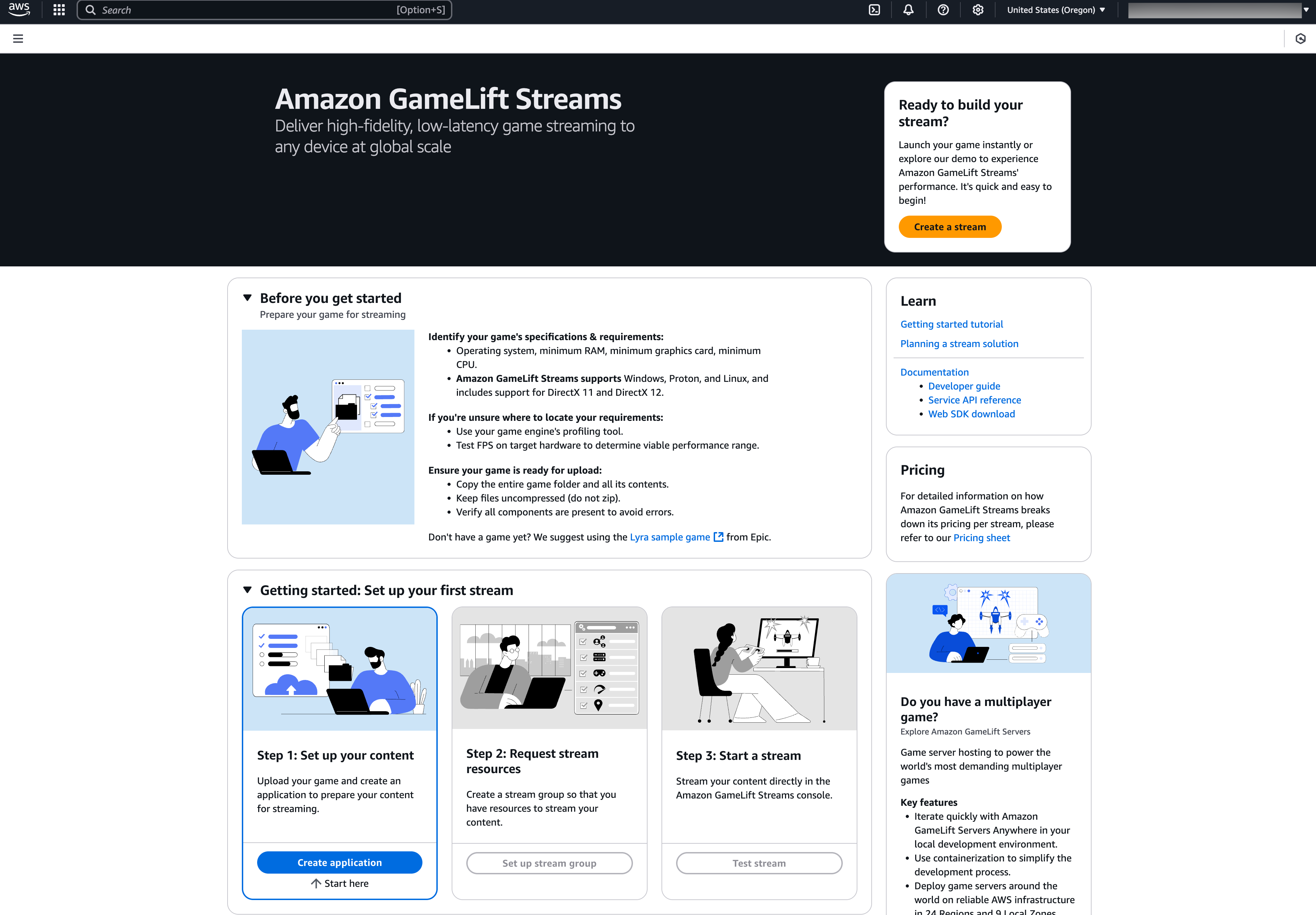
The next step is to create an Amazon GameLift Streams application. I navigate to the Amazon GameLift Streams console. This is how the new AWS GameLift Streams console looks:

On the Amazon GameLift Streams console, I choose Create application.

In the Runtime settings, I select the runtime environment for my game application.

Then, I need to select my S3 bucket and folder from the previous step, then set the path to my game’s main executable.

I also have the option to configure the automatic transfer of application-generated log files into a S3 bucket. After I’m done with this configuration, I choose Create application.

After my application setup is completed, I need to create a stream group, a collection of compute resources to run and stream the application. I navigate to Stream groups in the left navigation pane of the Amazon GameLift Streams console.

On this page, I define a description for my new stream group.

Here, I select the capabilities and pricing of my stream group. Since my application is using Microsoft Windows Server 2022 Base, I make sure to select one of the compatible stream classes.

Next, I need to link with the application I created in the previous step.

On the Configure stream settings page, I can configure additional locations for my stream group, bringing in additional capacity from other AWS Regions. There are two capacity options that I can choose, always-on capacity and on-demand capacity. The default capacity setting provides one streaming slot, which is sufficient for initial testing.

Then, I need to review my configuration and choose Create stream group.

With stream groups configured, I can test my game streaming. I navigate to the Test stream page on the console to launch my application as a stream. I select this stream group and select Choose.

On the next page, I can configure any command line arguments or environment variables to run my application. I don’t need any extra configurations and choose Test stream.

Then, I can see that my application is running as expected. I can also interact with my game. This test helps me verify that my game works properly in streaming mode and serves as an initial proof of concept.

After I’ve confirmed everything works, I can integrate the Web SDK into my own website. The Web SDK and AWS Software Development Kit (AWS SDK) with Amazon GameLift Streams APIs help me to embed game streams, similar to what I tested in the console, into any web page I manage.

Additional things to know

  • Availability – Amazon GameLift Streams is currently available in the following AWS Regions: US East (Ohio), US West (Oregon), Asia Pacific (Tokyo), Europe (Frankfurt). Additional streaming capacity can also be configured in US East (N. Virginia) and Europe (Ireland).
  • Supported operating systems – Amazon GameLift Streams supports games running on Windows, Linux, or Proton, offering easy onboarding and compatibility with game binaries. Learn more on Choosing a configuration in Amazon GameLift Streams documentation page.
  • Programmatic access – This new capability provides comprehensive tools including service APIs, client streaming SDKs, and AWS CLI for content packaging.

Now available
Explore how to streamline your game distribution using Amazon GameLift Streams. Learn more about getting started on the Amazon GameLift Streams page.

Happy streaming!

— Donnie

—

How is the News Blog doing? Take this 1 minute survey!

(This survey is hosted by an external company. AWS handles your information as described in the AWS Privacy Notice. AWS will own the data gathered via this survey and will not share the information collected with survey respondents.)


from AWS News Blog https://ift.tt/durWSOC
via IFTTT

Tuesday, March 4, 2025

New year, new Heroes – March 2025

As we dive into 2025, we’re thrilled to announce our latest group of AWS Heroes! These exceptional individuals have demonstrated outstanding expertise and innovation, and are committed to sharing knowledge. Their contributions to the AWS community are greatly appreciated, and today we’re excited to celebrate them.

Ahmed Bebars – New Jersey, USA

Container Hero Ahmed Bebars is a Principal Engineer at The New York Times, where he leads the design and delivery of scalable developer platforms that enhance productivity and empower engineering teams. With deep expertise in containers, Kubernetes, and cloud-native technologies, Ahmed builds robust infrastructure solutions that streamline development workflows and support innovation. As an active member of the AWS and Cloud Native communities, he frequently shares his expertise at events like KubeCon, AWS re:Invent, AWS Community Days, and Kubernetes Community Days. Through his initiative, “Level Up with Ahmed,” he shares practical insights and resources to help engineers grow their skills and stay ahead in the evolving tech landscape.

Badri Narayanan Kesavan – Singapore

Community Hero Badri Narayanan Kesavan is an Engineering Lead and Solutions Architect with over a decade of professional experience, specializing in AWS Cloud solutions, platform engineering, and DevOps automation. Badri’s passion lies in learning and sharing with the community. He has delivered several talks at AWS Singapore Summit, AWS Summit ASEAN 2023, AWS Community Days, and various user group meetups. As an active AWS community leader, he organizes meetups and workshops under the AWS Singapore User Group where he regularly conducts sessions on diverse AWS topics, engaging a wide audience to foster innovation and collaboration. He has also authored the book “Mastering Amazon EC2)” which is a comprehensive guide to building robust and resilient applications on Amazon Elastic Compute Cloud (Amazon EC2).

Marcelo Paiva – Goiânia, Brazil

Community Hero Marcelo Paiva has over 30 years of experience in technology and is the CTO at Softprime Soluções, leading product development and research in digital biometrics, facial recognition, and artificial intelligence (AI). With more than a decade working with cloud computing, he specializes in building scalable and innovative solutions using AWS. Passionate about tech communities, Marcelo founded the AWS User Group in Goiânia in 2018, helping grow the local community. Today, he organizes events such as JoinCommunity and Cloud Summit Cerrado, fostering learning and networking in the Cerrado region.

Raphael Jambalos – Quezon City, Philippines

Community Hero Raphael Jambalos manages the Cloud Native development team at eCloudValley Philippines. His team has implemented dozens of cloud-native applications across multiple industries for customers in the Philippines. He is active in helping the AWS User Groups grow in the Philippines, and is passionate about connecting with the community beyond Manila. In his free time, he loves to read books and write about cloud technologies on his Dev.to blog.

Stav Ochakovski – Tel Aviv, Israel

Container Hero Stav Ochakovski is a DevOps Engineer at Beacon and a cybersecurity expert, managing highly scalable multi-cloud environments. With a background in DevOps engineering and instruction, Stav seamlessly transitioned into the dynamic cybersecurity start-up scene. A champion of container technologies and Amazon Elastic Kubernetes Service (Amazon EKS), she brings deep expertise in Kubernetes, CI/CD pipelines, and logging solutions to the AWS community. Stav actively shares her expertise by speaking at AWS community events, as well as security and container conferences. She is also a leader of the Israel AWS User Group and is a pastry-chef school graduate and licensed skipper.

Learn More

Visit the AWS Heroes website if you’d like to learn more about the AWS Heroes program, or to connect with a Hero near you.

— Taylor


from AWS News Blog https://ift.tt/ZIcFVxR
via IFTTT

Monday, March 3, 2025

AWS Weekly Roundup: Anthropic Claude 3.7, JAWS Days, Cross-account access, and more (March 3, 2025)

I have fond memories of the time I built an application live at the AWS GenAI Loft London last September. AWS GenAI Lofts are back in locations such as San Francisco, Berlin, and more, to continue providing collaborative spaces and immersive experiences for startups and developers. Find a loft near you for hands-on access to AI products and services events, workshops, and networking opportunities, that you can’t miss!

Last week’s launches
Here are some launches that got my attention during the previous week.

Four ways to grant cross-account access in AWS — For some situations, you may want to enable centralized operations across multiple AWS accounts or share resources across teams, or projects within your teams. In these cases, you may be concerned about security, availability, or the manageability of granting this cross-account access. We’ve announced four ways to grant cross-account access in AWS and detail each of the methods and its unique trade-offs.

Amazon ECS adds support for additional IAM condition keys — We’ve launched eight new service-specific condition keys for Identity and Access Management (IAM). These new condition keys let you create IAM policies as well as Service Control Policies (SCPs) to better enforce your organizational policies in containerized environments. IAM condition keys allow you to author policies that enforce access control based on API request context.

AWS Chatbot is now named Amazon Q Developer — AWS Chatbot has been renamed to Amazon Q Developer, representing an enhancement to developer productivity through generative AI-powered capabilities. Furthermore, this update is an enhancement of our chat-based DevOps capabilities. By combining AWS Chatbot’s proven functionality with the generative AI capabilities of Amazon Q, we’re providing developers with more intuitive, efficient tools for cloud resource management.

Anthropic’s Claude 3.7 Sonnet hybrid reasoning model is now available in Amazon Bedrock — We’re expanding the foundation models (FM) offerings of Amazon Bedrock and we’ve announced the availability of Anthropic’s Claude 3.7 Sonnet foundation model in Amazon Bedrock. Claude 3.7 Sonnet is Anthropic’s most intelligent model to-date. It stands out as their first hybrid reasoning model capable of producing quick responses or extended thinking, meaning it can work through difficult problems using careful, step-by-step reasoning.

Other AWS News
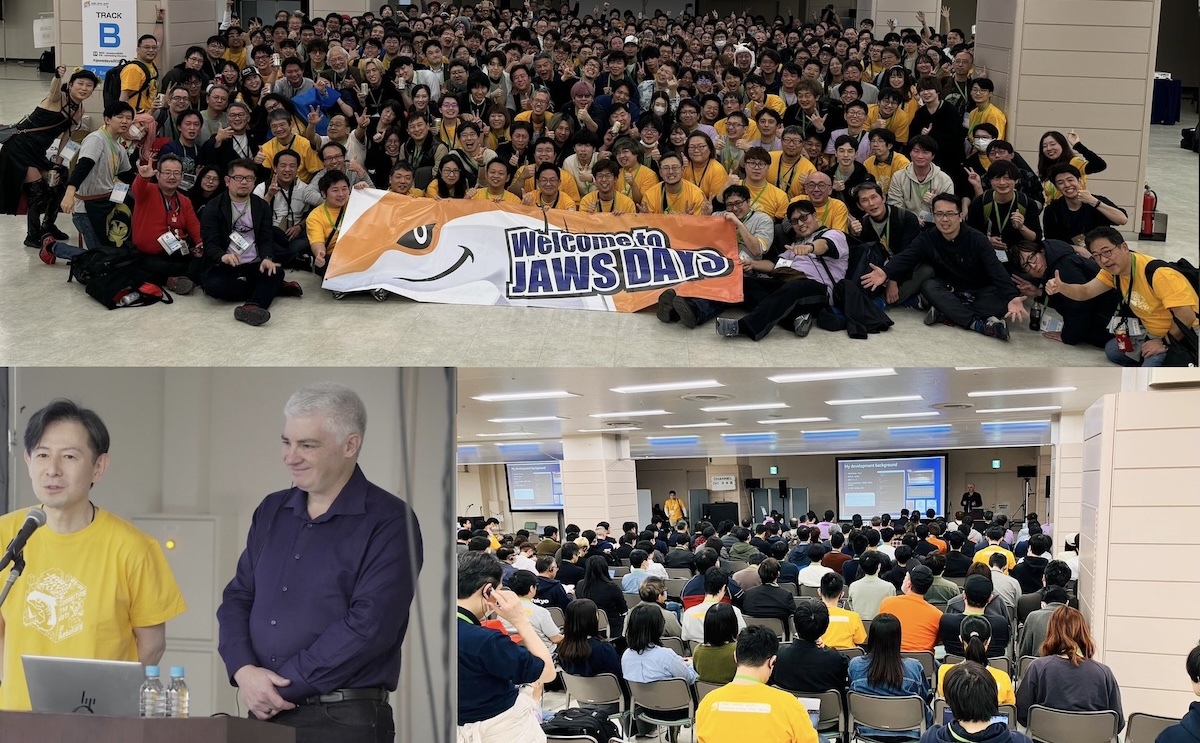
JAWS UG (Japan AWS Usergroup) is the largest AWS user group in the world, and holds JAWS Days every year with over a thousand participants from Japan, Korea, Taiwan, and Hong Kong. The March 1st event started with a keynote speech on next-generation development by Jeff Barr (VP of AWS Evangelism), and included over 100 technical and community experience sessions, lightning talks, and workshops such as Game Days, Builders Card Challenges, and networking parties. If you want to experience the most active AWS community event in the world, I recommend attending next year.


Amazon Q Developer now generally available in Amazon SageMaker Canvas — Announced as available in preview at AWS reinvent 2024, we’ve now announced the general availability of Amazon Q Developer in Amazon SageMaker Canvas to help you build machine learning (ML) models using natural language.

Applications for the 2025 AWS Cloud Club Captains Program are still open through March 6th. AWS Cloud Clubs are student-led groups for post-secondary and independent students, 18 years old and over. Find a club near you on the Meetup page.

From community.aws
Here are some of my favorite posts from community.aws:

DevSecOps on AWS: Secure, Automate, and Have a Laugh Along the Way – Discover how DevSecOps on AWS transforms your development pipeline by integrating security from the very first commit to production deployment, by Ahmed Mohamed.

Find out how to earn 100 percent free AWS certification vouchers in this post published, by Anand Joshi.

In the post, Boost SaaS Onboarding & Retention with AWS AI & Automation, Kaumudi Tiwari details how to navigate endless forms, generic guides, and a cluttered interface when signing up for a new SaaS platform.

My colleague Dennis Traub has published helpful step-by-step guides on how to use reasoning capabilities with Claude 3.7 Sonnet in your C#/.NET, Java, JavaScript, or Python applications. Find these posts and much more generative AI-related content in the Gen AI Space on community.aws.

Upcoming AWS events
Check your calendars and sign up for these upcoming AWS events:

AWS Community Days – Join community-led conferences that feature technical discussions, workshops, and hands-on labs led by expert AWS users and industry leaders from around the world: Milan, Italy (April 2), Bay Area – Security Edition (April 4), Timișoara, Romania (April 10), and Prague, Czeh Republic (April 29).

AWS Innovate: Generative AI + Data – Join a free online conference focusing on generative AI and data innovations. Available in multiple geographic regions: APJC and EMEA (March 6), North America (March 13), Greater China Region (March 14), and Latin America (April 8).

AWS Summits – Join free online and in-person events that bring the cloud computing community together to connect, collaborate, and learn about AWS. Register in your nearest city: Paris (April 9), Amsterdam (April 16), London (April 30), and Poland (May 5).

AWS re:Inforce – AWS re:Inforce (June 16–18) in Philadelphia, PA is our annual learning event devoted to all things AWS cloud security. Registration opens in March–be ready to join more than 5,000 security builders and leaders.

AWS DevDays are free, technical events where developers will learn about some of the hottest topics in cloud computing. DevDays offer hands-on workshops, technical sessions, live demos, and networking with AWS technical experts and your peers. Register to access AWS DevDays sessions on-demand.

Create your AWS Builder ID and reserve your alias. Builder ID is a universal login credential that gives you access–beyond the AWS Management Console–to AWS tools and resources, including over 600 free training courses, community features, and developer tools such as Amazon Q Developer.

AWS Training and Certification hosts free training events, both online and in-person that helps you get the most out of the AWS Cloud. Register to gain foundational cloud knowledge or dive deep in a technical area. Join AWS experts for training events that meet your goals, such as AWS Discovery Days, in-person. and virtual events at AWS Skills Centers including the one in Cape Town.

You can browse all upcoming in-person and virtual events here.

That’s all for this week. Check back next Monday for another Weekly Roundup!

– Veliswa

This post is part of our Weekly Roundup series. Check back each week for a quick roundup of interesting news and announcements from AWS!

—

How is the News Blog doing? Take this 1 minute survey!


from AWS News Blog https://ift.tt/HKaVWn6
via IFTTT