Tuesday, June 30, 2026

Amazon EC2 C9g and C9gd instances powered by AWS Graviton5 processors are now available

When you run compute-intensive workloads like real-time analytics, batch processing, video encoding, scientific modeling, or CPU-based machine learning inference, every percentage point of performance matters. You need instances that deliver higher throughput per vCPU, faster memory access, and more network bandwidth, all while keeping your costs in check.

Today I am happy to announce the general availability of Amazon Elastic Compute Cloud (Amazon EC2) C9g and C9gd instances, powered by AWS Graviton5 processors. C9g instances are compute-optimized and deliver up to 25% higher performance per vCPU compared to previous-generation C8g instances. They feature the fastest memory of any processor instance in the cloud, with DDR5 8800MT/s DIMMs, 5x more L3 cache, and up to 3x higher packet-processing performance compared to Graviton4-based instances. The faster memory and larger caches mean your workloads spend less time waiting on data, translating into higher throughput for in-memory analytics, faster agentic loops, and more responsive real-time applications.

C9g instances are ideal for batch jobs, video encoding pipelines, or distributed analytics that can utilize Amazon Elastic Block Store (Amazon EBS) for storage. It is also a natural fit for agentic AI workloads, where concurrent environments and CPU-bound reasoning steps benefit from Graviton5’s higher core count and larger caches. As AI shifts from answering questions to taking actions, running code, and orchestrating multi-step tasks, the demand for CPU compute is growing, and C9g instances are built for this shift.

Some workloads also need fast local storage alongside that compute power. Choose C9gd when your application benefits from high-speed, low-latency local NVMe SSD storage, for example scratch space during HPC simulations, temporary caches for ML inference, or local buffers for ad-serving engines.

Graviton5-based instances with NVMe instance store volumes also support detailed performance statistics, providing high-resolution I/O metrics, including latency histograms broken down by I/O size, up to 1-second granularity and accessible via Amazon CloudWatch or nvme-cli at no additional cost.

C9g and C9gd instances at a glance
C9g and C9gd instances are available in 11 sizes ranging from medium to 48xlarge, plus a bare metal option. They offer up to 15% higher network bandwidth and 20% higher EBS bandwidth on average across sizes compared to the previous generation, with the largest 48xlarge size delivering up to 100 Gbps of network bandwidth and up to 72 Gbps of EBS bandwidth, a 2x increase.

C9g vCPUs Memory
(GiB)
Network Bandwidth
(Gbps)
EBS Bandwidth
(Gbps)
medium 1 2 Up to 15 Up to 12
large 2 4 Up to 15 Up to 12
xlarge 4 8 Up to 15 Up to 12
2xlarge 8 16 Up to 17 Up to 12
4xlarge 16 32 Up to 17 Up to 12
8xlarge 32 64 17 12
12xlarge 48 96 25 18
16xlarge 64 128 34 24
24xlarge 96 192 50 36
48xlarge 192 384 100 72
metal-48xl 192 384 100 72

C9gd instances add local NVMe SSD storage with up to 30% higher storage performance compared to previous-generation local storage instances.

C9gd vCPUs Memory
(GiB)
Instance Storage
(GB)
Network Bandwidth
(Gbps)
EBS Bandwidth
(Gbps)
medium 1 2 1 x 59 Up to 15 Up to 12
large 2 4 1 x 118 Up to 15 Up to 12
xlarge 4 8 1 x 237 Up to 15 Up to 12
2xlarge 8 16 1 x 474 Up to 17 Up to 12
4xlarge 16 32 1 x 950 Up to 17 Up to 12
8xlarge 32 64 1 x 1900 17 12
12xlarge 48 96 3 x 950 25 18
16xlarge 64 128 1 x 3800 34 24
24xlarge 96 192 3 x 1900 50 36
48xlarge 192 384 3 x 3800 100 72
metal-48xl 192 384 3 x 3800 100 72

Both families are well-suited for high-performance computing (HPC), batch processing, gaming, video encoding, scientific modeling, distributed analytics, CPU-based machine learning inference, and ad serving.

Here are some additional capabilities:

  • Instance Bandwidth Configuration (IBC) lets you adjust the allocation of bandwidth between Amazon EBS and Amazon VPC networking by up to 25%, helping you optimize performance for workloads with specific bandwidth requirements such as databases and caching.
  • ENA Express support for enhanced networking.
  • Up to 128 EBS volumes can be attached to virtual instances.
  • Support for Savings Plans, On-Demand, Spot Instances, Dedicated Instances, and Dedicated Hosts.

Nitro Isolation Engine
C9g and C9gd instances are the first compute optimized Amazon EC2 instances to feature the AWS Nitro Isolation Engine, a new capability of the AWS Nitro System. The Nitro Isolation Engine is a purpose-built component of the Nitro Hypervisor, implemented in Rust, that enforces isolation between virtual machines. It mediates all access to VM memory, CPU register state, and I/O devices through a minimal set of APIs.

To learn more about the Nitro Isolation Engine, visit the blog post. For details on the formal verification results, including scope and assumptions, see our technical white paper.

Now available
Amazon EC2 C9g and C9gd instances are now available in US East (Ohio, N. Virginia), US West (Oregon), and Europe (Frankfurt). Additional regions will follow.

You can launch C9g and C9gd instances today using the AWS Management Console, AWS Command Line Interface (AWS CLI), or AWS SDKs. For pricing information, visit the Amazon EC2 Pricing page.

To learn more, visit the Amazon EC2 C9g and C9gd instances page and send feedback to AWS re:Post for EC2 or through your usual AWS Support contacts.

— seb

from AWS News Blog https://ift.tt/ZeoBWM3
via IFTTT

Automate public TLS certificate issuance with ACME support in AWS Certificate Manager

If you manage TLS certificates for your applications, you know the challenge: certificates expire, and when they do, your customers see errors or your service goes down. As certificate validity periods get shorter (the Certification Authority (CA)/Browser Forum mandates reduced maximum validity to 100 days starting March 2027, and to 47 days by 2029), manual renewal processes become untenable. You need automation.

Automatic Certificate Management Environment (ACME) is an open protocol for requesting, renewing, and revoking TLS certificates without human intervention. It’s the same protocol behind Let’s Encrypt, and it’s supported by dozens of clients across every platform.

Today we’re announcing ACME support for public certificates in AWS Certificate Manager (ACM). ACM now provides a fully managed ACME server endpoint that works with any ACMEv2-compatible client, such as Certbot, cert-manager for Kubernetes, acme.sh, or any other client you already use. You can issue public TLS certificates from Amazon Trust Services through the standard ACME protocol.

Before today, if you wanted automated certificate management using the ACME protocol, you relied on external certificate authorities alongside ACM, leading to a fragmented visibility experience. Some certificates lived in ACM, others were managed externally with no central dashboard. PKI administrators had limited ability to control who could request certificates or which domains were allowed.

With ACME support in ACM, you can now set up one or more managed ACME endpoint that allows you to centrally manage and monitor ACME certificate usage across your organization.

As a PKI administrator, you get centralized controls that go beyond basic certificate issuance. You can bind IAM roles to ACME accounts for fine-grained access control over which domains each client can request. You can define domain scopes at the endpoint level to enforce organization-wide policies. And you get centralized monitoring and visibility in the same place: AWS CloudTrail logs every certificate request for auditability, Amazon CloudWatch tracks operational metrics, and ACM sends expiry notifications when certificates are approaching renewal. Using ACM, your PKI team can search all certificates, whether issued through the ACM console, an API call, or ACME.

How it works
To get started, you first set up a dedicated ACME endpoint, configure authorization controls using External Account Binding (EAB), validate which domains the endpoint can issue certificates for, and point your existing ACME clients to the new endpoint.

The domain validation step is important: it separates who can set up certificate issuance from who can request certificates. The PKI administrator validates domains once at the endpoint level, using DNS credentials that stay with the admin. Application owners who need certificates never touch DNS. They register with an EAB credential, and the endpoint enforces which domains and scopes they’re allowed to request. This means you can distribute certificate automation broadly across your organization without distributing DNS keys along with it.

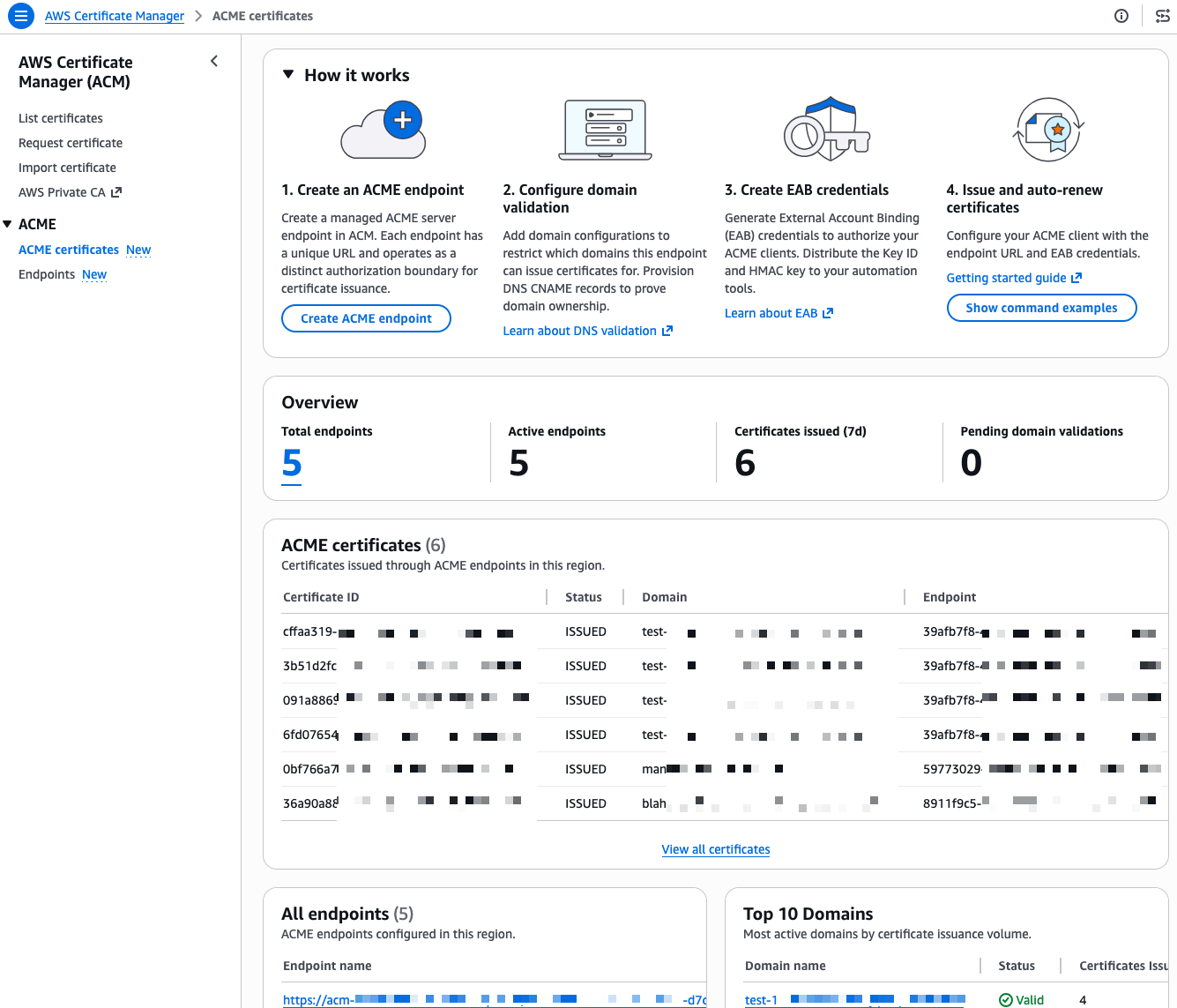
I start this demo from the ACME certificates page in the AWS Certificate Manager console.

ACME Console

I already have a few endpoints and certificates in this account, I walk you through creating a new one from scratch. First, I select Create ACME endpoint.

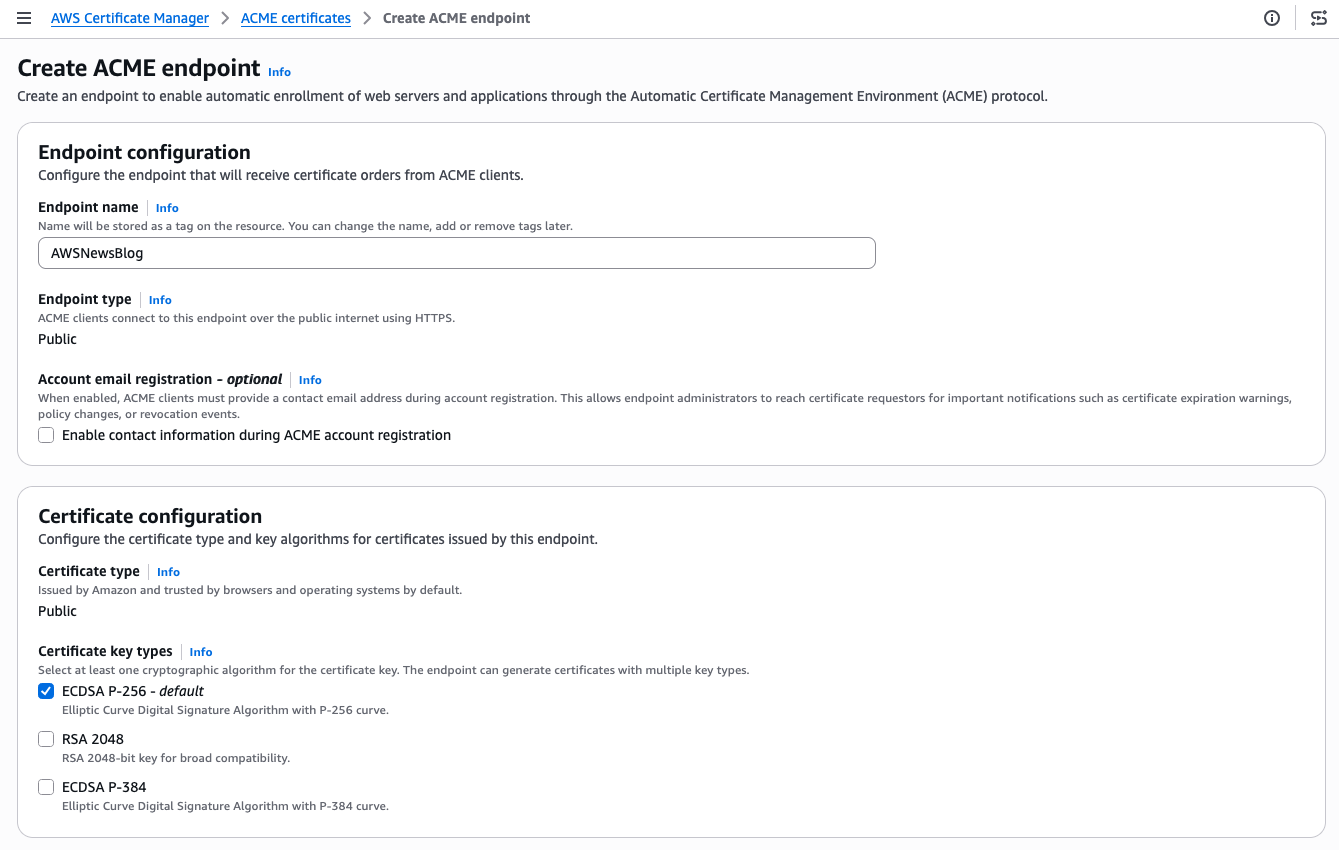
ACME - Ceeate endpoint 1

I give my endpoint a name. The Endpoint type is Public. ACME clients will connect over the public internet. The Certificate type is Public. The certificate will be issued by Amazon Trust Services and trusted by browsers and operating systems by default. For the certificate key type, I keep the default ECDSA P-256. RSA 2048 and ECDSA P-384 are also available if your clients require them.

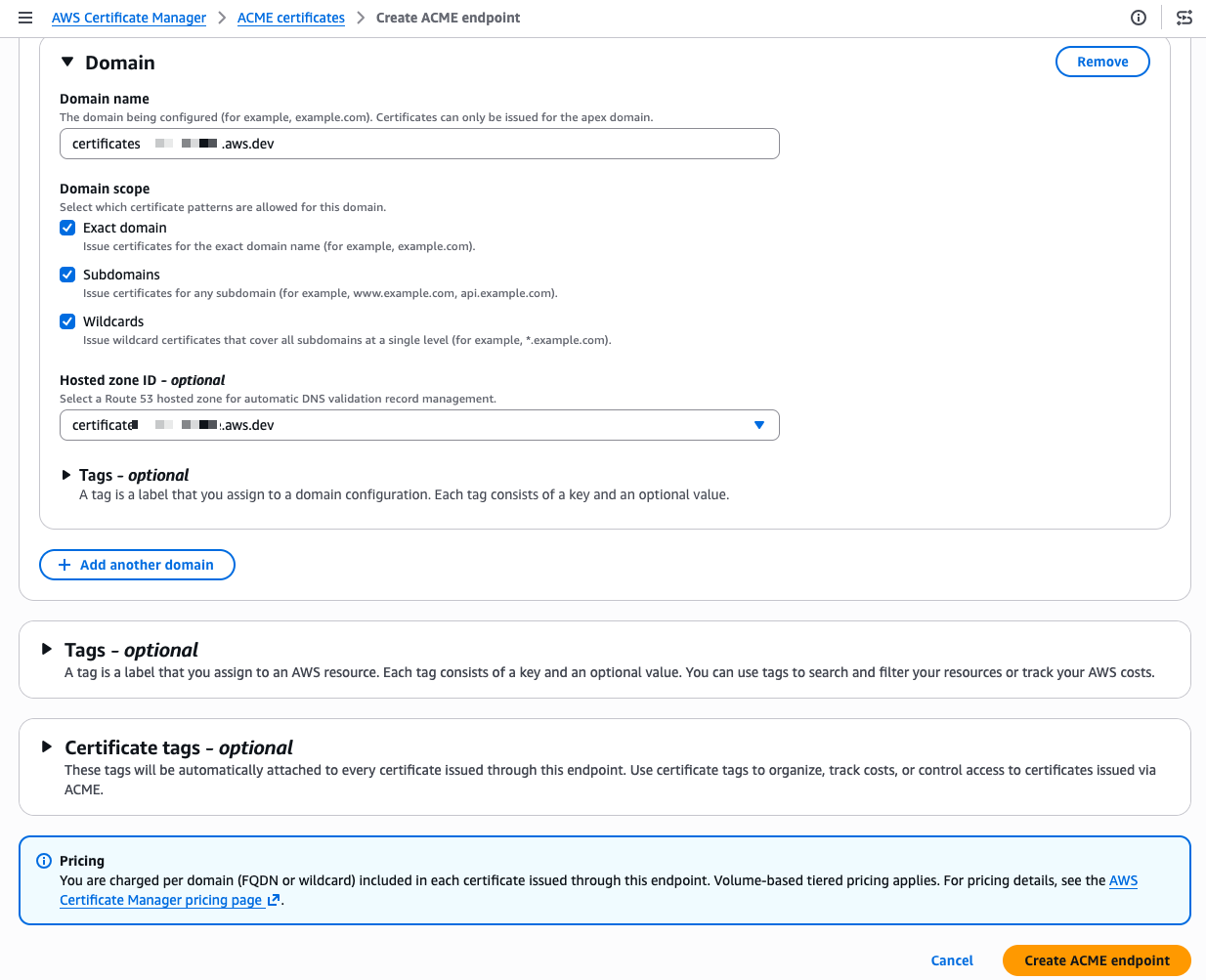
ACME - Ceeate endpoint 2

Scrolling down, I configure the domain. I enter my domain name and select the domain scope. The scope controls exactly what certificate patterns your ACME clients are allowed to request for this domain. If I check only Exact domain, clients can only request certificates for that specific domain name. Adding Subdomains allows certificates for any subdomain (for example, api.example.com or dev.example.com). Adding Wildcards allows wildcard certificates (*.example.com). By leaving a scope unchecked, you prevent any client using this endpoint from requesting that type of certificate, even if their ACME request is otherwise valid. For a production endpoint, you might enable only Exact domain and Subdomains while leaving Wildcards unchecked to enforce a stricter security posture.

I also select my Amazon Route 53 hosted zone from the drop down menu. ACM then automatically creates the DNS CNAME records needed for domain validation, so I don’t have to do it manually. When my domain is hosted outside of Route 53, I manually create the provided CNAME record at my DNS provider instead. This is a meaningful difference from typical ACME setups where each client handles its own domain verification independently.

These centralized controls give PKI administrators a single place to authenticate domains, restrict which certificate types (ECDSA or RSA) clients can request, and further limit wildcard issuance. Having these governance capabilities built in means you don’t need to purchase a separate certificate lifecycle management product or invest in building a custom policy layer yourself, both of which come at significant cost and operational overhead.

I select Create ACME endpoint

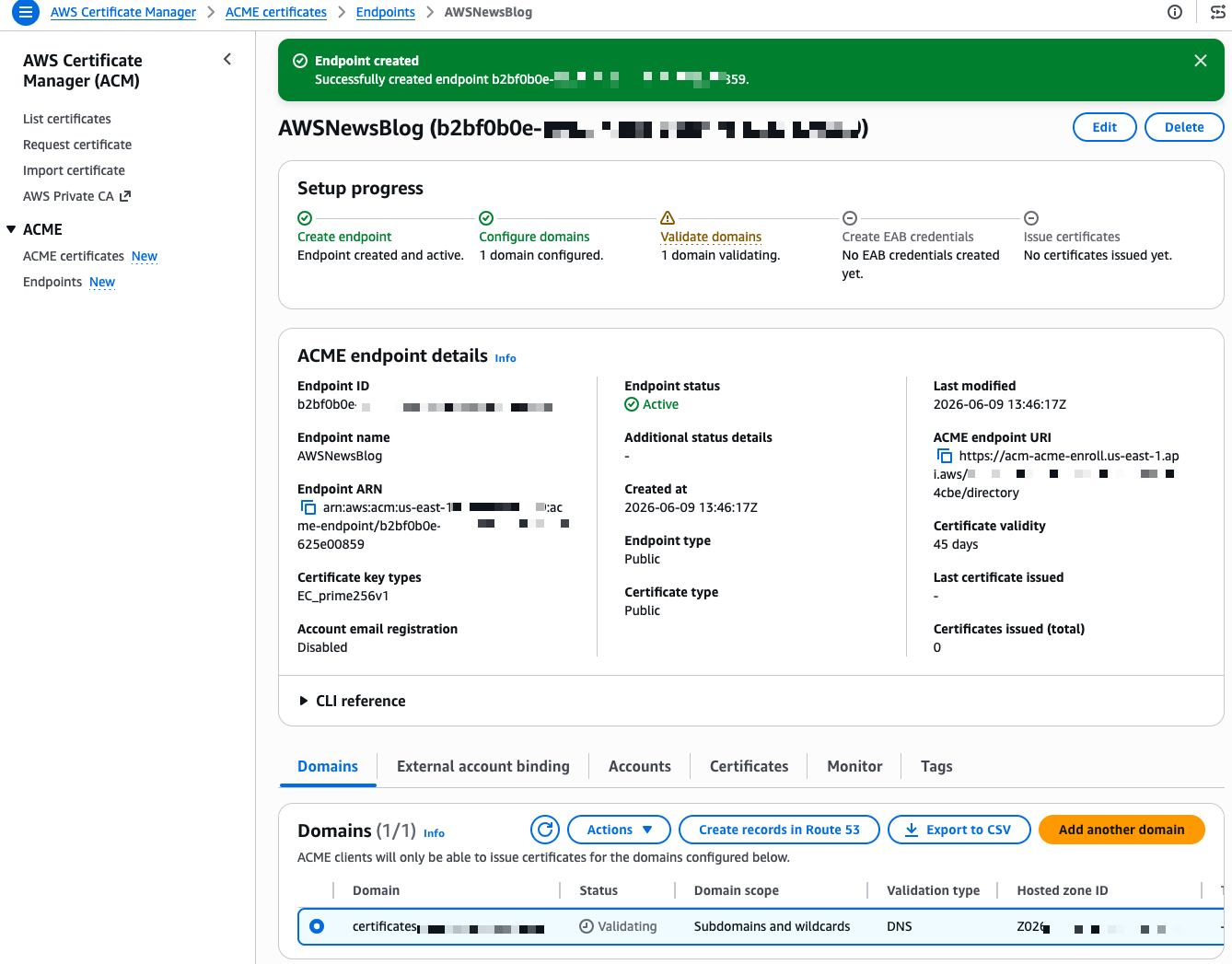
ACME - DNS configuration

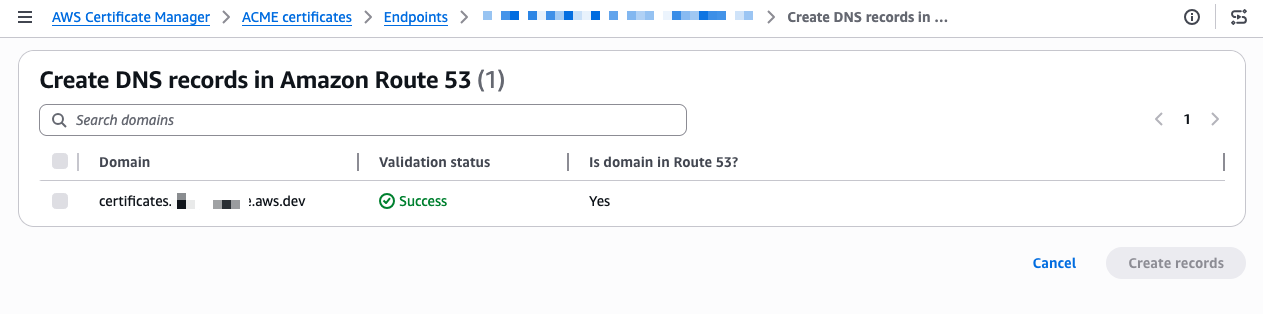
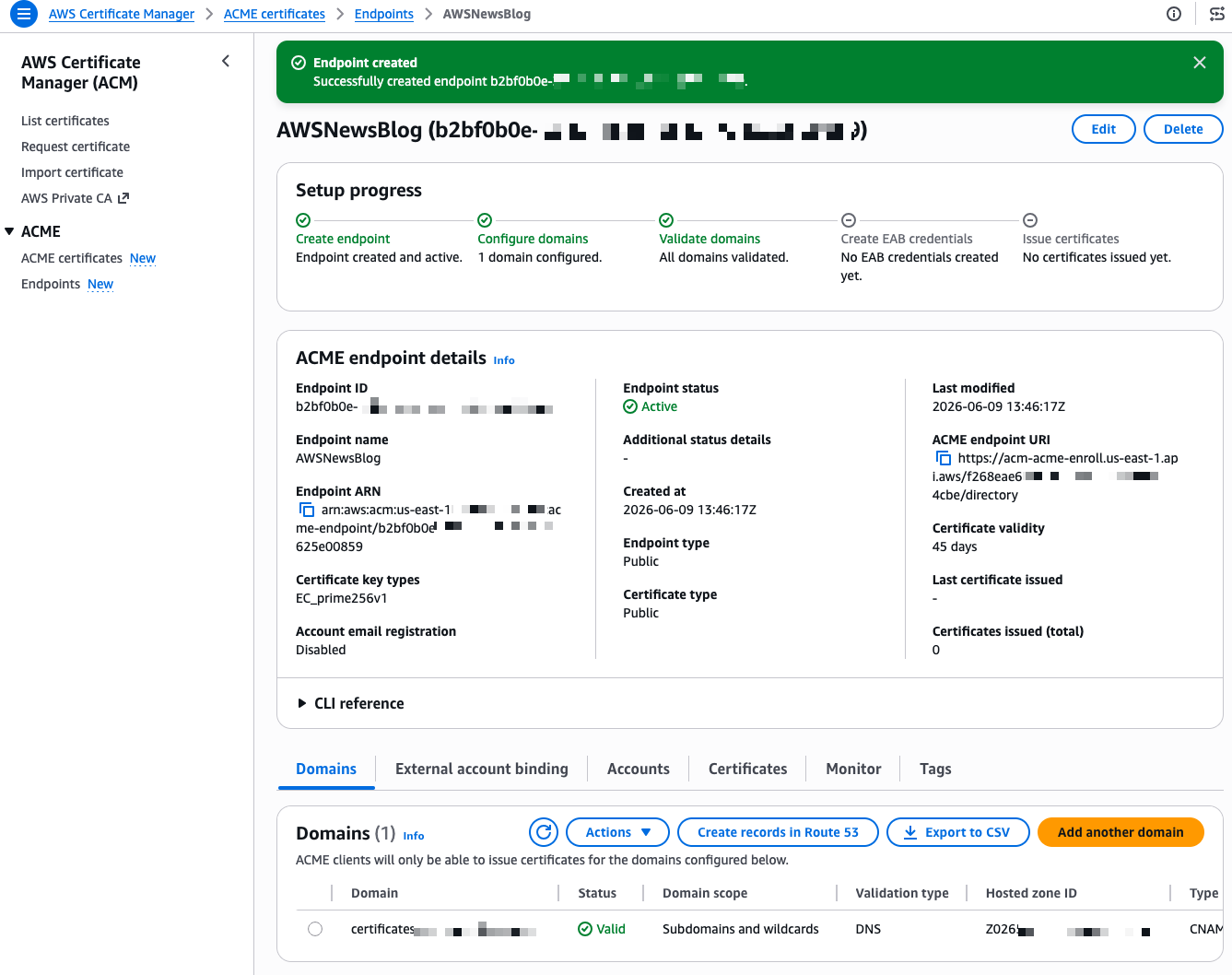
After a few seconds, the endpoint is created. The console shows a Setup progress tracker with the next steps. My domain shows a “Validating” status. The validation method is DNS validation, where ACM verifies that you control the domain by checking for a specific CNAME record. Because I selected my Route 53 hosted zone during creation, I select Create records in Route 53 to let ACM handle the DNS validation automatically.

ACME - DNS successThe validation completes in a few seconds and the status changes to Success.

ACME - External Account Binding 1

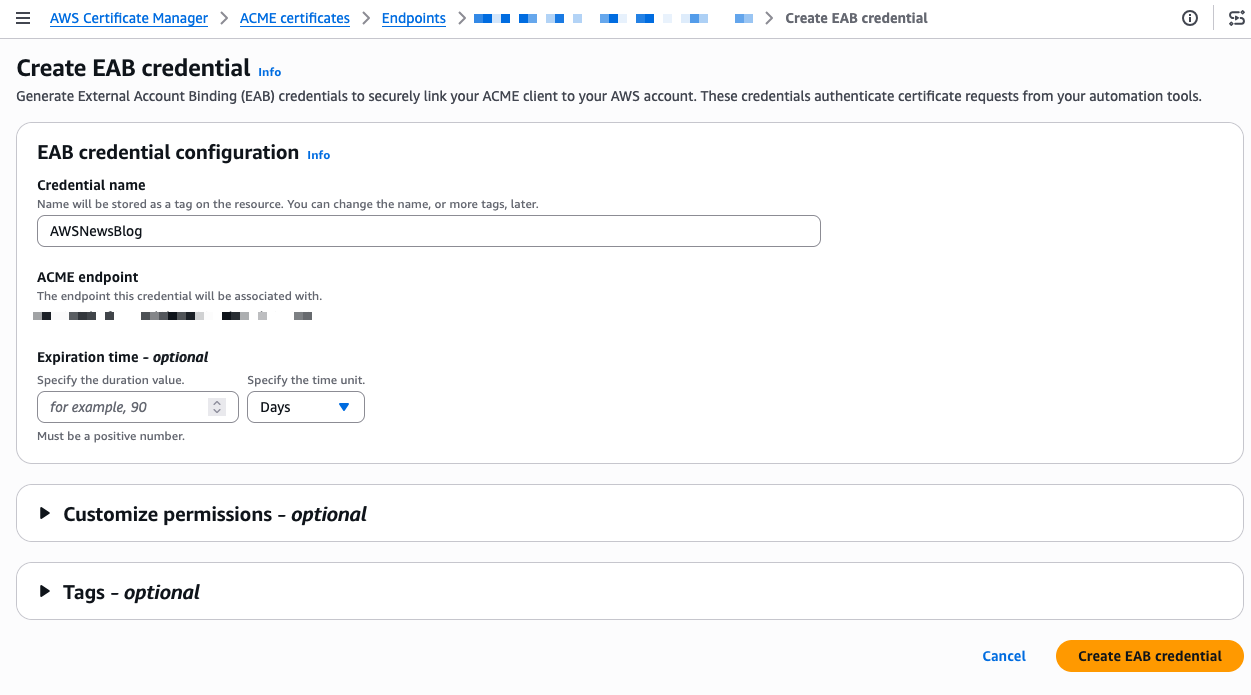
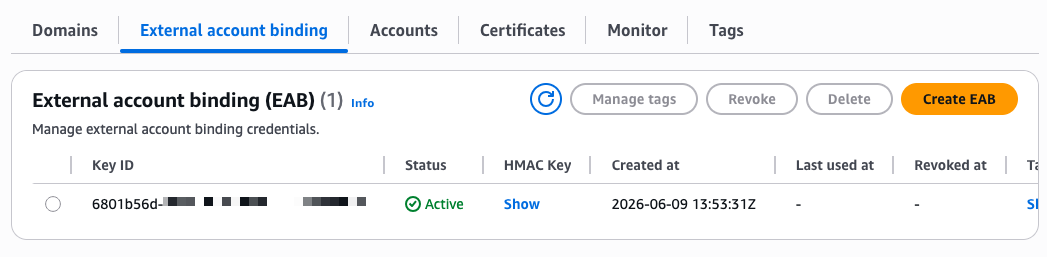
Now I need to create External Account Binding (EAB) credentials. EAB credentials are a key identifier and HMAC key pair that lets your ACME client register an account with the ACME server. Once registered, the client generates its own asymmetric key pair, which is then used to authenticate all subsequent certificate requests. On the endpoint details page, I select the External account binding tab, then select Create EAB. I give the credential a name and optionally set an expiration time, ideally no longer than needed to complete client registration.

ACME - External Account Binding 2

ACME - end of configuration - show key

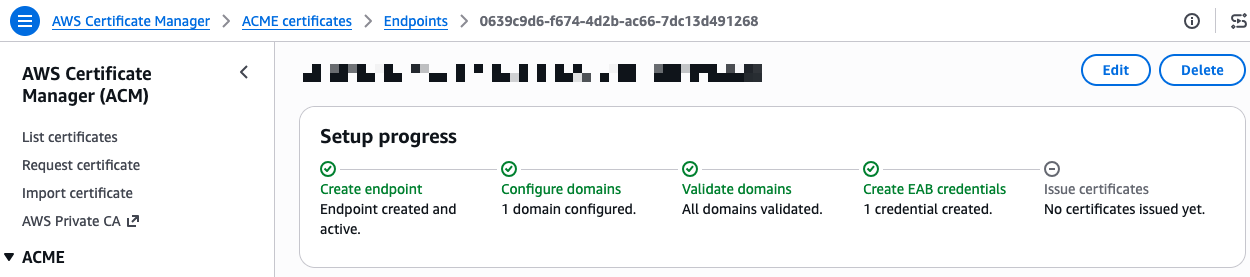
After I select Create EAB credential, the console shows the Key ID and HMAC Key. I note these values because I need them to configure my ACME client. The setup progress now shows four green checkmarks.

ACME - end of configuration - success

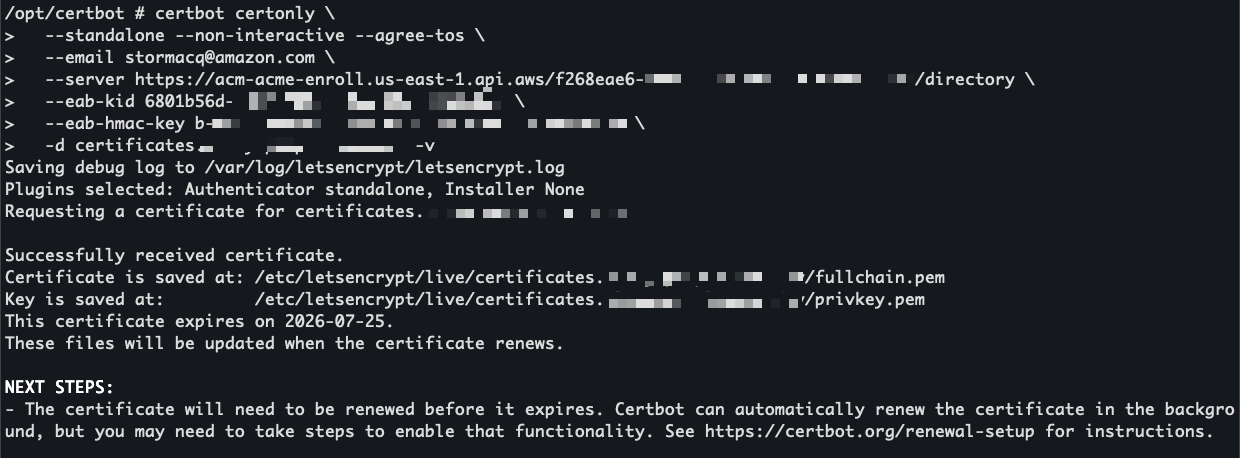
I’m ready to request a certificate. On the endpoint details page, I expand the CLI reference section. The console provides ready-to-use command examples for both Certbot and acme.sh. I copy the Certbot command and run it inside a container using the certbot/certbot image.

certbot certonly --standalone --non-interactive --agree-tos \
    --email <EMAIL> \
    --server https://acm-acme-enroll.us-east-1.api.aws/<ENDPOINT_ID>/directory \
    --eab-kid <EAB_KID> \
    --eab-hmac-key <EAB_HMAC_KEY> \
    --issuance-timeout <ISSUANCE_TIMEOUT> \
    -d <DOMAIN>

I replace the placeholders with my endpoint URL, EAB credentials, and domain name. The --eab-kid and --eab-hmac-key arguments are how Certbot registers with your ACME endpoint using the External Account Binding credentials I generated earlier. Each ACME client has its own syntax for this step, so check your client’s documentation for the exact flags.

Certbot contacts the ACME endpoint and returns a valid certificate signed by Amazon Trust Services.

Certbot to obtain a certificate through ACME

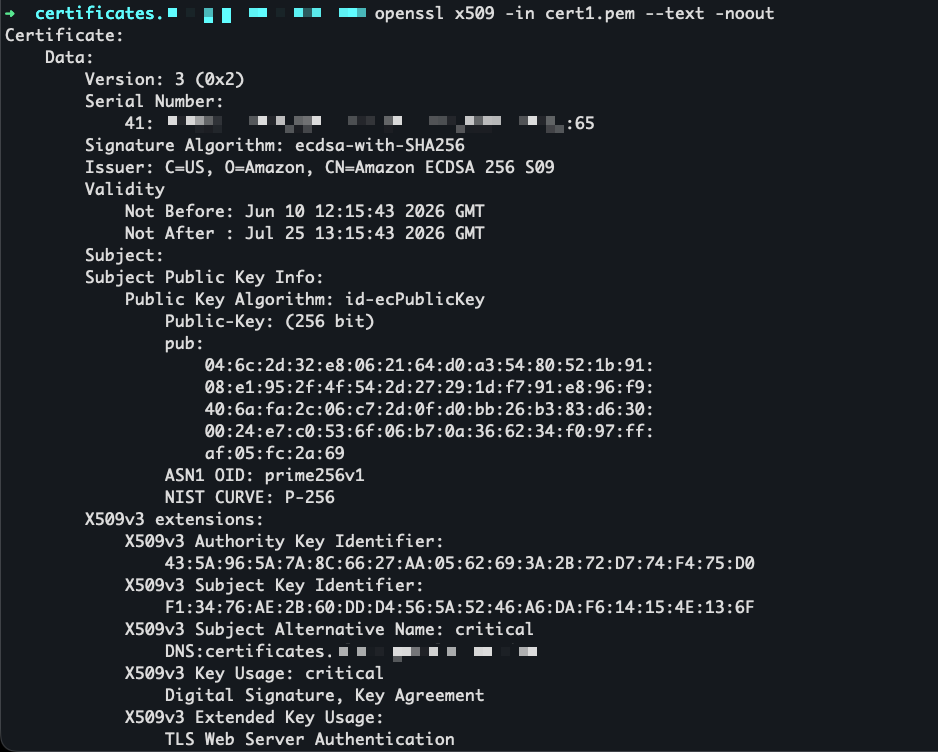
I use openssl to view the certificate before installing it.

openssl to view the certificate

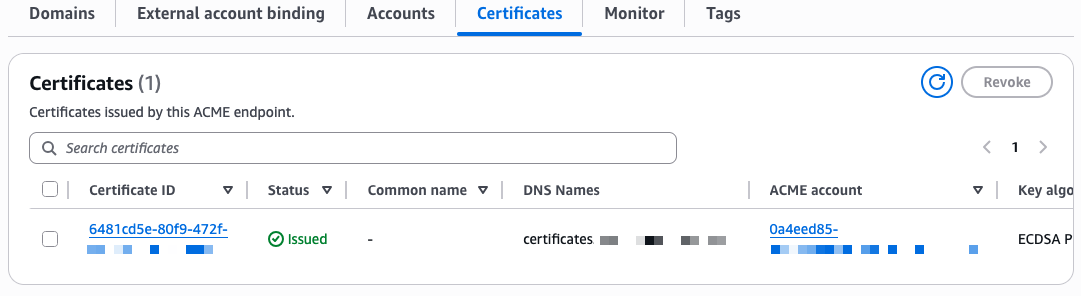
The certificate is now visible in the ACM console under the ACME certificates tab, alongside any certificates issued through the console or API.

Certoficate view in the ACME console

Availability and pricing
ACME support in AWS Certificate Manager is available today in all commercial AWS Regions and will be available in AWS GovCloud (US), the China Regions, and the AWS European Sovereign Cloud partitions at a later date.

Pricing is per domain included in each certificate at the time of issuance, with a different price for fully qualified domain names and wildcards. Volume tiers are calculated based on total domain occurrences across all certificates issued per month in your AWS account. For details, see the ACM pricing page.

To get started, visit the ACM section on the AWS console or read the documentation.

— seb

from AWS News Blog https://ift.tt/cSfbQG8
via IFTTT

Monday, June 29, 2026

AWS Weekly Roundup, Agentic CX designer for Amazon Connect Customer, EC2 AMI Watermarks, Open Governance for MySQL, and more (June 29, 2026)

It has been a busy stretch on the AWS Summit circuit. At the New York City Summit, I delivered a workshop called Building AI architectures with AWS Serverless, and it was a lot of fun watching builders wire up agents and serverless services to solve real problems in a single afternoon. This week I am heading down to the Washington, DC Summit, which always puts a spotlight on innovation in the public sector. If you are going to be there, come say hello.

A question I hear a lot at these events is how teams can put AI to work without waiting on a long engineering backlog, and this week’s biggest launch speaks directly to that, with Amazon Connect Customer introducing a no-code way for business teams to design AI powered customer experiences themselves. Now, let’s get into this week’s AWS news.

Headlines

Amazon Connect Customer launched the Agentic CX designer (NLX) in preview, a no-code canvas for designing and deploying AI powered self service experiences. Business teams can build and launch voice and digital experiences that bring agentic and deterministic AI together in one governed flow, going from design to testing and simulation to production ready experiences in weeks rather than months. The launch also includes Live Sync in preview, a patented technology that drives a customer’s web or mobile experience in real time as they speak or type. A caller can complete a form or pull up the right product page without ever leaving the conversation. To see how this reshapes who designs customer experience, read the blog post on how the business user is the new architect of customer experience and visit the Amazon Connect Customer page.

Last week’s launches

Here are some launches and updates from this past week that caught my attention:

  • AWS Lambda MicroVMs – A new serverless compute primitive that gives each user or job VM level isolation with near instant launch and resume speeds, plus the ability to suspend and resume execution for up to 8 hours. Built on Firecracker, it is made for running user or AI generated code in multi-tenant applications without managing virtualization infrastructure or trading off isolation, speed, and state.
  • Amazon EC2 AMI Watermarks – Lets you embed custom identifiers in your private AMIs that automatically carry forward to every derived AMI across copies, Regions, and account shares. You can combine watermarks with Allowed AMIs and Declarative Policies to restrict launches to approved images, available at no additional cost in all AWS Regions.
  • AWS Outposts self-service lifecycle management – Adds self service configuration, quoting, ordering, subscription management, renewal, and decommissioning directly from the console, CLI, and API. A new quoting tool generates real time cost estimates in seconds and surfaces account and regional constraints before you submit an order.
  • Amazon MSK AI Agent Skills – Gives AI coding assistants like Kiro, Claude Code, and Cursor expert, up-to-date guidance for operating Amazon MSK, covering troubleshooting, sizing, configuring, monitoring, and migrating external Kafka clusters to MSK Express. Tasks that once required specialized knowledge become a guided experience developers can complete on their own.
  • Amazon OpenSearch Service AI-assisted migrations – Migration Assistant now includes an agent guided experience that helps you move self managed Apache Solr, Elasticsearch, or OpenSearch deployments to OpenSearch Serverless or Managed Clusters using tools like Kiro and Claude Code, with new live traffic capture and replay support for Solr.
  • Amazon GuardDuty AI-powered investigations (preview) – Automatically analyzes findings and accounts to help you separate true threats from benign activity, examining context and related activity from the last 90 days with knowledge graphs and threat intelligence. Each investigation returns a disposition assessment with confidence scoring, MITRE ATT&CK classification, and actionable recommendations in minutes.

For a full list of AWS announcements, be sure to keep an eye on the What’s New with AWS page.

Other AWS news

Here are some additional posts and resources that you might find interesting:

  • Open Governance for MySQL – Oracle announced a community governance model for MySQL that gives organizations outside Oracle a defined role in the project, including four non Oracle seats on a new Steering Committee and a public GitHub presence. AWS holds a seat and shares why it supports the move and how it already contributes fixes upstream for everyone running MySQL.
  • A new way to keep your AWS Certification current -You can now maintain an eligible AWS Certification for an additional year by completing curated training and hands on labs on AWS Skill Builder instead of retaking a full exam. The option is available today in open beta for several Associate and Professional certifications, with more coming later this year.
  • The All Builders Welcome Grant insider’s guide for 2026 applicants – A community guide on AWS Builder Center that walks early career builders through applying for the grant, which covers a full conference pass, airfare, and hotel for AWS re:Invent 2026. Applications are open now and close on July 14.

For a full list of AWS blog posts, be sure to keep an eye on the AWS Blogs page.

Looking for ways to connect with builders in person? Check out the AWS Summits coming to a city near you, find a local AWS Community Day led by user groups around the world, and explore tutorials, community content, and ways to grow your skills over at the AWS Builder Center.

That’s all for this week. Check back next Monday for another Weekly Roundup!

-Micah


from AWS News Blog https://ift.tt/ngrxRV3
via IFTTT

Monday, June 22, 2026

Run isolated sandboxes with full lifecycle control: AWS Lambda introduces MicroVMs

Today, we are announcing AWS Lambda MicroVMs, a new serverless compute primitive within AWS Lambda that lets you run code generated by users or AI in isolated, stateful execution environments. You get virtual machine level isolation, near-instant launch and resume, and direct control over environment lifecycle and state, all without managing infrastructure or building expertise in complex virtualization technologies. Lambda MicroVMs are powered by Firecracker, the same lightweight virtualization technology that has powered over 15 trillions of monthly Lambda function invocations.

Why customers need this
Over the past few years a new class of multi-tenant applications has emerged that all share the need to hand each end user their own dedicated execution environment in which to safely run code that the application developer did not write. AI coding assistants, interactive code environments, data analytics platforms, vulnerability scanners, and game servers that run user-supplied scripts all fit this pattern. Building that capability today means making a difficult choice. Virtual machines deliver strong isolation but take minutes to start. Containers launch in seconds, yet their shared-kernel architecture requires significant custom hardening to safely contain untrusted code. Functions as a service are optimized for event-driven, request-response workloads, but are not designed for long-running interactive sessions that need to retain environment state across user interactions. That leaves developers either accepting tradeoffs between performance and isolation, or investing significant engineering resources to build and operate custom virtualization infrastructure to achieve isolated execution while delivering low-latency experiences to end-users. This presents an effort that demands deep expertise and pulls engineering time away from the product they are actually trying to build.

Lambda MicroVMs is purpose-built for exactly this gap. Each MicroVM gives a single end user or session its own isolated environment that launches rapidly, retains memory and disk state for the length of the session, and pauses to a low idle cost when the user steps away. Because the same Firecracker technology already underpins AWS Lambda Functions, you inherit the operational maturity of a service that has been running this stack at scale.

Let’s try it out
To get started, I navigated to the AWS Lambda console, where Lambda MicroVMs now appears in the left-hand navigation menu. I first need to create a MicroVM Image.

I packaged a Flask web app and its Dockerfile into a zip file, uploaded it to an Amazon Simple Storage Service (Amazon S3) bucket.

My Flask API – app.py

import logging

from flask import Flask, jsonify

app = Flask(__name__)
logging.basicConfig(level=logging.INFO)


@app.route("/")
def hello():
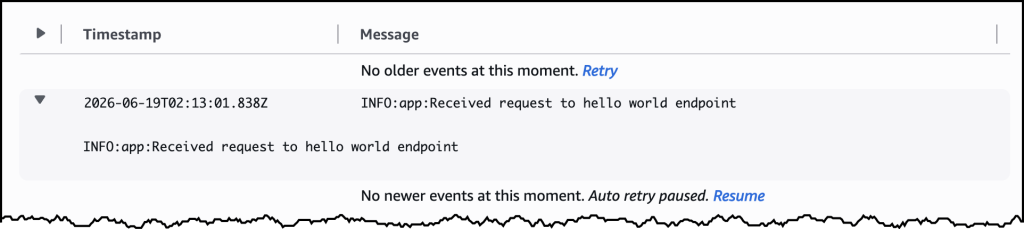
    app.logger.info("Received request to hello world endpoint")
    return jsonify(message="Hello, World!")


if __name__ == "__main__":
    app.run(host="0.0.0.0", port=5000)

My Dockerfile


FROM public.ecr.aws/lambda/microvms:al2023-minimal
RUN dnf install -y python3 python3-pip && dnf clean all

WORKDIR /app

COPY requirements.txt .
RUN pip install --no-cache-dir -r requirements.txt

COPY app.py .

EXPOSE 5000

CMD ["gunicorn", "--bind", "0.0.0.0:5000", "app:app"]

I used the following command to create my MicroVM Image.

aws lambda-microvms create-microvm-image \
--code-artifact uri=<path/to/s3/artifact.zip> --name <VM_image_name> \
--base-image-arn arn:aws:lambda:us-east-1:aws:microvm-image:al2023-1 \
--build-role-arn <IAM role ARN>

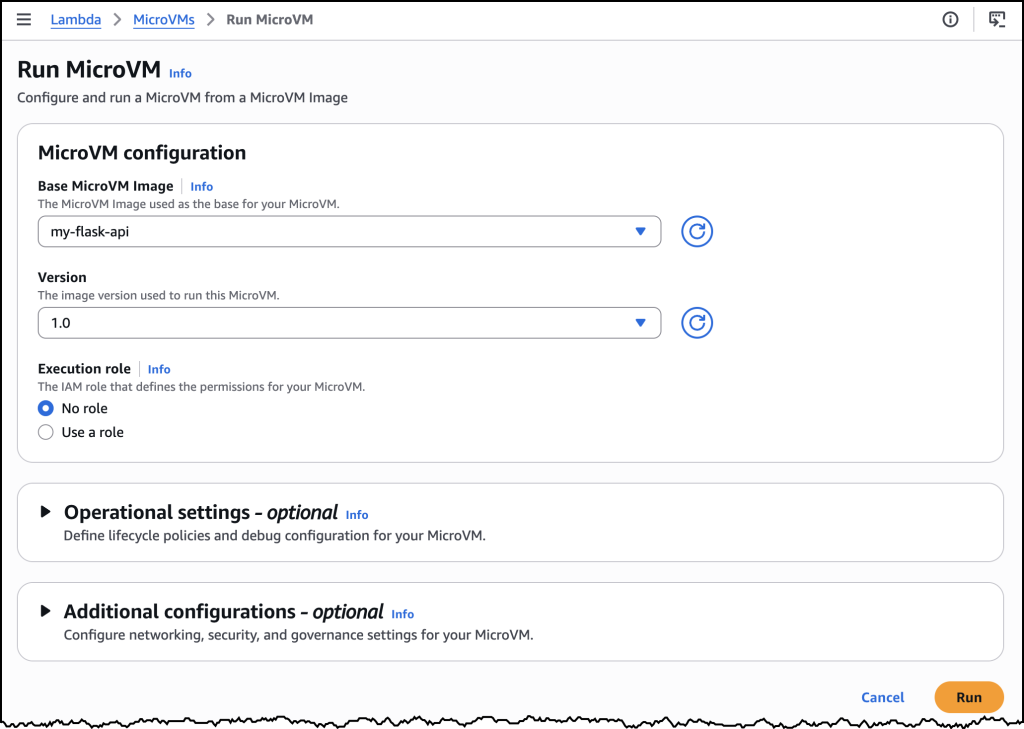
You can also create the MicroVM Image in the AWS Console as in the image above. Once I ran the command, Lambda retrieved the zip, ran the Dockerfile, initialized the application, and took a Firecracker snapshot of the running disk and memory state. Build logs streamed in real time to Amazon CloudWatch under /aws/lambda/microvms/<image-name>, and when the image was ready it appeared in the console with its Amazon Resource Name (ARN) and version number.

aws lambda-microvms run-microvm \
--image-identifier arn:aws:lambda:<region>:<acct>:microvm-image:my-image \
--execution-role-arn arn:aws:iam::<acct>:role/MicroVMExecutionRole \
--idle-policy '{"maxIdleDurationSeconds":900,"suspendedDurationSeconds":300,"autoResumeEnabled":true}'

Launching can also be done via the AWS Console or the CLI. I passed the image ARN and an idle policy configured to auto-suspend after 15 minutes of inactivity and auto-resume on the next incoming request. No networking setup was required. Lambda assigned the MicroVM a unique ID, returned a dedicated endpoint URL, and started a new MicroVM with my Flask app already running, since it was resumed from a snapshot. My Flask app was already running the moment the launch completed. One API call to get a fully initialized, bootstrapped compute environment.

To send traffic, I generated a short-lived auth token with the CLI and attached it to a plain HTTPS request using the X-aws-proxy-auth header. The request landed on my Flask app immediately. I then let the MicroVM sit idle past the suspend threshold, at which point the MicroVM was suspended, with its memory and disk state snapshotted and stored. I then sent another request, and it resumed with the application state fully intact. From the client side, the pause never happened.

How it works
Under the covers, Lambda MicroVMs delivers three capabilities that, until today, no single AWS compute service offered together. The first is virtual machine level isolation, which comes from Firecracker. Each session runs in its own dedicated MicroVM with no shared kernel and no shared resources between users, so untrusted code supplied by one user is contained to their execution environment, without access to other environments or the underlying system. The second is rapid launch and resume. The model is image-then-launch: you create a MicroVM Image by supplying a Dockerfile and code packaged as a zip artifact in Amazon S3, and Lambda runs your Dockerfile, initializes your application, and takes a Firecracker snapshot of the running environment’s memory and disk state. Every subsequent MicroVM launched from that image resumes from the pre-initialized snapshot rather than booting cold, which means launches and idle resumes both achieve near-instant startup latency. Even a multi-gigabyte interactive session comes back online quickly enough to feel responsive to the end user. The third is stateful execution. A running MicroVM retains memory, disk, and running processes across the user’s session. During idle periods, a MicroVM can be suspended – with memory and disk state intact – and resumed when traffic arrives. Installed packages, loaded models, and working filesets are readily available when the user resumes their session. MicroVMs support up to 8 hours of total runtime and can be suspended automatically after a configurable idle window, which makes it straightforward to build products as varied as software vulnerability scans that complete in minutes, data analytics applications that run for hours, and interactive coding sessions with extended idle periods. As Lambda MicroVMs are started from pre-initialized snapshots, applications generating unique content, establishing network connections, or loading ephemeral data during initialization may need to integrate with service-provided hooks for compatibility.

Lambda MicroVMs is a new resource within AWS Lambda, with a distinct API surface. Lambda Functions remain the right choice for event-driven, request-response workloads, and Lambda MicroVMs is purpose-built for multi-tenant applications that need to hand each end user or session their own isolated environment to execute user- or AI-generated code. The two complement each other. An application using Lambda Functions for its event-driven backbone can call into Lambda MicroVMs for the steps that need to run untrusted code in isolation. You bring the application, and the service delivers the execution environment.

Now available
AWS Lambda MicroVMs is available today in the US East (N. Virginia, Ohio), US West (Oregon), Europe (Ireland) and Asia Pacific (Tokyo) Regions, on the ARM64 architecture, with up to 16 vCPUs, 32 GB of memory, and 32 GB of disk per MicroVM. Idle MicroVMs can be suspended explicitly through an API call or automatically through a lifecycle policy, which reduces the running cost while preserving full state for fast resume. Pricing details can be found on the AWS Lambda pricing page.

To get started, visit the AWS Lambda console, or learn more on the Lambda MicroVMs product page. For documentation, see the Lambda MicroVMs Developer Guide.


from AWS News Blog https://ift.tt/kV5jQvG
via IFTTT

AWS Weekly Roundup: NY Summit recap, Local Zone in Hanoi, Grok 4.3 in Bedrock, price reductions, and more (June 22, 2026)

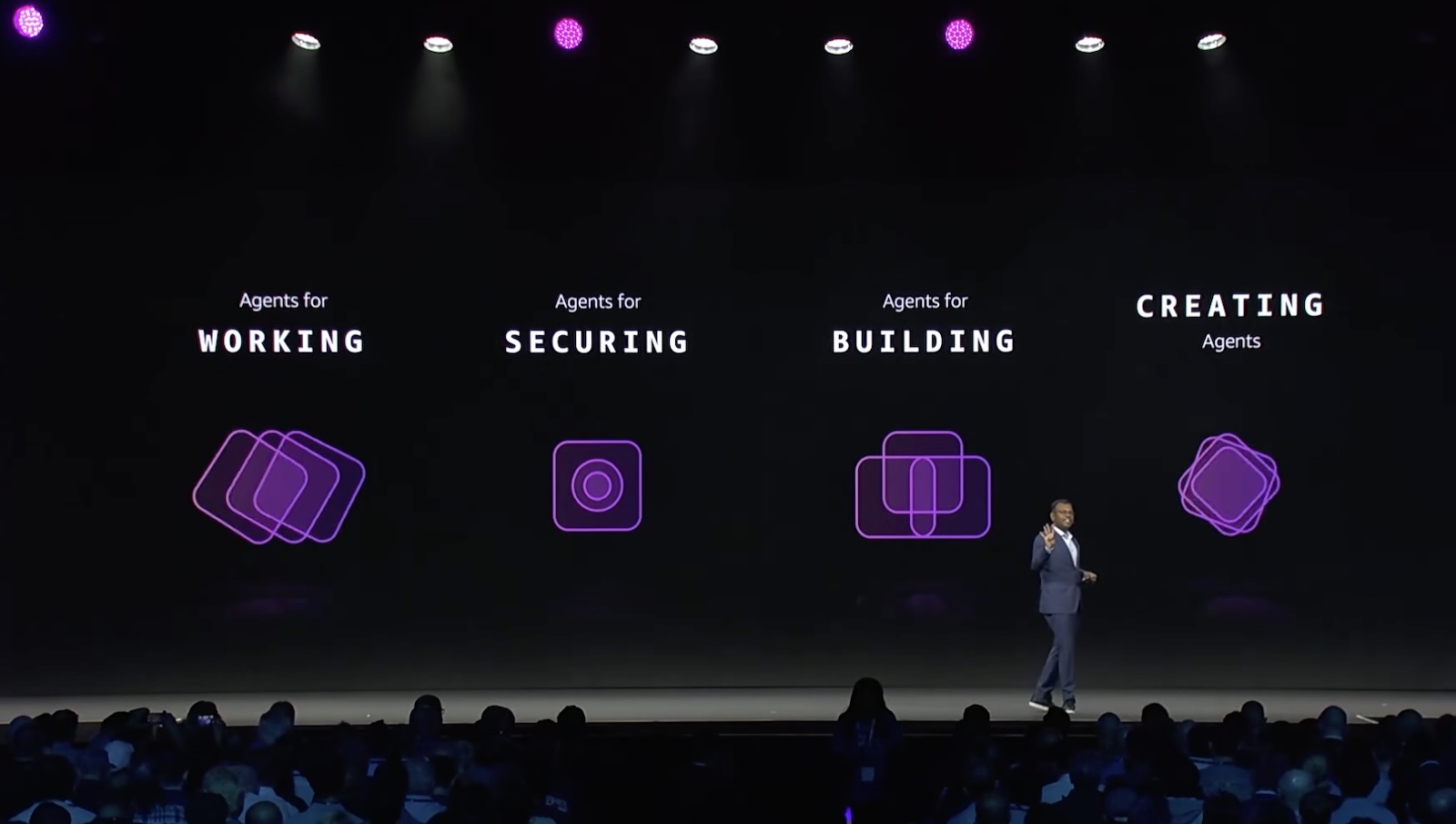
Last week AWS Summit New York City brought together thousands of customers, partners, and builders for a free, one-day event showcasing the latest in cloud and AI innovation. Dr. Swami Sivasubramanian, VP of Agentic AI at AWS unveiled a stack of AI launches in his keynote, all built around one thesis: agents that compound value over time.

  • Agents for working – You can launch autonomous agents and access a smarter activity feed with new Amazon Quick features, which now let you create and run multi-step agents directly in the desktop app and consolidates email, Slack, calendar, and tasks into a single prioritized view with personalized rules.
  • Agents for securing – You can shift from reactive to proactive security with AWS Continuum, a new AI-native security service that reasons, validates, and acts at machine speed across the full code vulnerability lifecycle. AWS Security Agent (now part of AWS Continuum) adds new features: threat modeling; pull request code scanning with remediation across major Git platforms; and IDE integrations via Kiro power, Claude Code plugin, and MCP.
  • Agents for building – You can write, ship, and modernize code in one continuous loop with Kiro, AWS DevOps Agent, and AWS Transform. Kiro introduces a native iOS app; AWS DevOps Agent adds release management capabilities to assess code changes before production; and AWS Transform continuous modernization reduces tech debt autonomously.
  • Agents customers create – You can go from agent idea to production in minutes with Amazon Bedrock AgentCore, which now includes a GA harness for infrastructure and orchestration, Web Search, Managed Knowledge Base, policy integrations with Guardrails, and the new AWS Context service for mapping organizational data relationships.

To learn more, visit the Summit recap from our top announcements blog post and Amazon News post.

Last week’s launches
Here are last week’s launches that caught my attention:

  • AWS Local Zone in Hanoi, Vietnam  —This new Local Zone is one of the first AWS Local Zones in the Asia Pacific with support for Amazon S3 and Amazon EBS Local Snapshots, enabling customers to meet data residency requirements by storing and backing up data locally. To get started, enable the Hanoi Local Zone (ap-southeast-1-han-1a) from the Regions and Zones tab in the AWS Global View or by using the ModifyAvailabilityZoneGroup API.
  • AWS Blocks, an open-source TypeScript framework for application developers (preview) — AWS Blocks runs a fully functional local environment with Postgres, authentication, and real-time messaging, no AWS account required. When you’re ready to deploy, the same application code runs on production AWS services with zero changes, and you can drop into AWS CDK at any point for direct resource configuration.
  • Grok 4.3 from xAI in Amazon Bedrock —You can use the Grok 4.3 model on Amazon Bedrock, giving you even more choice as you build generative AI applications across reasoning, agentic, and enterprise workflows. Grok 4.3 runs on a new inference engine in Bedrock designed for price performance, with support for tool calling, structured output, and response streaming.
  • Amazon S3 annotations: attach rich, queryable context directly to your objects — Amazon S3 now lets you attach up to 1 GB of rich, mutable, and queryable context directly to your objects using annotations, purpose-built for AI agents and autonomous workflows that need to discover, understand, and act on data at scale without maintaining separate metadata systems.
  • Amazon ECS announces faster service auto scaling — Amazon ECS service auto scaling now detects and responds to load changes faster with support for high resolution (20-second) metrics and metric publishing optimizations. In AWS benchmarking tests, time to trigger scale-out improved from 363 seconds to 86 seconds (76% faster), and total time to scale and provision new tasks improved from 386 seconds to 109 seconds (72% faster).
  • Amazon EC2 G7 instances accelerated by NVIDIA RTX PRO 4500 Blackwell Server Edition GPUs — AWS is the first major cloud provider to support NVIDIA RTX PRO 4500 Blackwell Server Edition GPUs. G7 instances are accelerated by these GPUs with custom sixth-generation Intel Xeon Scalable processors, delivering up to 4.6x AI inference performance and up to 2.1x graphics performance compared to G6 instances.
  • Strands Agents introduces new capabilities — Strands is an open source toolkit for building production agents. You can now use better context management in Harness SDK, a new isolated execution environment with Strands Shell, and chaos testing and red teaming in Strands Evals.
  • AWS Management Console Private Access – You can access the AWS Console from VPCs without internet connectivity, allowing enterprises to manage their AWS infrastructure through the console while maintaining strict network security controls in air-gapped environments.
  • AWS Marketplace Storefront is now generally available – AWS Partners can create and deploy their own branded catalog of solutions and services on their website or application in hours. Channel Partners and Independent Software Vendors can now simplify how they manage their cloud marketplace business and make it easier for customers to discover and purchase their solutions from AWS Marketplace.
  • Palo Alto Networks (PANW) Advanced DNS Security on Amazon Route 53 Resolver DNS Firewall (preview) – You can now enforce DNS threat protections from Palo Alto Networks directly on Route 53 DNS Firewall rules, without deploying separate firewalls or modifying VPC configurations — by subscribing to PANW from the DNS Firewall console through the embedded AWS Marketplace widget.

For a full list of AWS announcements, be sure to keep an eye on the What’s New with AWS page.

Price reductions 
AWS continues to look for ways to increase performance and lower prices for our customers. I noticed a few such efforts last week, so I’d like to share them:

Learn more about AWS, browse and join upcoming AWS-led in-person and virtual events, startup events, and developer-focused events as well as AWS Summits and AWS Community Days. Join the AWS Builder Center to connect with builders, share solutions, and access content that supports your development.

That’s all for this week. Check back next Monday for another Weekly Roundup!

Channy


from AWS News Blog https://ift.tt/pd19So0
via IFTTT

Thursday, June 18, 2026

Amazon ECS introduces new high-resolution metrics for faster service auto scaling

Amazon Elastic Container Service (Amazon ECS) service auto scaling automatically adjusts task counts to meet workload demand with comprehensive scaling policies, including predictive scaling for recurring traffic patterns, scheduled scaling for planned events, and target tracking to scale dynamically on real-time metrics.

You can choose proactive scaling by using predictive scaling (automatic) and scheduled scaling (customer-defined), or reactive scaling by using target tracking with just a target to scale on. Amazon ECS service auto scaling adjusts the number of tasks in an ECS service based on Amazon CloudWatch metrics, such as average CPU/Memory usage, request count per target, a custom metric such as queue depth, or demand surges by using advanced machine learning (ML) algorithms.

With today’s launch, Amazon ECS service auto scaling now detects and responds to load changes faster with support for high resolution (20-second) metrics and metric publishing optimizations. In AWS benchmarking tests, time to trigger scale-out improved from 363 seconds to 86 seconds (76% faster, 4.2x), and total time to scale and provision new tasks improved from 386 seconds to 109 seconds (72% faster, 3.5x)

This launch delivers three key benefits for your applications:

  • Improved performance and reliability: Faster scaling means, your application responds faster to demand surges, reducing latencies or failures for end users during demand surges.
  • Right-size without compromise: Depending on the workload, you can reduce baseline task counts because scale-out now happens fast enough to handle traffic spikes without preemptive capacity padding. This directly reduces compute costs while maintaining application performance and availability.
  • Simpler scaling configuration: Target tracking with high-resolution metrics delivers the aggressive scaling behavior that previously required custom scaling configurations, such as usage of step-scaling policies. One configuration change replaces custom engineering work.

How it works
To use ECS faster service auto scaling, first enable high-resolution metrics for your ECS service, and then configure a target tracking scaling policy which uses high-resolution metrics. ECS faster service autoscaling works across all compute options on ECS: AWS Fargate, ECS Managed Instances, and Amazon Elastic Compute Cloud (Amazon EC2). You can enable these metrics when you create or update your ECS service in the Amazon ECS console, or using AWS SDKs and tools, and AWS CloudFormation.

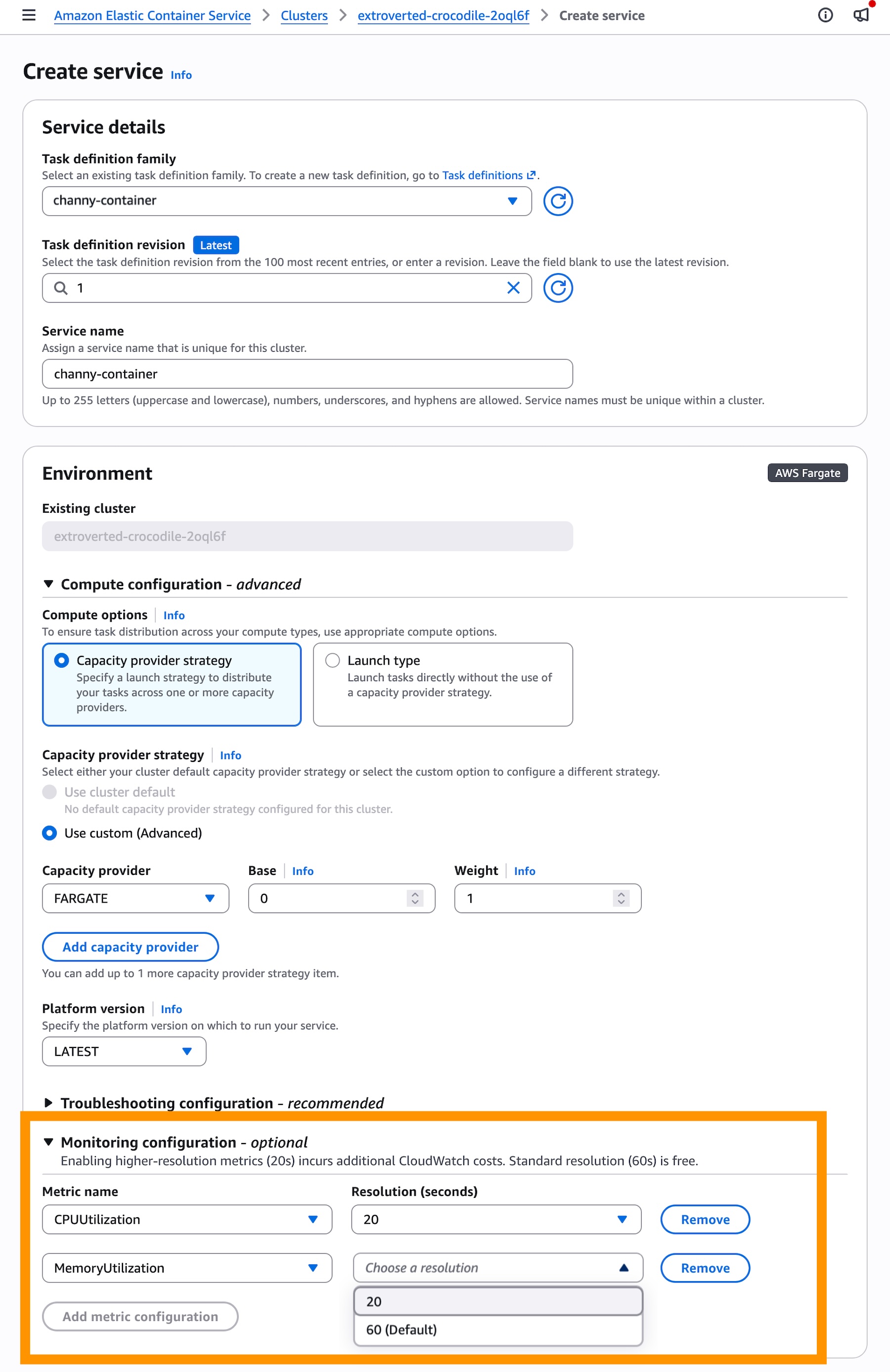
When you create a service in the console, add 20-seconds resolution metrics in the Monitoring configuration section. These metrics incur additional CloudWatch costs while the standard resolution (60-seconds) is free.

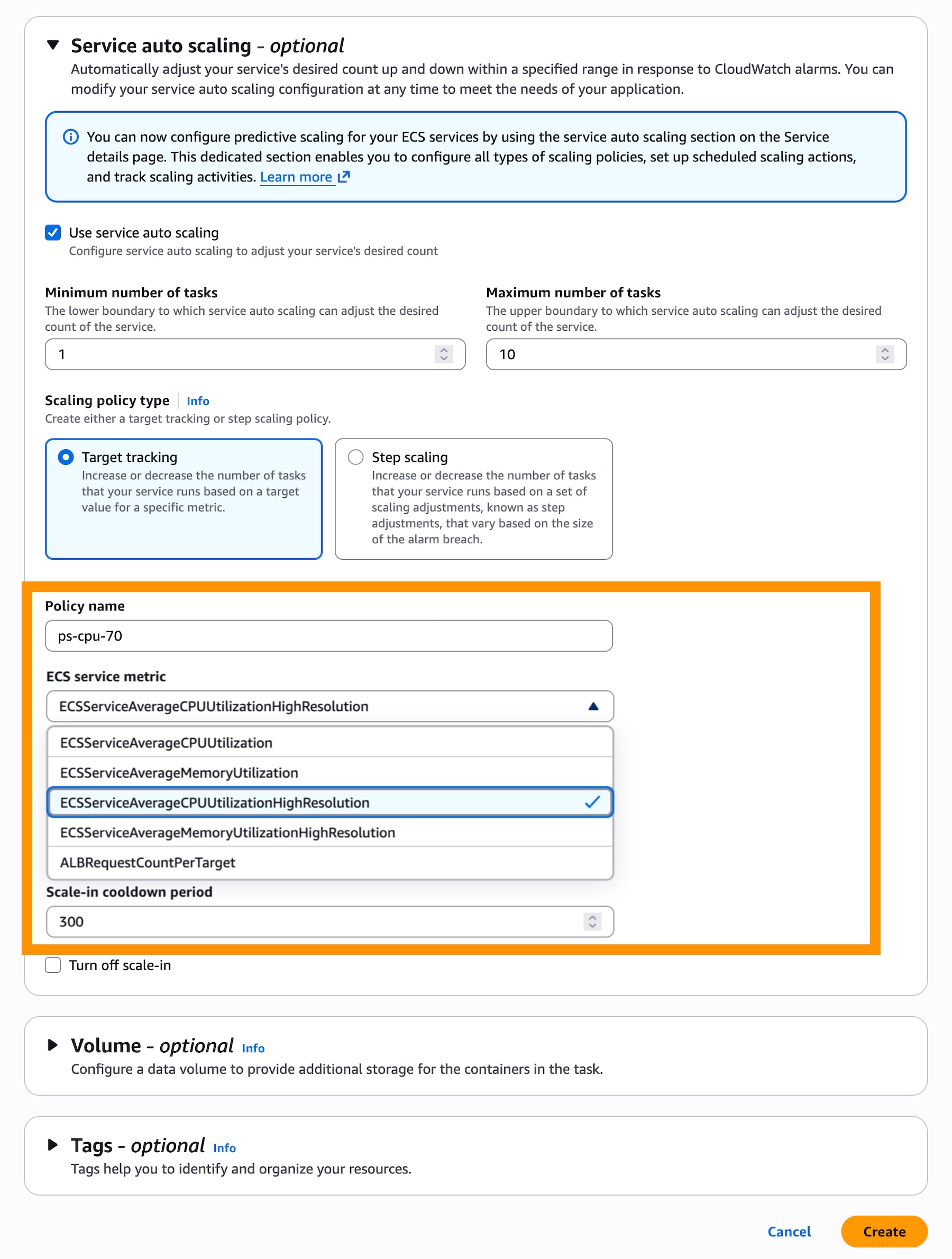
In the Service auto scaling section, check Use service auto scaling and choose Target Tracking for the scaling policy type to use real-time data to scale the number of tasks that your service runs based on demand.

Then, choose a Scaling policy type for the target tracking. You can select ECSServiceAverageCPUUtilizationHighResolution or ECSServiceAverageMemoryUtilizationHighResolution as new metrics.

That’s it – your ECS service will use high resolution metrics for auto scaling.

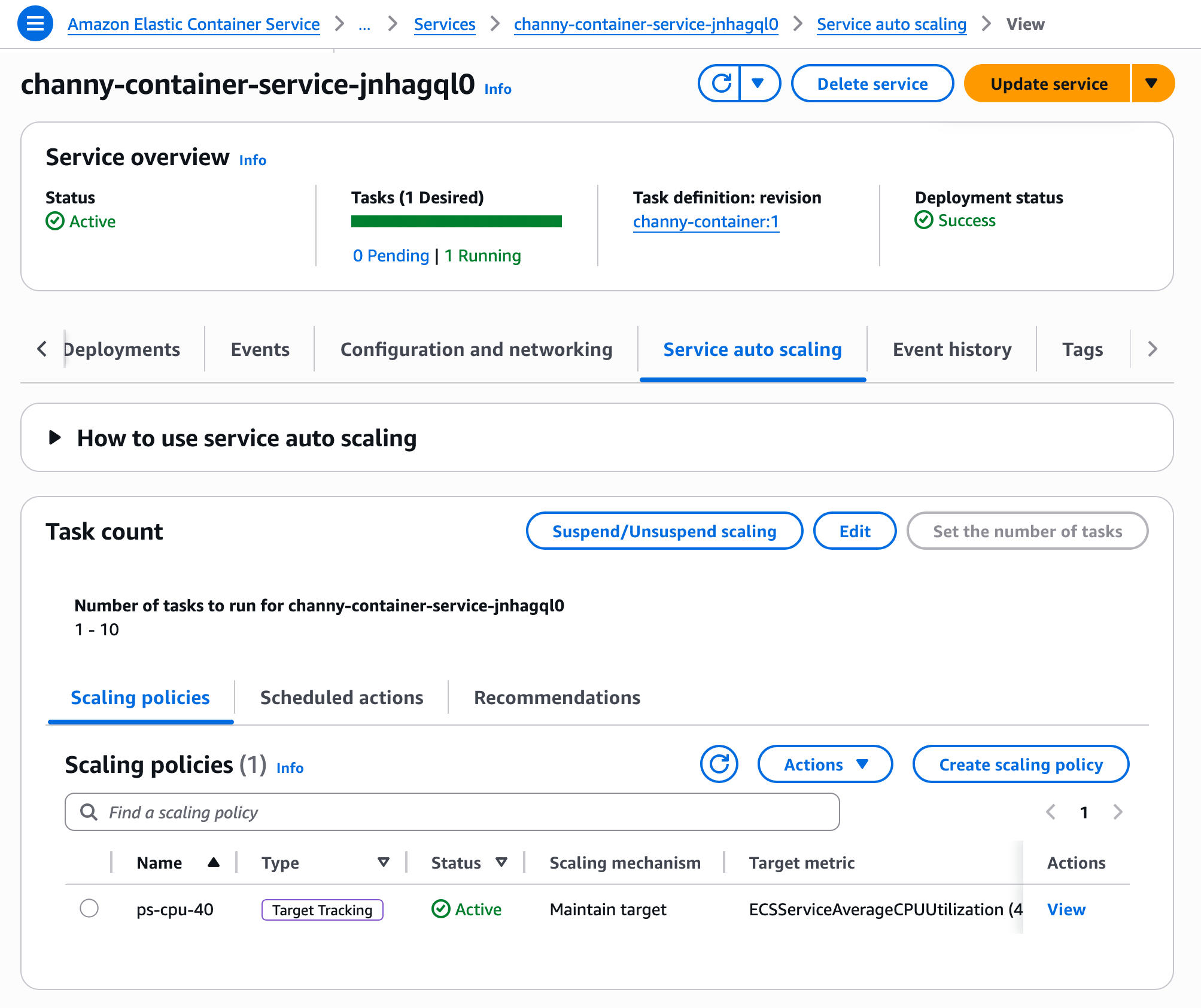
To update an existing ECS service to use faster auto scaling, you first need to configure high resolution metrics via Update Service. Once deployment completes, your service will generate high-resolution metrics. You can then go to the Service and auto scaling tab from your service details to update scaling policy to use higher resolution metrics.

That’s all you need. Your ECS service now evaluates scaling decisions at 20-second intervals.

You can also use the AWS Command Line Interface (AWS CLI) to enable new metrics in your ECS service through Application Auto Scaling. To learn more, visit the faster auto scaling documentation.

Now available
Faster service autoscaling with high-resolution metrics for Amazon ECS is available today. The feature itself has no additional cost, but high-resolution CloudWatch metrics introduce a new pricing dimension. For details, see the CloudWatch pricing page.

Give it a try today and send feedback to AWS re:Post for ECS or through your usual AWS Support contacts.

Channy


from AWS News Blog https://ift.tt/U0oj5bH
via IFTTT

Wednesday, June 17, 2026

AWS Security Agent adds threat modeling, Kiro power and Claude Code plugin, and more

At re:Invent 2025, we previewed AWS Security Agent (now part of AWS Continuum), a frontier agent that proactively secures your applications throughout the development lifecycle across all your environments. You can perform on-demand penetration testing customized to your application, discovering and reporting security risks verified through exploitability testing.

Since the preview, we announced general availability for on-demand penetration testing and the preview of full repository code review that performs deep, context-aware security analysis of your entire codebase.

Today, we’re introducing more features based on customer feedback:

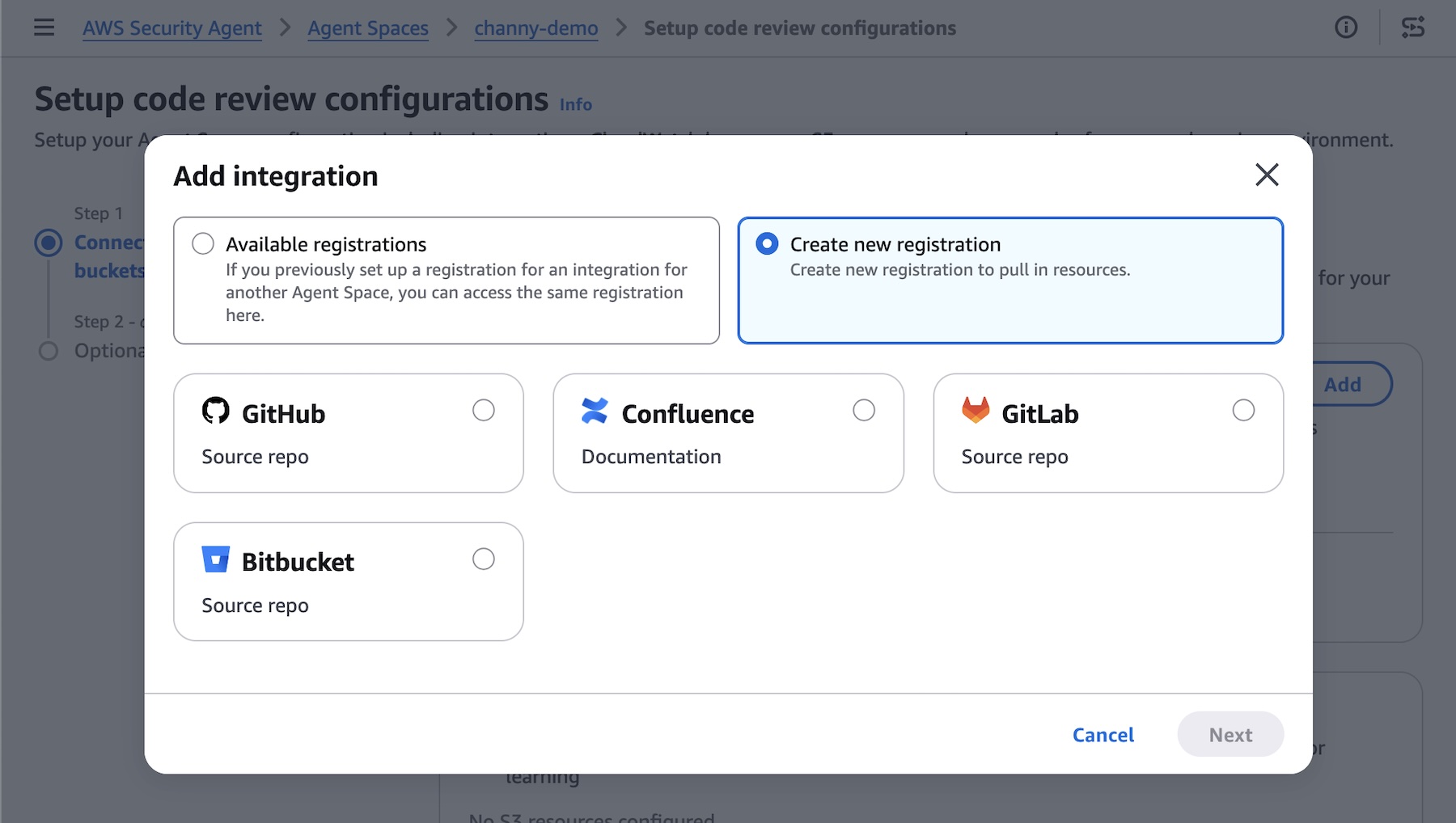
  • Code review updates (Preview) — You can now use pull request scanning with remediation, security requirements packs, and simulated validation. New integrations support GitHub, GitLab, Bitbucket, and Confluence.
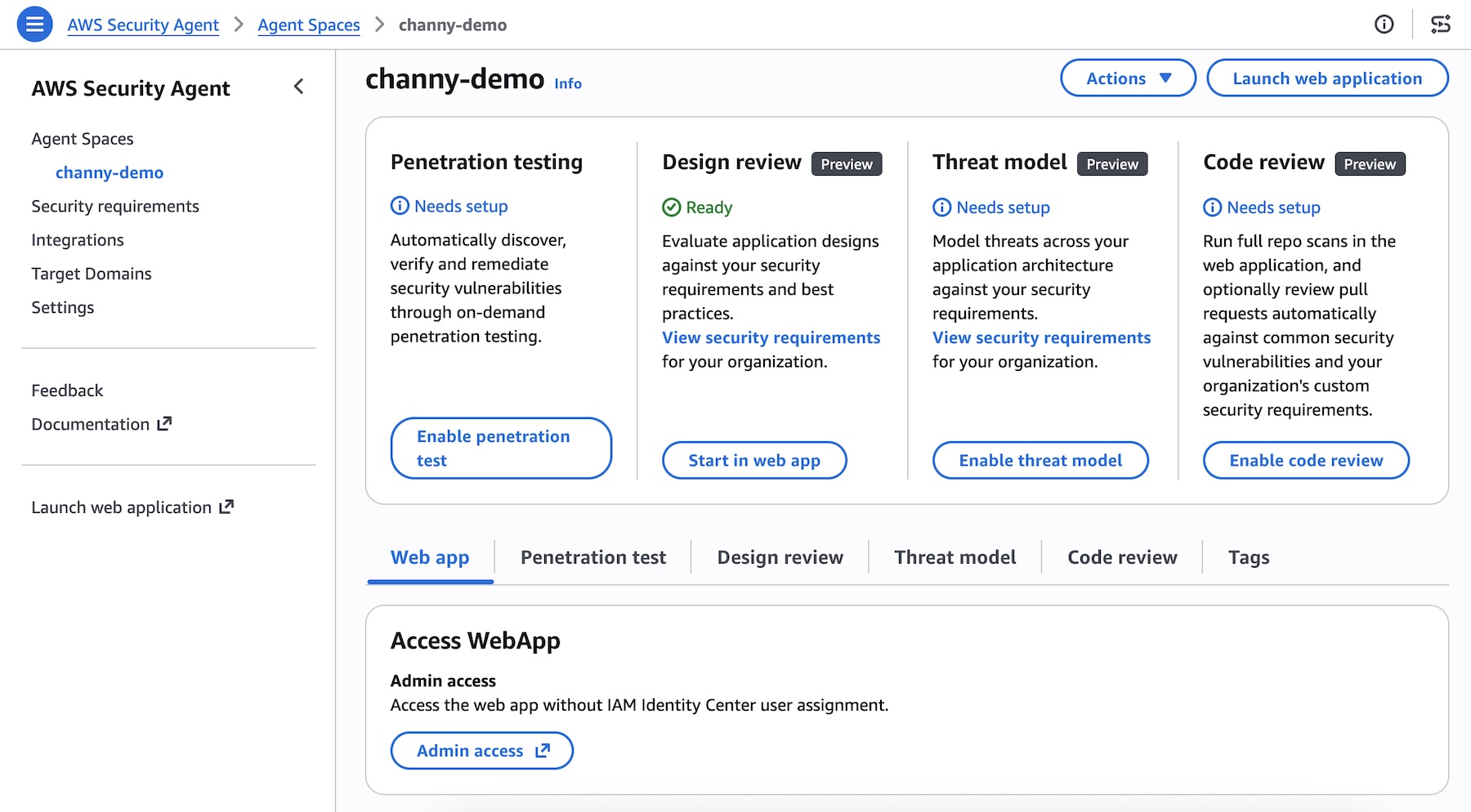
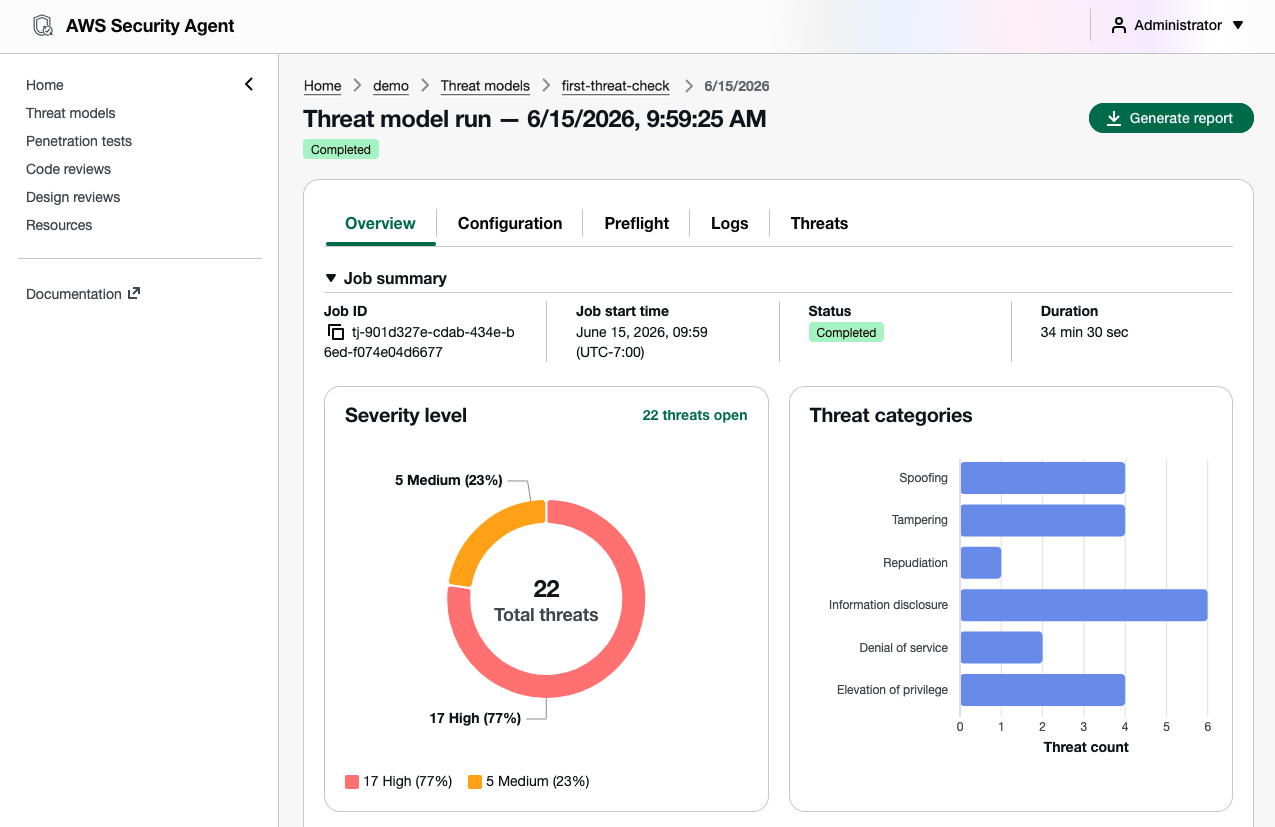
  • Threat modeling (Preview) — AWS Security Agent analyzes your design documents or application source code, understands the full context of your application architecture and identifies threats with recommended mitigations using the STRIDE framework.
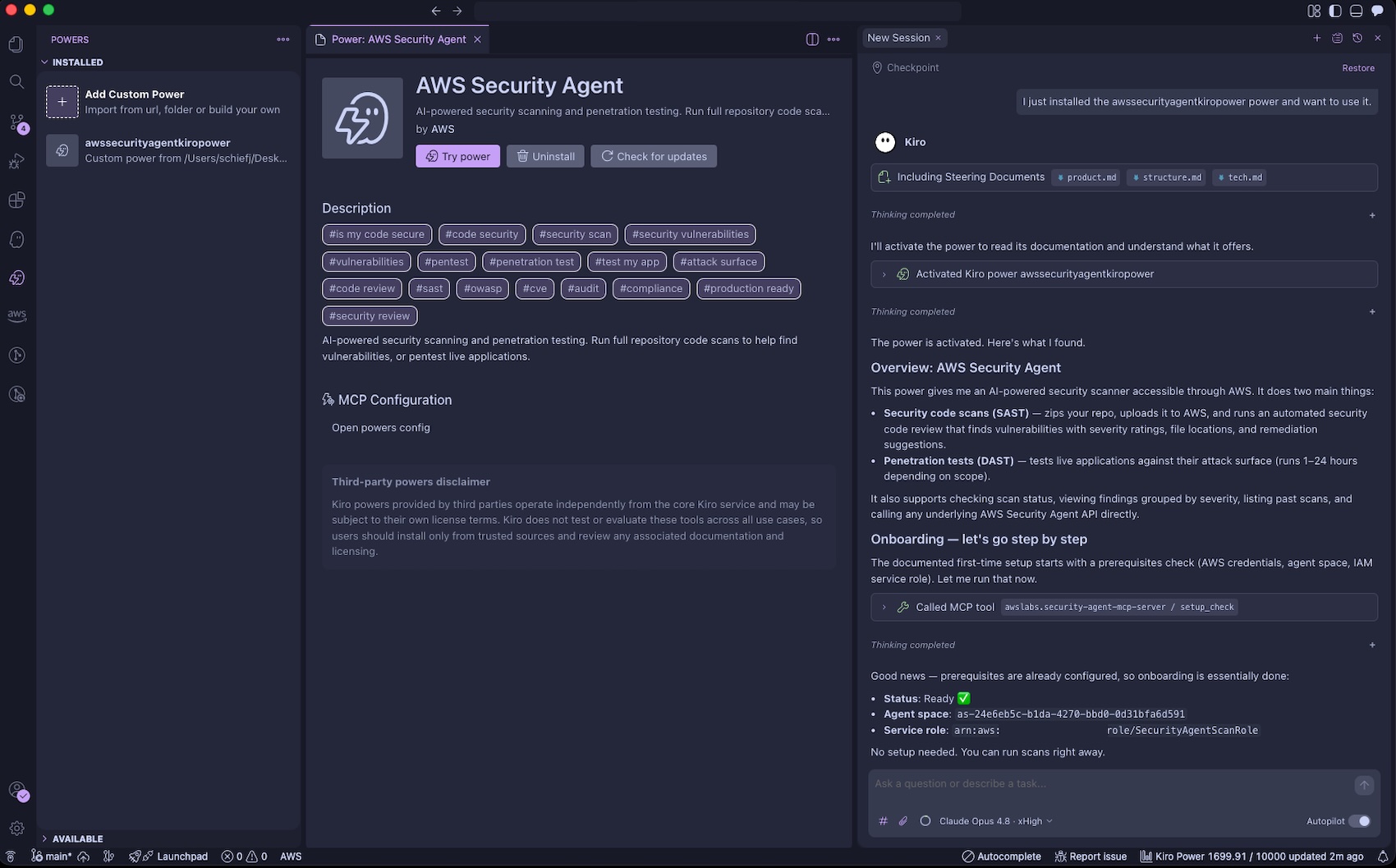
  • Kiro power, Claude Code plugin, and MCP integration — You can run code reviews, generate threat models, and remediate findings directly from your IDE, CLI, or any AI-powered IDE through an open MCP integration, with results surfacing inline without any context switching.

Let’s take a closer look at each launch!

Code review updates
You can now connect to GitLab and Bitbucket in addition to GitHub— supporting both SaaS and self-hosted versions, so you can trigger scans regardless of where code lives. You can also integrate Confluence to reference your existing documentation as context for reviews.

To get started, choose Enable code review or update your code review setting in the Security Agent console.

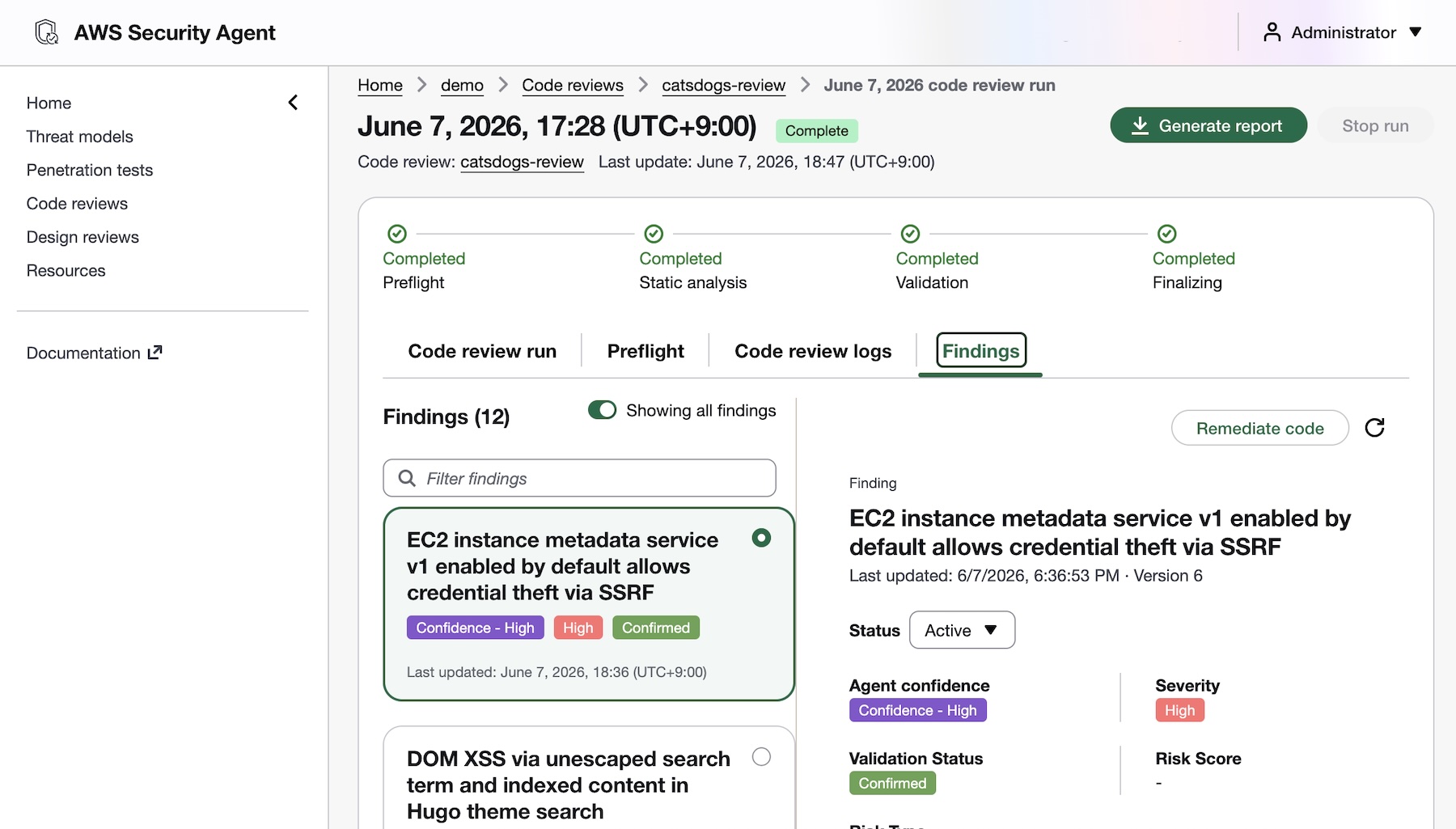
AWS Security Agent introduces deep, reasoning-based analysis on every pull request as well as full repository to identify complex vulnerabilities that go beyond pattern-matching. It checks against your organizational security requirements and common security risks to catch what other tools can’t. To get started, access the Security Agent web application and run your code review.

You’ll receive fix commits and remediation guidance directly in your GitHub, GitLab, or Bitbucket workflow, while your security teams configure the repositories to be monitored and intervene on critical issues. AWS Security Agent validates findings in simulated environments to demonstrate proof of exploitability. This embeds security expertise across all repositories, reducing security-related delays in the development pipeline.

To learn more about new code review features, visit Create a code review in the AWS Security Agent User Guide.

Design review updates
You can continuously validate your security requirements across every design and code review with managed compliance packs: AWS WAF, NIST CSF, PCI DSS, and AWS best practices, or import your own organizational requirements directly from internal documents or Confluence. Every finding maps back to your compliance posture, so teams stay audit-ready as they build.

To learn more, visit the design review documentation.

Threat modeling
AWS Security Agent generates threat models based on your design documentation or code repository, creates and build context about the application, including data flows, architecture, and trust boundaries. It maps out all components of your application, identifies potential threat actors and attack vectors, determines where weaknesses may exist, and prioritizes threats so you know what to address first.

To get started, choose Enable threat model and Connect source code repository in the Security Agent console.

To learn more, visit the threat modeling documentation.

Kiro power and Claude Code plugin for Security Agent
AWS Security Agent introduces a new Kiro power and Claude Code plugin (coming soon) and can be integrated with any AI IDE through an open MCP integration to secure your applications. You can trigger threat models and code reviews directly from your IDE, with results surfacing inline without any context switching.

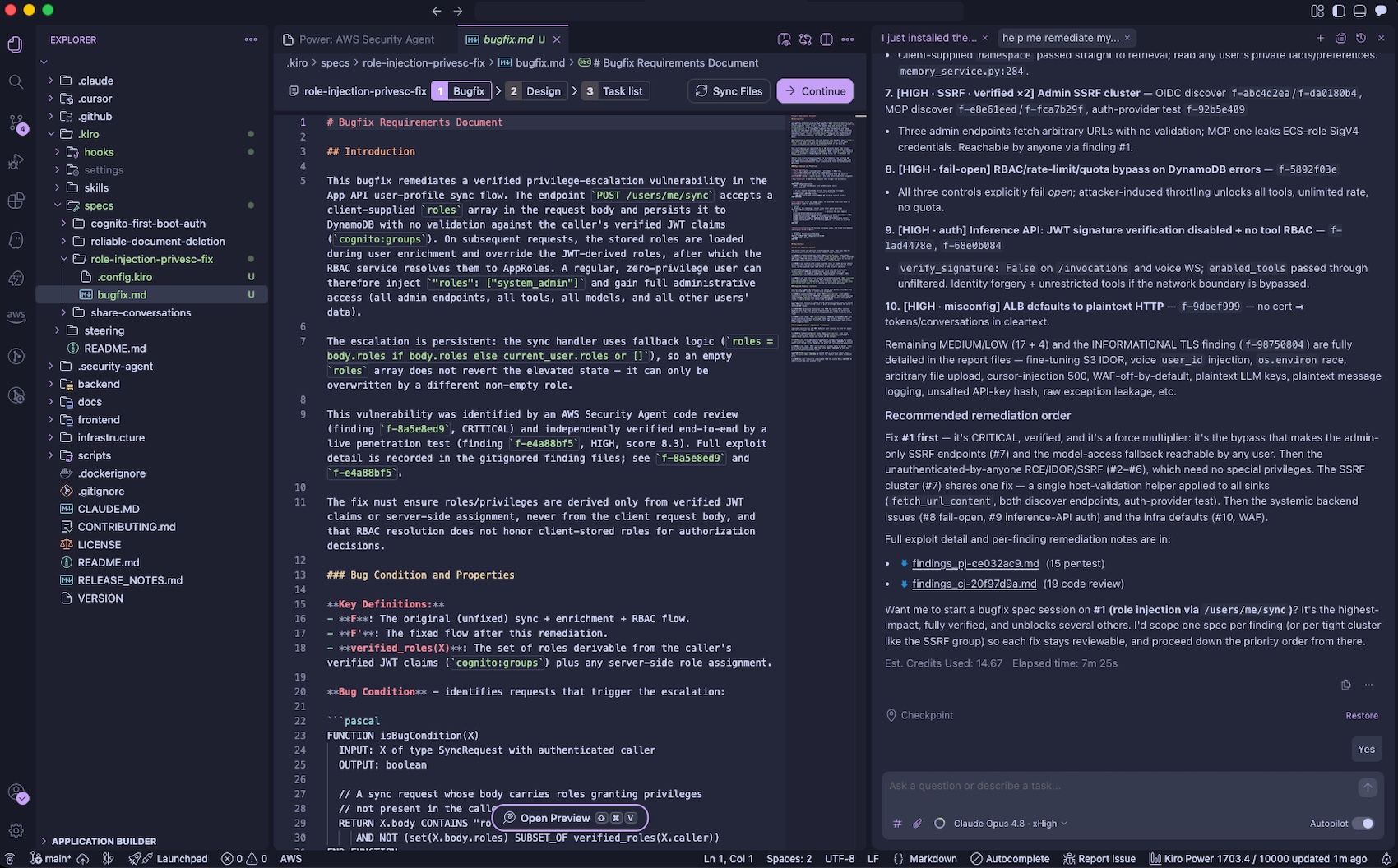
To get started, install the Kiro power, and run your prompts. The Kiro power uses the AWS Security Agent MCP server. You can get started with the power by asking “Set up AWS Security Agent“. Kiro will check if you have an Agent Space and ask if you would like to use the existing one or create a new one.

With the Kiro power for Security Agent, you can catch vulnerabilities on every pull request as you build and scan an entire repository to surface accumulated risk by asking “Run a full security scan on this repo“. The Security Agent power includes an Agent hook to evaluate if a code review diff scan should be started after the Kiro agent has completed its turn. Before deploying to production, you can run a penetration test from your CLI to find what most scanners miss. Security Agent closes the loop by validating every finding and generating ready-to-implement code fixes.

You can pull the findings back into your development environment by asking “help me remediate my findings“. The Kiro power for AWS Security Agent will download findings to your local workspace, prioritize the most critical finding, and offer to start a bugfix spec session. You can iterate on fixing the findings using their familiar IDE with their existing tooling, steering, powers, and MCP servers.

You can also run threat models through the Kiro power in the IDE by asking “Build a threat model for this application“. The generated threat model is saved to .security-agent/threat_model.md

To learn more, visit the Kiro power for Security Agent.

Now available
AWS Security Agent understands the full security context across your software development lifecycle by covering design-time security (design reviews and threat modeling in preview), development-time security (code review in preview), and deployment-time security (penetration testing in GA), in a single, unified agentic offering. To learn more, visit the AWS Security Agent product page and the technical documentation.

These features are now available in AWS commercial Regions where AWS Security Agent is available. For Regional availability and the future roadmap, visit the AWS Capabilities by Region. For detailed pricing information and to access our 2-month free trial offer, please visit the AWS Security Agent pricing page.

Give it a try in the Security Agent console and send feedback to AWS re:Post for Security Agent or through your usual AWS Support contacts.

Channy


from AWS News Blog https://ift.tt/WzDSTtj
via IFTTT

Tuesday, June 16, 2026

Amazon S3 annotations: attach rich, queryable context directly to your objects

Today, we’re announcing a new metadata capability for Amazon Simple Storage Service (Amazon S3) called annotations, enabling you to attach rich, large-scale business context directly to your objects. You can store up to 1,000 named annotations per object, each up to 1 MB in size, totaling up to 1 GB per object, in flexible formats like JSON, XML, YAML, or plain text. You can modify or delete an annotation at any time, without re-writing your objects, making it easy to keep your object context current.

Organizations are building AI agents and autonomous workflows that need to find, understand, and act on data without human intervention. To support these agentic workflows, you need metadata that can evolve alongside the data, scale to petabytes of objects, and remain queryable without expensive retrieval.

With S3 annotations, you can store context such as AI-generated transcripts, content ratings, or technical specifications directly alongside your objects. Your context moves automatically with the object during copy, replication, and cross-region transfers, and S3 removes it when you delete the object. When you enable S3 Metadata, annotations automatically flow into fully managed annotation tables that you can query with Amazon Athena and other analytics engines.

Common use cases
Annotations solve complex metadata challenges across industries:

  • Media & Entertainment: Track transcripts, content moderation results, subtitle files, and licensing metadata as separate annotations on video assets, eliminating the need to synchronize metadata across multiple media asset management systems.
  • Financial Services: Attach AI-generated investment summaries and sentiment analysis to research documents, enabling autonomous research agents to discover relevant datasets through natural-language queries without maintaining separate metadata databases.
  • Life Sciences: Annotate clinical trial data with regulatory status, patient cohort details, and approval chains, making compliance audits faster while keeping full context accessible for archived data in Amazon S3 Glacier storage classes without retrieval charges.

How annotations address metadata challenges
Amazon S3 already supports several ways to describe your objects. System-defined metadata captures properties like size and storage class. Object tags support operational tasks like access control and lifecycle management. User-defined metadata lets you add small amounts of custom information at upload time.

While these capabilities work well for their intended purposes, they have limitations when you need to attach much richer context without building and maintaining separate metadata systems. Annotations address these needs by providing metadata capabilities at a fundamentally different scale and flexibility, offering mutable, queryable context per object compared to 10 immutable tags or 2 KB of headers.

Capability Max size Mutable? Best for
System-defined metadata Fixed No Object properties (size, storage class, creation time)
User-defined metadata 2 KB No (set at upload) Small custom key-value pairs
Object tags 10 tags, 128/256 characters per key/value Yes Access control, lifecycle rules, cost allocation
Annotations 1 GB (1,000 × 1 MB) Yes Rich business context (JSON, XML, YAML, plain text)

Today, metadata describing S3 objects often lives in separate databases or sidecar files, requiring complex synchronization workflows that can exceed data storage costs. When you enable S3 Metadata annotation tables, this context becomes queryable at scale through Amazon Athena. AI agents can discover your data through natural language with the S3 Tables MCP server, which provides a standardized interface for AI models to query your annotations. You can query annotations for objects in any storage class, without restoring the objects or paying retrieval charges.

Getting started with annotations
To start using annotations, make sure your AWS Identity and Access Management (IAM) policy or bucket policy grants permissions for the s3:PutObjectAnnotation and s3:GetObjectAnnotation actions. You can then add annotations to any existing or new S3 object using the PutObjectAnnotation API.
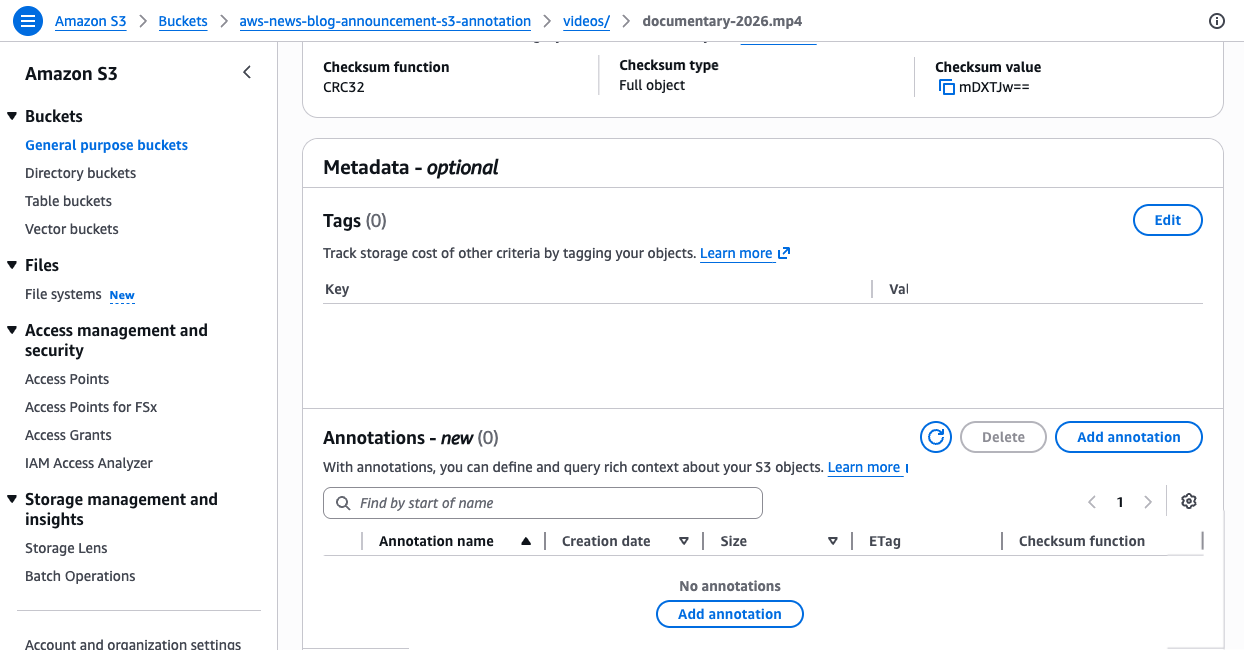
For example, a media company can attach technical specifications and AI-produced summaries to a video asset using the AWS Command Line Interface (AWS CLI):

# Create a JSON file with technical metadata
cat > mediainfo.json << 'EOF'
{"codec":"H.265","resolution":"3840x2160","audio_tracks":8,"frame_rate":29.97}
EOF

# Attach it as an annotation
aws s3api put-object-annotation \
  --bucket my-media-bucket \
  --key videos/documentary-2026.mp4 \
  --annotation-name mediainfo \
  --annotation-payload ./mediainfo.json
# Attach a plain-text AI-generated summary as a separate annotation
echo "A 90-minute nature documentary covering wildlife migration patterns across three continents, featuring aerial footage and underwater sequences. Languages: English, Spanish, Portuguese." > ai_summary.txt

aws s3api put-object-annotation \
  --bucket my-media-bucket \
  --key videos/documentary-2026.mp4 \
  --annotation-name ai_summary \
  --annotation-payload ./ai_summary.txt

These commands attach two separate annotations to the same video object. The mediainfo annotation stores structured technical specifications as JSON, while the ai_summary annotation stores a text description. Each annotation is identified by a unique name, and you can read and modify each one independently. With unique names for each annotation, you can use different annotations to support multiple concurrent enrichment workflows, for example, one team adding technical metadata while another team adds content classifications, without interfering with each other.
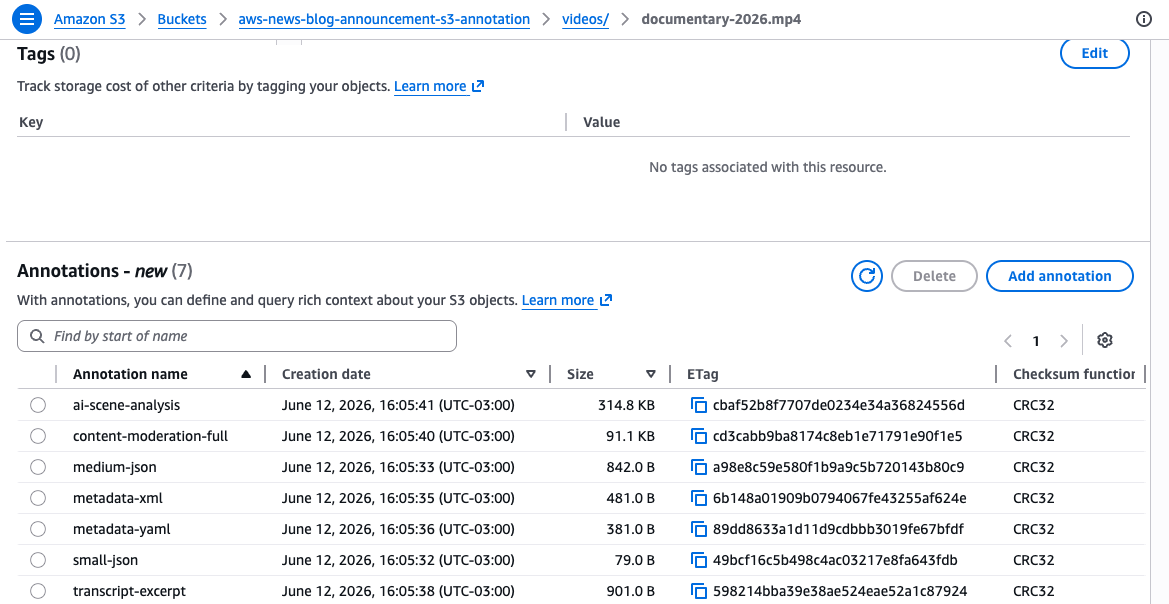
Retrieve a specific annotation using the GetObjectAnnotation API:

aws s3api get-object-annotation \
  --bucket my-media-bucket \
  --key videos/documentary-2026.mp4 \
  --annotation-name mediainfo \
  ./mediainfo-output.json

To see all annotations attached to an object, use the ListObjectAnnotations API:

aws s3api list-object-annotations \
  --bucket my-media-bucket \
  --key videos/documentary-2026.mp4

When you no longer need a specific annotation, remove it using the DeleteObjectAnnotation API:

aws s3api delete-object-annotation \
  --bucket my-media-bucket \
  --key videos/documentary-2026.mp4 \
  --annotation-name mediainfo

You can update an existing annotation at any time by calling PutObjectAnnotation again with the same annotation name. For large objects uploaded using multipart upload, attach annotations after completing the multipart upload using the PutObjectAnnotation API.

Querying annotations at scale with S3 Metadata tables
Attaching annotations to individual objects is useful, but the real power comes when you query across all your annotations at scale. When you enable S3 Metadata annotation tables on your bucket, S3 automatically indexes your annotations into a fully managed Apache Iceberg table, called an annotation table. You can query annotation tables with Amazon Athena or any Iceberg-compatible engine.

To enable annotation tables, use the S3 console or the CreateBucketMetadataConfiguration API. The following example creates a new metadata configuration with annotation tables enabled while keeping journal tables for change tracking and disabling the live inventory table:

{
  "JournalTableConfiguration": {
    "RecordExpiration": { "Expiration": "DISABLED" }
  },
  "InventoryTableConfiguration": { "ConfigurationState": "DISABLED" },
  "AnnotationTableConfiguration": {
    "ConfigurationState": "ENABLED",
    "Role": "arn:aws:iam::123456789012:role/S3MetadataAnnotationRole"
  }
}

This configuration tells S3 to automatically capture all your annotations in a queryable table. Once applied, any annotation you attach to objects in this bucket will appear in the table within approximately one hour.

If the bucket already has a metadata configuration, use the UpdateBucketMetadataAnnotationTableConfiguration API:

aws s3api update-bucket-metadata-annotation-table-configuration \
  --bucket my-media-bucket \
  --annotation-table-configuration '{"ConfigurationState":"ENABLED","Role":"arn:aws:iam::123456789012:role/S3MetadataAnnotationRole"}'

Once enabled, your annotations automatically flow into the annotation table. Journal tables update in near real time, while annotation tables refresh within an hour. Unlike traditional metadata tables that require predefined schemas, annotation tables automatically adapt to any JSON, XML, or YAML structure you write. Each annotation becomes a row in the table with its content stored in a text_value column, letting you query across all annotations without schema migrations.

If you enable annotation tables on a bucket that already has annotated objects, S3 automatically backfills existing annotations into the table. The backfill process runs in the background and can take several hours to days depending on the number of objects.

For example, to find all video assets with more than 8 audio tracks across your entire bucket using Amazon Athena:

SELECT DISTINCT bucket, object_key
FROM "s3tablescatalog/aws-s3"."b_my_media_bucket"."annotation"
WHERE name = 'mediainfo'
AND CAST(json_extract_scalar(text_value, '$.audio_tracks') AS INTEGER) > 8

This query scans the annotation table for all annotations named mediainfo, extracts the audio_tracks field from the JSON content, and returns objects where the count exceeds 8.

Or to find all objects that received new annotations in the last 24 hours through the journal table:

SELECT bucket, key, version_id, record_timestamp, annotation.name
FROM "s3tablescatalog/aws-s3"."b_my_media_bucket"."journal"
WHERE record_timestamp >= (current_date - interval '1' day)
AND annotation.name IS NOT NULL
AND record_type IN ('CREATE_ANNOTATION', 'DELETE_ANNOTATION')

This query uses the journal table to track annotation changes in near real time, which is ideal for building event-driven workflows that respond to new or deleted annotations.

You can also use natural language to search objects by their annotations using agents in Amazon SageMaker Unified Studio or any IDE with the S3 Tables MCP server. For example, asking “find all PG-rated movies with Spanish subtitles from 2023” returns results in seconds instead of the hours it would take querying multiple disconnected systems.

Get started today
You can start using Amazon S3 annotations today in all AWS Regions, including the AWS China Regions. Annotation tables are available in all AWS Regions where S3 Metadata is available.

Whether you’re building AI agents that need to discover data autonomously, managing petabytes of media assets with complex metadata, or tracking compliance context for archived datasets, annotations give you the scale and flexibility to attach rich metadata directly to your objects without managing separate systems.

Annotation storage is always billed at S3 Standard rates, even if the parent object is in S3 Glacier or another storage class. For full pricing details, visit the Amazon S3 pricing page.

To learn more and get started, visit the Amazon S3 Metadata overview page and the Amazon S3 documentation. Send feedback to AWS re:Post for S3 or through your usual AWS Support contacts.

Daniel Abib


from AWS News Blog https://ift.tt/pSg1Dbn
via IFTTT